Herald on Sunday : Cyberbullying Originally uploaded by cx1uk

I just noticed Neil‘s photo on flickr.

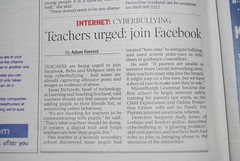
Article from The Herald on Sunday about cyberbullying. Includes recommendation that teachers should join Facebook.

I’ve had a facebook account for a wee while now and am pretty ambivalent about it. I am not really very keen on the closed nature of the network. Most of the web 2 stuff I’ve found useful (rss, blogs, flickr and I dare say twitter) are open(ish) networks, anyone can see what you have to say.

Someone, maybe Ewan, explained that facebook could be a place to get away from the openness and post more personal things that they would not like all to see, but now teachers are being asked to be ‘friends’ with pupils on social networks which would remove this personal aspect.
Personally I’d not post anything onto facebook or anywhere else that I want to keep secret.

I know facebook groups can be useful, teachmeetperth on Facebook, but in my opinion a wiki is better.

Neil has a great post Are You Going Far Enough? Or Too Far? on this area and I agree that in the case of your own children you need to discuss and reach agreement about access to their social space. Fortunately (for me) my daughter is too old for this to become a problem, I’m her friend on facebook but not on Bebo and for a 17 year old living away from home that is fine.
For pupils this is a different matter, I can’t imagine that many would be happy with teachers befriending them on their space and I don’t think I want to sneak in by faking my age or claiming to be a pupil.

Better in my opinion to:

  • try to teach sensible behaviour and safety with open tools (blogs anyone)
  • model good behaviour and give the children a chance to practise this
  • discuss social software, relating that to real life (cyberbullying = bullying) with the same principals (tell someone)
  • take online behaviour as seriously are offline

and hope/expect that understanding and behaviour transfer to other online areas.

On the topic of facebook I did get an interesting invite the other day:

Facebookinvite

I just wonder how to accept it;-)

I’ve not updated here for a week, but have been quite busy elsewhere.Teachmeet 08 North tn

After reading Neil‘s announcement of teachMeet 08 North, I popped over to the ScotEduBlogs Wiki and started a new page: TeachMeet 08 North for folk to join in the fun. It looks like it is going to be a great event, over 50 edits on the wiki page on the last two days shows a deal of enthusiasm for TeachMeet.

I bumped into Suzie Vesper while following Ewan‘s ULearn07 adventures in NZ on twitter. Suzie hads a great wiki: educational software and web 2.0 which covers nearly everything I’ve heard of. After a few tweets this morning, I’ve started adding an Adobe Flash page to the wiki. Hopefully it will be of some value, the rest of the wiki certainly is.

Flash  eg

Coincidentally, I’ve become involved in another flash project; as I was invited to join the Teachers sharing their work with Flash blog.
Teachers sharing their work with Flash centres round the work of Geoff Dellow. Geoff has done an amazing amount of work with flash in schools. He tells me he is retired but he has certainly not slowed down (a quick google will tell a lot). Geoff promotes the use of flash 4 in primary schools and provides free over the phone tutoring for teachers. I first met Geoff at SETT before it was The Scottish Learning Festival. He had children creating animations in flash at his stall which had me hooked.
I hope I manage to do some work with flash again soon so that I can share it on the blog.

I’ve updated my Sandaig Google Maps Experiment a little this weekend, getting ready for some international co-operation this session I hope.

I added a few schools and a wee popup control to the page to point to the school chosen.

the interface I made for editing the maps proved far too clunky for children to use, so I’ve been thinking of redoing that as a step by step process.

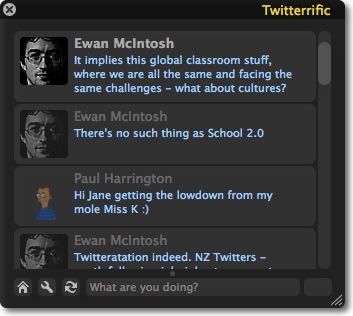
Somewhat unbelievably, I am watching Ewan give a presentation via twitter!

He is at ULearn07 giving a Keynote.

nope commenting on Helen Baxter’s, I checked New Zealand current local time from WorldTimeServer.com (Ewan’s was yesterday)

notes from Ewan:

There’s no such thing as School 2.0
It implies this global classroom stuff, where we are all the same and facing the same challenges – what about cultures?

Careers 2.0: the global microbrand. Anyone with a blog can become an employer and entrepreneur. No cost, no risk, nothing to lose

Global Microbrands are what Career 2.0 is all about: edublogs: Global Microbrands for professionals

Career 2.0 or Exploitation 2.0: we need to educate the process, too or this happens: Ogre to Slay? Outsource It to Chinese – New York Times

Weirdest live blog I’ve ever done, maybe I do not need to leave the couch ever again. I am not sure if i know what Helen Baxter was talking about, but I got interesting stuff through Ewan‘s and Paul‘s twits, Paul seems to be linked up to some NZ twitters. Tweets keep everyting short and sweet, perfect for sound-bite nation or media snackers.

I think you could use twitter and some scripting to present, forget powerpoint, maybe filter tweets through some css to fill up a screen.

Swict Tagline

I’ve been reading some of the wordpress course over at swict.com :||: the place for help when you’re Stuck With ICT. Swict is a project by Andrew Brown.

Swict Menu

If you want to get started blogging with wordpress this is a great place to start, especially if you are a busy teacher. All of the 18 lessons are available as pdf files and Adobe Captivate videos. The videos are between 40 seconds ans 3 minutes each, bite size for easy consumption!
Andrew has a great voice for listening too and the tutorials could not be clearer or easier to follow. As well as wordpress the growing collection covers Adobe Captivate 2 (Andrew eats his own dogfood), PowerPoint and Macromedia Breeze Presenter 5 Course all in the same style.

Blogged from tm

Scratchscreen

I run a couple of after school clubs at Sandaig, today was the primary 7 computer club. The number are limited to 12 so that we don’t have to worry about resources and help. I usually have a lovely time. The primary sevens are working on Scratch. After one of the children’s nice flash movies produced last session I was tempted to stick with Flash, but Scratch is getting a lot of coverage so I though I’d try it.

We started exploring the scratch files on the projects page and watching one of the Scratch Videos. The next week the children worked through the Getting Started pdf. We missed the week after as I was at the Scottish Learning Festival and this week the children started on the Scratch cards. They are beginning to get comfortable with the interface and are having a ton of fun. It is lovely watching them find things out for themselves, some quickly found the record sound facility and gales of laughter echoed round the school. Some children quickly wanted to leave the introductory cards and explore ideas for themselves. Quite often these ideas seem pretty advanced and are leading up blind avenues but usually making interesting discoveries along the way. The children worked in pairs and sometimes one group has a solution the others need. I’ve not really explored scratch at all by myself, the children know this which hopefully will give them s sense of pride. I do have enough basic programming concepts to be able to give some help.
I a not sure if the children will be able to progress to the levels of some Scratchers (see for example munkeeb’s Stuff) in the time available, but I am sure they will have fun. I wonder how they would get on if they had an hour or two a day working with this stuff for a couple of weeks, could that work with the curriculum for excellence?

Water lilies This is just a wee test of windows live writer I am thinking of trying it out with the children, if I can get it installed on the machines at school. It looks as if there are some useful features, especially for adding and resizing images. It looks like it is going to impress me, especially the bit for wrapping images and adding a drop shadow.

Live writer also lets you preview and the preview looks great.

Apologies

Map image

for the image I am on my old Masterclass PC and had to reinstall the system, only got the sample images on it at the moment.

Oh look Virtual Earth!

As I mentioned earlier I recorded some of the presentations from TeachMeet07. I’ve turned these into a enhanced podcast. spent a bit more time in GarageBand and am beginning to understand a bit more about it and it’s relationship to the other iLife apps. As usually I made a silly mistake or two, the main one being I did not know the maximum length depended on the tempo of the Master Track. This lead me to having to change that after I had organised all the chapter marks and links, I then had to reposition these on the time line which took me most of the afternoon.

Anyway time well spent, as teachMeet07 has been one of the most exciting educational events I’ve attended for a long time. Have a listen and let me know if you agree.

I had a bit of bother with this one. I’ve not used keynote much, but it was very easy to create a presentation with. While playing about with it I noticed you could record an audio soundtrack very easily and though I’d do that, export to quicktime or even youtube to let folk see what I’ve been talking about (and to play with the toys). Recording was easy enough, but when I came to export I got errors every time. A quick google fould more folk with the same problem and fixes for keynote 3 & 3, unfortunately I was using keynote 4 and the fixes didn’t work for me. I am guessing the problem has something to do with combining a recorded audio with movies and audio in the presentation. So what should have been a few minutes work turned into a few hours! I exported the presentation to jpgs, then I dug into the presentation package and found the narration audio. Next I imported the into GarageBand and one by one placed the images on the podcast track, adding urls as I went.

Next I exported the podcast to iWeb and published it, the first time I had used iWeb and again it seems easy enough to use without having to read a manual.

anyway here is a version of the presentation as an enhanced podcast.

As a by-product I now have a Podcast. I will not be adding to it very often, but I’ve got some audio from TeachMeet07 which I’ll publish soon. I didn’t manage to record all the presentations, but I’ve got some.