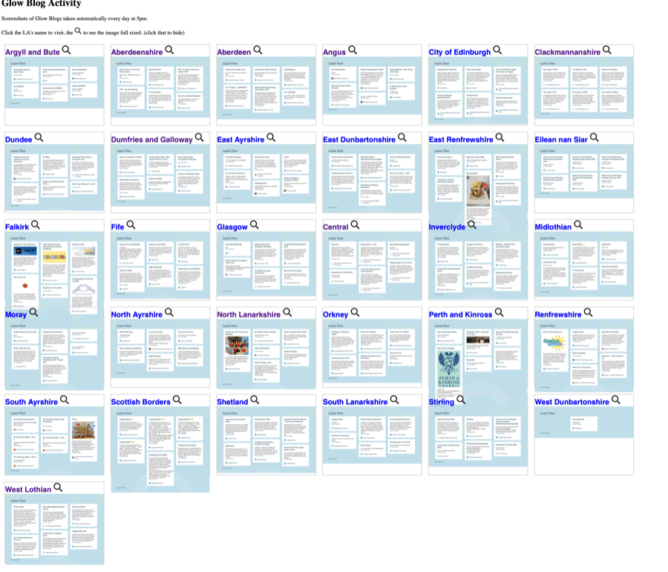
screenshot of pi.johnj.info/gb

One of the things I am interested in as part of my work on Glow Blogs is what people are using Glow Blogs for.

Glow Blogs is made of of 33 different WordPress multi-sites. One for each Local Authority in Scotland and one central one.

The home page of each LA lists the last few posts. Visiting these pages will give you an idea of what is going on. In the past I’ve opened up each L.A. in a tab in my browser and gone through them. I had a script that would open them all up. I’ve now worked out an easy way to give a quick overview.

Recently I noticed shot-scraper ,Tools for taking automated screenshots of websites . I’ve used various automatic webpage screenshot pages in the past. These have usually been services that either charge money or have shut down. I used webkit2png a wee bit, but ran into now forgotten problems, perhaps around https?

shot-scraper can be automated and extended. It is a command line tool and using these is always an interesting struggle. I usually just follow any instructions blindly, searching any problems as I go. In this case it didn’t take tool long.

Once installed shot-scraper is pretty easy to use. shot-scraper https://johnjohnston.info Dumps an image johnjohnston-info.png

There are a lot of options, you can output jpegs rather than pngs. Run some javascript before taking a screenshot or wait for a while. you can even choose a section of the page to grab.

So I can use shot-scraper to create screenshots of each LA homepage. Then display them on a web page for a quick overview of Glow Blogs.


    #!/bin/bash

    cd /Users/john/Documents/scripts/glowscrape/img

    URLLIST="ab as ac an ce cl dd dg ea ed el er es fa fi gc glowblogs hi in mc my na nl or pk re sa sb sh sl st wd wl"
    for i in $URLLIST ;
    do
        /usr/local/bin/shot-scraper -s "#glow-latest-posts" -j "jQuery('.pea_cook_wrapper').hide()" --quality 80 https://blogs.glowscotland.org.uk/"$i" -o  "$i".jpg && continue
    done;
    

This first hides the cookie banner displayed by blogs and then screenshots the #glow-latest-posts section of the page only.

The script continues by copying the image over to my raspberry pi where they are shown on a web page

I hit a couple of problems along the way. The first was that the script stopped running when it could not find the #glow-latest-posts section. This happens on a couple of LAs who have no public blogs. adding && continue to the screenshot fixed that.

The second problem came when I wanted to run the script regularly. OSX schedules tasks with launchd. I’ve used Lingon X to schedule a few of these. Since I recently updated my system I first needed to get a new version of Lingon X. I then found that increased security gave me a few hoops to jump through to get the script to run.

I think it would have been simpler to do the whole job on a raspberry pi. But I was not sure if it would run shot-scraper. I’ll leave that for another day and a newer pi.

This is a pretty trivial use of a very powerful tool. I’ve now got a webpage that gives me a quick overview of what is going on in Glow Blogs and took another baby step in bash.

The first thing that surprised me was the lack of featured Images on the blog posts. These not only make the LA home pages took nicer they also make display blog posts on twitter more attractive.

I’ve been messing about with Drummer for a while now. I alway enjoy when a new thing opens up a few rabbit holes. Drummer certainly does that.

Blogging in an outline is different. I’ve done a little before with Fargo. Then I mostly thought about using the outliners reorganisation affordances as the main idea. This time I am seeing more possibilities with the micro, one line posts narrating a day’s work. As I am on holiday this week and not busy I’ve managed a bit of this, not so much work as narrating my play. Back to school on Monday, so I’ll be doing less of that.

One rabbit hole than digging out how some things work in Drummer. Mostly by trying failing and trying again after changing one this. Obviously reading the docs would be better.

It is truly fascinating seeing a little of how Drummer is put together. Reading other users experiences and getting a glimpse into Dave’s mind.

The GitHub site, Issues · scripting/drummerSupport has some great questions and answers. The later provided not only by Dave but other folk. This is also a useful place to help in exploring drummer. The requests and problems found give a bit of insight in how other bloggers think and blog.

Amit Gawande produced a great summary post: Getting Started Blogging with Drummer. This clears a lot up and points to some other good information. I’ve tried to write these sorts of notes when on a new path. I often get dragged down by an error and into a confusing maze to fix that. The notes get skipped or bits missed out. Amit’s are exceptionally clear.

Jack Batty has some drummer notes, a lot of the questions have resonated with me.

Thursday’s rabbit hole was getting my drummer blog to appear on my own domain.

And that tunnel lead to some more raspberry pi thoughts. I though I might get river5 running again. This time on a separate pi, using my, slight, new found reverse proxy knowledge to get it going on river.johnj.info. And I did. Unfortunately, it is really slow. I guess because of the old pi. I also failed to install forever, which might make running things with any consistency. I might dig out a newer pi and try again. Hopefully slightly quicker than yesterday & today effort.

I’ve also been reading Testing HTTPS · Issue #78 · scripting/drummerSupport so made some progression that. I’ve added a cert to river.johnj.info, but I’ve not changed the templates in Old School yet.

Meanwhile I’ve been blogging a bit both to my ‘real’ blog and through Drummer. I cankt imagine at the moment giving up WordPress. I like the archives, search(sic), categorisation & tagging too much. I wonder if these features will come to Drummer is some way. One solution for me would be a way to post from Drummer to WordPress in the same way as you can tweet.

Currently I spend more time reading my blog as opposed to writing it. Nearly all via the On This Day page. I find this endlessly fascinating. Partly seeing old thoughts and how they have repeated and morphed. I also love seeming the seasonal changes reflected through my photos and observations.
Apart from being a new place to play and learn I and still seeing, for me, drummer as a possible place to build, pulling and gathering material that could end up here.

This post turned out to a set of rambles rather than coming to a coherent conclusion.

Replied to Command Line — The MagPi magazine by Aaron DavisAaron Davis (collect.readwriterespond.com)
MagPi / RaspberryPi put together a guide to getting going with command line.

Hi Aaron,
This is a useful guide. I remember  Oliver Quinlan, a guest on Radio EDUtalk talking about the eloquence of the command line compared to pointing and grunting.
I enjoy using the command line, often with Raspberry PIs, but it is easy to miss some of the basics which this guide covers well.

Featured image my own dithered to grey with imagemagick, from an idea by Doug Belshaw who was trying to save energy. I just like the idea of these images for link list posts.

The Small Web is for people (not startups, enterprises, or governments). It is also made by people and small, independent organisations (not startups, enterprises, or governments2).

I got site.js up and running on my raspberry pi for a while. Pretty straightforward (I managed the certs stuff eventually).

The idea of The Small Web is the sort of thing I’ve been interested in since I started blogging. I’d love Glow to do something like this for educators (Glow Blogs is part way there, government hosting for some (educators) of its citizens).

Hope to dig into this some more. All the ideas are just lovely!

Bookmarked SAFE Acoustics - Rainforest Audio (acoustics.safeproject.net)
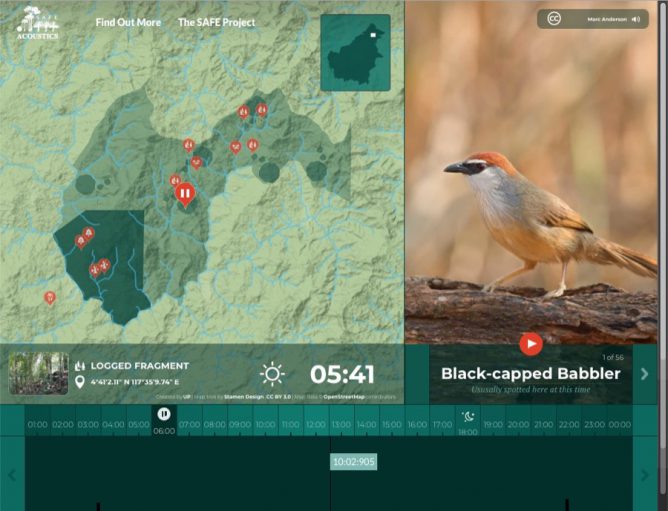
The SAFE Project has been placing recording devices throughout the rainforest in Borneo. That audio is now available to listen to here.
screenshot of safe project

SAFE Acoustics – Rainforest Audio a beautiful project. Raspberry Pis, across different environment in the Borneo rainforest record audio. There is a how to at: Ecosystem monitoring, made easy.
Via Raspberry Pi listening posts ‘hear’ the Borneo rainforest – Raspberry Pi

Replied to bookmark Site.js by Aaron Davis (collect.readwriterespond.com)
Small Technology Foundation has created a simple library for setting up your own site quickly and easily on the web. This is discussed further in a presentation by Aral Balkan at Creative Mornings Istanbul on 26 June, 2020.

I spend a couple of hours last night trying to set up Site.js on a Raspberry pi, I got it working locally, but fell at the https cert and I think my firewall.

Looks fascinating as does Small Technology Foundation Personal Web Prototype-01: a mobile personal web server which is a portable server you can carry about in your pocket. Put together from a pi and some bits I wish I could afford to buy the bits for that. Reminds me a wee bit of the piratebox.

A few more details on how I got Minecraft education running as a “server” on my Mac. More a note to self than anything else.

I am pretty much a complete novice when it comes to Minecraft, I’ve never managed to get up much enthusiasm for computer games of any sort. I have used Minetest and Minecraft Edu in my class a few times and it is certainly an engaging environment for many of my pupils 1.

Given that Microsoft extends access to Minecraft: Education Edition and resources to support remote learning and it works with Glow accounts it seemed worth a punt to set up a server. I had suggested some tasks for individual use, but didn’t seem much sign of action.

So this is what I did:

I updated to the latest version of Minecraft education edition.

I read some documentation, I found some of this a little confusing mostly because I followed a link to help with Port Forwarding. Mentions of X-Box and different ports to open confused me. It seemed to be selling some software to help. Turned outto be a lot simpler.

Back at the bottom of How To Set Up A Multiplayer Game – Minecraft: Education Edition Support was all I needed.

You also may need to forward port 19132 on your router. Forwarding ports is useful because it can help to make your network connection more stable and sometimes even faster.

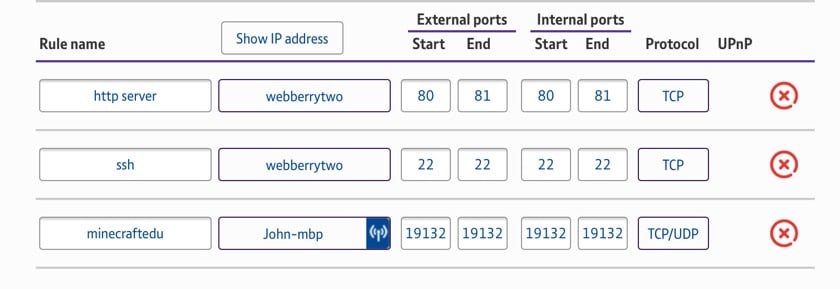
  • Forward Port 19132 TCP AND UDP.

What I had to do was to add a Firewall rule to my router to open these ports. I’ve got a BT hub so I logged on through the web interface, found the Firewall setting and added this. I have done this before for Raspberry Pi reasons. I guess different routers have different interfaces.

On testing with some of my class half a dozen tried to get in, and one failed. The others sometimes took a while to get connected but seemed to be fine once they started. It is hard to figure out why one failed when you can’t see what is going on, it could be a typo on the email address!

I don’t intend to do too much to start with, open a World Up and set an open ended task of some sort (design and make me a Minecraft classroom perhaps). I’ll see how it goes. I am finding just preparing for one hour of conferencing teaching it taking up a lot of time.

I’ve also not much idea about the security issues around this. I wonder too if it will handle more than a few pupils, we certainly had trouble in school with multi-play with more than a few pupils in one World.

1. I found that some of the activities were fun and helped with learning, but it took a lot of classroom time which seems hard to justify given I struggle to fit things in, might be an advantage now.