Tumblr crop

I’ve mentioned Tumblr before, and of course link to my tumblelog in the sidebar here.

On saturday I saw that Tumblr 3.0 was announced with “Over 400 new features, fixes, and improvements“.

A tumblelog is a sort of quick post a link, video, photo, quote sort of tool:

Tumblr Menu

Not the place to post long thoughtful blogs, but a pretty easy way to found objects from the net. The presentation is nice too, huge fonts, auto imbedding of flickr photos and youtube video, this facility has be expanded to Tumblr will now take any video or Flash embed code and scale it down proportionally. The new feature that really impresses me is the way tumblr shows my Archive (like the screenshot at the top of this post). Very sweet in my opinion. tumblr now does audio upload and has tied in with Vimeo to allow video upload. also included with tumblr 3.0 are tags, markdown, channels (which is a move towards multi-author tumblelogs) and a pile of other stuff, best read on the announcement.

I don’t know any other teachers using tumblr yet, but I’d be interested in playing around with this, so let me know if you want to post to the edutumblrs channel and I’ll invite you in. No link as yet as channels are private at the moment. I am also on the lookout for folk interested in the same sort of things as myself to follow in tumblr.

At the monet I post wee links to games and fun that I think my pupils will like to a sub-weblog here, which appears in the side bar of Sandaig Otters and as a web page encorporated int othe main sandaig site: Links for Children and Staff at Sandaig, but this could be a lot prettier as a tumblelog.

Aberdour

I am sitting on the train on my way home from Hillside school in Aberdour in Fife. I’ll probably not get this online until tomorrow. I have just spent the day on David Noble’s course on Using the Social Web to develop the Four Capacities.

Aberdour is a pretty looking village and we had a nice autumnal view when we took a minute to look out the window.

David took participants through a gament of Web 2.0 tools explained there use in theory and in practise; participants created an edublogs blog, a mp3 recording (which was uploaded to the blog), took part in a flash meeting, explored flickr, youtube and discussed many other web tools in a packed day.
As in listening to David’s booruch podcast you get the feeling you are in the safe hands of someone who not only has a leading edge grasp of the new technology, but can walk the talk, incorporating the tools in his teaching regularly over an extended period of time. He explained the tools, suggested ways of using them, pointed to good practice and reinforced them with his own practice. I was comforted by his reference to aCfE and the four capacities, it looks like some of our efforts to use the social web will support the aims of aCfE.

I was particularly interested in the use of Flash Meeting. David had organised a meeting with Lisa from England and it was the first time I had seen Flash Meeting used. Flash meeting is a free to education tool supported by the Open University. A browser based video conferencing application, whch includes a shared whiteboard and chat, it reminded me of Marratech which I’ve used in the Glow trials. Flash Meeting seemed to have the edge over Marratech o the video quality and in the fact that it is a flash/browser based application. I hope to be able to use it in school, just need to check to see what protocols it uses and if these are usable on the Glasgow network.

David Whiteboard

I also enjoyed David’s presentation, instead of powerpoint, David used a series of del.icio.us pages for each segment of the day: tagged with “3Nov1” on del.icio.us through to tagged with “3Nov7” on del.icio.us, this method of presentation was obviously very flexible due to a pile of excellent links.

Throughout the day David touch on pupils safety issues in a light way but constantly reminding us of its importance. He is in the unusual position of having services often filtered in Local Authority networks available and has to deal with the risks in a professional manner. This also meant that I could plug my laptop in and be online without any problem.

Hillside School is a residential school for boys aged 11-16 with social, emotional and behavioural difficulties David’s experience made a clear link in my mind between pupil motivation and the four capacities. David’s work shows that Social media will help us both motivate pupils and to help them move towards becoming successful learners, confident individuals, responsible citizens and effective contributors.

We have just published the first podcast of the session on Radio Sandaig. A new bunch of children and as usual a scramble to fit it into the day. A few lunchtimes and some non-class-contact time got it done. (The children are not all in my class, so I guess this is NCC).I decided to use garageBand instead of Audacity this year, just to see what the differences are. I’ve already started some children off making some simple music using Garageband, and our peripatetic music teacher has joined in working with a few children every week. So we have incorporated one of the pieces of music into the podcast.

For the first time with GarageBand, I took a lot more control than usual of recording, mostly to figure out what we are doing and these are first impressions. Garageband has a pile of useful loops, jingles etc built in, these are easy to review and pull in. For the rest of the session I hope to find time for children to make jingles that will be used regularly, this should make the show sound a bit more professional once we start to really think about this. The auto ducking is also nice, with audacity the children hand ducked the background track as they organised the segments.
One of the things I really liked about audacity was the way you could record segments of a podcast in any order and then the children could easily move them around as they made the final edit. We recorded each segment on a separate track. With GarageBand you get a male voice and female voice tracks, jingle and music tracks. This means we will have to plan out the podcast in more detail and record it in order, this will present a bit more of a challenge to my organisation. At the moment I invite children from 4 classes to contribute so have to find time when they are available at the same time as myself (playtime, NCC time), some thinking to do.

Anyway please have a listen and if you like the show you might like to leave an audio response on the Radio Sandaig page, give us our first review in itunes or on our new Scotcast.net listing. Thanks to Tim Geddes of Glaitness School for pointing me to Scotcast.net. Tim helps the children with the TV Glaitness Video Podcast, which is well worth watching.

Halloweenpoemsicon 08

One of my favourite pastimes is messing about with supercard an easy to use application development system for macs. One of the toys I’ve been working on for a few years is Halloween Poems. I am rushing out a new version this week. if you have a mac (OS 10.4) you might like to give me a wee hand and download my new beta.

Halloween Poems is a simple game for primary children. It lets them produce illustrated spooky poems. Features:

  • Scary word bank; click on words to insert.
  • Halloween Clip Art palette.
  • Spooky sounds.
  • Acrostics starter.

More info and a screenshot on the last version’s download page. The app is freeware and just a wee bit of non Web 2.0 fun, if you do download the beta let me know about any problems via email. If it seems to work I’ll post a final tomorrow in time for halloween.
28 Oct 2007 updated beta at: Halloween Poems_b_2.app.zip as good as it is going to get this year. next year metaweblogAPI integration.


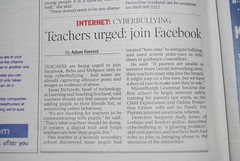
Herald on Sunday : Cyberbullying Originally uploaded by cx1uk

I just noticed Neil‘s photo on flickr.

Article from The Herald on Sunday about cyberbullying. Includes recommendation that teachers should join Facebook.

I’ve had a facebook account for a wee while now and am pretty ambivalent about it. I am not really very keen on the closed nature of the network. Most of the web 2 stuff I’ve found useful (rss, blogs, flickr and I dare say twitter) are open(ish) networks, anyone can see what you have to say.

Someone, maybe Ewan, explained that facebook could be a place to get away from the openness and post more personal things that they would not like all to see, but now teachers are being asked to be ‘friends’ with pupils on social networks which would remove this personal aspect.
Personally I’d not post anything onto facebook or anywhere else that I want to keep secret.

I know facebook groups can be useful, teachmeetperth on Facebook, but in my opinion a wiki is better.

Neil has a great post Are You Going Far Enough? Or Too Far? on this area and I agree that in the case of your own children you need to discuss and reach agreement about access to their social space. Fortunately (for me) my daughter is too old for this to become a problem, I’m her friend on facebook but not on Bebo and for a 17 year old living away from home that is fine.
For pupils this is a different matter, I can’t imagine that many would be happy with teachers befriending them on their space and I don’t think I want to sneak in by faking my age or claiming to be a pupil.

Better in my opinion to:

  • try to teach sensible behaviour and safety with open tools (blogs anyone)
  • model good behaviour and give the children a chance to practise this
  • discuss social software, relating that to real life (cyberbullying = bullying) with the same principals (tell someone)
  • take online behaviour as seriously are offline

and hope/expect that understanding and behaviour transfer to other online areas.

On the topic of facebook I did get an interesting invite the other day:

Facebookinvite

I just wonder how to accept it;-)

I’ve not updated here for a week, but have been quite busy elsewhere.Teachmeet 08 North tn

After reading Neil‘s announcement of teachMeet 08 North, I popped over to the ScotEduBlogs Wiki and started a new page: TeachMeet 08 North for folk to join in the fun. It looks like it is going to be a great event, over 50 edits on the wiki page on the last two days shows a deal of enthusiasm for TeachMeet.

I bumped into Suzie Vesper while following Ewan‘s ULearn07 adventures in NZ on twitter. Suzie hads a great wiki: educational software and web 2.0 which covers nearly everything I’ve heard of. After a few tweets this morning, I’ve started adding an Adobe Flash page to the wiki. Hopefully it will be of some value, the rest of the wiki certainly is.

Flash  eg

Coincidentally, I’ve become involved in another flash project; as I was invited to join the Teachers sharing their work with Flash blog.
Teachers sharing their work with Flash centres round the work of Geoff Dellow. Geoff has done an amazing amount of work with flash in schools. He tells me he is retired but he has certainly not slowed down (a quick google will tell a lot). Geoff promotes the use of flash 4 in primary schools and provides free over the phone tutoring for teachers. I first met Geoff at SETT before it was The Scottish Learning Festival. He had children creating animations in flash at his stall which had me hooked.
I hope I manage to do some work with flash again soon so that I can share it on the blog.

I’ve updated my Sandaig Google Maps Experiment a little this weekend, getting ready for some international co-operation this session I hope.

I added a few schools and a wee popup control to the page to point to the school chosen.

the interface I made for editing the maps proved far too clunky for children to use, so I’ve been thinking of redoing that as a step by step process.

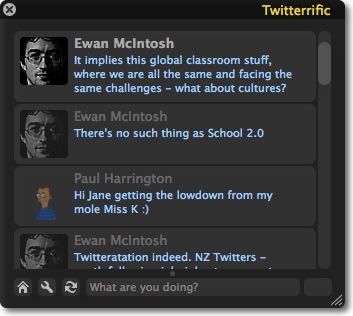
Somewhat unbelievably, I am watching Ewan give a presentation via twitter!

He is at ULearn07 giving a Keynote.

nope commenting on Helen Baxter’s, I checked New Zealand current local time from WorldTimeServer.com (Ewan’s was yesterday)

notes from Ewan:

There’s no such thing as School 2.0
It implies this global classroom stuff, where we are all the same and facing the same challenges – what about cultures?

Careers 2.0: the global microbrand. Anyone with a blog can become an employer and entrepreneur. No cost, no risk, nothing to lose

Global Microbrands are what Career 2.0 is all about: edublogs: Global Microbrands for professionals

Career 2.0 or Exploitation 2.0: we need to educate the process, too or this happens: Ogre to Slay? Outsource It to Chinese – New York Times

Weirdest live blog I’ve ever done, maybe I do not need to leave the couch ever again. I am not sure if i know what Helen Baxter was talking about, but I got interesting stuff through Ewan‘s and Paul‘s twits, Paul seems to be linked up to some NZ twitters. Tweets keep everyting short and sweet, perfect for sound-bite nation or media snackers.

I think you could use twitter and some scripting to present, forget powerpoint, maybe filter tweets through some css to fill up a screen.

Swict Tagline

I’ve been reading some of the wordpress course over at swict.com :||: the place for help when you’re Stuck With ICT. Swict is a project by Andrew Brown.

Swict Menu

If you want to get started blogging with wordpress this is a great place to start, especially if you are a busy teacher. All of the 18 lessons are available as pdf files and Adobe Captivate videos. The videos are between 40 seconds ans 3 minutes each, bite size for easy consumption!
Andrew has a great voice for listening too and the tutorials could not be clearer or easier to follow. As well as wordpress the growing collection covers Adobe Captivate 2 (Andrew eats his own dogfood), PowerPoint and Macromedia Breeze Presenter 5 Course all in the same style.

Blogged from tm