Today I started a bit of work with garageBand and a few primary sevens.

In the summer I visited Lori Ramsay to find out about The Mothership. Lori gave me a great intro to using GarageBand to create tunes and I left with a set of her notes.

I’ve added some screenshots to these to use with the children, using Pages. It was the first time I’d used Pages and it seems a pretty simple app to create pretty and simple documents.

This is the first version of the worksheets, and I’ve not used them with kids yet, but I’ve uploaded them if you want a look. Feedback and suggestions are more than welcome.

Update: After Mark‘s comment I realised that there is an easier way to lay the loops out in a long strip, here is a sheet.

Blogged from tm

After all the fuss last year testing WP and Lyceum here with pretty poor results, I now have a working wordpress mu setup: Sandaig PupilsI’ve not got any children started, just trying to get the setup ready, so far all I’ve added the Anarchy Media Player and put together a widget to pull the links for the rest of the Sandaig blogs in.
I hope to run this for one of our primary seven classes while the other one uses the pivot blogs set up last year now renamed Primary Seven S

Hopefully I’ll be able to do some comparisons between Pivot and WPMU.

If you have any good wordpress mu tips, please let me know. I am especially interested in being able to set up site wide widgets by default.

Blogged from tm

Yesterday I was at the Apple Store Glasgow opening. Fun was had by a lot of smiling people. As I mentioned I was interviewed by Mark‘s ex -piecast team The MacCast. I would guess I’ll end up on the cutting-room floor as I mumbled and probably blushed, but the questions made me think a bit. They asked about my favourite apple applications, this got me started, my favourite applications are not apple ones. Of course I use the iLife tools and would not be without them, I’ve just started using pages and keynote and like them. But some of the ones I like most come from elsewhere. Here is a wee bit about 3 of them, why I like them and what they do. A sort of 3 favourite applications after I’ve skipped past iLife, iWork, email, browsing and Web 2.0 etc.

SC Icon

SuperCard is cousin of the old mac essential HyperCard a simple but powerful tool for building applications and scripting on a mac. SuperCard has a simple english type scripting language and can tap into the power of appleScript and unix shell calls. I use it everyday. In the past I have created fairly useful teacher and teaching tools but now I mostly use if for avoiding repetitious task. Eg. most of the gallerys on Sandaig Classes such as this one are run up with a SC project. I blog about Supercard at Bad Poet and have some resources for teachers and others on the site.

Comic Life is not an application that I use everyday, but it is a great tool for children and epitomises a type of good mac application. The way it fits in with the iLife suite, making creating comics a simple task, drag and drop. By tapping into core mac ‘stuff’ the graphics, gradients and shadows are beautiful. I believe there is a windows version in the works, I’ll be interested to see if it is as slick as the mac one.
 

TextMate is an amazing text editor for macs. I probably only use a tiny fraction of textmate’s facilities. Aimed mostly at programmers TextMate is still useful to folk like me who write a bit of html, css and occasional snippet of php, it has a ton of keyboard shortcuts to do all sorts of thing. for example if you are writing on a html document and select a bit of text and hit command-control-shift-L textmate looks up the selection on google and creates a link in your document. textMate is extensible via bundles, there are bundles for all sorts of things, different programming languages etc. I am blogging this with the blogging bundle, I can preview and post this to the blog without leaving textmate. I drag an image onto the Textmate document and it is uploaded to my blog and the html snippet inserted. you can define your own snippets, I type seb and hit tab and a link to ScotEduBlogs is created (like that). Drag a swf onto the document and the code for inserting the flash file is created. It would take months to explain everything textMate can do.

I’ve just realised there is another wee application that I am beginning to depend on almost everyday ImageWell which is wonderful for quickly doing what you want with images, annotating, dropping a shadow, resizing and uploading. I just used it to create and upload all of the images in this post, in no time: command-shift-4 in the finder to get a screenshot (hold the)

So those are my 3-4 left field must have applications I would be interested in yours?

Blogged from tm

After hearing Mark and Mr W twittering away, I woke up early and decided to pop along to the new Apple Store that opened today and see if I could get a t-shirt.

This one was snapped with photobooth and quickly uploaded here from one of the macbooks in the store:

Here are my flickr photos tagged with applestoreglasgow

Not too much to say about the event nice to briefly catch up with Mark and Neil, shop looks as cool as a mac, crowd happy.

I was interviewed by a couple of Mark’s pie crew who were making a podcast for The MacCast, I don’t think I made much sense but it gave me an idea for the next post.

I ran some of the photos through the A N I M O T O online slideshow tool:

I must say I am a bit disappointed with animoto, the end result looks very slick, but I had nothing to do with that. The interface is excellent, good looking and easy to use. You just upload photos and the online app decides on all the crops and transitions, the only thing I did was choose the music (I didn’t really spend much time on that).

Although this is a quick way to make slick shows there is a lack of creativity on the users part.

I’ve been a lot slower off the mark getting my class blogging this session, by this time last year we had several posts on the otter’s blog. My class this session are a little different, bigger and it will take longer to organise them into practised bloggers. I am hoping that my class from last session will continue to blog with their new teacher and they and Skippy have made a start.

So I’ve started tidying up the blogs a little, the Primary Six SJ blog has become the Primary Seven S one, and I’ve just added an interesting blog to the children’s side bar: Al Upton and the miniLegends. If you are running a class blog that children write on and would like some sort of informal connection to our guys, let me know and I’ll add a link. I’ve not started checking links and testing to see if our blog friends are blocked yet but that will need t obe done before the children get going.

I am also beginning to think of the links we hope to make this year along with strengthening some loose bonds. I hope to join the Mothership at some point. Our peripatetic music teacher has spoken to me about learning GarageBand so I hope he can help me improve the sound of Radio Sandaig, I’ve also joined Voices Of The World an interesting looking podcast project organised by Sharon Tonner. I a mlooking forward to finding out what sort of tasks the project will set, the fact they are going to be about producing one or two minutes of audio makes them very doable.

Blogged from tm

Since the last post I’ve continued to messing around with twitter.
My facebook and twitter script has stopped working, due I think to changes on facebook, but I’ve become more interested in twitter. It is not much use in school, because it is blocked in Glasgow primaries, but it has been interesting watching the tweets spring up when I am at home. I’ve installed Twitterrific a sweet, free, desktop app, to view and post to twitter. I am beginning see the use for firing off quick informal questions but even more interesting are some mashups.

The most educational of these is twitterlearn :: micro language-learning from the Radio Lingua Network. Basically you can follow learnitalian on Twitter, it will give you tweets of short phrases to translate into italian and a link to provide the answer in a blog post. So in the twitter feed you see:

Translate into Italian: “I’ve already visited Rome” http://tinyurl.com/2osa6g

Clicking on the link will take you to the answer.

twittermap

The nice thing about twitterlearn is that it uses another service twitterfeed.com which posts RSS to twitter automatically. so the questions are produced automatically from the blog posts that combine questions and answers.

I’ve used twitterfeed.com to post this blog to my Twitter and created a new twitter account for scotedublogs.org.uk : ScotEdublogs on twitter, if you follow the ScotEdublogs tweets you will know when new posts arrive at SEB. (there is one for teachmeet07 too).

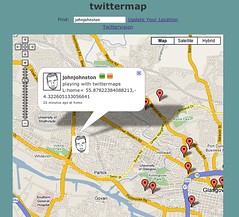
I’ve also looked at twittermap which allows you to set your location in a tweet and places you on a google map, via the google maps api. This is connect to twittervision which show tweets poping up all over the place and provides pages for users showing where they are: twittervision: johnjohnston

I am still unsure where twitter would fit into a primary pupil’s learning but there are lots of interesting things being done with twitter now.

I’ve been reading a pile of stuff about twitter over the last few months. Quite a few edubloggers around the globe have taken up tweeting in a big way. I originally thought that it would be more use to conference goers than class teachers and didn’t pay much attention.
Yesterday I saw that a facebook friend was wondering how to update his status on facebook and on twitter at the same time.
This remined me that both twitter and facebook have APIs. A bit of googling took me to ”More status updating goodness‘ where Sören provides an applescript for quicksilver to update several status messages at once, including twitter and facebook. I took the script and simplified it a bit, got rid of the quicksilver stuff other services and I am afraid removed the keychain scripting for the faster hard coded username and password.

So I am thinking of what good scripting these services would do. I guess you could combine the script to tell other twitters what you are playing in itunes, what you are reading in safari, or some other information grabbed by AppleScript either locally or via a webservice. You could run thse in an idle loop so that someone could twitter the current webpage they are reading, application they are using etc. Would this be useful? Eventually a scriptable phone could twitter its geolocation…

teachmeet07

Now I am on twitter I’d appreciate some contacts, my username is johnjohnston.
It is not all that likely I’ll be doing much tweeting for now. I do look forward to seeing it it is a useful tool at the Scottish learning festival and TeachMeet07.

Speaking of which the planning for TeachMeet07 is well under way. Check the wiki or follow everything Tagged: Teachmeet07. It looks like being a great event.

On Thursday I went over for a holiday visit to Lourdes Secondary School to visit Lori Ramsay. At the last Glasgow Masterclass meeting Lori had presented a tantalising view of The Mothership which seemed to involve enterprise, podcasting and music. Wendy from Edict invited me to get in touch with Lori to find out more and I popped over to the southside of the city on Thursday morning.

Lori met me and took me to a music classroom full of macs, keyboards and other musical gear. She booted up one of the few macs in Glasgow City Schools and launched into a garageband lesson! This was great, I’ve steered clear of GarageBand except for the occasional voice and background podcast as I have the musical ear of a turnip.

Lori quickly showed me how to teach children to put together a short song or jingle, first blocking out drums, then rhythm and synth followed by some instruments, until we had a wall of sound ‘blocks’. She then knocked holes in the wall to create an intro, verse and chorus. This would be broken down into several lessons in class, but you could really see how excited the children would be. Lori gave me quite a few bit of essential information that a musical person would understand and that I can follow. I an now ready to teach some music watch out for the effect on Radio Sandaig!

Lori explained that she was not a teacher, although she teaches sound engineering at Lourdes, she has a professional sound engineering background. She brings the real world into the classroom using the enterprise model. The pupils learn radio production and sound recording skills at SQA Int 2 Higher and Advanced Higher levels. I m sure that the string of backstage passes hanging on the wall and working with an expert from the real world wil ladd to the positive effect of working on a ‘real’ task.
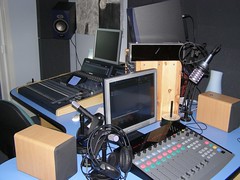
Sound Studio Lourdes Secondary School

Next Lori took me through a well equipped music studio to a soundproof room where the music could be edited and Radio Shows created. We listen to some of the children’s work. It was immediately apparent that the sound quality was much better than you usually find in a school podcast. We listened to professional sounding music, intros and voiceovers the pupils organising and running the shows. Some of the music was produced by the pupils and some by independent musicians. I was surprised to find that the children produce not podcasts but streaming audio. This is wrapped up in copyright issues, the station plays music from up and coming bands. I asked how they got the music expecting that they would be pulling it from music sharing sites, Lori pointer to a huge pile of CDs these were sent in by aspiring bands to play on the show.

Lori told me the pupils organised a event at the Garage night-club in Glasgow. The show included signed and unsigned bands including some musicians from the school. A & R folk from major record companies turned up. Undoubtedly this has had a real effect on the pupils involved, Lori mentions the positive effect on their attitude and that they are learning real world skills as they gain academic success. The program has a neat fit with the Curriculum for Excellence as well as enterprise.

Next we went online to take a look at the The Mothership.

The first function of the site is the streaming radio station where you can listen to the pupils productions, pupils from 4 Glasgow Secondary schools and one primary are involved:

Central to The Mothership project is the production and streaming of radio shows created by the students in a real professional studio environment. The studio, based at Lourdes Secondary School is available to students on allocated ?studio nights…

Plans are afoot to expand the number of schools involved.
As well as the music section of the site there is a password protected, secure section as well. This allows pupils to log on and download learning resources or take quizzes on the site. There are also chat rooms which are opened by teachers to help with homework and pre-exam revision. The site is still under development but plans are that pupils will have alien style avatars which they will be able to customise as the gain points through completing learning activities. Lori explained that the design of the site was reviewed by the pupils whose feedback has enabled the web designers to produce what the pupils wanted.

There is an interview of lori on her work on the Bluesbunny Independent Music Reviews Site : Mothership Project

Overall the Mothership project is very impressive, hitting academic, enterprise and Curriculum for Excellence targets. I am looking to taking Sandaig’s broadcasting, audio and video, to a more formal enterprise model this session and hope to get on board.

Over the last couple of weeks I’ve been reading quite a few post as about what makes a good edublog and blog identity. Eventually I ended up on Andy Roberts’ Writing an About page where he followed the advice from lifehack.org , I’ve done the same. I’ve started working on an about page. It is pretty clunky at the moment but if you are interested in where I am coming from it might give you an idea.

I’ve never really wanted to do this, but I notice if I visit a blog and can’t find who/where the person is it makes me wonder.

I’ve also exported the blogs I read in my feedreader and converted it to html. If you want to see what I read most days you can on the subs page. Pretty much as it came out of the reader, I just deleted those handy feeds that are only of interest to me, del.icio.us for me, comments on radio sandaig, comments on my flickr etc.

What do you think, do you want to know a bit about who is writing a blog, are a pile of links useful?

I’ve a page with a bigger version:A walk along the canal and you can see this on voicethreads too.

Obviously I’ve been trying out voicethreads which has had a fair amount of linkage on various edublogs.

I’ve only made one show but voicethreads is a very sweet application. Wesley Fryer has a nice post VoiceThread versus BubbleShare comparing this with bubbleshare, voicethreads seems to win.
Briefly voicethreads lets you upload (or grab from flickr) photos and turns them into a pretty slideshow, you can then add audio and text comments and drawings all in your browser (flash). You can title and link your slide to external pages too.
Next you can share your slideshow and viewers can add comments (again audio, text or drawings) the interface is extremely easy to use. Vociethreads call this Group Audio Blogging(GAB).

Even better you can keep the show private and moderate or turn off comments. Even better you can add different identities to a voicethread account without new emails, so everyone in your class can work on the same show adding comments. An identity is just another name and photo/pic (weemee anyone) associated with your account. This process is clearly laid out in the voicethread Classroom.

All in all voicethread looks like a wonderful app for classroom use, to start: whiteboard select photos, individually add audio or text comments; next: groups plan shows take photos, or draw and scan and build show. Children could tell a story, report on a trip, provide instructions for others, explain a concept, report on an experiment etc. etc. etc….

I am looking forward to find out if the voicethreads site gets through our filters and then plan some fun in a week or two.

Please feel free to leave a comment on my voicethread, to try out the comments.

technorati: