We know a lot of you were perfectly happy with Posterous and wouldn’t want us to change a thing. Rest assured, with Posterous Spaces you can keep doing everything you’ve been doing with yesterday’s service. Plus we’ve added many cool new features to enjoy

I like this way of updating. The up and coming Glow update will not be as smooth but I hope the new glow service will be both flexible, able to add new features and evolutionary rather than revolutionary in the future.

Turn off, be quiet and think. It’s OK, I promise

This is a great post. I guess we are a long way from stopping pupils being bored in school. I do wonder if the new curriculum is building in any quite time. I recently talked to a teacher trialing nintendo DSi in class and was surprised to hear the idea that a spell of maths on the DSi gave the children a quiet spell in the midst of their active maths. I know my mind works differently when I am cut off and value those times. Back in my childhood I am sure my mind ran riot during quiet times in my learning as we cranked through a repetitive task be it a big page of fractions or binka.

I want to tell them that the iPad is not the future of education, it’s the present of education. If we consign the iPad to the realms of the future, then we are implicitly saying that it’s not for right here, right now, today. We’re saying that we can postpone the task of seriously engaging with the educational and social impact of ubiquity of Internet-connected computing.

I am wondering about the graph of computer to pupil ratios, pulled in by freedom of information requests (see Fraser’s post)

But there are lots of different reasons for reading this post by @fraserspeirs.

I am with him all the way on the need for more hardware for pupils in our schools, still wondering where it will come from and how long it would take us to turn round our eduTanker if someone comes up with a radical model.

I am also wondering with Adrewburrett: even if it were 1:1 would the majority of pupils still use the tech meaningfully if teachers lacked skills?.

Just one video on The Kid Should See This.

There’s just so much science, nature, music, arts, technology, storytelling and assorted good stuff out there that my kids (and maybe your kids) haven’t seen. It’s most likely not stuff that was made for them…

But we don’t underestimate kids around here.

Off the grid-for-little-kids videos and other smart stuff collected by Rion Nakaya and her three year old co-curator.

from: The Kid Should See This.

via Swissmiss The Kid Should See This

An introduction to Apple’s Hypercard. Guests include Apple Fellow and Hypercard creator Bill Atkinson, Hypercard senior engineer Dan Winkler, author of “The Complete Hypercard Handbook” Danny Goodman, and Robert Stein, Publisher of Voyager Company. Demonstrations include Hypercard 1.0, Complete Car Cost Guide, Focal Point, Laserstacks, and National Galllery of Art. Originally broadcast in 1987.

HyperCard: One of my favourite things.

Piratebox Teackmeet

I am wondering if folk would donate a few quid for a TeachMeet PirateBox?

29 August: I just got to £60 in promises. I’ve ordered the Buffalo WZR-HP-G300NH wireless router. now hoping that I can get it working;-)

I’d noticed Alan Levine blogging about StoryBox and even donated a file in after this post: StoryBox Wants YOU – CogDogBlog.

More recently I saw it on Doug Belshaw’s Synechism Ltd. – User Outcomes Weekly – #11 (A weekly must read), where I commented wonder if a piratebox of some sort would be a useful addition to TeachMeets and the like? Doug had also linked to the PirateBox site where I read more about it and followed some links.

PirateBox is a self-contained mobile communication and file sharing device. Simply turn it on to transform any space into a free and open communications and file sharing network.

and

The PirateBox solves a technical/social problem by providing people in the same physical space with an easy way to anonymously communicate and exchange files. This obviously has larger cultural and political implications thus the PirateBox also serves as an artistic provocation.

Obviously TeachMeets do not need the subversion of tracking and preservation of user privacy that a PirateBox offers. Nor would sharing of copyrighted material be desirable, but It might be fun to have a PirateBox at TeachMeets.

It would allow folk to share files with others at the meet. If it was a traveling project, the box could go from TeachMeet to TeachMeet spreading files as it went. This would provide a sponsor-less goodie bag. Folk would be free to share what they liked, perhaps presenters would share presentations, digital musicians give away background music etc.

Obviously lots of the TeachMeet crowd already share many things online, A TM PirateBox would be a fun side project that might add to the buzz during a TeachMeet and be a concrete way of connecting different events.

A proposal

Having looked at the PirateBox DIY it looks like the cheapest way to make one is to use a Buffalo WZR-HP-G300NH wireless router which costs about £70. There are a few other bits and pieces needed but the cost is negligible.

I’d like to put one together, take it to TeachMeet SLF11 and then post it off to another TeachMeet. Unfortunately I don’t have £70 Is there enough folk interested in putting in a fiver to make a box and set it adrift?

If you are interested then DM tweet @johnjohnston, leave a comment here or make contact in another way, if I get a dozen people up for it I’ll send then a link to paypal me a fiver. As a PirateBox utilizes Free, Libre and Open Source software (FLOSS) I don’t think this is one for commercial sponsorship. If you do contribute you will get a warm fuzzy feeling and your name on the PirateBox.

Pledged so far: £60

29 August: I just got to £60 in promises. I’ve ordered the Buffalo WZR-HP-G300NH wireless router. now hoping that I can get it working;-)

I’ve been interested in combining maps and media for a while now. Here is a recap of some of the methods I’ve been using. I’ve not often had the chance to do this sort of thing in a teaching situation but continue to believe that mapping media would be a valuable way to record experiences for pupils and a nice slant on digital storytelling.

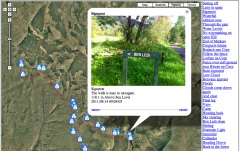
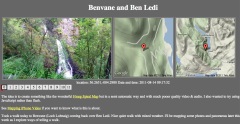
Last Sunday I had a walk to Benvane & Ben Ledi recorded the gpx with the iPhone Trails app (one of my top 10 apps) took photos, video and some panoramas. Here are the three ways I’ve been developing of displaying them on the web. None of these are good as examples of story telling as I am still thinking about the workflow and tech.

Photos on the map

Benvamemap

I’ve built up a fair collection of these over the last few years. this one only uses iPhone photos which means I can skip the stage of matching photos to the gpx file. When I started doing these google maps API was at version 1, I move to 2 and now am behind version 3.

This is the most conventional story combining an image with text in a liner fashion along the track.

Video Mapping

Videoandmap

Benvane and Ben Ledi video map

I just blogged about this in the previous post

I am hoping that this can produce a more contemplative result.

Although I’ve only just worked out how to do this the workflow is a lot simpler than the photo maps. I’ve developed a mac application (using SuperCard) to make these. All I need to do is to drag some iphone videos out of iPhoto onto the application and it creates the smaller versions of the video and the HTML to display them along side the maps

I you have a mac and would be interested in trying the app, let me know.

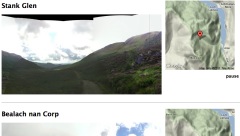
Panoramas in Place

Panomapthumb

Benvane Panos

This is the most recent development, after tweeting about the Video Maps @drewburrett suggested using photosynth for the iPhone to take pano photos and do something similar. I’ve not got a workflow for creating these and don’t think I’ve got the display method right yet but I am quite excited about working out different ways to present pano photos.

As I said I’ve been messing with maps and media for a long time (2006 example) I’ve blogged about it a fair bit, pretty much in a vacuum. I’d be really interested in finding some folk to play along with or a school interested in trying out some of this stuff.

Investigating new ways to credentialize learning

With the upcoming release of Mozilla’s Open Badges framework this group is an opportunity for educators and interested parties to discuss the various ways such badges could be used in educational contexts.

Proposed: Semester of Learning: Open Badges and assessment | dougbelshaw.com/blog and organised by Doug @dajbelshaw this course has a ton of interesting information and links about using Open Badges in education. Weekly (Saturday 8pm! I am not going to make that, but I am enjoying following up lots of stuff including:

etc!
I wonder if anyone at Glow Futures is following this? Could be interesting integrating this with the developing glow e-portfolios.

I’ve blogged before about the wonderful Hmsg Spiral Map a project that combines video, audio and google maps into a mesmerising meditative experience.

Recently I noticed that iPhoto shows the location of videos as well as audio which got me thinking a wee bit. I checked out a few exif tools and found that the location was stored in exif data in the same way as photos.

I already had made some crude tools to map walks on google maps and made an odd foray into adding sounds to the photos: burn, so though I might be able to knit together some video and maps.

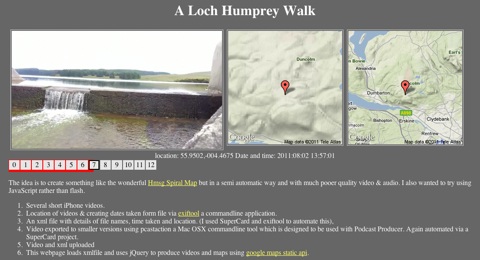
After a few false starts I manage to do this:

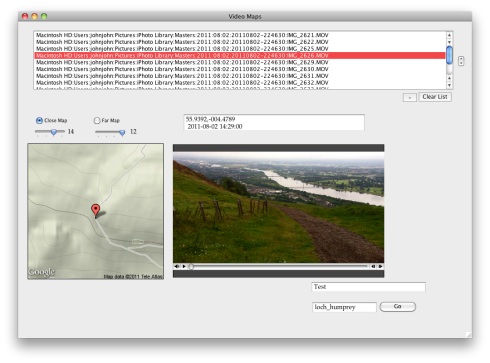
Loch Hump Screen
A Loch Humphrey Walk

This is a webpage that shows a series of videos with a couple of maps pointing to the location the video was shot at. When one video ends the next is automatically loaded. You can jump around by clicking the numbers.It information: videos urls, locations and time shot is stored in an xml file, this is loaded by some javascript (jquery)

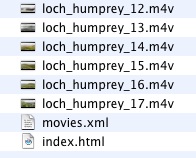
Bideomapfolder

The list of movies and locations are loaded from an xml file that is a very simple list:
<item><file>loch_humprey_02.m4v</file><loc>55.9323,-004.4594</loc><dc> 2011:08:02 21:27:10</dc></item>
I though xml was a good idea as it would allow reuse to display the movie in different ways. As the movies are shown the location is used to show a couple of images using the google maps static api. This first Video Map Experiment was cobbled together using a couple of command line tools (pcastaction, built into Mac OS X and ExifTool by Phil Harvey). I am not knowledgeable about shell stuff but it can often help do interesting things and once you figure it out is easy to reuse.

After a couple of tries I’ve made a Supercard project that sorts this all out, here is what I did to make the A Loch Humphrey Walk

  1. Take videos on iPhone
  2. Trim on iPhone
  3. import into iphoto
  4. Drag videos from iphoto on to a field in a SuperCard project I’ve made.
  5. Click a button on said project which:
    1. Asks me to choose a folder
    2. Gathers locations & date/time from the video files
    3. Makes a copy of videos in the folder, shrinking file size & dimensions (this take a few minutes)
    4. Creates an xml file & and index.html file in the folder to show videos

Video Maps.sc45

I then upload folder to server via ftp.

Getting the JavaScript stuff sorted out took me a wee while and quite a few wrong turnings, but it all seems to work on both Mac & Windows with FireFox, Safari or IE now. I started to write about the gory details in this post, but decided to split them off and I’ll put them up somewhere else sometime soon. I also hope to make the Supercard Project available for anyone who is interested. (If you want to see an early version let me know)

I hope this could be an interesting way to tell a story, record a trip or describe a place. I’d be interested to know what other folk think.

What has Twitter and Facebook done for me? Nothing, really. Other than perhaps attending to my emotive needs of being connected to people when I’m traveling and whining.

Social media=emotions.

Blogging/writing/transparent scholarship=intellect.

Put another way, Twitter/Facebook/G+ are secondary media. They are a means to connect in crisis situations and to quickly disseminate rapidly evolving information. They are also great for staying connected with others on similar interests (Stanley Cup, Olympics). Social media is good for event-based activities. But terrible when people try to make it do more – such as, for example, nonsensically proclaiming that a hashtag is a movement. The substance needs to exist somewhere else (an academic profile, journal articles, blogs, online courses).

I seem to be collecting stuff like this of late. It parallels my feeling about open VS closed technology. Unfortunately my blogging has never been deeply thought out or philosophically substantial.

Twitter and G+ have been valuable to me in getting specific answers to problems and leading me to interesting posts and I do think the emotional connections (even if the emotion is laughter) are important.

I started writing the above a few hours ago, stopped for dinner and some TV. Since then John Connell picked it up: Putting Social Media in their Place and Jen Deyenberg posted Writing 140 Characters at a Time pointing out some valuable uses of twitter.