
I’ve been following the work of Dave Winer for a while now. His pioneering work with RSS, blogging and podcasting is central to my use of the web. I’ve even dipped my toes into and blogged about Fargo his outliner tool a few times, I tried myword.io a couple too.

The product I am most interested in was the Rivers project. This is a take on RSS readers, where you view collections of RSS in a stream, rather than a folder structure.

In the past I set up River3 and River4. These products really need a server that goes a bit further than web hosting. I had some working locally but this was not ideal. The instructions for using the previous version of River tended to involve Amazon Web Services and a server elsewhere.

River5

River5 changes all of this, it is designed to keep everything in the same place, one server. The only difficulty is that it requires a server running node.

This is pretty simple to set up locally on a mac. You need to use the terminal. You install node. Then you follow the instructions on the River5 github page and you are away.

What is very nice indeed is that you can add feeds you want to read in several different formats opml (handy for export from other RSS readers), json and plain text. There is a set of example feeds provided that will let you see everything is working.

I wanted to be able to have the rivers running all the time and be accessible from other computers. For that I need a server that I could install and run node on. Turns out I have one, john’s pi server. That sits on my window sill mostly taking pictures of the sky. It was running a twitter bot but that is broken at the moment.

Setting up River5 on a Raspberry Pi

I do most things on my pi via the terminal on a mac or iPad, suing ssh to logon.

I had installed node on the pi a while back.

Download the latest:
wget http://node-arm.herokuapp.com/node_latest_armhf.deb

then install:

sudo dpkg -i node_latest_armhf.deb

I seem to have done that a while back when I was failing to get something else up and running.

All I need to do to get River5 installed was to download the files from github and upload them to the pi with scp.
I then unzipped them went into the folder and ran these two commands:

npm install

node river5.js

This set everything up, a plie of stuff streams by in the terminal and all looked ok. (I had problems the first time I tried but an update came out immediately that fixed things for Linux servers. I got a very quick response on the River5 Forum).

My Pi already has a sub domain so I visited http://pi.johnj.info:1337 and could see the rivers flowing with Dave’s Feeds.

I’ve now removed the original ones and replace them with lists of feeds of my own.

Rivers Forever

After that I went to bed, next morning I tried the link and it was down. The problem is I need to keep the application up and running even when I am not logged onto the server. I recalled reading on Dave’s blog about Forever. As usual google found the instructions to install and use: Keep a node.js server up with Forever.

This is pretty simple you install Forever with:

sudo npm install forever

npm is a package manager for JavaScript so it installs stuff.

After it is installed we can start up the river5 with:
forever start river5.js and it keeps going.

Mine has been running for a few days now on the pi without any problems.I’ve been enjoying an alternative view of some of my RSS feeds. My next steps are probably to move things around a bit so that I don’t relay on the built in node server, and can pull the river json over to here.

I am pretty amazed by the ease of doing this. The software has been made to be very easy to install and the Raspberry Pi turns out to be a very capable wee box.
Since I changed themes here I’ve been using featured images a lot more on posts. 1

There are a couple of things that bother me about WordPress featured images, the fact they do not show up in an RSS feed and that any attribution needs to go in the body of the post.

This morning I read Transforming Photo Attribution from Credit to Stories on Alan’s blog, which mentioned these problems while discussion a much more important one.

I though I’d see if it was easy enough to find a fix and headed to google.

First I found a few plugins but also some DIY advice. I decided that these looks simple enough for me.

Featured Images in RSS

How to Show Featured Image in WordPress RSS Feed shows how to do just that. You need to edit the functions.php file in your blogs theme 2.

All I needed to do was copy the code suggested from that site and add it to the bottom of my functions.php file which I already had in my child theme. The post shows how to edit this file via the WordPress dashboard. I do this with my ftp application.

A quick look at my feed in Forefox (Safari dos not show RSS any more 🙁 )
http://johnjohnston.info/blog/feed/ or http://feeds.feedburner.com/johnjohnston
Looks good.

Captions for featured images

Again there are plugins for this, but I found:
How to add caption to the featured images in WordPress which had done the trick.

This uses the built in caption from the media library. To do this I needed to copy the content-single.php file from the theme to my child themes folder. I then edited that one.

My theme’s code was slightly different to the example but it was easy enough to figure out where the code for the featured image/thumbnail was and add:

<?php if ( $caption = get_post( get_post_thumbnail_id() )->post_excerpt ) : ?>
    <p class="featuredcaption"><?php echo $caption; ?></p>
<?php endif; ?>

After it. I also added a bit of css to the child themes styles.css file to align the text right. I’ll think about how to make that better looking….

What I particularly like is that this approach uses the built in WordPress caption for the image. When I started thinking about it I was thinking about adding a custom field and complexity. I keep finding that WordPress is already half way to do what I want, if only I knew where to look. Until I do google will keep me right.

  1. I choose the theme because it supports indyweb features I wanted to test. I’ve still not got my head round many of them.
  2.  This just works if you can edit your theme, so you would need a self hosted blog. I use a child theme here which should avoid changes being overwritten if the them is updated.Child Themes « WordPress Codex covers the details

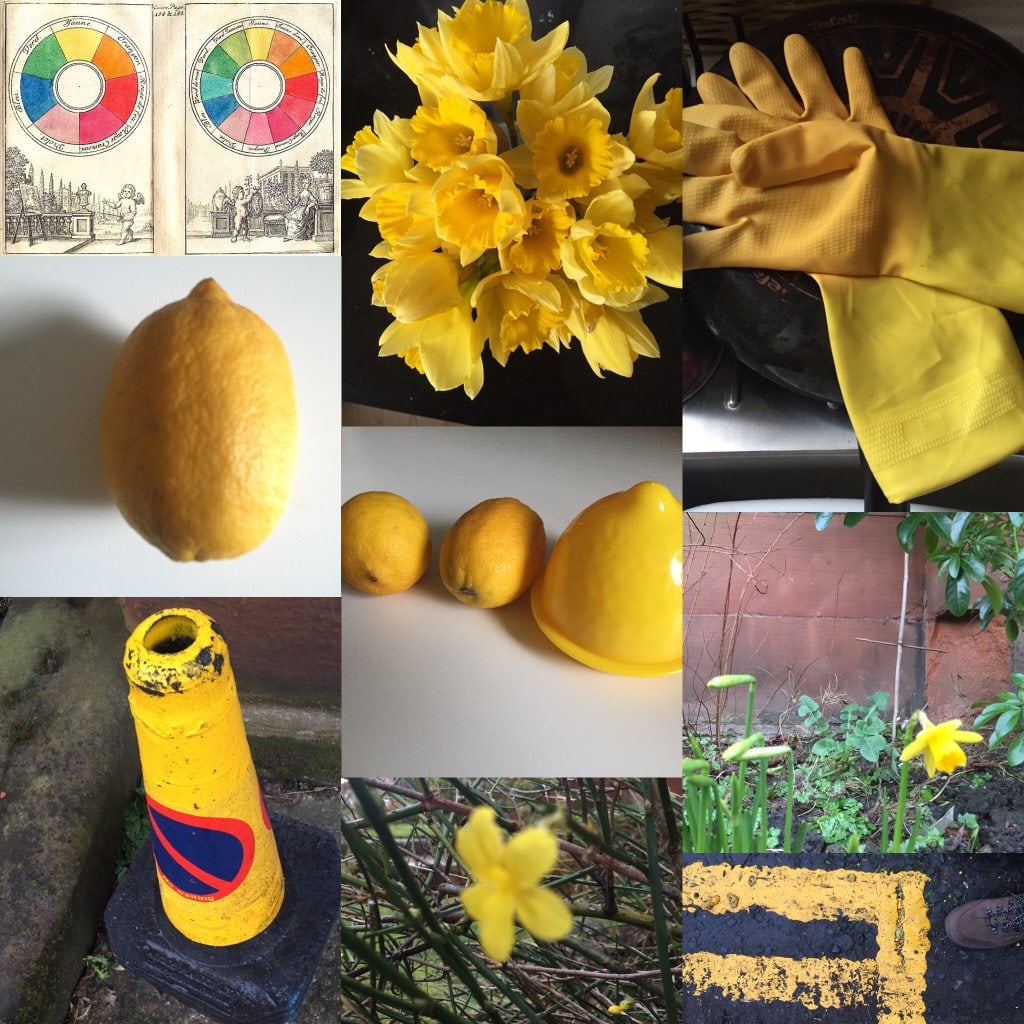
Pick a colour for the day. Notice it anywhere you go. Take photos. Pick the best one to show us. Did you notice that setting an intention to notice something, helped you pay attention and be more aware of your surroundings?

Thursday was a lovely day a bit of frost and a clear sky. unfortunately I was stuck indoors all day. I thought I’d wait till the weekend.

As atonement for not doing it on the right day I decided on yellow as I thought that would be hard.

Saturday started a dreach damp day sleet, rain and wet snow. I still managed to find plenty of yellow.

I love these simple challenges best of all this morning yellow shone out like lights. I didn’t even take gave of the opportunities.

File under another thing about WordPress I didn’t know.

I do not use the more tag on this blog very often, but it is a handy thing if you do not want all the text from a post filling up your home page. I was using it elsewhere today and wondered if I could edit the text from the standard Continue reading → turns out you can. You need to stitch to the Text view in the post editor, rather than the Visual, There you will see:

<!–more–>

you can edit it like this:
<!–more Find out more about more… –>

Find out more about more…

The University of Dundee seems to be making its voice heard about glow and so it should! It’s here, let’s use it. But, it made me start to think about why I personally have got into blogging so much when some of the professionals around me just don’t want to?

from: Making This Blog Count | Katie-Rebecca’s ePortfolio

Further evidence of the blogging boom in the University of Dundee. Katie-Rebecca’s post about why she blogs makes me very glad to have worked on Glow Blogs.


I was alerted to Anchor by Joe Dale.

I don’t think audio needs reanimated but…

Looks like an interesting app for mobile audio. Ease of use and the ability to reply seem to be the features they are going for. Setup was largely audio, for instance you don’t type your name, you speak it.

Pasting the link to a piece of audio into WordPress here embeds it, via oEmbed I guess. I can’t see any sign of RSS yet. I’ve not found the documentation yet either. Seems to be iOS/iPhone only so far.

They do say:

Once published, conversations can be shared as podcasts, and heard all over the web.

from: Anchor – True public radio – About Anchor

So I’d expect RSS to be involved somewhere. I am hoping for RSS for tags so that we could pull  them into Edutalk.

Recording is so easy that I made the above without much though, I’ll try again soon with more of a plan.


For example, teaching digital skills would include showing students how to download images from the Internet and insert them into PowerPoint slides or webpages. Digital literacy would focus on helping students choose appropriate images, recognize copyright licensing, and cite or get permissions, in addition to reminding students to use alternative text for images to support those with visual disabilities.

Really interesting post by Maha Bali with some great real world examples.

Knowing the Difference Between Digital Skills and Digital Literacies, and Teaching Both

So often we only seem to have time for breezing through the skills and mentioning literacy. In my own work we deliver fewer and fewer daytime CPD opportunities, shorter twilights are delivered more often. Skills then become the main focus.

I’d be interested in knowing how much penetration digital literacy has in classrooms across Scotland?

Especially among staff who do not identify themselves as having digital skills?

An even more challenging read is: Media Literacy: 5 key concepts to teach this year

I am yet to see Microsoft or MinecraftEdu act in a way other than marketing and brand-building (ie scholarly).

and

Most media messages are organized to gain profit and/or power.
To learn this, kids need to be removed from the kind of dubious activity that ‘brands’ are doing to children with the willing co-operation of teachers. Point 5 – The message that goes with the device you place in the child’s hand was not created, designed or sold to make them more literate – and yet, we call it ‘digital literacy’ to mask the obvious effect of forcing one brand over another into kids education.

I’d like to see this discussed by a group of teachers who belong to different clubs, ADEs, MIEExperts, Google for Education Certified Innovators and the like. How do we deal with our bias when teaching? Do we walk the talk if we claim some sort of balancing act?

The featured image for this post is Public Domain: Image from page 108 of “Argument to errors of thought in science, religion and social life” (1911) | Flickr – Photo Sharing!

I quite often read above my understanding age, which is why Hapgood is in my RSS feeds. The other day I read: Connected Copies where I read this:

the future of the web involves moving away from the idea of centralized, authoritative locations and into something I call “connected copies”.

This lead me to AMBER where it says:

The Berkman Center for Internet & Society wants to keep linked content accessible.

Whether links fail because of DDoS attacks, censorship, or just plain old link rot, reliably accessing linked content is a problem for Internet users everywhere.

Having blogged for a while I am very aware of this problem, links I’ve made have fallen away. My bookmarks are full of holes.

Just the other day I linked to a couple of posts here that were made this month. They have already gone.1

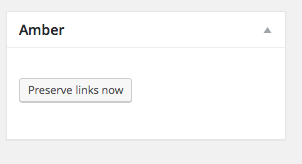
Preserve Links Now. The plugin added this to my post editor.

I’ve installed the Amber WordPress Plugin here and set it to use the Internet Archive to ‘save links’ when I make them. I could have chosen to save them here, but I wonder if that could get messy?

The other thing that crosses my mind is what if people want to rub out something they have published. When a post is taken down deliberately, should I be archiving it?  The posts I mentioned above were deleted by the author (I presume). Should I then make public copies available?  That is what would have happened if I’d had the amber plugin working at the time.

I don’t know the answer to these questions or how the plugin works, but I’ll keep it running here for a while and look out for broken links.

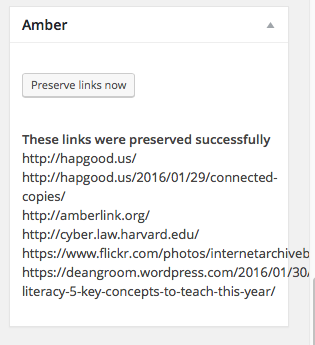
After hitting the button
After hitting the button I get a list of links preserved. Presumably on the Internet Archive.


Featured image Flickr photo Public Domain: Image from page 28 of “The effect of black rot on turnips, a series of photomicrographs, accompanied by an explanatory text” (1903) | Flickr – Photo Sharing!

1. These links were to posts Dean Groom made about Microsoft acquiring Minecraft EDU. Strangely they have persisted in my RSS reader. I’d recommend a more recent one that is still there: Media Literacy: 5 key concepts to teach this year | Playable

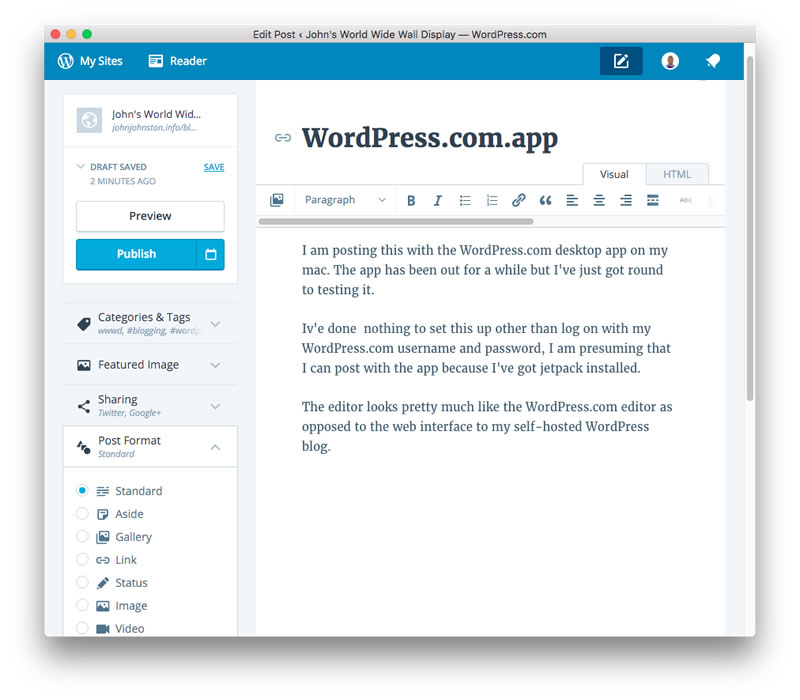
I am posting this with the WordPress.com desktop app on my mac. The app has been out for a while but I’ve just got round to testing it.

I’ve done  nothing to set this up other than log on with my WordPress.com username and password, I am presuming that I can post with the app because I’ve got jetpack installed.

The editor looks pretty much like the WordPress.com editor as opposed to the web interface to my self-hosted WordPress blog.

WordPress

The application feels a bit like a site specfic browser.

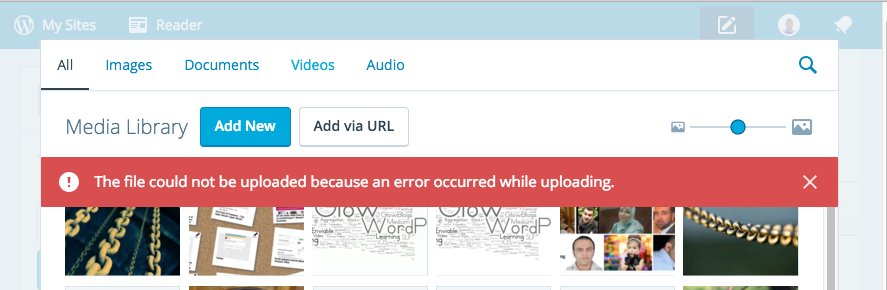
On my site I am having problems uploading images so will be switching to the browsers to finish this post off.

Screen Shot 2016-01-25 at 20.52.55

It does not give me access to things added to my editor by plugins. For example the post to medium plugin or the indie-web post kinds plugin.

I guess the writing ‘experience’ is a bit smoother than the browser. I am surprised that there is now distraction free mode for writing.

Hitting preview opened Safari but pointed to the post without &preview=true the first time I clicked Preview. The next time was fine.

There are a huge number of Revisions saved. I don’t know if this is a good thing.

An interesting editor but I think I’ll stick to writing posts locally with TextMate for now. This gives me local/dropbox backups and lots of shortcuts.

It is worth noting that this app will currently not work with Glow Blogs. I suspect that the WordPress.com connection would worry the security folk at Scot Gov.

From what I’ve read this app is part of major changes happening with WordPress and the Rest API hence the featured image!

Featured image credit: wordpress revolution | Flickr – Photo Sharing! CC BY NC by Tom Woodward.

Bonus link the CC0 image at the top of this post is from FindA.Photo which looks like a useful service that searches across a few other sites. Fré Sonneveld
viaUnsplash