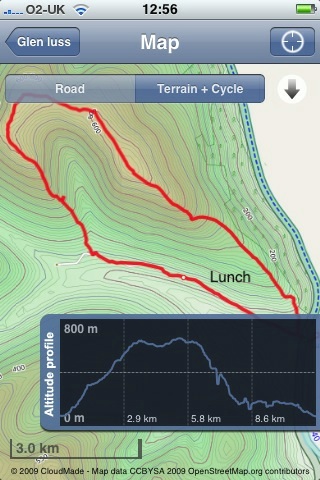
Since my last walk map post I’ve made a bit of progress. I am now using Trails an iPhone app that:

allows you to record, import and export tracks onto your iPhone.

Trailsscreen

Trails is really nice, it records and show position and altitude. It also allows you to cache map tiles when you have a good connection to use later on a walk.
You can zoom in quite close and it has already been handy in finding out I was going the wrong way in the mist.

Trails allows you to email a track in both kml and gpx format. Clicking the kml file opens the trail in GoogleEarth.

I’ve been using GPSPhotoLinker a free app to add geotags to photos using the gpx track from Trails. Once you have dome that they will be mapped by flickr.

I’ve then been using .SuperCard to read the data from the photos and the gpx track and produce an xml file and set of resized photos. The xml files can be used with the google maps api to show the track and photos on a google map.

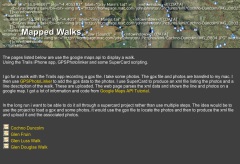
I’ve started to put together some webpages to list and show the maps: Mapped Walks.

Walklist tn

The idea is to end up with a SuperCard project that cuts out some of the steps, it would take in photos and gpx file and upload resized photos and xml file to the web. I just need a bit of time to write and test the scripts.

I have managed to add an mp3 player to some of the google bubbles on one map that plays sound recorded on my phone. The aim is to have pictures, audio video and text. The maps now also have links in the bubbles that take you from one to the next in the correct order, I think this could be come an interesting way to tell a story that travels through space and time.


Herramientas – Tools by karramarro
Attribution-NonCommercial-ShareAlike License

Since my move from Sandaig I’ve not had time to sort out this site the way I’d like it. I spent a wee bit of the rainy holiday Monday moving some webpages over here and tidying them up a little. In no particular order:

A flickr CC search toy This is a variation on the flickr search theme, the page searches for flickr creative commons images and shows them. More interestingly it produces the html code to embed the photos with attribution into a webpage or blog. for example the image on the left was produced by a search for tools. The search is fairly underpowered but if you want to give pupils a way to search for images to embed in a blog post and talk about attribution it might help. I hope to improve the page when I get time and a bit more know how.

A Tasty Tumble This is one of my favourite pages it is a fake tumblelog produced from my delicious links. An experiment in presenting data from delicious. Again the code do with more tidying up.

Big Tweets is a simple tweet search and display page that auto updates every minute, it is designed for use with a projector (big text size). It uses the twitter search API and is based on a toy I made for Joe Dale‘s The Isle of Wight Conference.

tags is a page that pulls information for several sources: del.icio.us, technorati, flickr and twitter. For example things tagged glowscotland. I’ve found technorati less useful recently as it doesn’t seem to keep blog posts for as long. This was first developed for teachmeet06.

I’ve also move my wiki over here, it is mostly empty, and I still have various maps to organise (pics, work navigation and some walks ), optimise and sort out. I’ve also got an experimental lifestream home page to finish off.

While none of these applications will set the heather on fire, they give me a lot of fun. They may be useful to others on occasion, but mostly they have served to keep me happily plugging away at the keyboard on rainy afternoons and dull evenings. If you do find anything of value let me know, I work for smiles. They all use various APIs and Libraries provided for free (credit on the various pages) by various developers whose generosity still amazes me, long may they continue.

My blogging seems to have hit a all time low. I think this is mainly because I used to blog about my classroom practice (with some iPhone, web tech and the odd AppleScript thrown in). I was never one for educational theory I am afraid. I now don’t have a classroom to practise in and blog about.

My more technical posts have never been popular (judging by comments) and fall between absolute beginner and competent so don’t have that wide an audience;-)

Anyway I am going to start a wee Glow post and see what happens.

Glow 2blogpost

I’ve blogged about glow before but never had the chance to use it in the classroom. Over the last few weeks I’ve watched North Lanarkshire teachers and pupils start to use glow in practise and have been involved in helping with some of the training.

So far I’ve seen glow have a remarkable effect on some teaching and learning in the first schools to get on board. Teachers have been setting work on glow, children posting work and commenting on other pupils work, locally and further afield. Classes have joined and contributed to National groups and in one case I know off a teacher created a national group within about a week of joining glow. There seems to be a real appetite for getting children involved in all sorts of online collaborating.

One of the favourite activities seem to be the use of Marratech video conferencing through Glow Meet. This is a little ironic as North Lanarkshire has run its own Marratech server for several years. Although this has been used for many projects I think there has been a significant increase in video conferencing in the first couple of months of glow.

I am beginning to think that the most important aspect glow is the way that online collaboration and communication receive promotion and support. There is top down encouragement that is being met by great enthusiasm, almost as if folk have been waiting for the tools unaware that they were already available.

Watching folk take their first steps in glow also highlights some problems with glow and perhaps some pointers for Glow 2.

GUI

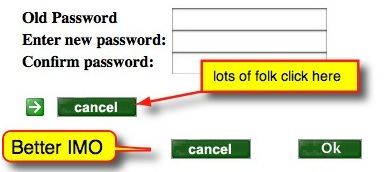
Glow Password Change

I’ve watch a fair number of people click the cancel button to start all over again by accident. There are a number of similar examples.
The editing of pages in glow is quite a laborious process compared to many web 2 applications there are many examples of slicker interfaces. Compare adding an rss feed to glow and to, say netvibes. Editing information in glow usually seems to involved lots or page reloads and then some scrolling.

Organisation

Groups are hierarchical and difficult to find, interesting groups may be buried inside others. The ability to search group descriptions and the tagging of groups would help this. Some sort of way of filtering and organising groups is needed.
Recently I found a group discussion in glow asking for suggestions for glow 2. I posted a couple of comments but there is very little discussion on the board, perhaps because folk cannot find it?

Data Exchange

One of the strengths of Web 2 applications is the way many of them allow syndication and distribution of data, I can have flickr update in my blog, recent posts from blogs listed in a wiki and so on. At the moment RSS in glow relies on 3rd party scripts or widgets. The is no way, as far as I know, of getting information out of glow in an automatic way. It is hard t ofollow the work of groups you are interested in and no simple ways to share what a group are doing.
Some of this is due to the overriding concern for security but glow does allow for public facing html webpages so the idea of some of glow being open to the public is not beyond the pale.

Wish List

It would be good if Glow 2 was in some way modular, allowing users and groups to add popular and useful open source components, making them private or open to the world. So a group could have a wordpress blog, a phpBB discussion forum, a choice of cms, wikis VLEs etc. etc. Adding the ability for glow to update and add modules would also make Glow a work in progress, in perpetual Beta, rather than a fixed toolset.
I don’t think this is to far fetched, at the moment glow will allow secure access to lots of external content. If this could be expand to give users a choice of the tools it could be wonderful it would help with some of my GUI and data exchange wishes too.

2 Stars & a Wish

We, in Scotland, have an amazing opportunity in Glow which could be even better.

Basic 5 Point Gold Star Beveled The vision of a national collaboration and communication space for education..

Basic 5 Point Gold Star BeveledThe promotion and support of this collaboration and communication..

BubblesWhen the dust settles we have the best tools for the job, and tools that we can swap at will as better ones come along..

I’d be interested to know what other users have on their glow 2 wishlist? Or if you know where the best place to discuss this would be?

Top image http://www.wordle.net/ with this post’s text.

twitter icon

I’ve messed about with the twitter API before in a ham fisted sort of way (say ObliqueTweet, twitter presenter or Tweets @iowconference08) by basically borrowing various snippets of code, this is another such effort.

I notice an interesting post on Tom Smith’s theOTHERblog: Twitter, Growl, Boosh! In AppleScript!!. I’ve borrowed code from Tom before and was interested in this latest script. The script basically used growl to show tweets for a search or hashtag to be used when watch tv with a group spread over different locations. Tom’s script used the Vienna rss reader as a intermediary for handling the RSS. I recently switched from Vienna to NetNewsWire and didn’t have Vienna installed so took a slightly different approach.

I remembered that someone had mentioned that AppleScript handles xml now (via the ‘System Events’ application) and this seemed like an opportunity to mess about with that and growl.

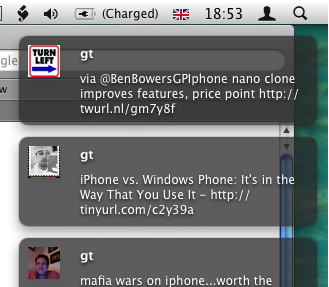
Growltweets

I’ve cobbled together an applescript that runs and every minute, downloads the latest from a twitter search and growls them. The script is pretty rough at the moment (and in all likelihood will stay that way) but I’ve posted it for view and will upload the actual script once it looks a wee bit better.

The script might be of use in the same way Tom’s is, to display tweets over a shared experience. Or perhaps so make sure I don’t miss an @johnjohnston tweet but don’t get caught up in twitter while I am ‘working’ but really it served to give me a bit more practice with the twitter search API and in starting to learn to parse xml with AppleScript. As twitter become bigger by the second and its API continues to grow I hope one day I’ll do something useful.

twitter image Mirjami Manninen from smashingmagazine

I’ve seen quite a few references to Pivot Stickfigure Animator for making simple animations in the classroom,for example these ones from Kent ICT, but never tried it out. Pivot is windows only software and until the Dell refresh in Glasgow primaries I could not install software there. Now I’ve moved to North Lanarkshire where most of the primaries run macs so I’ve not tried it here either.

Last week I was checking some old Supercard links and found reference to Stykz – The first multi-platform stick figure animation program on Sons of Thunder Software developer site. It looks like Stykz has been developed with revolution which is sort of a modern x-platform HyperCard clone. Ken Ray of Sons of Thunder used to be a very helpful contributor to the Supercard mailing list.

Stykz worked well on my mac at home proving to be simple and engaging to use. I can imagine that some children would find it very appealing. Stykz exports to animated gifs and quicktime movie files, in my brief test the movies were a wee bit smaller that the gifs, swf support may be coming, I presume that would make for smaller file sizes.

Stykz is still in Beta, version 1.0 for Mac and windows is expected on the 30th of April the Linux version will follow a month later. The Stykz F.A.Q. lists some interesting features in the works.

The example below show a lack of imagination on my part, but only took a few minutes to produce 70 odd frames and export to a mov file. Well worth a download if you are thinking of teaching the basics of animation and giving your class some fun.

T“>

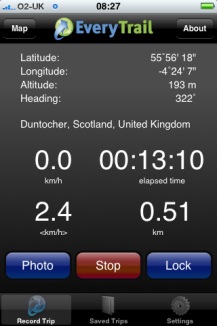
Every Trail

I decided to try a new approach to plotting photos on a map today and use EveryTrail which according to the site:

With this geotracking application, you can record your movements, take geotagged photos, make notes and immediately upload it all to EveryTrail, the leading online community for travel storytelling

The weather was not very nice so i just went a short way from home to the Kilpatrick hills. I started walking and took some photos with EveryTrails as I went, it seemed a smooth and well crafted application. After about 20 minutes I decided I could not remember if I had locked the car to turned around to check. I clicked stop and save in the app and as I was looking at the field to fill in the application quit. On opening it nothing was saved.

On restarting the walk I reverted to using SnailTrail (this application seems to have vanished from the store.)

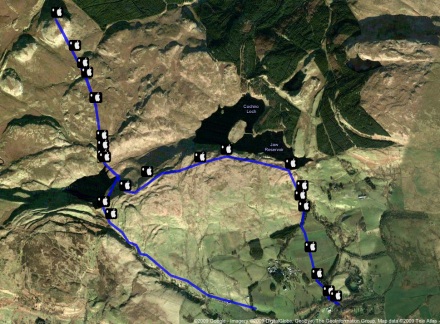
SnailTrail just lets you save a list of waypoints and email them to yourself. I sure a simple SuperCard project to create the kml file from the list and the photos exif data. I’ve uploaded the the kml file which will open in google earth and imported it into google maps.

googlemapscreenshot

I noticed a strange thing when working with the photos, the ones taken in portrait seemed to have lost their exif data. I drag the photos from iPhoto onto my SuperCard project to get the exif data (Via the exiftags commandline app), it seems when iPhoto rotates the images according to the camera’s instructions it loses the exif data. however if you export the files via iPhoto’s file menu you can check a box to include location and the exif data is in the exported files.

Update 2 March 2009 I was trying to incorporate mp3 sound in the kml file but the object tag is not shown by google maps (it is by earth) so I’ve experimented with the maps API and have markers with pictures and sound: Mapped walk which has some potential I think.

Tracker

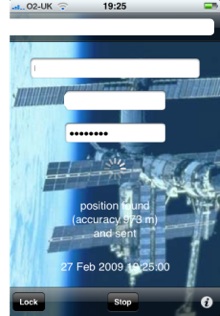
I had a very pleasant location experience this week. I had been trying the iPhone app Tracker to ftp a small webpage with my location to the web (example target=”new”), I was then parsing out the data with php to produce a static google map (example). Then the application was upgraded and the structure of the html file was improved, this of course broke my script. I then emailed the developer Stefan Welebny and asked him if he could have an option just to upload the basic information to a text file. Much to my surprise he wrote back and then updated the application. It now will send the information as parameters to a webpage, in my case a php file. at the moment my file just writes that information out to a text file but I hope to soon be able to record my location to a list and then do other things with it. As I understand it Tracker will send its position every 20 seconds so I could use it by turning the app on for a few seconds to record a location.

I’ve not posted here for a bit longer than usual. I am not sure why as I’ve got a few posts running round my head at the moment. I did have some time this week but that was eaten up by sorting out a few backend things on this blog. Last weekend I updated the blog to PivotX – 2.0.0: beta 12j and I must have made a mistake or two. In the new version of pivot some thing have changed (Upgrading from previous beta releases). By the middle of the week I had noticed a few funny things going on, individual posts were giving 404 errors. I tried uploading the files again but due to the careless way I had originally installed pivot I had to be careful not to over write my templates. I them made things even worse. To cut a long story short I uploaded a clean version of pivot, and move my data across then deleted the old directory. Hence the change of theme.

I suspect that the root of the problem stems from the way I move the blog to here from the Sandaig Primary site.

I could probably footer around and put the old theme back in place but as I had never really finished that one I was not too sad to see it go. At the moment I am using the bare bones theme which is designed to be customised.

Flatfiles

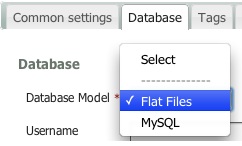
One of the main reasons I use Pivot (which is now officially pivotX) is the fact you can easily customise the theme of you know a little html. The original reason I picked it was it was the only blog I could find that used flat files rather than a database. PivotX now gives you the choice to use MySQL if you want. At the moment I am sticking with flat files.

I also quite like the barebones theme, I’ve always like fixed width or maximum width webpages but flexible is beginning to grow on me.

I guess I’ll tweek away at the template and css, but I now have a much cleaner starting point to start from.

Another thing that seems to be fixed by the clean install is the MetaWeblog API which I had managed to break in the move here so I am now back to blogging with TextMate which I am delighted about (or will be if this post works when I hit ?-?-p).

All I need now is a bit of time to tweek and some more to actually blog, for today this will depend on the weather.

Blogged from tm

I usually think I can google with the best of them but I am coming round to thinking twitter is quicker!

Yesterday I was working on a wee document on how asus netbooks running linux could be used in class. (I hope to add some more stuff to Doug’s google presentation soon). The webcan can record video nicely, but the files are .ogg ones. On the machine i was using there was no video editing software so I was thinking of moving the video onto a mac to edit. I started googling ogg to mov and the like but didn’t find a result. I figured the ffmpegx might do the trick, but installing that app is not straightforward. So I tweeted: anyone know how to convert ogg video on a mac. can only get VLC to view simple solution prefered at 3:32 PM. By 3:34 PM rogbi200 had tweeted @johnjohnston http://handbrake.fr will convert most things!, followed by one from atstewart and two from jimhenderson.

Handbrake works a treat, is easy to install.

Today, still working on the asus, transferring screen-shots via pen drive to a mac for documentation, I could not see how to eject the disk, right click had no eject. I tweeted atstewart and twowhizzy replied. Again I had spent a few minutes googling. Again twitter was quicker.

My tongue is in my cheek of course, I’ve probably run dozens of google searches over the last two days which have got me what I wanted, twitter seems a good option when you can’t find what you want.

wallace monument

I spent Thursday and Friday at the Stirling Management Centre learning about Glow Learn. This is just my first reaction to the training, my own opinion which will probably change once I’ve had a chance to discuss and think a bit more.

Back in Glasgow I had been a Glow mentor but as the Glow roll out hadn’t started before I left my experience limited to a couple of pilots when I spent a fair bit of time testing glow. I’ve never used glow in a teaching situation and it now feels peculiar that I will not be doing so.

In North Lanarkshire we have just started rolling out glow accounts to mentors and only had our mentor training a couple of weeks ago so it is a bit of a jump going straight into glow learn. The in-school mentors will have a wee while longer before they get to the Learn training but it might have been better if we could have had a bit of time to embed glow before getting into learn, unfortunately this is not possible.

Most of the time over the two days was spent in a mix of instruction and practical activity. The group I was in was lead by Karen-Ann MacAlpine, Ian Hoffman, Lorna Murray all of RM Glow Team, Lorna is the RM contact for North Lanarkshire. The pacing and delivery of the material was excellent, lots of time to practice and chat and ask questions.

Pictures from Glow Learn Training are on the New North Lanarkshire Glow Blog which is being developed by the Glow Development officers.

Glow Learn is a VLE (virtual learning environment) within glow. I’ve never taught with a vle and have only come across them by accessing a Moodle course or two. Glow learn allows teachers to gather objective and learning resources together into courses, present them to pupils and follow those pupils tracks recording and assessing their progress.

Glow learn also allows the organising an sharing of resources and courses with other glow users. It allows teacher to search for courses and resources and use these.

Finally it allows the courses created to be added to a Glow group in a learning space sitting along site discussion boards and other resources.

The practical job of all of this organisation, sharing and presentation is necessarily complex. Even after two days I was struggling to hold a consistent overview of how all the bits fitted together in my head.

The learn section allows you to collect resources of several types, files, links and tests. You can make your own or search for them in resources that are available above you in the hierarchy, that is, resources at the national level or your school level are available to you. Resources (and courses) created can pushed up the hierarchy to make the available for more users. The organisation of this becomes interesting when you start to think about who has permission to edit resources and how that will effect other users. Various safeguards are in place to prevent other teachers changing courses.

Once you have created some resources and added them to a course you can add students/pupils and assign them work. Glow learn is flexible enough to allow work by pupils to be a quiz/test answered online or submission of any sort of file. I like the idea of allowing pupils to answer or record their learning in different ways.

It seems that glow learn is adaptable enough to use in different ways, you could just create the resources and use that as a whole class teaching tool, or you could have a class access differentiated resources and complete assignments online.

Back in glow itself glow learn resources can be presented through a learning space which in this case is a specialised web-part that can be added to a glow page. Although this looks like a good idea it also adds to a teachers workload as pupils need to be added to both the course in glow learn and the learning space.

GLOW learn has loads of potential to widen the curriculum subjects offered in many schools - especially at advanced higher

Good Things About Glow Learn:

  • Potential of Creating Courses for reuse.
  • Sharing and using other courses.
  • Collaborative building of courses and schemes of work.
  • Widen range of children’s work & Choices.
  • Combine with other resources in Glow, discussions, video conferences etc.

Possible Drawbacks

  • Fairly steep learning curve.
  • Some of Glow’s GUI is confusing, I think learn is better than glow itself in this respect.

The advantages that glow learn has over other online tools such as blogs and wiki are the potential for sharing of resources with other Scottish teachers, the archiving and tracking of pupil learning over the pupils whole career. This will depend on the willingness of Local Authorities and teachers to share and on their skill in describing and tagging their resources.

It is early days for glow learn and I understand that it is still in development,the team spoke about the fact that they did not know how the VLE was going to be used and how it would develop in practise. This could be a very positive thing if glow learn will be actively developed to accommodate the users.

As some of us come late to the glow party there are already signs of glow 2, I noticed this tweet from Laurie O’Donnell:

“@JConnell @jayerichards Just like Glow 1 the plan for Glow 2 is go public with a draft spec and seek suggestions to make it better.”

Although I made a fair number of suggestions for the improvement of glow one during the pilot I am only now figuring out what could be the best thing about glow 2.0, keep it in beta.

Instead of designing a spec which is fixed in stone I hope glow 2 like most of the Web 2.0 applications we now use will be in perpetual beta. Think about how much the google services have changed in the last few years, look at posterous adding features as users suggest them, keeping ease of use at the top of the agenda. The definition of Perpetual beta at Wikipedia would be a good starting place for glow 2.

sandaig home

This post consists of some notes and information to go along with a short chat I will be having with folk at the North Lanarkshire business meeting in Modern Languages at the invite of Robert Dalzell QIO International Education.

Disclaimer, a quick scan of this blog will prove that I’ve not mastered my first language never mind a second. I have no real knowledge of MFL except that I read quite a few MLF blogs and I have talked to MFL teachers before.
Not much of this post is specfic to MFL but hopefully the examples I give on the day will be of practical use to the audience.

Why Blogs?:

  • Easy low bar technology:
    If you can type you can blog. Recent blogging systems deal with text, and multi-media is a very simple and straightforward way. Low cost or free. Modern blogs handle media and organisation automatically in ways that used to be open only to skilled web developers.
  • Community & audience:
    There is already a widespread network of educational blogging you can join. For pupils blogging can make learning real and purposeful.
  • Dissemination & Aggregation:
    Through RSS (really simple syndication) it is easy to keep up with a large number of blogs and easy for your blog to be widely read.

Further reading on OpenSourceCPD:

Ways to use blogs in education::

  • CPD
    Blogging has become a powerful tool for professional development for many teachers and educators worldwide. By reading blogs you can keep up with some of the latest ideas in education and join in discussions of these ideas.
    I’ve put together some ideas about this at OpenSourceCPD- Reading Blogs as CPD and there are some links to mfl teachers blogs below.
  • Teacher to Pupil:
    Teachers can publish homework, revision, extra material. This can be text, files such as pdfs, audio (podcasting) or video.
  • Pupil Publishing:
    (This is my favourite bit) A static website involves a fair bit of work and distances children from the publishing process. Weblogs allow children to become more directly involved in the publishing process without delving into time consuming html skills.
    Allow children to ‘write the web’ as opposed to reading it.

    It is another wall display

    To give the children a wider (one of the widest) audience for some of their work, increase their sense of ownership and responsibility of their work and gain feedback and co-operation from others. Working in small groups on a shared text/media encourages peer feedback and co-operation.

    Hopefully it should inform parents and even allow children to understand aspects of class life. Scanning down the blog show a surprisingly wide variety of activities recently covered.

    For many children working on the computer still has motivational value and this is surely increased by the fact that we are publishing for the world.

    Many types of media; images, comics, audio, video, animation can be used by pupils as well as text. Starting Blogging in the Classroom

Further Reading:
Blogs tagged MFL on ScotEduBlogs:


LTS: MFLE – Information, support, ideas and resources for modern languages teaching