sites I take a lot of screenshots. Mostly I use the standard mac keyboard shortcuts or the home + sleep buttons on iOS or less frequently the snipping tool on Windows. These are all covered on How to take a screenshot. I find the mac ones to be the best for general purposes, lots of options at your finger tips.

Occasionally I’ll use other tools:

webkit2png a command line tool if I need to get a lot of webpage screens quickly or to do some automation.

Paparazzi a mac app gets images of full pages including the off screen sections.

Firefox’s Developer Toolbar is a new one to me. The Developer Toolbar gives you command-line access to a number of developer tools from within Firefox. One of the things it does is take screenshots, which can be of full pages. I used it to take this screenshot of the Glow Blogs Sites page (resized for display here).

To use the firefox tool you open the Developer tools (Shift-F2) and this opens a wee box at the bottom of the page where you type commands. For example

screenshot dev-tools.png --fullpage

Will save a png of the full pages into your downloads folder, the file will be named dev-tools.png

I tried this iPhone app out before the summer on the recommendation of Ian Stuart. At that time it was not integrated with O365/Glow and its main selling point seemed to be it took great pictures of whiteboards and straightened them up nicely.

Back then I gave it a try and it did that job, but not, IMO, as well as Scanner Pro. Scanner Pro is £2.99. (I like paying for apps, if you are not the customer…).

So last week when Ian mention that it was now integrated with O365 for business/school (ie Glow), I didn’t get that excited but I did download it. Not being at a conference or near a whiteboard I just did a quick scan of a newspaper and saw that it uploaded.

Continue reading

Hot on the heels of Sway comes Delve. This is a sort of search engine come Pinterest for O365.

This post is just a quick note. I’ve only spent an hour or so last evening having a quick look at delve in the browser and iOS app.

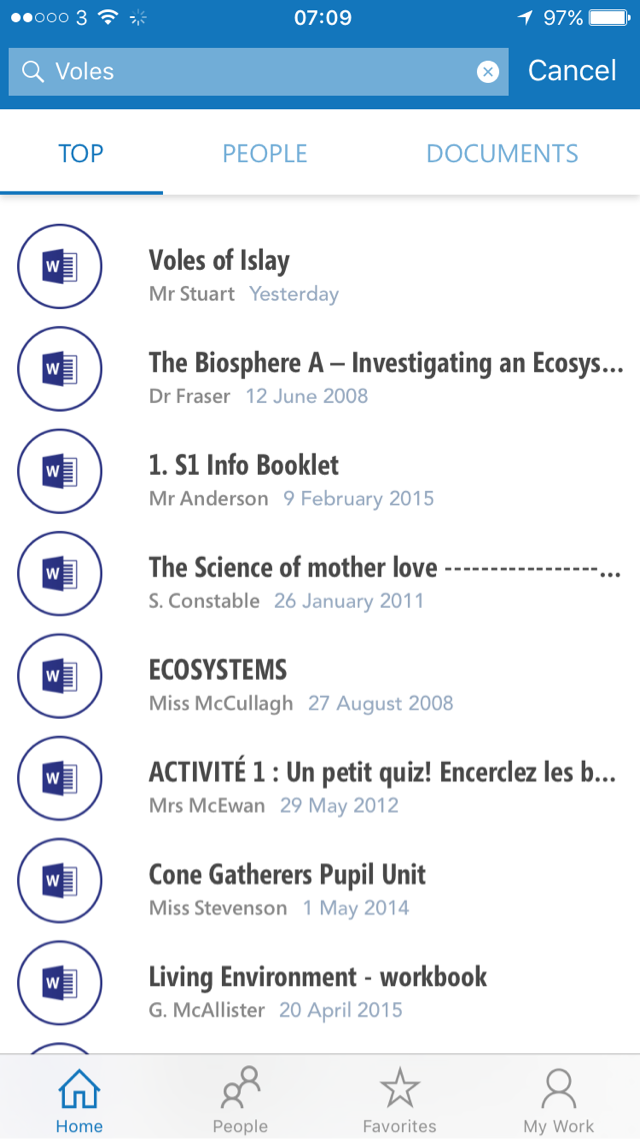
I have been amazed by the results of searching. Who would have thought there were so many results for ‘voles’!

If you have a glow account it is worth heading over to O365 and opening delve from the waffle. Then just search for something.

Next step is to start a board. This is the Pinterest bit. The more folk that do this the more interesting it will get. Boards are not supported on the iOS app but appear in the works. Boards are shared, looks to me like a collection of tags. It seems to take a while sometimes for these to come through if someone else tags them.

I’ve not really spent that much time in the O365 bit of glow.  I have been fairly critical of sharepoint in the past but delve looks like it might be the most interesting part of the whole O365 setup.

More info on the Glow Help Wiki.


You can opt out of sharing your stuff on Delve, but I am not sure why you would, other users only see your documents if you have share those particular docs with them.


Sway has arrived for Glow users.

Sway allows you to

Create and share interactive reports, presentations, personal stories, and more.

I blogged a bit back in May.

Basically the app helps you present media online in a slick way. I’ve mostly looked at the iOS version. The different versions, Windows, web and iOS so far have different feature sets and a personal Microsoft account allows you do do slightly different things from a business/education account.

The app feels as if it is in pretty active development. Features that were coming soon in May are here.

What is particularly interesting, from my point of view, is that sways can be made public on the web and can be shared ready for remix.

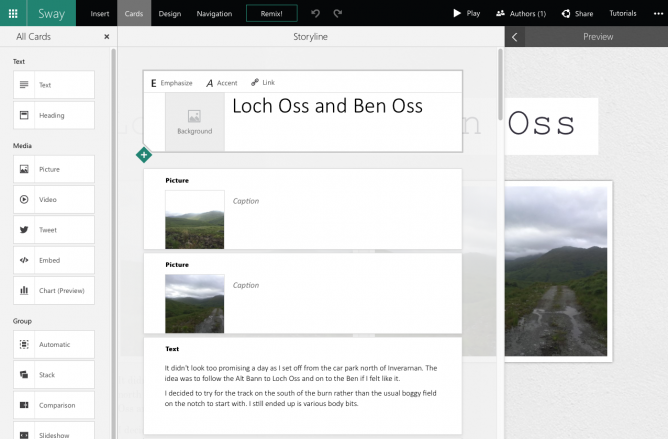
This evening I used the iOS app on an iPad to build another sway (The featured image on this post is a screenshot of the borwser version of the sway, not the iPad view):

It didn’t take very long to add text and images. One difference I noticed was if I was signed into the app with a personal account I could upload video in iOS, I could not do this with my Glow account. Hopefully coming soon.

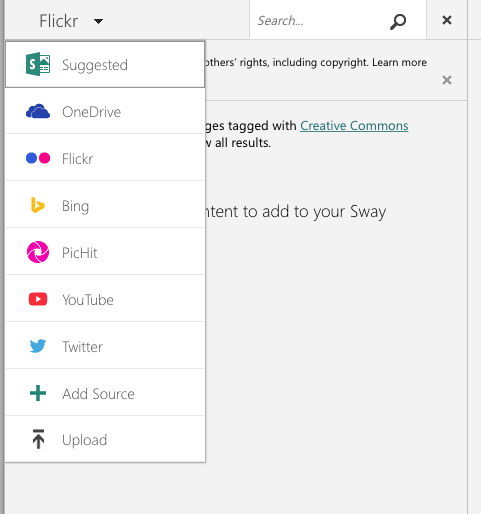
The browser app has a lot more options, including built in searches over flickr, youtube and other media sources.
Screen Shot 2015-10-26 at 21.29.19

It also looks like if you create or even edit a sway in the browser you cannot edit it afterwards on iOS (I might be wrong about this). I do not think either of these things are a great problem, we now know an iPad is a great content creation device and I would hope pupils would be using there camera and their own images for the most part on mobile.

Swaying in Public!

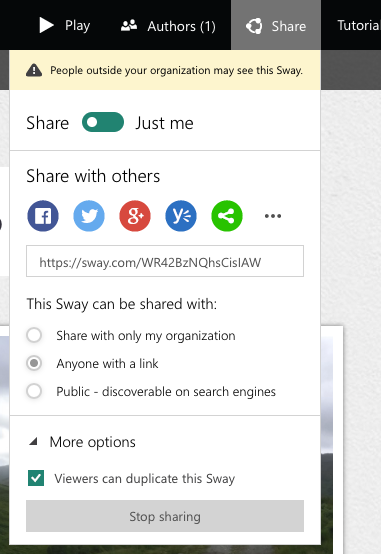
I’ve got the same feeling about the slickness of the creations as I had back in May, mostly about the ‘automatic creativity’ but the most exciting two things about Sway are public sharing and remixing.
Screen Shot 2015-10-26 at 21.19.24

Users have control over who the Sway is shared with and if they will allow their Sway to be duplicated by others.

Learning Opportunities

This is the first of the O365 services to allow public sharing which is very encouraging for those who see value on pupils sharing widely.  I also think that the ability to remix, change and improve someone else’s creation is a important skill.

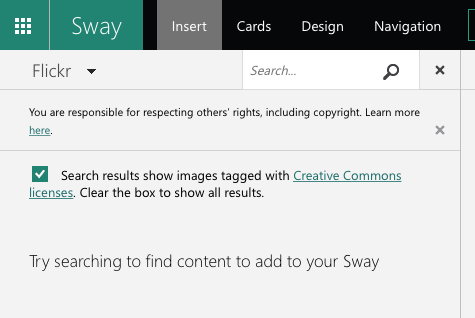
There is obviously the opportunity to discuss aspects of publishing in public, Internet safety and copyright. The copyright issue is also nicely lead into by the browser version:
sway-copyright

We want pupils (and teachers) to understand aspects of copyright and creative commons. Unfortunately the editor does not auto-add attribution but it can be copied and pasted in the browser.

Glow Blogs?

I can embed a sway in this blog using the embed code. Unfortunately this is via a iFrame. iFrames are not supported in Glow Blogs. I do hope we can develop oEmbed like functionality in the Blogs soon in the same way as we have for ClickView video.

It looks like Sway itself supports oEmbed of other content so I’d hope that oEmbed of sways is at least under consideration.

I’ve barely scratched the surface of Sway, and look forward to seeing how it is used in Glow.

Update 11.11.2015 Glow Blogs support the embedding of sways, just paste the url to a sway into the editor: Embedding Media | Glow Blog Help.

Some gems from my Pinboard this week

Featured image, my own gif, Source, public domain: Book on Swordsmanship and Wrestling.   found on europeana

If you want your kids to have a solid computer science education, encourage them to go build something cool. Not by typing in pedantic command words in a programming environment, but by learning just enough about how that peculiar little blocky world inside their computer works to discover what they and their friends can make with it together.

We shouldn’t be teaching kids “computer science.” Instead, we should provide them plenty of structured opportunities to play with hardware and software. There’s a whole world waiting to be unlocked.

from: Jeff Atwood: Learning to code is overrated – NY Daily News

The article stems from the news that all New York City pupils will be coding in 10 years.  English education is away ahead of them: National curriculum in England: computing programmes of study – GOV.UK

The counter argument is that there are a lot of coding jobs in Scotland waiting for applicants:

Scotland’s tech sector is booming and our employment partners have existing vacancies just waiting to be filled by CodeClan graduates. Learn with CodeClan and become part of shaping the future of the digital world.

from: Home | Digital Skills Academy Scotland | CodeClan
and
Digital tech sector ‘to see strong growth in Scotland’.

This links very much to the views expressed by Charlie Love on Radio #EDUtalk: we have a lack of these skills in Scotland.

I do wonder how we can gear up for typing in pedantic command words in a programming environment with our current decline in computer science teaching. Should we go down the same road as England or would it be better to take Jeff Atwood’s advice? Is there a happy medium?

Image my own from a brief encounter with processing.

I’ve read a lot of interesting things on Medium over the last couple of years. It seemed to start as an online space to write longer-than tweet posts, and evolved.

I’ve never written more than a few comments and one test post on Medium before this. I’ve been excited about blogging in a Domain of One’s Own and the ideas around that and those coming from the IndieWeb. A lot of the IndieWeb technology goes a wee bit over my head but I’ve installed a bunch of plugins here and thing about it a bit.

One of the IndieWeb ideas is POSSE Publish (on your) Own Site, Syndicate Elsewhere. This site auto posts links to twitter and G+ as do many blogs. I can now send posts to Medium too.

Medium now have an API and there is a Medium/WordPress plugin which allows you to push blog posts to Medium. There are also Medium IFTTT recipes that will do the same thing from other blogging systems. I’ve installed the plugin here.

I don’t suppose I’ll send posts to Medium often, it seems a little too writerly for me, but it is fun to play with and think about a further extension of blogging.

The WordPress plugin attaches the Medium account to your profile, so if you have more than one person posting to a blog they all could posse to different medium accounts. There are settings for copyright and for posting links to the posts in different spaces. The API does not allow you, as of now, to update posts on Medium from your blog. There is a Meta Box on the WordPress post editor to set the status of Medium posts as you go.

medium-settings


Technical note: I had a bit of trouble getting  plugin to work as it uses php short echo tags and I had to do a bit of find-and-replace in the plugin files. I am not sure if that will effect many folk.

I read about this first not in medium but my RSS reader, followed through to these interesting links:


Update, multiple  Also published on Medium lines appear at the top of this post, I do not know why?

It is National Poetry Day. When I was in class I always wanted to do something for this, but only occasionally remembered. Although I don’t have a way with words I like working with poetry in the class. I also occasionally like twitter haiku and the like.

I read Tom Woodward’s blog regularly and yesterday I noticed Fridge Poetry – Google Sheets as Database in my RSS reader. Given that I’ve messed about with fridges before 1, I took a look: Google Sheets – Fridge Poetry.

The really interesting thing 2 about this is that Tom has set it up so that it is easy to make another fridge with different sets of words. He even has a link on his post to create a copy of the google spreadsheet to make your own copy (you need a google account, a low entry bar). The sheet itself has the instructions.

Here is one with a selection of words from Scotland small? by Hugh MacDiarmid.

How do you save something like this? Take a screenshot.

What I really love about this idea, besides the sharing of how to do it, it the easy way it can be extended and used with a different set of words.

  1. That was back in 2002 when I was playing with Flash
  2. The other interesting this is the JavaScript and php stuff.

I’ve posted a few things here in reaction to the idea about banning mobiles in school: tagged: yesmobile.

Here is another reason for using mobile in learning:

I grabbed this video in the park this morning with my phone in the slowmo mode.

I would have though that the ability to do this outweighs the need to address problems of distraction?