I have been working on OpenSourceCPD a bit recently. Mostly working on the On-site Cpd Opportunities. Nearly everything is labelled first draft being work in progress but I guess that is the beauty of a wiki.

Yesterday I knocked out a rough version of the first of some guides to Online Tools. This covers the basic use of Picnik the online image editor. I used Picnik a couple of times with my class last session and was please with how easy it was for children to use. The course (or cpd opportunity) at OpenSourceCPD just goes over the basic use of Picnik and has a few ideas about using it in school. Very much a first draft at the moment, feedback is welcome in the comments or via email.

For the first time on the OpenSourceCPD site I’ve made use of a screencast. I’ve made a few of these before elsewhere and used the smartnote book recorder to make instructional videos for the children at school but this time I used an application new to me ScreenFlow.

ScreenFlow is a mac application that allows you to record your screen, audio from the mac and a mic (you can also record from an isight). It then allows you to edit the video and export to quicktime. The editing is very slick, you can auto highlight the main window, the mouse or zoom and pan the video. You can add other images, video and audio. I had a bit of trouble with my mic and recorded the audio over the original footage without too much bother. I am not completely happy with the result (and may redo it ) but that is more to do with me than screenflow, my previous efforts were much shorter, smaller and without a voice over. I think I was trying to go a little too quickly to make for good instruction.

As ever I’d be interested in feedback about OpensourceCPD and the screencast not only the content but the playback as it is a H.264 movie and nearly 30mb.

Flowgram is a new web-based tool for giving online tours of sets of webpages or photos. I have hasd a quick play (click the widget to see my creation) and it looks like it could be a very useful tool in the classroom.

Once you have signed up and been accepted for the beta flowgram program you can create your own pretty easily. I just watched one of the flowgrams about flogram and tested it without really reading the manual. It is pretty simple to use although I could not get the create tool to load in Safari.

You add pages to a flowgram by adding a url or uploading a photo. Or you could import a flickr set or RSS feed to create a set of pages. Once you have collected your set of pages you can add audio recorded via your browser (flash based) notes and highlight text. I managed to do all without too much bother although it took me a while to get the highlight work. If you scroll a page during recording and then highlight something it will scroll to show the highlight in sync with the audio when playing back. I found that quite tricky to do and if you watch my flowgram above you will notice a few pauses while I scroll and highlight.

The most amazing thing about flowgram is that the pages viewed in flowgram are live the links etc work for the audience. I am not sure how flowgram deals with changes in the webpage perhaps they store local copies.

I think it might be a bit difficult for primary children to use for creating a tour of websites but they could certainly make a slideshow of photos or pictures without too much trouble. For teachers it could be used to give children instructions on using online tools (or for a set of screenshots) or for blogging sites to other teachers for professional development.

Flowgram could be used as an alternate presentation tool, and feels a little like voicethread, although users cannot audio comment. You can make your flowgrams private but I can’t see a way to turn off comments which would sometimes be handy for school use. another one t otest on the nexwork next term.

posterous is a new blogging tool that takes simple to extremes. To post to posterous you just send an email to post@posterous.com from any email account, the mail is posted and you get a reply. At that point you can set up a posterous page/blog and then everything sent to posterous from the same email (you can add more) will go onto the posterous page. Mine is John’s posterous.

What is really clever is how posterous deals with content.

Text becomes, well text, and image is posted as you would expect, but so is a image url). A series of images are turned into a mimi gallery. Powerpoint is passed over to Scribd and presented on the posterous page with iPaper as are pdfs. If you print a pdf frpm Safari on a mac and mail it to posterous, the pdf is displated via scribd and the links on the page are live (example). Pasting an image, say a screenshot, into your email app puts it on the blog, as does pasting code from kwout: kwout example. I managed to create 10 posts of all sorts without any problems, on a mac you can even Drag and Drop to Posterous via a simple Automator workflow.
Youtube and other video service are embedded as are mp3s.

posterous is just out the wrappers, but the developers really seem on the ball

For education, I am thinking this is a really quick way to create a blog, a series of resources for learners (rss of course), a student portfolio etc. With 1 GB of space you could use it for podcasting much simpler than many other methods.

Functionmachine tn
Function Machine, an old HC stack of mine
( a newer flash version)

They say that things in education go round in circles. I came late to teaching and later to ict. I got my first mac, a Performa 630, in 1995. Over the next few years I became a HyperCard fanatic spending many an hour creating stacks for use in the classroom. Many of these were drill and practise application, for practising tables, telling the time, cloze procedures etc.

After a while I became more interested in children creating with computers, podcasting, blogging, animation and digital video, I have played with them all. When I started blogging it seemed that most of my reading was pointing me away from drill applications towards creative projects.

Drill and practise applications became associated in my mind with worksheets, I used them but do not talk about them in the polite company.

I noticed some drill and practise popping its head above the parapet with the various games based learning especially the brain training type of application, but have not managed to get involved with this yet. This session I’ve been happy with Educationcity.com which provides a nice variety of colourful and attractive games for children linked to the 5-14 curriculum with reasonable record keeping. At first I was reluctant to use Education city, but once I learned how to target pupils with particular tasks I’ve used it every day with the children support in maths.

Lately I’ve seen a bit of twittering and blogging about tutpup which seems to be a new twist on an old song:

Tutpup

Tutpup consists of some pretty straightforward drill and practise maths and spelling exercises so far, although they seem to be interested in increasing the range of games.
What makes tutpup different is the fact that you play the games against other members of the community live. While playing they can see the progress of their opponent who is identified by a user name and a flag for their country, in my class this generated a lot of excitement. From a safety point of view tutpup is great, the help for parents and privacy policy are clear. Each child is identified by a colour-animal-number user name only, the site does not collect data from the children, teachers and parents need an email address and to give permission to the children. The setup for a class is slick and simple, teachers set a class code which pupils use to join a class. There is even some simple recording of scores.

I do not know who is behind tutpup, but Ewan has been advising the team on its development, given his knowledge of the educational use of social media It will be interesting to watch the site move on from beta. Tutpup seem to have the usual Web 2 speed of response to feedback, I’d an email within minutes of sending feedback asking for times to be added to the recording of pupil scores to allow me to see who is using tutpup at home.

I do not suppose I’ll use tutpup much before the end of term, sports and activity days are filling up the calendar but I look forward to using it next session and seeing if it can give some legs to good old drill and practise.

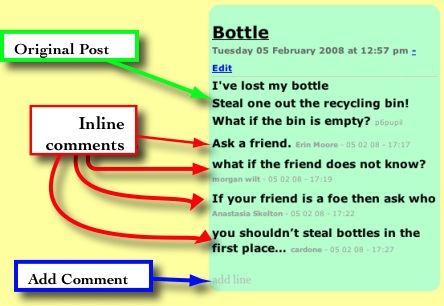
I’ve run a couple of short term collaborative poetry blogs this session. The first was part of the The Sandaig McClure Connection: Solutions – A poetry conversation. I played around a bit with the blog template so that comments became part of the poem. Comments were displayed inline and the link to add a comment became ‘add line’. The comment form was simplified by removing the email and url fields. An entry would look like this (slightly reduced):

screenshot

At the time I was reasonably pleased with this solution although the whole page layout started to look a bit odd as the poems began varying in length.

Last week we were working on the On the street where you live – An International Poetry Project I kept the blog in a fairly straightforward shape, except for the addition of the (stars) and (wishes) to the emoticons (that works in most of the Sandaig blogs) to help the children assess each other work. The idea with this blog was that the children would use 2 stars and a wish to offer feedback to the children on the other side of the atlantic. (In the event the US students didn’t get to commenting on our work, which might have been due to communication failures between myself and the us organisers).

The problem with using a traditional blog layout became apparent as the number of posts grew very quickly, pushing poem off the front page (which I increased to 30 poems/posts). With hindsight it might have been better to only have the last poem on the blog front-page with a list of all the poems on the side or scattered around. Or maybe no poems just boxes with titles which would open entries in a lighbox/thickbox style when clicked?

With the increase in the number of primary school blogs I’ve noticed a big drop in the comments on on main blog, perhaps due to that blog becoming routine and neglected to some extent. I’ve also not found the time to get the children reading and commenting on other blogs something else I hope to remedy next session.

So I hope to be doing more of these sort of arranged commenting blogs in the future, where there is a fairly intense burst of activity on the blog over a short period. I think this calls for a different sort of organisation and layout, I am just not sure what yet.

Pivot which we use for blogging here is a lot easier for an amateur to mess about with layout and organisation than some of the more popular blogs, its simple template tags allow you to create templates for posts, pages etc with a wee bit of html and css knowledge.
I’ve not seen any other school blogs that have altered the shape of a blog to suit purpose in this way and I’d be interested in any ideas for making these sort of blogs more accessible, interesting and attractive, if you have ideas and examples please let me know.

Islay high School

Yesterday I went to the Islay ICT: ICT Open Day

Islay High School is one of the Schools of Ambition and is well know for its innovative changes to school organisation and use of ict.

I had a great day from the start. The boat trip from Kennacraig in the company of Moira my HT, Krysia and Doug was a relaxing way to start a cpd event, I even spotted a Porpoise rising to breathe.

Once we got to school we had a visit to the music room where the children were demoing music software, with Ewan in attendance, then a chat with Ian about the umpcs which merged into lunch.

central to the use of the umpcs at Islay is oneNote which Ian demoed, it is quite hard to describe it briefly, it accepts hand written (on the umpc’s touchscreen) notes, typed text, records audio and video through mic and webcam and allows you to tag, store , search and share all of this. Teacher’s notes and presentations can easily be shared to pupils. The pupils at Islay all have their own umpc which travels home with them.

After lunch we visited the English department where the new S2s were creating a video for the soon to be S1s.
The children were working in groups, had story boarded and planed their movies on the umpcs or bits of paper and were filming and editing. We had a chance to chat to the pupils. Their skill with the umpcs was obvious and I was impressed with the machines (and the pupils) video editing capabilities. Some of the children had come to the high school with experience of iMovie and this seemed to transfer easily to movieMaker.

Chatting to the children about their umpcs was interesting, they obviously enjoyed using them, but the kit was ‘normal’ to them not something special. The umpcs seemed robust and in my opinion would be a better investment than the various ‘mini pcs’ such as the eeePc that are getting a lot of attention for educators at the moment.
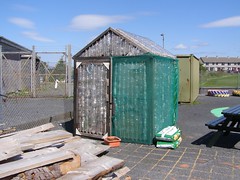
bowmore primary

We popped out to the back of the school to take in the amazing view and then visited the award winning Bowmore Primary School. The primary received BT Scotland’s ICT Learning Award for the school?s under-five unit uses a Promethean Interactive Whiteboard. We were a bit late to see the children in action but saw some great viedo, filmed by the four year olds, of the whiteboards in action. We also had a good look around the school with the HT, picking up a good many ideas to take back to Sandaig, not least there eco greenhouse.

Then it was back to the high School for a tour of the tech and design department before heading for a quick pint and the 6:00pm boat.

As usual with a trip to an exciting school there was far too many interesting things going on to remember them all, these stand out at the moment:

  • A culture of change staff see themselves as learners
  • pupils working together according to their needs and interests, rather than on more age based progression
  • lots of vocational opportunities
  • ICT as a tool rather than a end it its self. Some children prefer paper for some tasks

UmpcassIdeas I hope to use:

  • Pupil recorded assessment on umpcs could be replicated with laptop.webcam/ macbook/isight
  • More free use of whiteboard, this happens in our infant department, but my p6s are not as slick with the tools as the wee ones
  • The eco greenhouse and wellie flower pots!
  • ict and technology needs to be transparent, pupils must be able to use it without thinking, more free use

There was probably many more things that I could mention, but Islay High Open Day was a great event, the chance to spend time observing and talking about all sort of things with the staff there and at Bowmore primary along with a extended and gentle journey giving time for reflection and chatting was a great cpd opportunity. Many thanks to Ian and Islay for inviting us

I’ve just created a new blog On the street where you live – An International Poetry Project for a new collaboration between sandaig and Kennesaw Mountain Writing Project. The blog will be active from the 9th to the 13th of June.
The idea is that children/students from both groups will be writing poems about the street where they live and hopefully offering support to each other by using 2 stars and a wish to assess the work.

The project came about due to the involvement in the writing camp by my good friend Carol Fuller from Georgia, whom I visited in February. Hopefully we will get some interesting work/play from the participants. As well as a distance gap there is a bit of an age gap the US students being older than my 10 year olds, I am hoping that my kids get a feeling of pride working with older children and the US students a sense of mentoring the Sandaig Poets.

Of course the bit I like the best is the wee tweak I’ve give Sandaig blogs, typing (star) produces a (star) and (wish) a (wish), simple thing etc.
Please feel free to add comments on the children’s work and join in the fun.


picture from the busI guess I am now recovered from the trip last week, and starting to think a bit about the blogging.

I expected to blog a lot more this year than on the previous trip. I even took a couple of extra laptops for thew children to use in the evening. I turned out that the weather was far too good to stay in the hotel and blog so the process and results were similar to 2007.

As usual the trip was a busy one, with 2 or 3 main activities each day and another after dinner one, not much time to sit still except on the bus. So the process went, on bus, activity (everyone takes lots of photos), back on the bus; I sort images and create galleries, children blog and make quick recordings on ipod, and repeat. At some point I find an internet connection (11pm outside a closed McDonald’s for example) and post stuff.

sunset

After last year I had expected some indoor time in the evening due to rain when the children could have done a bit more typing, made slideshows etc, but that was not to be.

Hopefully in the future we would be able to have better access to the internet with a dongle or at least a hotel with wifi. The previous week we had a visit from our Dutch partner school and they used a usb dongle to blog successfully this must be the way to go.


pupils recording with iPod

On the audio front I took along 2 iRivers and my old ipod to record with, the better quality of the iRivers was not as important as the easy of use of the ipod (recording over a bus makes quality unimportant).

I found that the girls on the trip were a lot keener to type up reports and messages and record audio than the boys. The boys spent most of there time on the bus racing on their ds lites. I would like to thing of ways on engaging boys in voluntary blogging when the alternatives are more attractive than ‘language work’.


mobloggingA couple of boys were in charge of the moblog but we tended to forget to post when things got interesting, maybe a few more phones and higher profile for the moblog would get more boys excited by communication.

As expected the blog seems to have been a great success from the parents point of view judging by the number of comments and a few conversations at the end of the trip. I have noticed that quite a few comments got stuck in our spam trap, mostly for comments containing xxx, too many kisses!

This is the fifth trip blog I’ve run but I still do not think I am anywhere near using the format to its full potential.

We have also a few hundred photos and some video to be used for post trip classroom reflection before the end of term.

sandaig home

It has been a couple of weeks since my last post and may be a while before the next. This will be a even more unfocused post than usual. I part the last of activity has been down to being to busy and in some cases frustrated with technology. Network problems have slowed down some of the projects I’ve been working on in school and I’ve spend a fair bit of my NCC time fault reporting.

I have been using a couple of wikis with some success. On our own site I’ve been working with a class one afternoon a week on challenged based learning, the latest Instrument Challenge section of the wiki is nearly finished. This is using pmwiki. I am afraid that the method used to post images and sounds is a little too complex for a class I only see once a week. PmWiki requires the children to name the file rather than just upload it, this has lead to one or two cases of files being over written. Other files have been uploaded with out giving them extensions making them unusable. The attach, go back to page, and add image by typing. is more complex that uploading an image to a blog. My own class have been using a wikispaces wiki and one or two have started adding to their pages from home. We have had quite a few problems in school when wikispaces seems to freeze, I’ve not seen this at home but I text to use the text module rather than the wysiwyg. The freeze also might be caused by network slowdown which is also making both wikis sometime frustrating to use.
I am quite pleased with the possibilities of wikis although my heart is still with blogs. Hopefully next session I’ll have a chance to use wikis again, next time I’ll spend a bit more time getting the children familiar with the use before using then in anger.

I’ve not managed to use Exhibit, which I tested in the holidays, the network does not allow something that is going on there. I think I’ve managed to work around it with a wee kludge but it is not ideal. I do hope to let the children test it in a couple of weeks.

bloglogo

The last week or so I’ve been preparing for our trip to the Netherlands. I’ve set up another blog: Sandaig Netherlands 2008 and A moblog of sorts incase we cannot find a internet connection. Hopefully the children will post audio, video, photos and text to report on the trip and talk to their families. We leave on Sunday morning and return the following friday afternoon.

garden logo
I also hope that my own class, most of whom I am leaving at school will keep up some online activity. maybe update the wiki and blog, but I really want them to keep up the How does our Garden Go photo a day project. They have been doing ell so far, posting a photo of our school garden everyday for a couple of weeks. The idea is to document the changes, both seasonal and ecological and practise and think about taking photos.

There have also been new songs on the Sandaig Jukebox, another episode of Radio Sandaig and some Eco Ninjas posters added to the site in the last couple of weeks, no wonder I’ve not had time to blog.