After an exciting twittersation between Andrew Brown and Tom Barrett reported on David‘s blog EdCompBlog: Can you guess what it is yet? and Ollie’s iPhone posts (starting with iPhone in Education – Introduction) I was keen to try out gps drawing with my class.

I do not have a gps recorder but I do have an iPhone, I had been a little disappointed with the first GPS app I tried, a freebie, which only worked if you had a connection to the internet so I had invested 59 pence in SnailTrail

SnailTrail records your gps position and saves it to a list, you can add a name to the point and date and time is recorded. The list can sent via email. The points are saved until you delete them. The email arrives with a simple list of points, a second list with names you added and date time and a link to a simple kml template. You can download then open the template, in a text editor, paste in your points and see the trail in Google Earth by opening the template file.

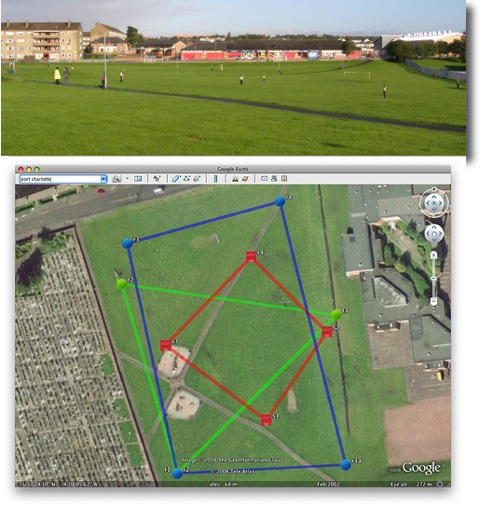
On Tuesday last week I had a few early finishers in Maths draw some 2D shapes onto printouts from Google Earth, of the park next to the school. On Wednesday I split the class into groups, issued colour coded gym bibs and explained that they were challenged to make a shape on the park. We talked over some ideas for making straight lines and figuring out where they should be on the map. The children then scattered very quickly indeed, splashing round a rather wet park. Once they were in position I walked round gathering the locations on my phone. I had planned for one child in each group to run round recording but the field was so wet I though it better to keep them still. We emailed the waypoints to my email and returned to school.

A quick paste of the points into the template showed up a few flaws in my implementation. I had not collected the points in sets of shapes, rather just walked down the field, so they points were all mixed up. The template was designed to show a simple trail rather than shapes.

I took the points and template home and played around a bit, the above screenshot was the result, our five pointed star was a bit of a mess so I left it out.

This morning I tried opening the template via google maps, and it showed a couple of errors.
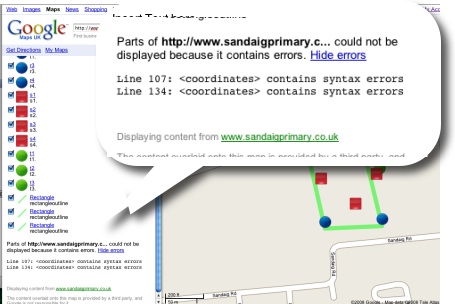
I had another wee dig around the file and now have one that shows up correctly in google maps.

I found it a bit tricky to fix as updating the file did not update in google maps, I had to rename the file with each test to view the results, I have got a lot to learn about kml files.

This is a pretty nice lesson, you can cover quite a lot in it. The properties of shapes, this challenges children to really understand these, working as a team, problem solving, co-ordinates, and a way to introduce latitude and longitude. The children really enjoyed it.

You do need to organise a few things, I had a PSA and link teacher from our local secondary with me, neither had very suitable footwear;-) Next time I’d record the shapes in order and have a template ready to draw the planned shapes as soon as we came back.

Tom Barrett has started a flickr group LearningTracks for sharing ideas about using tracksticks and other gps devices to draw on Google Earth.

Given the September weekend weather and having a cold I spent a lot of time the weekend in front of my computer.

I spent most of the time following up links from the Scottish Learning Festival and teachmeet and smoothing out some idiosyncrasies in the way that the Sandaig Primary website works.

I also spent some time thinking about ScotEduBlogs.org.uk and footering with my latest toy. This lead to the discovery of iPhone Navigation an example of a web interface for the iPhone, you can see it your browser if you do not have a phone. I was able to create a webpage that grabbed the RSS from ScotEduBlogs and present in using the iPhone Navagation design. I wnt on to discover iui – Google Code based on Joe Hewitt’s iPhone navigation work, iUI has the following features:

  • Create Navigational Menus and iPhone interfaces from standard HTML
  • Use or knowledge of JavaScript is not required to create basic iPhone pages
  • Ability to handle phone orientation changes
  • Provide a more “iPhone-like” experience to Web apps (on or off the iPhone)

I also got external links to work better. This ended up on ScotEduBlogs iPhone The pages provides a list of the latest posts on ScotEduBlogs which can be clicked to show the contents of their rss description, link etc. I gives in my opinion quite a nice way to keep up with ScotEdublogs on your phone, you just load the page in Safari. On the iphone you can bookmark a webpage and have it on your iPhone home screen I quickly discovered (thanks google & tweets from dalzinho ) that you can create a custom icon: How To Make iPhone Webclip Icons.

I’ve since discovered there is at least one other kit for creating iPhone ‘web apps’ WebApp.Net. I guess since the opening of the app store on iTunes the web app development has slowed a little but it looks like an interesting area t oplay in if you have not got programming ability.

Of course ScotEduBlogs iPhone is pretty simple, much simpler that the demo apps it is base on, just a basic rss reader, but it has me thinking if there are any developments that could be useful in school, I believe that some schools are buying sets of iPod touches for use in school and this might be an easy way to develop simple specific applications for them. It might be simple enough to create database/ key type pages for animal or plant identification. I also wonder if pupils could create pages for the iPhone/itouch, after seeing Neil Winton present about his pupils text based adventure game in a wiki The Caves Of Mull I wonder if something similar could be done for the iPhone?

 
the sevens
I’ve got the the end of a quick first week back at school. The first time in a couple of years I’ve had a class to myself, year before last I was doing ICT and last year involved a lot of learning support and team teaching. I am also back in Primary Seven.

A shock to the system as all my mushroom boxes have vanished and I need a quick trip to Pound Land.

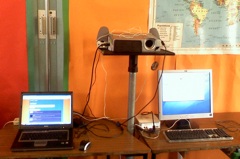
I am beginning to get the classroom they way I want, I have a projector and a big bit of white paper on the wall along with a gyro mouse and wireless keyboard. A networked xp laptop and non-networked mac mini are positioned beside the projector so that I can easily switch back and forth between platforms. So far I am missing the ability to draw quickly on the board but enjoying the shadow free screen.

The children have used ICT in the previous year a fair bit, mostly research, word-processing and powerpoint and I worked with them on the wiki for a Sound & Light project.

I always like the first week or two of term and other times when the timetable and curriculum is not so fixed in stone and decided to get the children introduced to online tools, cameras blogging etc.

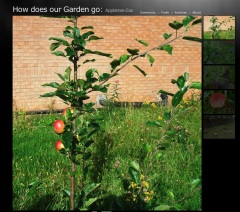
We got the Photo -a-day How does our Garden go galler off the ground to start with.

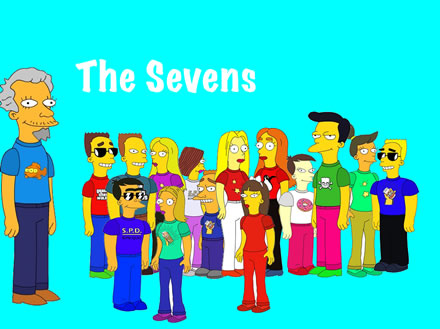
Next we started with the Simpsons Movie site making avatars which, I hope, will be used throughout the year as signatures on blogs and wikis. We had to use a horrible amount of kluding to work around the fact that we do not seem to be able to download the files on the school pcs (unblocking popups not withstanding). This become a good exercise in lots of things: print screen, cropping in picture manager and exporting as jpgs, allowing me to harp on about files etc. I had to download the saved images at home to slap together the pic at the top.

The children had more cropping to do to get a nice wee head shot of their avatar too.

We worked on one of my favourite start of session lessons, Bio-Poems, these use a strong template and give the children a lot of fun, this year we blogged these with the Simpson head-shots on the Sandaig Poets blog which give everybody a chance to blog. If you have a minute please leave some one a comment.

Finally, have talked about adjectives and watch a couple of youtube downloads on the subject earlier in the week, we made a quick photo movie about Feelings today giving the children more practise with the cameras and their first use of iMovie, it was also a great way to end the week as non of them though they were working.

Next week we start with a trip to Ayr so fingers crossed for the weather.

On Ewan’s Invitation I toddled along to Inspiration Session No. 4: The Best Stats You’ve Ever Seen. This was the second ‘open’ session and quite a few of the regulars from ScotEduBlogs were there in addition to LTS staff.

Ewan has given a rundown, LTS Inspiration Sessions: Run your own, (archive link) on the purpose and content of these sessions over at connected, number 4 was on improving presentations. Ewan has gathered a pile of useful links on delicious tagged ltsinspirations4, Andrew Brown live blogged the session: Do your presentations suck? very effectively, and Tessa used it as an excuse to return to blogging after the summer.

This is the first post here for a while too, although I’ve been posting to posterous, tweeting and keeping my photostream uptodate.

The others have covered the meat of the session so I’ll just pick over some bones here (in no particular order and with little organisation).

As usual it was a lesson in itself to see Ewan present he is both well prepared and able to respond to the audience flexibly. He also kept things light with plenty of ‘jokes with a purpose‘ Having said that he was not following any of the simpler styles of presentation he discussed (pecha kucha and the 10-20-30 rule for example), most of his presentation, was video from the web, discussion and analysis.

The classroom at LTS was beautiful and great space for this sort of meeting. Unfortunately I could not find ant creative commons photos of the building or space on flickr although Ewan gave a quick but thorough overview of finding images and using them legally which is always good to hear.

Although I was familiar with most of the videos shown it is a very different experience watching with a group, without the distraction of, email, twitter, todo.txt or the fact that you have to make dinner. Face-to-face sessions like this are worth ten time the same amount of browser time, the presence of others sharing the space really helps concentration and other folks ideas spark off your own. Class teachers often miss this sort of experience of discussing things that are of interest and do not have to be acted upon immediately.

As a primary teacher I felt a fair bit of tension between the role of a presenter to adult audiences, Steve Jobs rehearsing his 2 hour stint 6 times, and my own efforts in class, speeding round Scran for pictures of Victorian toys in my 45 minute lunch hour and plastering them onto a powerpoint. Many of the ideas were applicable though, repetition (some of my wee guys need more than three times) keeping it short an too the point. Shared reading of text has more of a place in the primary classroom than more adult settings. One of my new sessions resolutions it to review my use of projector/whiteboard and Ewan and his audience has given me plenty to think about.

On the few occasions I’ve formally presented to adult audiences it has been talking about my own practise and I hope the passion and experience has let me overcome the hurdles of imposed format, poor graphics and instinctual rather than trained design. I’ve also usually been so nervous in preparing a talk I’ve distracted myself by using a different technology each time. Ewan challenged the group to end the session by working on one of there own presentations to be posted to slideshare for review. I skipped that part ending up in a huddle of ScotEdubloggers (Mr W reported a unrepeatable collective noun for teachers, I wonder what a group of edubloggers is?). A couple presentations I’ve given are here (voicethread) and here (enhanced podcast), the second proving my point about horrible dot mac urls at least. Both break a fair few rules of presentation but they worked for me I would like to have spent some time getting some feedback and criticism.

One of the subjects talked about in the huddle of ScotEdubloggers was TeachMeet08 @ The Scottish Learning Festival 2008 this is approaching fast, and some community organisation is needed, if you can lend a hand with organisation equipment, sponsorship of food and drink( or know a person who can) you should head over to the wiki.

Zz79882878

We also talked over glow, wordpress, exams etc. and transferred the conversation to the horseshoe to continue the informal CPD.

Ewan has provided an online kit for running your own inspiration session which unfortunately does not come with a Ewan. Thinking about the session yesterday I think the big takeaways were the importance of personality and preparation which to my mind are probably more important than the tools and design.

I should suggest that you get together with some colleagues, watch the videos and check out Ewan’s links and Andrew’s post I am only reluctant to do so because I realise that one of the key parts of that process would be the leader unless you can find a friendly huddle. Even alone the linked video, sites and tools will provide plenty of food ofr though.

I am still churning a lot of the ideas the session and informal follow up just in time for starting school next wee.

Many thanks to Ewan and LTS for inviting me to an inspiring session.

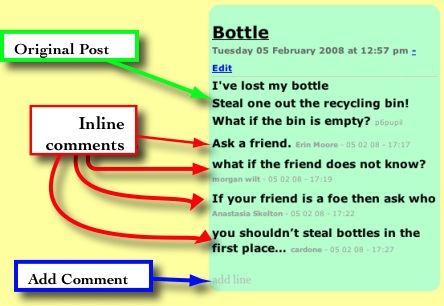
I’ve run a couple of short term collaborative poetry blogs this session. The first was part of the The Sandaig McClure Connection: Solutions – A poetry conversation. I played around a bit with the blog template so that comments became part of the poem. Comments were displayed inline and the link to add a comment became ‘add line’. The comment form was simplified by removing the email and url fields. An entry would look like this (slightly reduced):

screenshot

At the time I was reasonably pleased with this solution although the whole page layout started to look a bit odd as the poems began varying in length.

Last week we were working on the On the street where you live – An International Poetry Project I kept the blog in a fairly straightforward shape, except for the addition of the (stars) and (wishes) to the emoticons (that works in most of the Sandaig blogs) to help the children assess each other work. The idea with this blog was that the children would use 2 stars and a wish to offer feedback to the children on the other side of the atlantic. (In the event the US students didn’t get to commenting on our work, which might have been due to communication failures between myself and the us organisers).

The problem with using a traditional blog layout became apparent as the number of posts grew very quickly, pushing poem off the front page (which I increased to 30 poems/posts). With hindsight it might have been better to only have the last poem on the blog front-page with a list of all the poems on the side or scattered around. Or maybe no poems just boxes with titles which would open entries in a lighbox/thickbox style when clicked?

With the increase in the number of primary school blogs I’ve noticed a big drop in the comments on on main blog, perhaps due to that blog becoming routine and neglected to some extent. I’ve also not found the time to get the children reading and commenting on other blogs something else I hope to remedy next session.

So I hope to be doing more of these sort of arranged commenting blogs in the future, where there is a fairly intense burst of activity on the blog over a short period. I think this calls for a different sort of organisation and layout, I am just not sure what yet.

Pivot which we use for blogging here is a lot easier for an amateur to mess about with layout and organisation than some of the more popular blogs, its simple template tags allow you to create templates for posts, pages etc with a wee bit of html and css knowledge.
I’ve not seen any other school blogs that have altered the shape of a blog to suit purpose in this way and I’d be interested in any ideas for making these sort of blogs more accessible, interesting and attractive, if you have ideas and examples please let me know.


picture from the busI guess I am now recovered from the trip last week, and starting to think a bit about the blogging.

I expected to blog a lot more this year than on the previous trip. I even took a couple of extra laptops for thew children to use in the evening. I turned out that the weather was far too good to stay in the hotel and blog so the process and results were similar to 2007.

As usual the trip was a busy one, with 2 or 3 main activities each day and another after dinner one, not much time to sit still except on the bus. So the process went, on bus, activity (everyone takes lots of photos), back on the bus; I sort images and create galleries, children blog and make quick recordings on ipod, and repeat. At some point I find an internet connection (11pm outside a closed McDonald’s for example) and post stuff.

sunset

After last year I had expected some indoor time in the evening due to rain when the children could have done a bit more typing, made slideshows etc, but that was not to be.

Hopefully in the future we would be able to have better access to the internet with a dongle or at least a hotel with wifi. The previous week we had a visit from our Dutch partner school and they used a usb dongle to blog successfully this must be the way to go.


pupils recording with iPod

On the audio front I took along 2 iRivers and my old ipod to record with, the better quality of the iRivers was not as important as the easy of use of the ipod (recording over a bus makes quality unimportant).

I found that the girls on the trip were a lot keener to type up reports and messages and record audio than the boys. The boys spent most of there time on the bus racing on their ds lites. I would like to thing of ways on engaging boys in voluntary blogging when the alternatives are more attractive than ‘language work’.


mobloggingA couple of boys were in charge of the moblog but we tended to forget to post when things got interesting, maybe a few more phones and higher profile for the moblog would get more boys excited by communication.

As expected the blog seems to have been a great success from the parents point of view judging by the number of comments and a few conversations at the end of the trip. I have noticed that quite a few comments got stuck in our spam trap, mostly for comments containing xxx, too many kisses!

This is the fifth trip blog I’ve run but I still do not think I am anywhere near using the format to its full potential.

We have also a few hundred photos and some video to be used for post trip classroom reflection before the end of term.

sandaig home

It has been a couple of weeks since my last post and may be a while before the next. This will be a even more unfocused post than usual. I part the last of activity has been down to being to busy and in some cases frustrated with technology. Network problems have slowed down some of the projects I’ve been working on in school and I’ve spend a fair bit of my NCC time fault reporting.

I have been using a couple of wikis with some success. On our own site I’ve been working with a class one afternoon a week on challenged based learning, the latest Instrument Challenge section of the wiki is nearly finished. This is using pmwiki. I am afraid that the method used to post images and sounds is a little too complex for a class I only see once a week. PmWiki requires the children to name the file rather than just upload it, this has lead to one or two cases of files being over written. Other files have been uploaded with out giving them extensions making them unusable. The attach, go back to page, and add image by typing. is more complex that uploading an image to a blog. My own class have been using a wikispaces wiki and one or two have started adding to their pages from home. We have had quite a few problems in school when wikispaces seems to freeze, I’ve not seen this at home but I text to use the text module rather than the wysiwyg. The freeze also might be caused by network slowdown which is also making both wikis sometime frustrating to use.
I am quite pleased with the possibilities of wikis although my heart is still with blogs. Hopefully next session I’ll have a chance to use wikis again, next time I’ll spend a bit more time getting the children familiar with the use before using then in anger.

I’ve not managed to use Exhibit, which I tested in the holidays, the network does not allow something that is going on there. I think I’ve managed to work around it with a wee kludge but it is not ideal. I do hope to let the children test it in a couple of weeks.

bloglogo

The last week or so I’ve been preparing for our trip to the Netherlands. I’ve set up another blog: Sandaig Netherlands 2008 and A moblog of sorts incase we cannot find a internet connection. Hopefully the children will post audio, video, photos and text to report on the trip and talk to their families. We leave on Sunday morning and return the following friday afternoon.

garden logo
I also hope that my own class, most of whom I am leaving at school will keep up some online activity. maybe update the wiki and blog, but I really want them to keep up the How does our Garden Go photo a day project. They have been doing ell so far, posting a photo of our school garden everyday for a couple of weeks. The idea is to document the changes, both seasonal and ecological and practise and think about taking photos.

There have also been new songs on the Sandaig Jukebox, another episode of Radio Sandaig and some Eco Ninjas posters added to the site in the last couple of weeks, no wonder I’ve not had time to blog.

Warning, little educational content ahead, this is a holiday post.

I’ve been messing around a wee bit with the twitter api, twitter tester, Tweets to TeachMeetPerth and twitter presenter, the last in response to Ewan’s tweet: Can one present by Twit?.

None of these are what could be called polished jobs even given my limitations but the TwitterApi Documentation is pretty straightforward.

I have also created a few of rss twitter bots the most useful of which is ScotEduBlogs which tweets the blogs post title as they arrive on ScotEduBlogs this uses the twitterfeed.com : feed your blog to twitter – post RSS to twitter automatically I think.

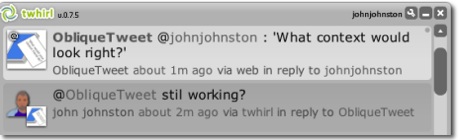
So it seems time for my first twitterbot ObliqueTweet, tweet anything @ObliqueTweet and it will reply with a random Oblique Strategy (currently the 4th edition).
The Oblique Strategies are a set of cards devised by Brian Eno and artist Peter Schmidt to solve (artistic) problems by drawing a card randomly. There is a lot of information at The Oblique Strategies. There have been a number of computer programs to show Strategies at random, web and download versions. (I even made a supercard project back in 2002). There is a nice php version, minimal design | Oblique Strategies, which you can download.

The ObliqueTweet twitterbot, just grabs the most recent @ replies to ObliqueTweet and then grabs a random Oblique Strategies and sends it back as a reply.

The script is automatically run using http://www.webbasedcron.com once every minute.

I am wondering now if I can think of a useful twitterbot, any ideas?

Comic Blogging

I was tagged by Robert, the meme was initiated by Miguel Guhlin.

I am presuming a good day when I am on my game.

I want children learning together, I want them to be connected to others (audience, purpose, communication), and I want them to be delighted.

I also enjoy a kludge, but the children don’t need to worry about that bit.

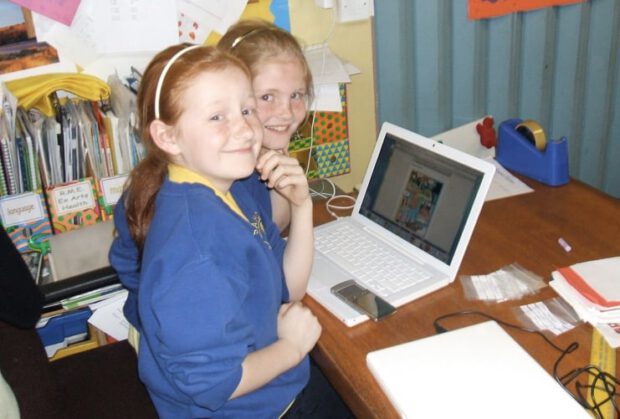
These children were blogging a comic they had worked on together, obviously enjoying themselves, hopefully connecting to an audience.

Here are the rules:

  1. Think about what you are passionate about teaching your students.

  2. Post a picture from a source like FlickrCC or Flickr Creative Commons or make/take your own that captures what YOU are most passionate about for kids to learn about?and give your picture a short title.

  3. Title your blog post ?Meme: Passion Quilt? and link back to this blog entry.

  4. Include links to 5 folks in your professional learning network or whom you follow on Twitter/Pownce.

I am tagging Andy, Bob, David, Krysia and Neil.

The kludge in the photo is left as a puzzle for the reader.

These are the slides I used at TeachMeetPerth Last week. You can see the images on a flickr set. The VoiceThread above is a work in progress, I’ll probably re record the audio with a quieter computer and a script.

I first got the idea for OpensourceCPD from teachmeet at the Scottish Learning Festival in 2007. Ollie Bray is widely quoted as saying that teachMeet was his best CPD experience. This had me thinking about Teachers as providers of CPD I also talked to Con Morris of LTS’s CPD Scotland team, he mentioned that reading my blog could be a cpd opportunity for someone!

My favourite learning experiences at conferences and inset have always been the ones presented by teachers. I include in this the more informal teachmeets and the social continuation in the pub or restaurant afterwards.

I’ve also been aware of the open source movement as a great deal of the software I use day to day is open source software, this blog, firefox, Vienna and many more. this got me wondering if this might be a useful model for distribution of cpd material by teachers, material that is not locked into a Local Authority, business or agency. Teachers as providers and consumers. The CPD material would be freely available and could be used by individuals or presented by a provide, the teachers supplying the material on the wiki could be providers/consultants. Of course because the material is freely available it can be supplied as CPD by anyone.

So the idea came together based on a casual reading of the Open Source Definition

  1. Free Redistribution: the software cpd materials can be freely given away or sold. (This was intended to expand sharing and use of the software on a legal basis.)
  2. Source Code: the source code must either be included or freely obtainable. (Without source code, making changes or modifications can be impossible.) this might be a little more difficult, hopefully it will not mean that folk would be put off uploading a pdf which is hard to edit, but more the spirit that material shared here is for mashing up.
  3. Derived Works: redistribution of modifications must be allowed. (To allow legal sharing and to permit new features or repairs.)

The Open Source Definition has a lot more, but you get the idea. This project will probably follow the Open Content model more closely:

Technically, it is royalty free, share alike and may or may not allow commercial redistribution. Content can be either in the public domain or under an open license like one of the Creative Commons licenses.

but at this time I thought that Open Source CPD was a snappy title

So I have started a wiki OpenSourceCPD to support this idea. I hope it is going to be connected to CPDFind in some way. At the moment the site is sitting on a temporary server and I probably will not get a lot of work done until the spring break. Several scottish educational bloggers have added Profiles and there seem to be a far bit of approval at TeachMeetPerth.

The focus to start with will be Social Media or Web 2.0 in teaching and learning.

Nothing is set in stone (it is a wiki) but I’ve begun three main sections:

  • CPD Materials A basic outline of various social media tools that can be used in teaching.
  • Cpd Opportunities CPD courses for self study or to be used as a skeleton for leading cpd.
  • Profiles A list of practitioners that could lead such cpd (this could be on a paid or free, online or face2face basis).

If this idea appeals please get in touch, if you want a password to edit the wiki leave a comment or send me a mail.
If you have some material you want hosted on the wiki but have not the time or inclination to edit it get in touch and I’ll be happy to post it for you.

So have a look at OpenSourceCPD.