HyperCard a tool so beautiful it still makes me cry. Although I say “used”… Sam, Richard, Kris and Stephen were our proper programmers… I tended to join in excitedly, but mainly made black & white graphics or icons.

By 1997 we’d made what you’d call a CMS ( Content Management System ) in HyperCard. It made making web sites easy. So easy that school kids did it, in their Mosaic browsers and even won awards. I remember one class project that was a site about World War II, that just grew and grew. You could start to see what all the fuss about HyperText was

from: Prograph – Back in the Day | Tom Smith’s: theOTHERblog Gone so archive link

Tom Smith’s post is mostly about Prograph, which I know nothing about. I still use SuperCard, a HyperCard clone, most days.

HyperCard keeps popping up in unexpected places. It is the reason I got interested in ICT (other than producing worksheets that pupils could actually read in the age of bandas).

The idea of a “Programming for Poets” application is still very attractive. There have been a few tries, TileStack was an attempt to recreate HyperCard online with JavaScript. I still wonder why Apple, 1. abandoned HyperCard and 2. have not made a HyperCard for either OSX or iOS. Maybe this Apple Patents A Tool Allowing Non-Developers To Build Apps | TechCrunch will come to fruition.

A few days ago I noticed that Alan Levine is mashing up ds106 assignments withThe ds106 Remix Machine. This, briefly, allows you to take an assignment from DS106 and add a filter. Shades of John Davit’s Learning Event Generators.

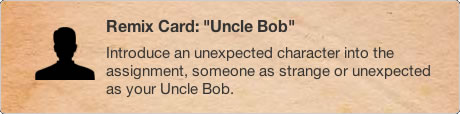
For example this remix: stop frame photography [remixed]: Uncle Bob — Remix Machine takes this original assignment stop frame photography and adds this remix card:

Uncle bob Remix

Use Existing Media

Remix is using the created media of others – it does not count as a remix if you use your own assignment work. As raw material for your remix, use media from examples created by other ds106 participants for this assignment.

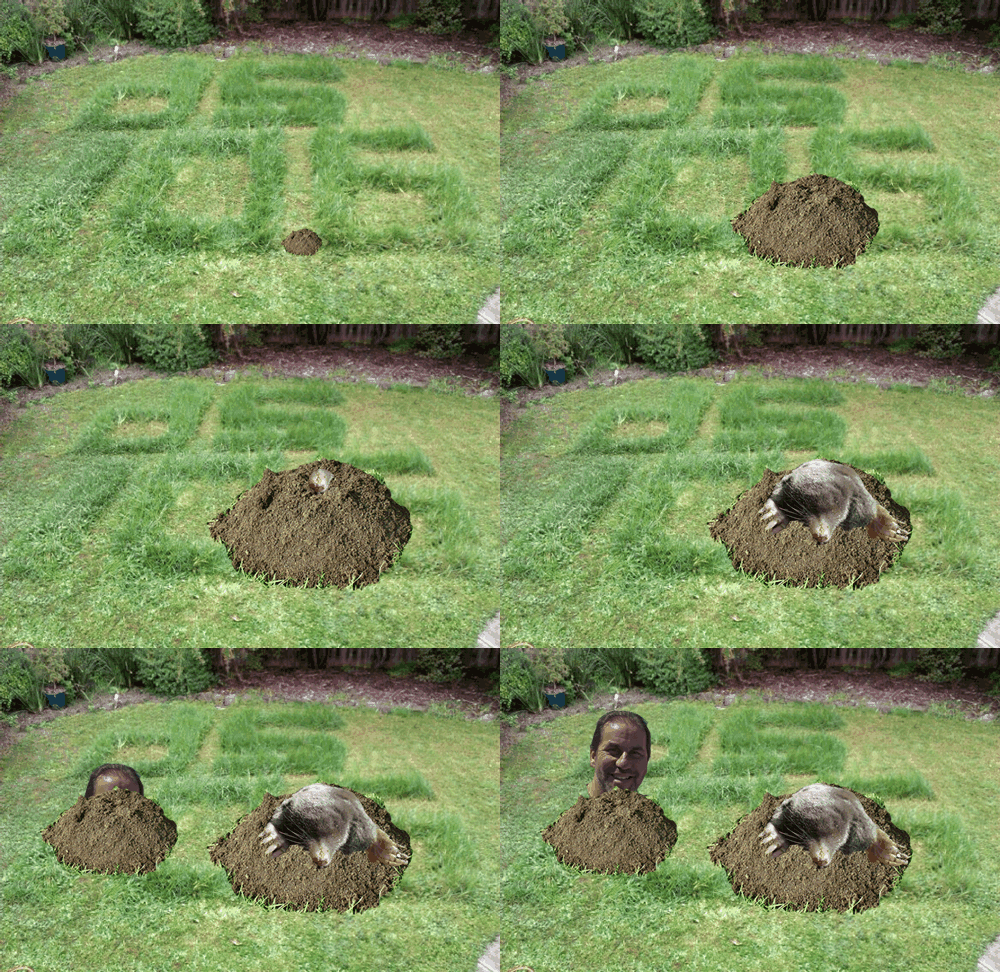
I’ve not ds106ed for a while so, just for fun (is there another reason?), I took one of a series of images from here: ds106: Stop frame photography by Rowan Peter and did this:

Cogmole

Mole photo from Mole Flickr Attribution-NonCommercial-ShareAlike 2.0 Generic (CC BY-NC-SA 2.0)

This could be a lot better, but it didn’t take long. I am tempted to dust off a copy of flash and make a wack a ds106 mole game;-).

DS106 has been looking very interesting of late, especially the Kickstarter project which has gathered a pile of money for developing DS106 in lots of interesting ways. (I am in for a t-shirt;-)). This looks like making ds106 increasingly interesting as time goes on.

Next time ds106 runs I am going to give it another shot, set up wordpress blog to make my tagging work a bit better. and have some more fun.

Assignment 8 – This Is The End – #edtechcca8

You must summarise what you have gained or achieved through participating in The Educational Technology Creative Collective. You have a choice of how you do this.

Either

make a visual presentation of what you’ve gained / achieved – use a tool of your choice, a video, Prezi, Animoto, etc

or

make an audio recording of your experiences

I’ve choose the audio option.

See my other posts for edtechcc.

I’ve not got much to add about the course except to reinforce that, if you are interested in ed tech and Colin Maxwell does something like this again I highly recommend it.

Flickr cc Picmonkey

Every so often something nice happens:

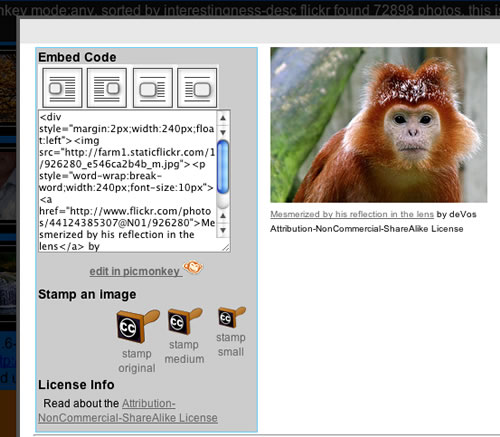
Which made me look again at the flickr CC search toy. A while back I posted about Picnik closing and then about PicMonkey which is a picnik replacement. The nice folk at PicMonkey let me know that the picmonky API is the same as the picnic one, so I thought I’d swap them out. As you can see from the screenshot, if the images found in the flickr CC search toy allow editing (ie NoDerivs is not in the License) there is a link to edit the picture in PicMonkey. I’ve changed the way this works so that PicMonkey will load the medium sized photo with the attribution stamped on it, rather than the original flickr image. Before I was expecting pupils to be able to add the attribution themselves if editing the picture.

I’ve also added a checkbox to the search form to only search for pictures you can edit.

The code behind this, php and javascript is a very messy affair. I intend to work thorough the whole thing sometime and make it more efficient etc.

If you have ideas of how this could be more useful to primary aged pupils please let me know.


Teachers use of the iPads in their lessons began primarily as substitutive in nature, but has seen an increased in augmented uses and in some cases, teachers even redefining how they teach.  Teachers across the board desired more training and support when it comes to integration of the iPad in their daily lessons.

Student research and questioning suggests that it has transformed learning at an even greater rate than that of teaching.  They have discovered new and creative ways to use the iPad to help them learn and collaborate…

from: Data and Analysis of a High School 1:1 iPad Program. «

Lots more interesting information in the post I was particularly interested in these two points. Based on my very brief visits to our, smaller, ipad 1-2-1 project classes I think we are seeing similar things. If the pupils are leading the way in finding new and creative ways to use the iPad to help them learn this should lead to an increased in augmented uses by teachers. Listening to some of our younger pupils talking about how they use the iPad I realised that my old comfort zone of knowing more about the tech that the learners has gone!

Last Sunday in the Observer I was reading Why all our kids should be taught how to code and have been following with great interest the boos by Alan O’Donohoe (teknoteacher) Submitted to EDUtalk
I am also interested in the difference between digital literacy/ fluency and coding beautifuly described by Josie Fraser in response to Mr Gove’s surprising enthusiasm for coding SocialTech: Computer Science is not Digital Literacy:

It’s dismaying then, to see in a week where we are seeing a huge move forward in the promotion of technology and a fresh look at how ICT as a subject area is designed and implemented in schools, to see digital literacy being used as an interchangeable term for computer science skills.

With the introduction of iPads into the mix as a really powerful tool for curricular ict. I am also intrigued by the tension between this back to programming and the use of ict to support learning. Brief visits to the primary classes piloting 1-2-1 have been exciting and gone a long way to convincing me that this is an important direction for ict in education.
Although I hope the iPads are only for consumption myth has been put to bed I’ve been wondering if there are ways they can support programming in education. It has often been pointed out that the reluctance of Apple to allow apps that produce executable code will hinder their use for coding.
(As a primary teacher this is well out of my depth or experience but fun as a sort of thought experiment.)
Some of the efforts to enthuse pupils and others in coding have started with HTML, CSS and JavaScript. (Hackasaurus and the like links). I though that might be a good place to start.
photoI’ve blogged before about Textastic – Text, Code and Markup Editor with Syntax Highlighting – FTP, SFTP, Dropbox – for iPad, the web page title says most of it.

a challenge of sorts

I though I’d give it a go and create a page or two with some sort of JavaScript stuff. To keep things nice and simple I thought I’d use the Dropbox functionality to publish the pages created to my Dropbox public folder. In a teaching situation this would avoiding FTP uploading.

templates and images

The first nice thing I noticed was that textastic supplies a few basic html templates which gets you off to a nice start. I created a folder in textastic then some files. Next I clicked on the globe to access my Dropbox. You see a listing of a local folder and one in Dropbox it is simple to transfer files back and forth. You can also pull images in from Dropbox to the textastic folder if you want to added images to your web page. This means a trip to the Dropbox app to add photos to that folder from the iPad photos.
I could not find an app on my iPad that would let me resize images where I could see pixels rather than manipulating with my fingers, but I am sure such an app exists.

auto complete

Textastic supports autocomplete in a TextMate like way type a < and say a p it pops a list of possible tags, selecte one and it is completed. The app then put the cursor in a good position, eg between the opening and closing tag of a paragraph to ready to type in the first parameter of a link. With more complex tags it wil select the first edit then tab through the other section indicated by a wee triangle:
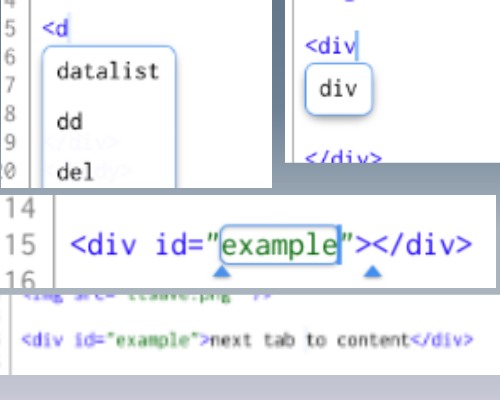

update: the first image I uploaded Looked ok on the iPad but was unreadable on my desktop. I’ve replaced it. Image editing for blogging is a bit of a challenge on the iPad, but I am learning.
It was pretty simple to create a HTML page and link it to a CSS file in the same folder in textastic, easy to publish both to Dropbox. Textastic allows you to locally preview and it is easy enough to switch to Safari too.

JavaScript challenge

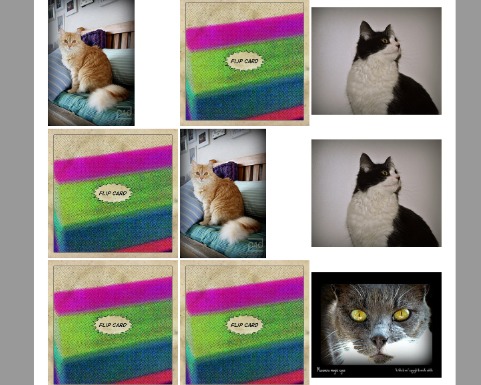
Since I know little JavaScript this should be a fairy realistic test of the iPad as a tool to learn coding. I decided to try assignment 3 from Mashups: Remixing the Web a course from New York University. The assignment was to create a lolcats memory game. I decided to make one with Flickr images. There are a few good hints in the assignment but I need to do a few things: look up JavaScript references on the web, preview and debug. Reference was easy to do by switching to safari and searching. Textastic supports preview and firebug. I also turned on the safari debug console. Textastic supports auto complete for JavaScript too.
The result is not a polished or complex piece of work, but I’ve stretched myself a wee bit. And managed to stick to the iPad throughout.

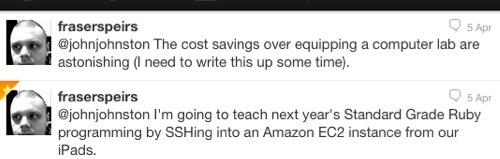
update a couple of tweets from @fraserspeirs who will know a lot more about this than me:

– Posted using BlogPress from my iPad

Location:Crow Rd,Glasgow,United Kingdom


Badges, surely, are a way of recognising achievement.  They don’t solve any problems, nor explain anything.  What they do do is allow an alternative way of enabling people to feel motivated (and, in some cases patronised, but that is another matter), and an alternative way for onlookers to judge whether they believe the individual has the knowledge/skills required for a role.

a comment by @patparslow on a post Badges: talking at cross purposes? | dougbelshaw.com/blog

The whole conversation started by Doug Gaining Some Perspective on Badges for Lifelong Learning is fascinating (some flying over my head).

Personally I’ve found comments more motivating than badges. for example, I worked a lot longer harder and learnt more after a few comments than I do on Code Year where Badges are auto generated.

So we need to keep inventing. We need to keep creating our own software, and our own content, even if it isn’t mainstream, even if it means we are not Twitter stars or TED gurus, because it’s the only antidote to the homogenization and commercialization of mass culture, as happened to the media of radio and television before the internet. We have to ensure that we have the legal and moral right to create and communicate directly with each other, to build our own networks, to share our own content, and to be able to shine a bright light on, and criticize, the popular media. Maybe it’s just cat videos, maybe it’s corrections of errors in AI courses, maybe it’s commentary on a Chanel commercial campaign, maybe it’s the creation of a way for families to keep in touch across borders. It’s because this is how we grow as a society, this is how we learn as a society.

Great end to a great post by Stephen Downes. The post covers Stephen’s use of Social Media for an interview. Not only is creating of software and media important it is a lot more fun than consuming. (I am a wee bit late linking this February post but worth reading the whole post a few times.)

A while back I posted about Picnik closing a great disappointment to many in schools. I’d used the picnic api in my flickr CC search toy and have not got round to removing the link.

Today I got a email from the folk at PicMonkey which turns out to be a picnik replacement. They had mailed me as an API user of picnik to let me know they have a similar API in the works. I gave the app a quick try and it does a very similar job to picnik. Great news. It made me update flash so I guess it needs a recent version. I look forward to seeing the API and putting it into the flickr CC search toy.


– Posted using BlogPress from my iPad


Yesterday I spent the afternoon with a group of teachers and managers talking about iPads. This was lead by Fraser Speirs and some colleagues from the Cedars School there was a ton of interesting and useful information passed on but I was particularly interested in a quick demo by Andrew Jewell of the BlogPress App. I have tested a fair few iOS blogging apps both here(iPad HTML Blogging & Blogsy ) and in glow. BlogPress is not a whizzy as Blogsy but it seem a bit more straightforward to use. Basically a text editor with a simple HTML insert menu and support for Flickr and its own image hosting. I went back to Blogsy for another look and to show it to someone last week and found I had forgotten how it worked. BlogPress is simple enough that I’ll not have to remember anything.


– Posted using BlogPress from my iPad

Location:Crow Rd,Glasgow,United Kingdom