
This is the result of two decades of deliberate, calculated effort by the largest technology companies on earth to turn users into consumers, instruments into appliances, and technical literacy into a niche hobby for weirdos. They succeeded beyond their wildest expectations. Congratulations to everyone involved. You’ve built a generation that can’t extract a zip file without a dedicated app and calls it innovation.

The YouTube tutorial is the perfect emblem of this rot. Tutorials are not documentation. A tutorial teaches you to perform a specific sequence of steps to achieve a specific outcome. The steps are usually correct for the specific scenario the tutorial covers. If your scenario differs — if something’s changed, if you get an error the tutorial didn’t anticipate, if you’re using a different version — the tutorial has given you no tools to respond. Documentation teaches you to understand a system: what its components are, how they interact, what the configuration options mean and why they exist, what the error messages indicate. One produces people who can follow instructions. The other produces people who understand what they’re doing. The industry has enthusiastically replaced the latter with the former and called it democratization.

Found via via Digital literacies involve layers of abstraction | Thought Shrapnel

This is a really interesting & powerful post. I didn’t touch a computer till my 30s and missed the whole BBS experience. I didn’t start with basic or the command line, but mac OS 7. The system was small and simple enough to get some sort of handle on things. Simple open ended software, HyperCard & appleScript helped too. My experience with the AOL HyperCard community was very like:

Kids learned by watching, by lurking in forums, by getting their stupid questions answered by people who then expected them to answer someone else’s stupid questions eventually

By the time OSX came along I was not ignorant of or put off by the terminal. I’ve never become expert, but I can use it in a basic fashion.

I also learned, by viewing source, how very basic html works. I know how to set Safari to show the full URL. I think these things are worth learning & teaching.

I was lucky in being exposed to tech in simpler times, there a lot of basics I know nothing about but the ones I do grasp I believe help.

As educators get excited or hot under the collar about the latest AI or design it for you free graphic package I do wonder if we have thrown the baby out with the bath water.

There is a lot more in the posts, it notes problems from the tech giants, algorithms & AI, suggesting learning and anger as possible ways to push back.
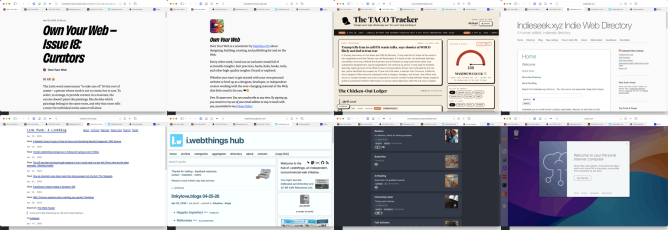
Montage of screenshot of thewebpages linked to in the article. Own Your Web – Issue 18: Curators • Buttondown Own Your Web • Buttondown About - Link Punk: A Linkblog i.webthings hub Commonplace Puter

I’ve not posted a set of links for a while, keep saving them, but retired life is busier than I thought it would be. I am prompted by this newletter post:

Own Your Web – Issue 18: Curators

So every time you share a link on your blog, every time you write a few sentences about why someone else’s work matters to you, every time you add a new entry to a blogroll or a links page – you are a curator. You are doing what no algorithm can do. You’re saying: I am a person. I read this. I think you should read it too.

There is a good selection of links to link curators.

I am not sure when I subscribed to Own Your Web

Own Your Web is a newsletter by Matthias Ott about designing, building, creating, and publishing for and on the Web.

But it is great. There is an RSS feed too.


The TACO Tracker: Every Time Trump Chickens Out

Trump won’t stop chickening out. We won’t stop tracking it

One of the more amusing uses of AI

Via brad who has the Indieseek.xyz Indie Web Directory

Indieseek.xyz is a small human curated, searchable, directory of web links to both websites and to individual web pages. We try and list pages that are informative, fun, classic and useful

And

Link Punk: A Linkblog

Just a linkblog, mainly for articles and individual blog posts that I find and want to share. I think of this as me being a DJ only playing articles rather than songs.

Brad also post funny political thoughts most days on mastodon.


Another great source of links is Joe Jennet
i.webthings hub

Welcome to the hub of i.webthings, an independent, noncommercial web initiative

Joe credits where he finds his links which can lead to some other interesting directories.


Commonplace

Commonplace is a self-hosted, federated link-collection manager. You can create curated collections of links and share them with followers across both the Fediverse (Mastodon, Pixelfed, etc.) and Bluesky — without creating new accounts on either network

Created by Doug Belshaw. And changing quickly. I am logged on via indieAuth, which is nice. I’ve created a few collections, the largest so far is AI Reading. It is always interesting to try out new pieces of software.

Commonplace allows sharing collections, suggestions and replies.

Commonplace now has a bookmarklet, which is for me essential. It grabs an image and description via open graph (I’d guess) to give a description. You can edit this and add curators notes.

I’ve used a bunch of link collectors over the year, delicious, pinboard, locally in the drafts app, on my site and a few more. I’ve not used pinboard much in the last few years. I feel a bit guilty about not updating my lifetime sub when pinboard changed to annual fees. Life-timers like myself could upgrade to a yearly fee. I didn’t. I mostly use drafts in a fairly disorganised way. At the very least commonplace is giving me the chance to think a bit about my link collection & sharing. It is also interesting to watch the development, as Doug is AI coding the site.


Here is an ‘real’ teaching and learning link. I’ve been doing the odd bit of supply and wonder if I should give this a go.

micro:bit CreateAI

micro:bit CreateAI is a free, web-based tool that makes it easy for students to explore AI through movement and machine learning (ML).

You can use micro:bit CreateAI to train an ML model and then run it on your BBC micro:bit V2.

  • Collect movement data from the micro:bit accelerometer
  • Train an ML model to recognise patterns in the data
  • Code the micro:bit to run ML models and take your creation anywhere.

And a last weird one.

Code seems like a computer on the web. You get a desktop. Also can create web apps and get access to AI. The UI has me baffled. I might not be the audience.

This article by the World Resources Institute shows how important it is that there is an infrastructure that enables individual decision-making to take place. For example, I’ve been vegetarian now for eight years, and it’s much easier to remove meat from your diet these days even than when I started to so in 2017. Likewise, because of investment in EV infrastructure, these days it’s unproblematic to own or lease an EV.

The idea of supportive infrastructure, policies or incentives rings true. My own situation makes an EV difficult: cost of an EV & charging when tenement living. My current job needs a 40 minute commute by car, or a couple of hours each way by public transport. I hope that is offset by not having a car till I was 49.

The page lined by Doug is a great read too: The Most Impactful Things You Can Do for the Climate | World Resources Institute

Recently I saw a post on Doug Belshaw’s Thought Shrapnel pointing to a nice 3 column layout for a blog.

Doug wondered :

If you’re reading this and know of a similar blog theme, on any platform, could you let me know?

I thought it would be possible to use the Site Editor on a WordPress block theme and left a comment.

I’ve been watching quite a few WordPress videos from Jamie WP. I especially like his Remaking Famous Websites playlist. So I thought it might be possible to make a WordPress site that looked a bit like garry.net.

Jamie does these in 30 minutes. This took me longer, but I’ve not a whole lot of experience with the site editor. I decided to use Glow Blogs. It is free and easy for me to set up a site there. I serve as part time product owner so this is good practise. The disadvantage is that I can’t install any extra plug-ins or add any custom css1. Glow Blogs also runs a version or so behind WordPress.org.

I only did enough to see where I could go easily. I didn’t attempt to match styles or other features.

I got as far as Three Columns, this is not finished or polised but I managed:

  1. 1. a home page with some static content and a left hand navigation.
  2. a posts page with the same left hand column. A second column listing the posts and loading the latest post in the third column.
  3. finally a single post page with the same first two columns. The post tapped or clicked in the second column showing in the third.

To do this I created three page templates2. All are inside columns. All have the same first column. So I made that one as a pattern3. The second column is used twice, so I made another pattern for that. This stopped me having to fix the same thing in different places. I think this is the right approach.

I’ve ignored mobile and other possible pages. I didn’t touch archive, views for categories and tags for example . My aim was to spend a couple of hours on this.

I had trouble with a few things.

  • I had edited the Front Page Template, which should be used for the posts page. This didn’t show up. When I edit the posts page and then edit the template I see my 3 column. Unfortunately the live page still uses the old template. So given my time limit I just made another page to act as the posts page and made an ‘All posts’ template for that. This has a query loop in the second column, acting as an index for the posts.
  • The second column on the Posts & single post page should ideally scroll all of the posts. Probably inside a fixed height block with lazy load.
  • I think I should have used Template parts when I used patterns. but the result seems the same.
  • I am not sure how to hilight the posts selected in the second column. garry.net does this nicely.
  • I enjoyed poking around in the site editor. I can see the potential for creating different types of site. I am not convinced that access to the Site Editor alone would make much differences to busy teachers with a lot on their plate. Most Glow Blogs stick with the default theme. I am beginning to see how patterns and templates could make things easier for folk.
  1. WordPress multi-sites do not automatically support custom css. The Jetpack plugin used to do this but not anymore. I hope it will be added back in. ↩︎
  2. Well I did that finally, I made lots of mistakes first. ↩︎
  3. Again I did that a more than a few times. I think this should have been a template part rather than a pattern. ↩︎

Replied to Bright green, blight green, and lean green futures | Open Thinkering by Doug Belshaw (Open Thinkering | Doug Belshaw's blog)
This is Vinay’s preferred option, and the only one he thinks is scalable and realistic. It’s “numerical” by which he means quantitative, not qualitative. You simply imagine that every human being has equal right to the planet’s “material bounty”, and then divide up what’s available, and how much they can emit.

Hi Doug,

Thanks for this link, I’d not heard Vinay Gupta before. A good listen although some of the verbal style grated a bit.  I’d heard the idea of fair shares, in relation to air miles, before and liked it. Possibly because I very seldom fly;-)

Listened Microcast #087 — Back in the game! by Doug BelshawDoug Belshaw from Doug Belshaw's Thought Shrapnel
In this microcast, I go through three interesting links from my saved list on Pocket.

Nice to hear Doug again particularly in micro format. I do love a microcast. Lots of podcasts, especially 2 or 3 hosts chatting I find a bit long. I’d rather queueup a few shorter ones for a commute.

Replied to Parasocial relationships through digital media by Doug BelshawDoug Belshaw (Doug Belshaw's Thought Shrapnel)
I think we've all felt a close affinity and, dare I say, relationship with people who wouldn't know who we were if we met them in real life. In fact, I've kind of experienced the other side of this due to my TEDx Talk and the TIDE podcast. People at events would come and talk to me as if they knew m

On the other end, this makes me feel a bit uncomfortable listening to some podcasts. I used to listen to quite a few popular mac/tech podcasts, but the feeling that I knew these folk was somehow quite unpleasant. 1. I don’t & 2. I live in a very different world. They are often over long with a lot of friendly, between presenters, chat. I now keep an eye and dip in occasionally when the topic looks good thank to Castro’s triage.

Tide, I very much enjoyed because I had met irl Doug and virtually Dai. My own broadcasting/podcasting efforts  were mostly aimed at folk just like me. I’d guess I knew many of our audience.