
Glasgow, Glasgow City, Scotland
This audio file was orginally posted to AudioBoo(m) with the mobile app. It has been downloaded and posted here since audioboom no longer supports free accounts.

Glasgow, Glasgow City, Scotland
This audio file was orginally posted to AudioBoo(m) with the mobile app. It has been downloaded and posted here since audioboom no longer supports free accounts.
Cairndow, Argyll and Bute, Scotland
This audio file was orginally posted to AudioBoo(m) with the mobile app. It has been downloaded and posted here since audioboom no longer supports free accounts.
Cairndow, Argyll and Bute, Scotland
This audio file was orginally posted to AudioBoo(m) with the mobile app. It has been downloaded and posted here since audioboom no longer supports free accounts.
Glasgow, Glasgow City, Scotland
This audio file was orginally posted to AudioBoo(m) with the mobile app. It has been downloaded and posted here since audioboom no longer supports free accounts.

A bit of a mouthful, but this is the title of our Scottish Learning Festival Seminar.
David Noble and myself will be running a seminar: Sharing Curriculum Change through the EDUtalk Project to talk about Edutalk on Wednesday 22 September at 12:30
We will be explaining how the EduTalk project kicked off at the Scottish Learning festival last year with SLFtalk which recorded the voices of educators attending the Scottish Learning Festival 2009. and grew from there.
We will hopefully give practical demonstrations of how the technology works and explain the thinking behind it. It should be fun.
As part of EDUtalk we hope that folk will be creating short reports and thoughts about SLF on EDUtalk, in the same way as last year but using the tag edutalk on audioboo and iPadio. Participants can also email audio to post@EDUtalk.posterous.com or phone Gabcast (033 0808 0214 channel 30938 and # password 1234 and # when asked
record your audio and press # when finished)
Full details of how to send audio to EduTalk are on the How to EDUtalk page. Further help from twitter: @johnjohnston or @parslad
Luss, Argyll and Bute, Scotland
This audio file was orginally posted to AudioBoo(m) with the mobile app. It has been downloaded and posted here since audioboom no longer supports free accounts.
Last session I was lucky enough to be involved with a small ipod touch pilot; Glencairn iPod and blogged about it and various iPod Touch things several times.
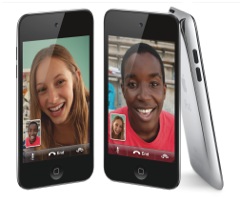 Image Courtesy of Apple
 A few things have made me think about iPod touches in class recently that I though might be worth a blog post.
I’ve been using some new, to me, bits of software on my iPhone which have either classroom potential or some concepts that could be transferred to the classroom.
Wifi Photo Transfer (App Store) is a simple application that turns your iPhone or ipod touch into a web server which displays the photos on the device on a web browser on any computer (or iPad) on the same WiFi network:
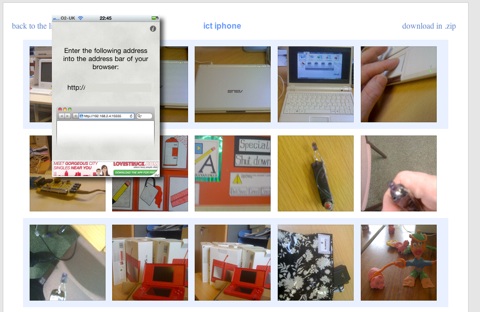
The photos can easily be downloaded to the computers. The application show a single screen on the phone with an IP address that can be typed into your browser to see the photos. Even better with Safari you just click Bookmarks and then Bonjour where you will see your phone listed:
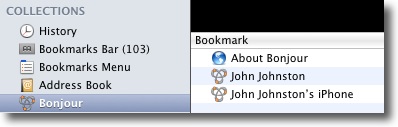
A click opens the webpage with out any tricky typing.
I imagine photos taken with a new camera equipped iPod being distributed to a class full of children without resort to cables or pen drives.
I mentioned The UK SoundMap in the previous post this mashup which adds Audioboo audio to a google map could be replicated for all sorts of sound recording in class. A map full of music recorded in classrooms around the world or some language swapping springs to mind.
I’ve also been using mappiness, the happiness mapping app to record how I am feeling when the app on my phone prompts me twice a day. This sort of collaborative data logging could be done through a google form on a touch.
The other stimlus for this post is the new ipod touch, this adds the long awaited still and video camera and in my mind turns the iPod touch into one of the most useful bits of tech you could have in a classroom.
A few possibilities:
Comparing the £159 before vat price of iPods with the cost of a smartboard or a couple of laptops makes these a real option for expanding technology in the classroom.
An interesting crowd sourced data project UK Sound Map answers the question: ‘What does Britain sound like?’
All you do is record some sound with Audioboo and tag it uksm the boos are moderated and added to the The UK SoundMap. This, of course, reminds me of our EDUtalk project.
Discussing social media and this sort of thing with my daughter Christine we recorded a quick boo of the rather quiet traffic outside our flat.
This could be a nice classroom activity for iPhone equipped teachers and I intend giving it a wee try next time I am working with a class, perhaps a playtime recording would be a good idea.
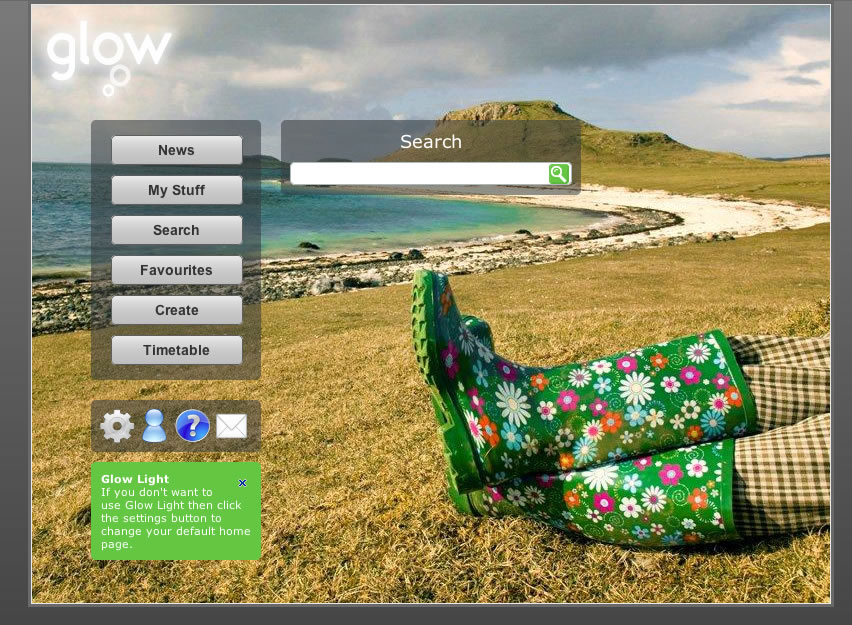
Glow light came online today yesterday:
Glow Light is a new alternative Glow interface designed with a simpler ‘splash’ page. This ‘splash’ page will display a list of user specific links to allow easier navigation to other areas within the Glow portal.
LTS have a video to show how it works:Glow Light – Making Glow better clicking on the thumbnail above will show a full-sized screenshot.
In my opinion this is a great improvement over the ‘Staff’ home page that loads when you log onto glow, much less cluttered and easier on the eye. The branding is subtile and the page has indeed a light feel and it is lighter:
this is the NLC Central Services home page (Staff page) load:

And this is the glow light load:

Showing glow light is just over half the load of the Staff page.
Glow Light also combines the functionality of more than one glow page so it should save quite a lot of time. As a default it comes with 6 ‘navigation’ buttons on the left side 4 ‘settings etc.’ buttons at the bottom and a search box. (see popup image at top.)
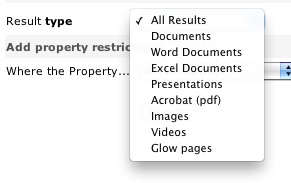
The search is much better than the old glow search. When you get to the results it gets even better linking to an advanced search with allows you to filter by type, and by various properties. The search is pretty fast (on the bases of a few Saturday tests). I never used the old search finding it nearly worthless, this new one looks like it will be valuable.
The six main buttons are as follows:
These are frequent tasks inside of glow and in the past would take quite a few click to get to.
You can customise the lists of buttons from the setting and add ‘link’ buttons of your own to the list. I ‘ll probably turn off the Timetable as I don’t have any classes and the Create button as I would normally work down to the site I am creating while I think about it.

There are 4 smaller buttons at the bottom of the main list: Settings, which opens the glow light settings. Profile, Help and Mail which are self explanatory.
Although glow light is a vast improvement I think it could be made even better. Here is my 2 pence worth:
I like the way the create button loads the groups list on the page and although I don’t think I’ll use it I’d like the favourites button to load my favourites (and just my favourites) in the same way rather than take me to my ‘My Glow Groups’ page.
The other thing that I think could be improved is the buttons. As indicated by the bold & italic text in the description above the buttons have different tasks. Some hide or show elements on the page, some open links and some open links in a new window. I think this is potentially confusing and would prefer something a little more straightforward:
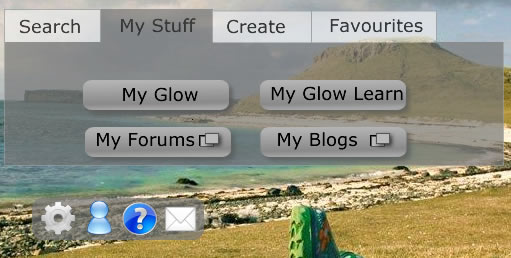
This is pretty quick and dirty but should illustrate the idea: Tabs hide an reveal elements and action buttons show if the link is in a new window or not.
The future of glow is looking a bit brighter, this is a long overdue facelift and perhaps indicative of the way glow is going. It now is starting to look like hub linking out to different services: glow, blogs (these were updated yesterday too, forums, glow learn and mail. The move to using open source, (phpBB, WordPress) familiar web tools is surely a move in the right direction. I hope too glow will move in the direction of constantly upgrading, or perpetual beta that is popular with open source and web technology (google, flickr) generally. Five years ago I had no idea what sort of web applications I’d be using now and I hope that the next 5 years will bring improvements and completely new ideas. If glow was a portal they services could be easily added when necessary we could have phpMotion ( a youtube clone) or laconi.ca (a twitter one) dropped into glows safe & secure environment at the drop of a hat.
Looking at the Glow futures tender notice:
- Interoperatability of Web Services using Open Standards
- Scalable with capacity to expand the scope to serve a wider population
- Glow Futures will apply open standards aiming to achieve unhindered data flow and interoperability. This model will help Glow to constantly evolve and remain modern.
- The current Glow portal and data centre infrastructure is provided by a single supplier. We envisage that the new service could be procured in a series of lots which may be provided by a single supplier or by a variety of suppliers to allow for a flexible and dynamic approach to respond to evolving requirements.
Gives me a fair bit of hope. I just hope we have, in Scotland, enough money to resource it and the hardware to use it.