
Arrochar, Argyll and Bute, Scotland
This audio file was orginally posted to AudioBoo(m) with the mobile app. It has been downloaded and posted here since audioboom no longer supports free accounts.

Arrochar, Argyll and Bute, Scotland
This audio file was orginally posted to AudioBoo(m) with the mobile app. It has been downloaded and posted here since audioboom no longer supports free accounts.


One of the things I’ve been trying to keep up with (and failing) in my RSS reader is Digital Storytelling | We jam econo
Digital Storytelling (also affectionately known as ds106) is an open, online course that will begin on January 10th, 2011. This course is free to anyone who wants to take it…
About ds106 | Digital Storytelling
I’ve been following mostly through bavatuesdays the blog of Jim Groom.
As an aside I first blogged about Jim a few years ago, pointing to the marvellous Welcome to the People’s Republic of Non-Programistan which seems to have vanished and The Party Line which is still there.
One of the things that the ds106 folk have been doing is creating animated gifs from very short sections of movies. I am still not sure if I see the whole point of this, but it becomes a very addictive process. Recently Jim posted: Creating Animated GIFs with MPEG Streamclip and GIMP and pointed to another tutorial Better Animated GIF Tutorial for PS CS4 « Bionic Teaching. This got me playing and thinking a wee bit on a rainy weekend.
I’ve not got Photoshop and have seldom opened GIMP, but was creating animated gifs just last week for a blog post. I used Gifsicle which is a command line application to create animated gifs and works very well indeed on OSX (and is available for lots of other platforms) Gifsicle is © Eddie Kohler.
I am only using a very few of the many gifsicle options here, you can see all of its features on the Gifsicle Man Page
I wanted to speed up my workflow playflow for messing about in this way and though of SuperCard, my favourite mac application. I’ve used SuperCard to create a simple application (mac only) that will, load a Quicktime compatible movie, grab a short selection of frames, and create an animated gif with a few mouse clicks. The SuperCard bit grabs the frames and then used the gifsicle app (which it contains) to create animated gifs.
I’ve tested the application only briefly on a few different macs (10.4, 10.5 & 10.6 or tiger, Leopard and mostly Snow Leopard) and it seem to work. On the old G4 10.4 machine there is a wee bit of lag grabbing the frames, but it works out ok.
Here is a screencast:
You can download Movie2Gif from my dropbox, it is a rainy afternoon project miles away from a polished bit of software but might be useful/fun for someone.
If you Movie2Gif and give it a try, let me know how you get on, if it gets any positive feedback I’ll do a bit to improve it. Please send any suggestions, bugs etc to me.

the Internet gives you access to a world of bloggers, tweeters, speakers, photographers, videographers, and colleagues who will teach you anything you want for nothing more than the price of your time and attention
Great snippet from Ted Curran quoted by Stephen Downes. I always think PLN is a bit of a mouthful compared to friends, pals or folk I know but this really nails why teachers and learners should be online.
A couple of weeks ago I watched Doug‘s video How I Use a MacBook Pro on of the ways he discussed was a very new (beta) service ifttt.
ifttt stand for If This Then That and I requested a beta invite that arrived a day of three later. I’ve now had a look over the site and set up my first task.
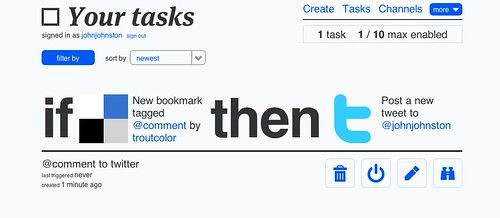
This is a simple one, if I tag a link on delicious with @comment it will be tweeted (Hopefully with commenting at: ). I post @comment tagged links to delicious with a keyboard short cut so the whole thing should be painless.
This is a really trivial use of ifttt, and I can see a lot of more powerful uses for the service. I like this sort of thing, the way posterous post stuff on to flickr, twitter and this blog for example.
We also do a little of the same sort of thing with edutalk.info, auto posting audioboos tagged edutalk to the moderation queue.
In fact my first thoughs were that ifttt could replace my rather clunky system for doing this. Unfortunately, at the moment ifttt only supports posting text to your main posterous blog and as far as I could see will not post to the moderation queue. I was also looking at posting my shared google reader to a new posterous blog but as it is not my mail one this will not work yet.
I am saying yet as the service seems to be developing quickly. I did manage to create a task to post my google reader shared items onto my tumblr blog (I’d almost forgotten that one). I usually star/like stuff in google reader to check later but will now try to share ’em too to see how ifttt works out.
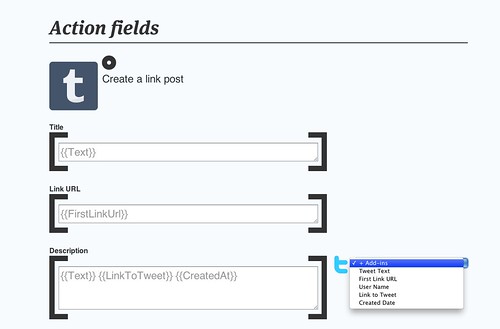
Finally I really love the interface of ifttt, very clean with huge text and icons. The process to create a new task is very simple with a fair bit of possible customisation:
I am looking forward to seeing how ittt develops.
Update:I seem to have flooded ScotEduBlogs with my tumblr posts. I’d forgotten that it was listed there. Apologies. I’ve now removed the blog from SEB.
There are a horde of time lapse apps on the Apple iOS app store now. A while back I tested iMotion – Stop motion animation for iPhone and I’ve downloaded a few more.
Yesterday I noticed iTimeLapse had an update, listed in the fixes was – General crashy-ness fixed which sounded good and I decided to give it another try.
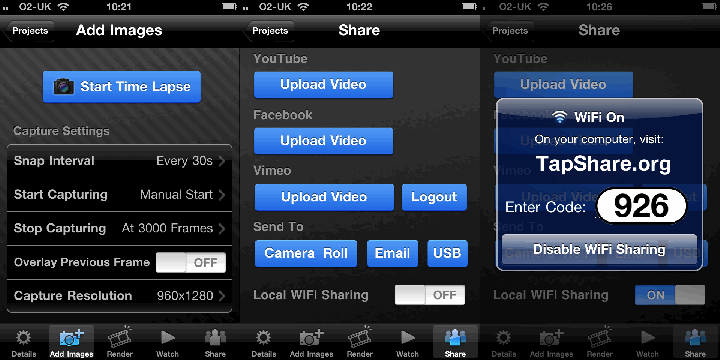
I set up my phone on the windowsill pointing at the trees and sky across the road. There is a choice of resolutions I choose 1280×960. I set the app to take a picture every 30 seconds and set it going. It seemed to be taking picture faster than that so I stopped, reset and started a few times (I even forced quit the app). Eventually I just let it do its own thing. After an hour or so it had taken 1333 images (Which the app tells me takes up 1339 mb on my phone) so I do not think that the Snap Interval is accurate/working! However the resulting video worked out fine.
On stopping the app you then have to render the video, my first attempt at one of the higher resolution settings failed, producing a block video, I tried again at a more sensible 640x 480 and this worked. The video was then watchable on my iPhone.
There are several export options, I tried the Vimeo option, which took a while but worked well and the Local WiFi Sharing.
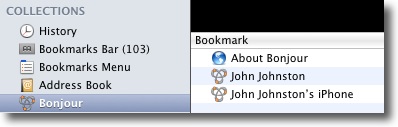
I am a fan of a few other apps which have Local WiFi Sharing. Most apps that do this have a screen which shows an address to be typed into a browser, usually an IP address, although some support using bonjour in Safari. iTimeLapse does something different it show a link to TapShare.org with a 3 figure number. You visit TapShare on your desktop, type in the 3 figure number and that opens the local iP. TapShare is a service which offers this small utility to generate a 24 hour shortcode which can redirect to your local IP via an API which iOS developers can use. Being nosy I checked Safari and bonjour works too:
Leading to a webpage to download video:
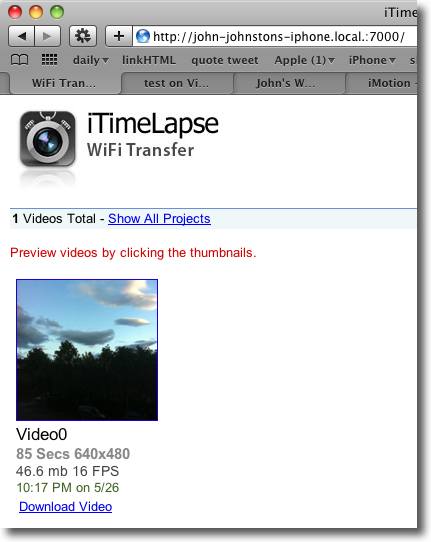
This video was 46MB in size and didn’t make it through my mail system to posterous, a quick export fromQuicktime, iphone setting, shrunk it to 9MB which upload fairly quickly: Evening Sky
Here is the Vimeo version:
I am sure this could be a useful app to use in the classroom for easily generating time lapse movies & animations.
I’ve illustrated this post with some screenshots, glued together in an animated gif, to save some screen space, please let me know if you think it is useful or annoying.
Firstly, I think we should all congratulate George Auckland and his team for breathing new life into the 1984-86 Domesday Project. I have met George several times and have been privileged to hear him to speak at conferences, and have never failed to be moved by his knowledge, modesty and vision. George can now add Domesday Reloaded to his significant achievements. Domesday Reloaded is a “full extraction of the community disc – This is the material which has been published online as the centrepiece of the BBC “Domesday Reloaded website.”
Completely new to me, I was not in education or interested in tech in 1986. A marvellous project now brought back to life on the web where you can read text about, and see photos from, ‘blocks’ on the map with contributions from a host of folk including many schools, teachers and pupils. now with the ability to update the blocks. An opportunity for many curricular areas. See Theo Kuechel’s two posts: Digital Signposts: Domesday Reloaded (Part 1) and Domesday Reloaded (Part 2) » for more info.
On Thursday evening I was lucky enough to be in conversation with Gillian Penny, Dan Bowen, John Johnston and Fraser Speirs as part of the Edutalkr series. Iain Hallahan kept the conversation organised as chairperson and David Noble did the background tech.
You can hear the discussion on Edutalk:
As the father of eleven and nine year-old boys, I can attest that so far, despite a massive investment on the part of their school in computer equipment, their computer education has consisted mostly of “play this math game” and “don’t be victimized by cyber-perverts”.
David Adams writing on OSnews about the Raspberry Pi Foundation‘s $25 computer. Raspberry
plan to develop, manufacture and distribute an ultra-low-cost computer, for use in teaching computer programming to children
.
I do not know how many teachers of 9 & 11 year olds are capable of teaching programming (Scratch maybe) but it is an interesting idea as is the.
Not much info at Raspberry Pi Foundation yet. I am intrigued that it is a UK based charity but quotes US $.
more linkage: USB Stick PC for $25| The Committed Sardine, Game developer David Braben creates a USB stick PC for $25 – Video Games Reviews, Cheats | Geek.com.
It seems Twitter has completely removed the ability to consume their feeds via the open standard of RSS in favor of their more proprietary API formats. At the same time, Facebook seems to have done the same.
Rather depressing. Although it seems twitter has buried the RSS feeds rather than killed them. Lack of RSS and ways to get data out has alway put me off Facebook. I followed Dave Winer’s link: Scripting News: RSS and CSS and Zeldman where he says: If you don’t want that to happen, support technologies that preserve choice. Like RSS.

I am reposting this as it seems to hove disappeared from the blog over the weekend
Over at Edutalk we have started posting a series of segments from The Purpos/ed Summit for Instigators. Purpos/ed is the first event from Purpos/ed: a non-partisan platform for discussion and debate about the purpose(s) of education. Started by Doug Belshaw and Andy Stewart prpos/ed has published a stream of material, discussions, and other media at a rate that leave me breathless.
I was really pleased that Doug gave me access to audio recordings made by Steve Boneham to chop up and post to Edutalk. We have published the first few and the rest will shortly follow, filed under purpos/ed
Just because Edutalk has gained some purpos/ed, should not put off our regular and irregular contributors. Everyone with something to say about education is alway welcome. Feel free to add to the mix in any of several ways.
I was delighted to see this tweet this morning:

how FANTASTIC TO SEE THAT @parslad‘s and @johnjohston ‘s edutalkr model has featured on @downes‘s weekly update
Fri May 13 20:39:07 +0000 2011 from TweetDeck captured: Sat, 14 May 11 03:10:03 -0600
Hopefully the mention: EDUtalk ~ Stephen’s Web will increase both Edutalk’s audience and contributors.
In amongst this weeks purpos/ed audio came a posted sent in by @oliverquinlan Why Stories? Keynote at the University of Plymouth #onandup conference via email. This was a link to a soundcloud page, the first one we have had. I followed the link and added the embed code to the post as I moderated it. SoundCloud looks really interesting and seems to be expanding rapidly. I am not sure yet if we can use the SoundCloud in the same way as we currently use AudioBoo and iPadio but will be having a look. If you know of any other services we could lever into Edutalk, please let us know.