
Etmooc Icon 2

My head is throbbing a wee bit trying to keep up with what is going on in etmooc. Lots of interesting stuff not quite connecting up here. I’ve not manage along to one live session yet, but have watch some of the replays available on Archive | #ETMOOC and listen to some more by recording from the replays.

Collecting

T0S3 – Introduction to Social Curation w/ Jeffery Heil (Jan 17, 12pm) was interesting. I’ve been collecting links, originally in delicious now in pinboard.

Delicious

I had a fair number of folk in my Delicious network and found it a very useful resource. At one time I used to get a fair number of links and send them out using the for:username tag. I am not sure why that died out in my circles. I also subscribed to the links from my network in my RSS reader. This became less useful when folk started pushing their tweets to delicious automatically.

I started using pinboard when it looked like Delicious might shut down and have kept using it. At some point in the past I’ve looked at various other tools, but preferred delicious/pinboard style simplicity. It also has an API which lets you do really interesting things. After listen to Jeffery I might try Diigo again. I have a tendency to prefer simple presentation and some sort of automation.

Sharing

Given the huge number of links, list etc that are now online I am not sure if it very valuable just sharing links beyond a quick tweet unless we add some value. I very much like the link blog style, for example Stephen Downes or, the not educational, Daring Fireball. I read both in an RSS reader. Daring Fireball is particularly good in the way the posts link points to the original post he quotes rather than his own post and the quote is clearly defined. Sometime I am not sure on a quick glance what is quote and what is Stephen Downes.

I don’t think that this sort of blogging needs a lot of text from the blogger but as Stephen Downes and John Gruber show it needs a great deal of thinking to work really well. I occasionally make this sort of post for example, Zero Privacy or Connections and hope to develop both a workflow and a way of adding value rather than being just an echo.

I used the etmooclogo by Adam Lark (remix from Alec Couros) under a Creative Commons — Attribution-NonCommercial-ShareAlike 2.0 Generic — CC BY-NC-SA 2.0 license.
ipad coding

A while back I noticed a post on the glow forums (glo login needed) where someone wanted to embed a google calendar on a glow blog. The problem is that the glow install of wordpress does not support iFrames (it does support short codes from youtube and vimeo).
After thinking about his I posted a solution that uses JavaScript, the suffusion theme supports adding a buit of JS to the blog template. this is the result: School Calendar » John Paul Academy

About a week ago I had an enquiry at work from a local school on how to add iFrames to their school blog which was fortunately using the suffusion theme. I revisited the code and made it a little more flexible. It is pretty simple stuff but seems to do the job.

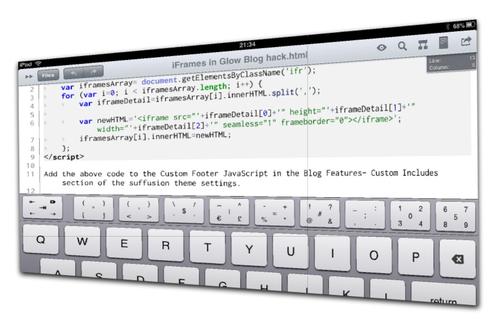
You can add JavaScript to the Custom Footer JavaScript field in the Blog Features– JavaScript to the Custom Footer JavaScript in the Blog Features- Custom Includes section of the suffusion theme settings. section of the suffusion theme settings.


	var iframesArray= document.getElementsByClassName('ifr');
	for (var i=0; i < iframesArray.length; i++) {
	var iframeDetail=iframesArray[i].innerHTML.split(',');
	var newHTML='<iframe src="'+iframeDetail[0]+'" height="'+iframeDetail[1]+'" width="'+iframeDetail[2]+'" seamless="1" frameborder="0"></iframe>';
	iframesArray[i].innerHTML=newHTML;
	};

Once that is added you can add a iFrame to a post or page by adding this sort of text with the html editor:

<div class="ifr">http://johnjohnston.info/flickrSounds/show3.php,400,500</div>

The above will result in an iframe showing the page http://johnjohnston.info/flickrSounds/show3.php with an iFrame height of 400 pixels and a width of 500 the idea is to be able to control the ifRame height and width.

What does the code do

For any other JavaScript neophytes out there this is what happens:

The code runs every time a pages is loaded.

  1. var iframesArray= document.getElementsByClassName('ifr'); this gets an Array of all the divs with a class of ifr.
  2. for (var i=0; i < iframesArray.length; i++) { we then loop through all of the divs with the class.
  3. var iframeDetail=iframesArray[i].innerHTML.split(','); we make a new array splitting up the content of the div, id URL,Height and Width
  4. var newHTML='<iframe src="'+iframeDetail[0]… we make an html fragment for the iframe
  5. iframesArray[i].innerHTML=newHTML; and replace the contents of the div with the iFrame code
  6. }; finally close the loop.

I am not sure how much longer glow blogs are going to be wordpress ones:

Glow Blogs (e-portfolios and school sites) – Stakeholders raised concerns about the plan to migrate away from the current WordPress implementation of Glow Blogs. In response to this, and to increase user choice, we continue to seek clarification on the feasibility of making available a new installation of WordPress that will be available in parallel with SharePoint Online. In the meantime you have my assurance that the data sitting in the current version of WordPress will continue to be available to you while we consider the next steps.

from: Glow Scotland » Glow – December 2012 update from Craig Munro

I really hope that we will not loose the traction gained by training many users, teachers and pupils in the use of wordpress blogs over the last year or so.

Create an introductory post, video, podcast, slideshow, etc., of yourself.  Tell us a little bit about yourself – perhaps, where you’re from, what you do, or what you want to be when you grow up – and let us know what you’d like to gain from #etmooc? A few paragraphs of text, or preferably, a form of visual or auditory media lasting between 30 seconds and 2 minutes is ideal. These are very rough guidelines – feel free to break every one of them if you wish.

from: #ETMOOC | A MOOC about educational technology & media – Coming January 2013

I recorded this with Quicktime thinking I could just trim without any edits, turned out I wanted to edit a wee bit so opened in in Screenflow to do a zoom or two. Would have just recorded into screenflow if I had known.

MOOC! by AJC1 Attribution-ShareAlike License

A bit before Christmas I signed up for #ETMOOC:

#etmooc, an open, online experience that is designed to facilitate & nurture conversations around the thoughtful integration of educational technology & media in teaching and learning.

from: Introduction to #etmooc | #ETMOOC

What is a MOOC

A massive open online course (MOOC) is a type of online course aimed at large-scale participation and open access via the web. MOOCs are a recent development in the area of distance education, and a progression of the kind of open education ideals suggested by open educational resources.

Though the design of and participation in a MOOC may be similar to college or university courses, MOOCs typically do not offer credits awarded to paying students at schools. However, assessment of learning may be done for certification.

from: Massive open online course – Wikipedia, the free encyclopedia

I’ve mooced a little before

I at least started a few mooc-like and other online learning things last year:

I found it quite difficult to stick to these ‘courses. ds106 and edtechcc being the easiest to hang in due to the social elements. The MechanicalMooc did have social stuff hooked up but just keeping up with the lectures and exercises took up more time than I had.

I was releaved to see this tweet from the course organiser:

What I am hoping to learn

Apart from the Topics & Schedule it looks like #etmooc with have a few valuable experiences:

  • There is a #etmooc Google Community where folk are introducing themselves, I’d kind of forgotten about Google plus, but this combined with a Scottish Education – Google+ group and a new iOS app will give an opportunity to look at Google+. I find it a lot easier to evaluate tools when using them for a real purpose. After the edtechcc course I understood a bit more about facebook groups. (I still do not love facebook but can see how folk would find it useful).
  • Alan Levine is helping organise the course, he is blogging how he is building the blog hub using FeedWordPress ( Building the ETMOOC Blog Hub (part 1) and Building the ETMOOC Blog Hub (part 2)). I am really excited about FeedWordPress, Charlie has built it into glew blogs and I really hope it is going to be available to Scottish pupils and teachers as glow evolves. (Still waiting for an announcement if we get to keep wordpress or move to sharepoint blogs).
  • There are a ton of folk signed up to etmooc, some I know, some I’ve heard of and some not I’ve already read some interesting stuff in the google group looking forward to lots of serendipity.

Getting Started

Hopefully I’ve fill in the form correctly and this post will get pulled into the ETMOOC Blog Hub | everything everyone publishes about ETMOOC. Next up is creating an introduction post:

Create an introductory post, video, podcast, slideshow, etc., of yourself. Tell us a little bit about yourself – perhaps, where you’re from, what you do, or what you want to be when you grow up – and let us know what you’d like to gain from #etmooc?

and the first #etmooc T0S1: Welcome & Orientation on Blackboard Collaborate. Not sure how that is going to work in with my time and work schedule, I hope they are recorded.


Eslabones / Links — [EXPLORE] by Juan R. Martos
Attribution-NonCommercial-NoDerivs License

Recent spotted mostly from google reader:

I’ve not posted much here recently, I have made a few posts over at my DS106 blog including in December:

Mostly playing around with gifs for the ds106 GIFfest which leads to messing about with JavaScript, flickr & freesound.org.

I had a way of generation a list of images and audio found with the same search word. I’ve now improved this to make a image/audio slide show like the one below. The new interface is rough as I’ve just added a button to get an iframe code that produces something like the one below.

Getting all the audio to play has been a bit messy, but it works for me in Safari, FF & Chrome on my mac and FF and IE9 on windows. Probably of little use to most folk as wordpress blogs, for one, usually do not allow iFrames.

Here are a couple more: drip and 404

Private by kh1234567890
Attribution-NonCommercial-NoDerivs License

In 1999, Scott McNealy, then the CEO of Sun Microsystems, famously observed that consumer privacy issues were a “red herring”. “You have zero privacy anyway,” he said. “Get over it.”

and

…so perhaps the rule to live by is this: don’t put anything in an email that you wouldn’t put on a postcard.

from: Lessons the tech world learned in 2012 | Technology | The Observer

In 1999!

Pretty much what I usually tell pupils: If you would not have it on your t-shirt don’t put it online.

As i was browsing my feeds this morning I read a post on the register that was over my head, AWS’ gift to sysadmins: a cloudy command line • The Register at the end of the article I notice a link to In the Beginning was the Command Line by Neal Stephenson. I’d read this a few years ago but thought I’d like another look so followed the link only to find:

oh no a zip The article, a plain text file was zipped. I am using an iPad, I didn’t want to read it enough to move to a computer so this is what I did.

  1. copy the url
  2. switch to iCab Mobile and open the page.
  3. Click the link and download.
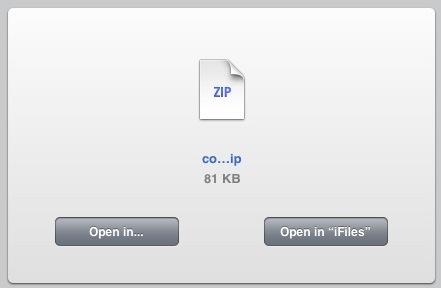
  4. open the download in iFiles: .1.
  5. unzip in iFiles (I like the wee unzip icon): unzip
  6. and read.

In the Beginning was the Command Line is an interesting read although it was written in 1999, an update/responce by Garrett Birke The Command Line In 2004 is good too, I guess another update in light of mobile computing would further explore Mr. Birke’s final question:

So I bought a Powerbook with OS X on it. And while an excellent solution, this is certainly not the only solution. A Windows 2000 setup on a Dell Inspiron laptop would be a fine second choice. And though there are many out there who have developed a comfortable Linux system for themselves, I believe that we should all be judged by the truest measure of the value of any personal computer: How much does it help us accomplish our tasks?

This post was written on an iPad in Texttastic, using a bookmarklet to grab links from Safari, native iOS screengrabbing, images cropped in the Photos app, resize and uploade with Pythonista. The post will be saved to dropbox when it syncs with my mac it will be posted to the blog via AppleScript. Most of this stuff helps get things done but some is just fun;)

1Well it seems that I was quite mistaken about the need for iCab. not that it is not a useful app. I switched to it when assumed that I could not open zip or sit files in Safari. I should have clicked the link:

open in ifiles safari

That would have saved a step.