
I’ve just posted this podcast episode over at GlowCast. GlowCast is a podcast for myself and colleagues in Glow. A short 3-4 minutes listen. The transcript is on the original post.


I’ve just posted this podcast episode over at GlowCast. GlowCast is a podcast for myself and colleagues in Glow. A short 3-4 minutes listen. The transcript is on the original post.

The blog I’ve enjoyed reading most this summer has been Clarence Fisher’s.
I’m still a believer that my default classroom tech set up: classroom blog, discussion boards, individual blogs, wikis, google docs and hangouts, flickr, skype, and a few random pieces of production software (audacity, etc) does more to give kids a voice, to connect them with people on the other side of the globe who have new ideas for them to evaluate, than 90% of the VC dollars out there have done with the latest apps.
The First 100 Years of Web Design 1
Is just one quote but I think anyone interested in using ICT in learning and teaching would get a lot from reading over his recent posts.
A Challenging Tweet is a great way of looking at and thinking about tech in schools overall.
This fitted with Second Life college campuses: A tour of abandoned worlds which I found via Stephen Downes
Clarence’s choices of tech to use parallels my own although I never could use some of these in the class due to blockages. The thing that strikes me about these choices: blogs, wikis, communications in general, is that they need some sort of long term care. One blog post will not a lot for your class or a learner. A series where they connect with another school across the world just might. This make this harder than grabbing an iPad and using a drill and practise app (I know easy target).
I am saying care rather than planning because a lot of goodness my classes got from blogs was serendipitous it could not be planned for. This takes me to:
The same sort of blind process happened in another series of experiments where Stanley and Joel Lehman instructed robots to work toward defined objectives. In one experiment a bipedal robot programmed to walk farther and farther actually ended up walking less far than one that simply was programmed to do something novel again and again, Stanley writes. Falling on the ground and flailing your legs doesn’t look much like walking, but it’s a good way to learn to oscillate, and oscillation is the most effective motion for walking. If you lock your objectives strictly on walking, you won’t hit that oscillation stepping stone. Stanley calls this the “objective paradox” — as soon as you create an objective, you ruin your ability to reach it.
from Stop Trying To Be Creative | FiveThirtyEight
Which sort of relate to my conversation with Charlie Love yesterday evening on Radio EDUtalk 2, where he talked about following learning interest in teaching coding in a creative way.
Charlie’s post Minecraft: A celebration of learning at #Minecon2015 about Minecraft if my final piece of envy for this post.
1. ↩
the linked post Web Design – The First 100 Years is great too.
2. ↩ Radio #EDUtalk 19-08-2015 Charlie Love
Featured Image giotto-envy on Flickr Public Domain.
Draftback is a Chrome extension that lets you play back any Google Doc’s revision history (for docs you can edit). It’s like going back in time to look over your own shoulder as you write.
from: Get Draftback to Play Back Google Docs
The above is not a video but an embed from Draftback!
Quite amazing, in the short playback above you can see how horrible a typist I am and also see Ian Stuart adding text to the document at the same time as me!
After I posted on G+ this Martian Hawksey commented with a link How I reverse-engineered Google Docs to play back any document’s keystrokes « James Somers (jsomers.net). Which give detail of the creation, a fascinating read.
The data that Google stores is, as you might expect, kind of incredible. What we actually have is not just a coarse “video” of a document — we have the complete history of every single character. Draftback is aware of this history, and assigns each character a persistent unique ID, which makes it possible to do stuff that I don’t think folks have really done to a piece of writing before.
And among explanations that go over my head things like this:
When you’re using Google Docs, you’re not actually typing into where you think you’re typing. You’re typing into a textarea in an iFrame off-screen, and through the postMessage API, those events are being sent to the “edit surface” that you see, which does stuff like draw your cursor. (Your cursor on Docs isn’t actually a cursor, it’s a 2px-wide
div!)
Would this be a useful tool in the classroom? For discussing pupil work or demonstrating writing?

Top 10 Reasons for Students to Blog by sylviaduckworth CC-BY
I tweeted this lovely image the other day when I saw it on Classroom Blogging Options. The Glow Blogs option was not discussed 😉 but I’d hope that it would be under consideration for Scottish learners and teachers.
Saw the graphic again today along with this advice from Stephen Downes:
It has been a while since I ran a good ‘blogging in schools’ post, but the activity – and the advice – still makes as much sense today as it did in the heyday of blogging. Maybe even more sense, because unlike the early 2000s, there are many other shorter and less-structured ways students can communicate online, and blogging pulls them back into the realm of extended descriptions, arguments, explanations, and actual efforts to communicate thoughts and feelings rather than quips and reactions (or should I say, reax). Theere are many reasons to write; conveying information is just one of them. Wes Fryer also summarizes a number of the tools available as we start the 2015 fall session. Nice graphic, too.
Classroom Blogging Options (August 2015) ~ Stephen’s Web
Some great advice.
Just in time for Blogging Bootcamp #2 | Get your blogs up and running Autumn 2015 which we are starting to organise. If you want to learn a bit about classroom blogging over 5 weeks you can sign up
I’m not on holiday at the moment but taking the odd day off over the summer. Yesterday was one. I found a good set of amusing links, here are a few.
The New Devil’s Dictionary From The Verge updates Ambrose Bierce’s The Devil’s Dictionary.
Examples:
blogger (n.): An invasive species with no natural predators.
GIF (n.): Many prefer to pronounce this word “GIF,” instead of the more controversial-sounding “GIF.”
music (n.): An art form whose medium is copyright law.
And so on.
This reminded me to google for an english translation of Flaubert’s Dictionary of Received Ideas, hoping as usual for a creative commons version that could be played with. As usual I didn’t find that but got In Place of Thought – The New Yorker by Teju Cole which adapts the idea for modern times:
COFFEE. Declare that it is intolerable at Starbucks. Buy it at Starbucks. EVOLUTION. Only a theory. FASCISM. Always preceded by “creeping.” FEMINISTS. Wonderful, in theory. FISH. A vegetable.
Ouch, that last one stung!
Checking Teju Cole (@tejucole) on Twitter as his ideas started as tweets, I found:
Back in March I had a wee shot of periscope. Since then I’ve sen a few notifications pop up on my screen, but not often had the chance to watch. Often they are fairly trivial, folk at the zoo or watching traffic or just testing the app.
Today I saw this tweet:
because i enjoy living on the edge, gonna try broadcasting my #UMGRC presentation in 25min on a platform i’ve never used. #whee #periscope
— Bonnie Stewart (@bonstewart) August 6, 2015
And hit the link. Turned out it was a presentation at UPEI Multidisciplinary Graduate Research Conference from a Workshop by Dr. Bonnie Stewart 1 on Becoming a Networked Scholar. 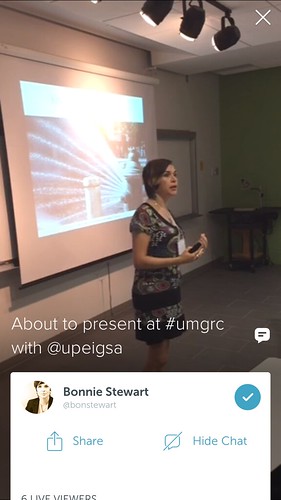 I watch the first 45 minutes of the broadcast from a couple of different rooms at home. A very engaging presentation on social media in Higher Education, much in my opinion directly transferable to PL in primary and secondary education. For a short while you can see the video at: Bonnie Stewart on Periscope, but I don’t think that will be around for long. After I tweeted out the fact I was watching some one asked me about the quality:
@daniellynds @UPEIGSA sound is great, visual not too bad, scren hard to see, but hey, other side of the world via a phone!
— john johnston (@johnjohnston) August 6, 2015
In the age of mobile we take for granted tons of things, but we now have amazing power to communicate in our pockets. For her tweets it appears Bonnie joined periscope just before she started broadcasting. It certainly didn’t take any technical expertise on my part to watch.
As I tweeted, the audio and indeed the video was very clear and synchronised. The Screenshot is slightly blurrier than average. The projector screen was not to clear, but the whole thing was very watchable. NB. bonnie’s slides are up here: Becoming a Networked Scholar.
I was supposed to be going to the post office but delayed as long as possible, I am pretty sure that the stream would hold up on 3 or 4g but unfortunately the audio is cut off when the lock screen is on. That might be an improvement for periscope or my audio bias showing.
This has certainly given me the idea that you can broadcast with periscope with a deal of confidence and make a good fist of it without a lot of prep. I guess if you wanted someone could screen capture the video. Looks like it might be a useful TeachMeet tool, classroom use would have to be though about carefully, but it could certainly be used to bring video into a classroom simply. With more and more primary classes using twitter it doesn’t seem much of a jump to use a teacher’s phone to project onto a screen or, network allowing, to watch on a desktop.
#tds34 How to achieve monkey mind | The Daily Stillness Today you get to find a quiet spot and read this Medium article by Sarah Buttenwieser. A 4 minute read how can you not have 4 minutes to invest in your well being? Well, it may be 10 after you do your task: select from the article and/or add to it and make your very own list on how to achieve monkey mind. You will smile and also remind yourself that you do already know ehow to achieve stillness – do the opposite of one item in your list each day! Tell us what is in your list?
The linked article gave me a good few smiles.
Wake up in the middle of the night, worry about lack of sleep.

My wish, my encouragement is just taking these ten second breaks. OK. You know. You know I can’t carve out a regular meditation practice every day and every morning, but ten seconds? Can you carve out ten seconds? And just do it, you know. You know when you’re going to work or something, you come
Ajahn Sucitto
downstairs and you go to open the door. You stop. Particularly in doorways and other thresholds where the tendency is to rush through… what is happening to my feet, shoulders back, ten seconds, breathing out. Where am I? How am I? Where am I going? There does not even really have to be an answer, it’s just this touching the earth. Touching the earth.
I guess this exercise is supposed to help with a busy working life, I tried it today far from work off in the hills.
Often when walking alone in the quite of the hills, I think over work, wonder about ideas, remember past sadness and even tell my self stories about walking.
This exercise, seems to physically open my view, expand the horizons and create quiet.
The sensation fades pretty quickly too but I’ll repeat the exercise in different places and see what happens. If it works when I am puffing up a slope it might work in the middle of town or work.
The previous post was an attempt to get the advanced Kanban open badge. This one follows up with an answer to the question posed in the P2PU Badges Project to my application and as wee thought about badge systems.
The feedback was questioning why I decided not to use the ‘Work in Progress’ system to limit the number of tasks in the doing section. I’ve already described the board I set up was to be used for Radio Edutalk. I’d had changed to do,doing and done for possible guests,shows and broadcasts.
I didn’t want to limit the doing(shows) section as that number will reflect the shows that are ready to go. A long list there is not a sign of doing too much but one of being prepared well in advance.
The feedback section in p2p is not that great. There is nowhere to enter answers to the question there. Hence this post and some blue sky thought. I wonder if a badge could send a trackback or something like it to a blog post, with feedback and /or a badge?
Maybe something trackback like (at least to my eyes) such as a Webmention (more:Webmention – IndieWebCamp).
So ideally (or in my imagination), the badge page has a URL. I write blog post in response giving evidence as to why I should get the badge. The badge pages gets pinged, creates my ‘project’ lets an approver/expert know. This person reviews the work and adds feedback to the project page and/or awards the badge. This action pings my blog post, adding the feedback/badge as a comment. Responding to the comment could answer feedback etc.
I am typing this pretty much from ignorance of the current badge scene perhaps this is already on some cards somewhere or already been rejected as a daft idea?
Thanks to Doug Belshaw who provide the opportunity to play with badges again.
On a walk today, and when I reached the reservoir I though about:
Go outside and walk in the direction that is the quietest. Continue until you’re in the quietest place possible. Take a moment to absorb it.
from: #tds25 Follow the quiet | The Daily Stillness
 A sheep started bawling, not so quietly and I moved into the larch to take the moment.
Â
How loud the burn,
Birds snatch my eyes, swallows skim the water and a robin bobs in a lower branch.
As I listen bird song quiets the water, as I focus on one song the others fade.
A baby wren trills along a branch, shouting for food.
The first midge bite moves me on, out of the trees and into the wind.
Â
Â