

Sunny with a fair breeze. Dorothy even got a little burnt.
The hawthorn is starting to bud, a bit late this year I think. lots of trees getting a fair amount of leaf cover.
Ferns coming through but little bracken on the hill so far, it is just starting to shoot.
Year: 2013
A Week in the Open

Teach the Web Week 3: the Open Web
Plan your makes with your collaborator and then do it! If you’re in a study group, you’re encouraged to work together around your topic. Share your makes with the #teachtheweb community.
Among the suggestions for reflection were:
- Why might sharing and publishing in the open be advantageous?
- What are the benefits of inviting people to remix ideas?
- What are some possible ways “free” tools aren’t really free? Or make money?
There are lots more suggested activities and reflections, but that was enough for me
Thinking about my activity in the Mozilla Webmakers – Google+ group this week gives, I believe, a little insight into some of these questions. I was not actively considering them, just reading and playing.
Working with Walter
First Walter Patterson a fellow Scot contacted me with an idea of working together on a thimble page about a couple of ‘open’ projects. We have started work on this. The first benefits of open I met were, getting an idea of what to do, Walter reminded me that EDUtalk was an open project. and then working off Walter’s thimble edits I got to a reasonable page: EDUtalk is Open (not as yet finished). I didn’t have an idea where to start until I’d seem Walter’s starting point. So the second benefit of working in the open is finding ideas, they don’t all come from serendipity.
Open Talk
Once I had thought of EDUtalk, I though that it might be a good place for talking about open collaboration. EDUtalk itself is an example of working in the open, part of it consists of a podcast that is open for anyone to contribute to. THe other part is a weekly internet radio broadcast that becomes a podcast, we publish in the open under a CC BY-NC-SA 2.5 SCOTLAND license. I invited folk from the Mozilla Webmakers community to participate, at very short notice. Chris Lawrence and Laura Hilliger stepped up and stepped into the skype studio for Radio #EDUtalk 15-05-13 #teachtheweb. This is another example of getting great contributors by working in the open. I am constantly amazed at the interesting folk I get to talk to just by running a podcast.
Open Learning
The rest of the week I have had a bundle of fun by getting ideas from other webmaker participants. One of the things I wanted to get out of the MOOC was to improve my webmaking skills. I’ve found it difficult to learn the skills by doing exercises, but often find, time constraints lead me to use less that elegant solutions when working on a ‘real’ web site.
This wek I’ve found that I’ve learnt by doing small things, these have been inspired by the open sharing of ideas and projects by others in the MOOC.
Crowning Chad
Somewhere in the group a comment by Chad lead me to mess around with a little CSS to make A Crown for Chad the request for others to mix it up was taken up by a few folk, Pekka Ollikainen took it to JavaScript, teaching us some canvas animation and showing this using JS Bin a great companion to thimble.
Thimble Tracking
I saw a post by Heather Angel wondering about how to to create a layout that is made to be constantly updated in thimble. As I had been wondering how to keep track of thimble edits I though I’d try something. Thimble Chaining is a simple thimble page with a google form and the resulting spreadsheet embedded. The idea would be to use the form to add your name and the url of the edit you just saved. Not very elegant, but it does the trick. I believe Mozilla are working on a solution that will track edits and pages spawned from the first page. This will would be a very useful addition to the system.
Open Is…
The last bit of fun this week was sparked by Chad again, he was making an “Open is…” inspirational web app collaboration from the Writing as Making, Making as Writing study group. The latest version by Chad is here: #teachtheweb: Open is…. As Chad was collecting quotes via twitter, I was thinking of automating that. I tried a couple of approaches, using ifttt.com to collect #open_is tweets to a google spreadsheet and then loading that via javascript: open-is – JS Bin I also pulled then in directly from a twitter search: Random #open_is tweet
What I was learning, using JS Bin was dealing with json in JavaScript, I got a lot out of this play, more that I do following tutorials or interactive lessons. I believe this increase in learning is due to playing in the open, the open provides the ideas and perhaps an audience. I am not sure if my edits are very useful, compared to human curation in this case but a great learning exercise for me.
Google + is not Open!
Of course it is open for anyone to join in. The Mozilla Webmakers – Google+ group is open to anyone and valuable for that. But I am struggling to keep up with conversation. The site works well for joining in with the moment, the iOS apps are great, but there is something missing. I can’t keep a record of my activities. I mentioned this in the last post too, but if I am learning here, I want to track my progress and wanderings. As a learner by progress is important to me and I am having trouble following it.
Picked up, ironically, via my Google Reader this morning was a post with much better, deeper thinking on this issue:
It seems to me that with Google+, Google is not adopting open syndication standards in two ways: not using it “internally”, and not making feeds publicly available. There may be good technical reasons for the first, but by the second Google is *not allowing* its community members to participate in a open content syndication network/system. Google’s choice, but I’m not playing.
from: Are We Just Google’s Lab Rats? | OUseful.Info, the blog…
Obviously I am playing, there is a lot to be gained from using G+, but I hope that organisers of powerful online learning communities like the teachtheweb one will have better tools to choose from sometime soon.
Connected Learning
The Teach the Web Week 2 is about Connected Learning in Practice
Last week we explored “Making as Learning”. We’re proponents of the idea that people learn best through making, but we also believe that making and learning are social activities. It’s a bit like the old idiom “If a tree falls in the forest and no one is around to hear it, does it make a sound?” If you make and learn, but don’t share and gather feedback, have you really learned? How do other people’s perceptions influence how we understand the world around us? How does being connected change the very fabric of our world?
So I am thinking about learning communities. Mostly about the practical way the connection happens in the #teachtheweb MOOC.
I joined this MOOC, the Mozilla Teach the Web. It follows the same sort of organisational structure as etmooc, using several different web sites and services:
- A Website, Teach the Web where information, announcements, tasks and the like can be posted.
- As part of that site a Blog Hub where participants blogs, or the appropriate category of said blogs, are aggregated.
- A twitter hashtag #teachtheweb
- A google plus community where participants can post links to their activities, discuss them etc.
This seems a reasonably inexpensive way to organise a learning community and for the most part works very well. I have only just started with the #teachtheweb MOOC and only fully participated in #etmooc for the first two or three weeks, but I’ve found, when I had the time, it is fairly easy to keep up with the communities.
As far as I can see almost all of the interaction, especially in #teachtheweb is taking place on the google plus group.
So there are 3 main spaces involved in this sort of community. These could be categorised as: Long Form, blog posts; medium on google plus and micro on twitter. Of course there is plenty of cross posting of blog posts to g+ and tweets that help connect the spaces together.
Each type of interaction has its benefits and each its drawbacks.
Own Your Own
One of the really appealing aspects of this set up is that participants own their own space and can participate by posting to their own blogs. This has been shown, for example in DS106 to be a powerful tool in community building.
Apart from the buzz and enjoyment of having a ‘domain’ of ones own the way blogs can be aggregated into one stream, either an official one, built on, for example, FeedWordPress or through the use of an RSS reader make it easy to connect with others while maintaining ownership of ones own space. WordPress blogs in particular (unlike this one) are great at collecting mentions or trackbacks from other blogs.
It would be interesting to see if this could be extended into the shorter conversations taking place on twitter and google plus. I’ve found the google plus communities to be good places to interact with other folk and keep up with what is going on. I’ve found it harder to keep track of what I’ve done there.
Google plus scores over twitter in the ease of interaction, there is more room for replying and the conversations can be richer in both media and length.
Hard to Collect
Google plus falls down in trying to find the things I’ve commented on or given a plus one. There is a page on google plus that lists things I’ve ‘plus oned’ on the web (I hardly ever do this) but it does not collect those I make inside a google plus community.
I’d really like a page where I could view my activity on the community. In twitter I use favourites as a quick way to bookmark things I want to revisit. I was in #etmooc trying to use the +1 button for the same thing, it doesn’t work, basically the use of the +1 is to let the person making the post know you like it.
I’d also like to be able to view a stream of my comments on other folks posts and one of my posts. Perhaps there is a way to do this that I’ve not found?
More sharing please
There are one or two features that could help. It would be nice to tweet a link to a google plus ‘post’, on an iPad. The iPad has a great google plus app, I’d like to be able to copy a link to a post. Unfortunately although this can be done in a desktop browser in a few click (a few too many) I’ve not managed to do this in either the iPad google+ app or in the few mobile browsers, safari, icab and chrome, I’ve tested.
I’d love the google+ iPad app to support the same sort of sharing that my ios RSS readers do.
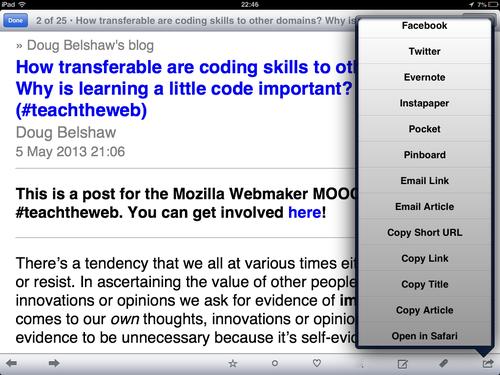
This RSS reader, FeeddlerPro allows me to customise the sharing menu, there are more possibilities that the ones I use.
If this was possible in G+ it would be a lot better at connecting my learning.
thimble and other Mozilla webmaking tools
These are being put at the heart of the practical tasks for the #teachtheweb MOOC. They are easy to use online web making tools. I’ve a few thoughts about how they work, but that is for another post. The feature that is really great for connecting to other learners is the idea that you can take another persons thimble project and remix it by simply adding a /edit at the end of the URL.
Unfortunately at the moment there is no way to see a trail of how different projects are being remixed. This does seem to be in the works. Once that happens this will be a more powerful tool for connected learning, one could see how others have remixed the same project and how people have improved and iterated on your project.
The other thing that would be useful would be to see the trail of your own iterations of an idea. At first I was annoyed by the fact that each time I saved an edit in thimble it was saved as a separate URL my next version would have a new URL. In fact this might be a positive feature, if tracked, it would allow me to see and share my progress through a task.
Pulling it together
What I’d really like if for all of the sources of activity to be able to be gathered, aggregated redistributed and mixed up together. I imagine a page where I could see links to all of the recent blog posts, tweets and google plus stuff, even better if things you made with the web maker tools were in the mix. This could be filtered so that you could view one persons activity, or activity around a particular tag or topic, eg. Week2
I guess there is not a lot of hope for this emerging from the tools available at the moment, twitter removed RSS and g+ has never supported it. Understandably these free to use services are interested in keeping you inside their own environment rather than viewing content from them on other places. I wonder if better tools for open learning are around the corner.
Here’s iterating at you, Chad
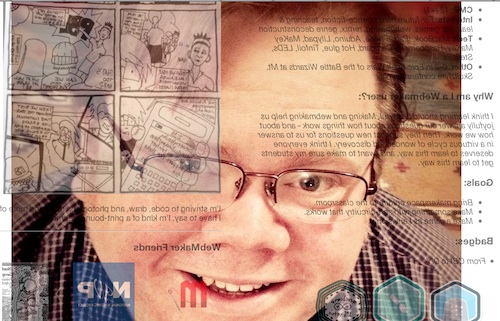
Week two of the teachtheweb mooc starts with a challange: Explore the awesome makes from last week, choose one, and remix it.. At lunch today I though I’d take a very quick stab at this using Chad’s Webmaker Profile, as Chad is a fellow ds106er and I though he would enjoy the play.
The First shot
Given I was on my lunch break, I though I’d just flip the profile: Chad’s Webmaker Profile. I went to Chad’s original profile and added edit after the url, this opened thimble for me to edit his profile. I know that you can flip, turn and rotate elements of a webpage via the css transform. A quick google and I came up with:
transform: rotateY(0.5turn);-webkit-transform:rotateY(180deg);
This rotates content 180 degrees around the y axis. I added it to the css section in thimble, changing this:
body { font-family:Open Sans, "Helvetica Neue", Helvetica, sans-serif;width:1000px;margin:0 auto; }
to this:
body { font-family:Open Sans, "Helvetica Neue", Helvetica, sans-serif;width:1000px;margin:0 auto; transform: rotateY(0.5turn);-webkit-transform:rotateY(180deg);}
I think you need to use both transform: rotateY(0.5turn) and -webkit-transform:rotateY(180deg) to get cross browser support, but I might be wrong.
Quite please with 3 minutes work I posted to the G+ Community.
Looking out
Between a comment and an image I made for ds106 a while back, I started thinking about the page being a view out of the computer, so it should be looking at Chad:Chad’s Webmaker Profile.
On this edit, I’ve added Chad’s photo, hotlinked from his g+ images as a background image. All this took was adding a wee bit nmore css to the body:
background-image:url('fullimageURL.jpg');
	background-repeat:no-repeat;
	background-attachment:fixed;
	background-position:center;
In the bloc above I’ve shortened the url, I used the full url to the image. The code first adds the iamge as a background to the page, ensures it does not repeat, fixes the position to the window and lastly centres it.
Itterating
What is probably irritating for my fellow MOOCers is that I am posting these and as I post geting more ideas, this means a lot of space is taken up on the G+ group.
As I post the last one, I irritate myself as the background picture does not fill the screen. Google again and I get this:
	webkit-background-size: cover;
	-moz-background-size: cover;
	-o-background-size: cover;
	background-size: cover;
All 4 lines do the same thing for different browsers.
I also notice a new post with an audio mashup, this reminds me of Freesound where I find: Freesound.org – “computer-noise_desktop_quadcore_2009.wav” by matucha, I know Freesound supply low quality mp3 and ogg files so add an audio tag to my page, just after the body tag:
<audio autoplay>
	  <source src="http://www.freesound.org/data/previews/160/160465_739478-lq.ogg" type="audio/ogg">
	  <source src="http://www.freesound.org/data/previews/160/160465_739478-lq.mp3" type="audio/mpeg">
	  Your browser does not support the audio tag.
	</audio>
As I don’t have any controls in the tag, the player does not show, but autoplay gets it going when the page loads.
Finally I remember that Chad suggested a gif, so I download his image and make a gif of him rolling his eyes. Upload that to google and hotlink instead of the original jpg as a background. finally I have: Here’s iterating at you, Chad, I had to save twice as I needed to attribute the audio which is share under a Creative Commons — Attribution 3.0 Unported — CC BY 3.0 license.
So here is the Final version:
Here’s iterating at you, Chad.
Musing about Making
So like a lot of the things that I do for fun, this sort of bumbled along with one shot leading to the next. What was great about doing this inside the #teachtheweb community was there were lots of ideas to bounce off. This blog post was started after a comment on the final link I posted. Does that make this connected learning?
One of the lovely things about html is, if you know sometinhg is possible the method is just a quick google away. I wonder if that makes web editing a more accessable way of encouraging creativity?
Thimble thoughts
I’ve made between 6 and 10 experiments with Mozilla Thimble now, which makes me an expert
I’ve found it a wee bit slow on older computers, so I’d think about that before using it in a class.
The split screen view is really good for seeing the changes made to the code take effect. I would however like the option of a tabbed screen so that I could see the whole of the preview without needing a huge screen. I’d also like the forthcoming ability to re-edit a page rather than having to save with a new url. The trail of urls is good for reviewing the process and blogging about it.
I would also like thimble to keep a track of my creations, I am pretty sure I’ve lost track of a few.
The most powerful features of thimble are, for me the templates which have great comments and the way you can easily edit someone else’s creation.
The Whangie
First published on Fargo moved here 22 Jul 2019
After working when most folk were on holiday today I took a quick walk round the Whangie this evening.
Dull overcast sky, but no wind and it has warmed to about 13 C

Heard my first cuckoos of the year. A few grouse gobbling on the moor to the north of the Whangie, this has been planted with trees so I guess grouse will get scarcer over the next few years.
Whangie may 13 – Google Maps
Needed to get images and kml file from dropbox, google maps api changes since 2013, needs a fix 22 Jul 2019
Hello Teach the Web
I’ve just Joined Teach the Web:
Teach the Web: a Mozilla Open Online Collaboration for Webmaker mentors
May 2 – June 30Learn how to teach digital literacies, master webmaking tools, develop your own educational resources, and take what you learned back to your communities and classrooms.
from: Teach the Web
The first task is:
MAKE Project this week: Introduce yourself @Webmaker style by using Popcorn Maker, Thimble or the XRay Goggles and sharing your make with #teachtheweb.
from: Teach the Web
Which smells quite like the #etmooc first task, so I decided to remix and recycle my Hello #ETMOOC youtube video with popcorn.
Popcorn Maker has evolved a lot since the last time I looked at it, Playing with Hackasaurus and popcorn, back then I gave up and used the Popcorn.js javascript files and edited by hand. At that time, I found popcorn maker really slow and klunky on my equipment. Since then it has really taken a jump (and I am on a better box). I found it really easy to use, and would say it would now be very usable in a classroom.
One of the things I am lookingfroward to finding out about is how folk fit webmaking into classrooms, as opposed to afterschool or out of school activities, but that is for later. Now I’ll jsut try and see what is going on in the #teachtheweb community.
Joining Teach the Web
I’ve just joined in the Mozilla Teach the Web MOOC.
This post is just to make sure that the feed I’ve submitted works.
Just for fun I am posting this through a new webservice Fargo. Fargo is an online outliner that can post to blogs, and do more interesting things. It might be of interest to other folk doing Teach the Web (I will have to go to the blog and set the category, to make this post show up on the Teach the Web blog hub.
Testing Fargo Blog posting
I am testing Fargo, an online outliner that can post to wordpress blogs. Although my blog is not a wordpress one, it still has MetaWebBlog support.
I have never really used an outliner much although I’ve use the OPML application to read RSS from time to time. Fargo may just change that. Fargo runs in a browser, stores in dropbox, supports markdown and gets new features very regularly.
I am wondering if Fargo supports images in blog posts so here is one from flickr.

Update: it looks like updating posts on this pivotx blog, does not work. The blog seems to return the wrong post id to fargo, I have the same problem posting from TextMate.
Fargo is well worth checking out.
EDUtalk Setup – WordPress Tech Notes

These are some technical notes on some of the changes I’ve made to the standard WordPress site for EDUtalk, I am not sure if they are of much interest to anyone but myself, but writing them up here will, 1. get them clear in my mind, and 2. provide a reference.
The site is running on WordPress 3.5.1. I made a child theme as I wanted to edit some of files and mostly be upgrade proof.
If you have no interest in this you might be interested in the main facts of the move: EDUtalk Has Moved, or just head over to EDUtalk and listen to some great audio.
Plugins
- Akismet, spam protection, pretty much a no brainer.
- FeedWordPress, this is very much at the heart of the new site, this plugin allows you to syndicate content from other sites, in our case audioboo boos tagged edutalk and iPadio phlogs with the same tag. Posts form these sites with the tag are added to EDUtalk. The plugin also allows us to make the titles link to the original site rather than our own post page, I believe this is a better way to do things for the authors who submit content by tagging.
- MediaElement.js – HTML5 Audio and Video, I installed this initially but it is now turned off. Instead I have used this JavaScript myself. As I understand it the plugin will provide html5 and fallback players for audio inserted with a short code player. As a lot of our content comes via FeedWordPress it would not work there unless we manually edited posts.
- In the process of importing all of the old content I found the Categories to Tags Converter Importer and WordPress Importer plugin invaluable.
- The Safe Redirect Manager plugin redirects links from the old site to the new one, for example, /pages/radio-edutalk to /listen.
Child Theme Files
It seems that the way you best edit a WordPress theme is through Child Themes, this avoids problems when upgrading.
I started by copying the content.php file from the theme to the child theme folder. Here I edited the php to add an html 5 audio player to the top of a post, if the post had an enclosure. I used:$enclosureData = get_post_meta($post->ID, 'enclosure' ); to find out if there was an enclosure. I had a bit of hassle as Audioboo encloses images as well as mp3s, but looped through the enclosures and used the first audio one I found.
I had to edit the main theme function.php file to comment out a bit of code that removed enclosures if they were not linked in the post. This proved a problem when doing some manual edits of the imports. I got information on how to do this from this post: How to stop WordPress 2.8 – 3.5 from deleting enclosures | Kevin J Edwards. The main tool used in building edutalk.info was google. In this case I edited the theme’s own function.php file, rather than the child themes, as the child theme’s function.php is added to, rather than replacing the parent theme. If there is a better way to do this, I’d like to know.
I did create a child theme function.php and added functions to include the jQuery and MediaElement.js. I then copied the footer.php to the child theme and added a script to added a flash player to the audio tags for browsers that do not play mp3s natively.
jQuery(document).ready(function() {
	jQuery('audio').mediaelementplayer();
});
Pretty simple stuff.
Originally I added a bit more jQuery to hide the audioboo and ipadio players and maps in the post. They were not making the posts look very nice, and I found it difficult to style them. Later on, as I found that the pages were loading very slowly, I went back into the content.php file and added some code to only show the post content, if it was in the Radio Edutalk category. Even with only 6 posts per page this made a huge difference in speeding up the page loading (twice as fast). I changed:
<?php the_content( __( 'Continue reading <span class="meta-nav">→</span>', 'twentytwelve' ) ); ?>to
<?php if(in_category(5)){the_content( __( 'Continue reading <span class="meta-nav">→</span>', 'twentytwelve' ) );} ?>5 being the category for Radio Edutalk, I’ll be adding another category for mailed in audio if needed. Thinking about it it would be best to change to not in the audioboo and ipadio categories.
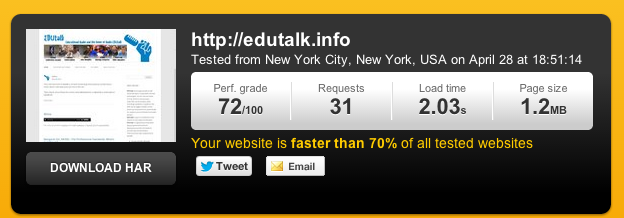
Altogether it was not very hard to figure this out with the help of google. WordPress is extremely well documented. The code is also easy to edit, without having to understand the whole thing. There are probably a lot of better ways to do this, and I’d be delighted to find out.
I’d also be interested in any other ways to improve the site, speed it up or add useful features.
EDUtalk Has Moved

A while back we heard that posterous was shutting down. This was quite bad news for EDUtalk, we had a lot invested (time and files not money) in our posterous site.
I had a look at alternatives, Posterous to What? and decided on a way forward EDUtalk, post posterous part 1. Since then we have been beavering away moving nearly 1000 bits of audio and the posts over from posterous to a new wordpress site.
One of the problems was the amount of space we need, there is already over 2GB of audio files hosted. Luckly Tim Owens @timmmmyboy of Hippie Hosting made us an offer we could not refuse!
The new site is by no means finished, but though that it was time to flick the switch and iron out any problems. We built the new site at edutalk.info, Just Now Last night I changed the nameservers for edutalk.info to point to the same place. As I am typing this, the new site is, at least in my house, being reached via edutalk.info, I am excited.
Changes
One of the great things about posterous was the wonderful way it handled media and its API. The api made it simple to pull in audio from Audioboo and iPadio, the FeedWordPress plugin makes this even easier. There is even a couple of benefits:
- We can have the titles and links to the posts point back to the originating site.
- FeedWordpress adds the enclosures to the feed, we were relying on Feedburner to create enclosures for Audioboo and iPadio posts and it was failing to do so. The new RSS feed has enclosures for all the content, a great improvement for listening in a podcatcher.
The other thing Posterous did for us was to give us an email address that anyone could send audio to and it would be pushed into the moderation queue to be published. This was the feature that got us started at SLFtalk. Posterous was really brilliant at handling spam, we never really saw much and, as far as I know, it never trapped any audio intended for the site.
There is a way to post to wordpress via email, but there is no spam filters so I don’t think that would work. What I’ve done instead, as a temporary measure is set up an email address audio@edutalk.info where folk can send audio, I’ll check it, convert audio to mp3(Again posterous was great at handling media), and post to the site. This will obviously be a wee bit slower that the old method.
Bonus Feature
As we are using FeedWordpress, we could incorporate other RSS feeds onto the site, this would allow folk to add audio from their own RSS feeds rather than just Audioboo and iPadio. I’d be delighted to hear from any one interested.
Technical Details
As I’ve poked around in the wordpress files to get the site going, I’ve done a wee bit of editing, I am going to blog about those soon, mostly for my own benefit.
An Open Invitation
As always, EDUtalk is open to contributions for anyone with anything to say about education. We are always delighted to get new contributions. We are also more than happy to help if you would like to get some audio onto the site. Please get in touch.
There is, of course, also an invitation to listen. There is some great podcasts on EDUtalk, the RSS feed is better making listening on mobile devices even easier.