
Glasgow, Glasgow City, Scotland
This audio file was orginally posted to AudioBoo(m) with the mobile app. It has been downloaded and posted here since audioboom no longer supports free accounts.

Glasgow, Glasgow City, Scotland
This audio file was orginally posted to AudioBoo(m) with the mobile app. It has been downloaded and posted here since audioboom no longer supports free accounts.
On Thursday there was a fair bit of tweeting about delicious shutting down. TechCrunch blogged Is Yahoo Shutting Down Del.icio.us? (this post is now updated).
The first thing I did was backup my delicious links.
I’ve got several years worth of delicious links so was a wee bit worried. I also prefer delicious to any other system for saving links I’d seen. It is simple, the interface is clean, the network is useful without turning into another social thing and the API and scripts are useful. I have also used the delicious tools to display sets of links on various webpages (quite a lot in glow) which I don’t want to hunt down and change.
There have been a lot of suggestions for delicious replacements Diigo seems to be a favourite. I looked at this a while ago and, for reasons I can quite recall (probably lack of simplicity), I didn’t stick with it, although a lot of education folk use it. I downloaded Scuttle again and though about setting this opensource delicious like site up but I’ve not done so yet.

Yesterday I signed up for pinboard this cost about £5 to signup which I hope will mean the service will not go away. I imported my exported delicious link.
I choose pinboard mainly for its delicious like simplicity and the fact it supports the delicious API.
Today things look a little brighter for delicious: delicious blog » What’s Next for Delicious? but I am quite happy to have paid my fiver. I’ve set pinboard to add any new links I post to delicious and set up an email address to post links from my phone. There looks like there are a few more useful features to explore later. I’ll keep using delicious at the moment and see how things go. It is, I feel, a good thing to get occasional reminders about our reliance on free services and to get the opportunity to pay for ones we really need.

A while back I noticed More Code Fun: Reading (or ‘to Read’) List – CogDogBlog which pointed to Reading: keeping on top of stuff I save | Helpful Technology The site has a nice byline Digital innovation for people with more sense than money when I grabbed the code to create my reading list.
My reading list pulls together various RSS feeds: my delicious, things live starred in google reader, instapaper & instapaper. I read my google reader and twitter on my phone. I don’t always want to follow the links so star or favourite them for later consumption. The reading list. pulls all of these together. Easy to use and I like the way it combines existing services rather than needing a new one. I’ll easily be able to add other feeds if I want to later on.
“REMEMBER! Real snow is the best! You should only really be here if you get too cold or fed up with playing out, snowballing or building snowmen!”
RSS image from used under NounProject Creative Commons — Attribution 3.0 Unported
I love Audioboo. We use it as one of the ways to publish to edutalk.info and I’ve joined in tagging some boos uksm for the UK Sound Map project.
Audioboo must be one of the simplest ways to do audio podcasting and it has many nice features. One of the ones that interests me most is the fact that the RSS feed has geo information in it, that is the location that the boo was recorded in (users can I believe turn this off). I have played about with the google maps api in simple ways (eg some walks) and really like the ability to tell a story in space as well as time.
Yesterday I though I’d have a look at the Audio Boo RSS feed (atom really) and see if I could do something similar.
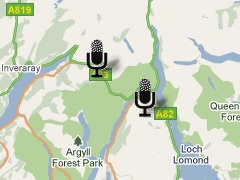
Since google maps support GEORSS I though I’d give that a try first, pasting my audioboo feed into the search box on google maps give me this map which shows the boos without the audio players (no flash support).
I had forgotten about the audioboo api so just recycled some of my old walks stuff
I made a few Adjustments, I usually use magpie RSS Reader for RSS parsing, but I could not get it to work for the
I am caching the rss feed from AudioBoo so updates might not appear. It would be easy enough to set this up so that the page would load boos from a user or tag in the url /boo.php?tag=thetag or /boo.php?user=user too, but might effect my bandwidth.

The other interesting thing I found was Shadowmaker a webpage that makes shadows for google map icons which is a nice touch. On the walk maps I never got round to doing that. Shadowmaker makes it so easy that I could not avoid it.
Anyway I think this would be a really nice way to podcast a school trip, once a page like this is in place it will reflect any updates to AudioBoo. You could also make one that would map a boos that were tagged with a particular tag although I don’t think AudioBoo had feeds for tags from a particular user?
I’d love to hear from anyone with a class or school interested in a project like this and lend a hand.
If you are interested in learning about custom google maps I’d recommend the Google Maps API Tutorial.
Coatbridge, North Lanarkshire, Scotland
This audio file was orginally posted to AudioBoo(m) with the mobile app. It has been downloaded and posted here since audioboom no longer supports free accounts.
Another positive of being an airhead was that one or two folk noticed my site was down.

@johnjohnston Flickr CC is down
Thu Dec 02 17:26:13 +0000 2010 from TweetDeck captured: Sun, 05 Dec 10 18:14:33 +0000
And when it came back, in particular A flickr CC search toy, tombarrett tweeted it again with the usual effect, including this one:

@johnjohnston @tombarrett looks good! Have you seen http://bit.ly/hevGEF It’s what we use in FE and HE.
Sat Dec 04 08:35:34 +0000 2010 from Echofon captured: Sun, 05 Dec 10 18:16:31 +0000

I think I had seen Xpert Attribution tool before but it was not at the front of my mind. Looking at it reminded me of the nice way they add attribution by padding the image at the bottom rather than the way I was doing it (stamping over the image). I had tried to work out how to pad an image before but failed. This morning I spent a wee bit of time digging around the PHP: Function Reference and managed to figure out a couple of things, padding the image, and wrapping the text when it is too wide for the image.
Like the rest of A flickr CC search toy the code is surely pretty horrible, but it seems to work.
I also looked over the How do I properly attribute a Creative Commons licensed work? on the FFAQ – CC Wiki again just to make sure I am keeping within the guidelines.
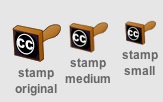
THe other thing that I’ve changes is to add a 3rd size to the stamped images. I’d avoided the small size as the attribution rarely fitted on the images, now I am padding them they do not present the problem.
Using the stamped image has the advantage of the attribution sticking to the image where ever it goes and as far as online use goes keeping the image under your control an avoilding problems if a user deletes their image when you hot link to flickr.
As always I am interested in any suggested improvements I can make to A flickr CC search toy the idea is still to provide pupils a practical way to use and attribute Creative Commons images from flickr.
Glasgow, Glasgow City, Scotland
This audio file was orginally posted to AudioBoo(m) with the mobile app. It has been downloaded and posted here since audioboom no longer supports free accounts.

Smile at a stranger by Nina Matthews Photography
Attribution License
A couple of folk might have noticed that this blog and site was down for the last couple of days. The first day or two was a problem with the host who fixed things last night. At about the same time as johnjohnston.info came back up I was checking to see if ftp was still working, unfortunately as it turned out, it was.
Somehow while using Cyberduck to browse the site I managed to drag the public_html folder inside another folder. I was intending to download as a backup, I turned round to speak to my wife and when I looked back I could not see the folder. I presumed I must have deleted it, even though Cyberduck asks for confirmation to delete. At that point the site came back up and of course everything was 404. I quickly contacted by host again and asked him to restore from backup. When I woke this morning the backup seemed to have taken place, but the site was missing except for 2 folders.
Again I contacted my host. Having a last look round the site for some reason I opened up the ruby folder, there was my public_html folder safe & sound. I’ve moved it back and all seems fine.
I have done daft things on web servers before this, but this is the silliest I think. Hopefully a lesson learnt.
It also makes me consider my rather haphazard backup strategy. Recently I’ve been editing html etc directly on the server which means no local backups. I download by blogs database occasionally but often images are uploaded while blogging and deleted from my desktop, I guess I should start using flickr all of the time for image storage.
It has also made me realise how much I value this site, mostly for the time spent on various web experiment which never see the light of day but I would not like to lose. I have a fairly robust desktop backup system, Time Machine and SuperDuper! the later has saved me a couple of times. I need something equally robust and idiot-proof for this website.
As I wonderd if schools were open this morning I checked the North Lanarkshire Council : Winter schools daily update webpage which was down so turned to nlcwinter (nlcwinter) on Twitter there were no new updates at that time so I tweeted:
@nlcwinter http://www.northlanarkshire.gov.uk/winter is down?
— john johnston (@johnjohnston) November 30, 2010

@nlcwinter http://www.northlanarkshire.gov.uk/winter is down?
Tue Nov 30 07:14:02 +0000 2010 from web captured: Tue, 30 Nov 10 01:59:51 -0600
Very quickly I got this mention:

RT @johnjohnston: @nlcwinter http://www.northlanarkshire.gov.uk/winter is down? http://bit.ly/gyzVwx
Tue Nov 30 07:17:20 +0000 2010 from twitterfeed captured: Tue, 30 Nov 10 08:00:43 +0000
Intregued I went to isdown (isdown) on Twitter where the profile weblink lead to this tweet:

Learning from first hand experience this is an interesting search on Twitter: http://tinyurl.com/57fzra
Sat Nov 22 18:24:21 +0000 2008 from TweetDeck captured: Tue, 30 Nov 10 08:01:21 +0000
I am guessing someone is using something like twitterfeed.com : feed your blog to twitter to auto tweet the rss for the twitter search (probably using advanced to skip too much recusion by getting @isdown’s tweets?)
I’ve used twitterfeed.com to post my blog posts to twitter and for @scotedublogs to tweet all the new ScotEdublogs posts but this takes it a bit further, I guess they use the syntax for not including tweets from @isdown itself.
Anyway an interesting way of using twitter that has me thinking a wee bit. I’ve not tried any simpe twitter stuff since the OAuth authentication came in, might be time to have a wee look at it.