A while back I posted about a system for Simplifying the glow logon I was developing. Hopefully some folk in North Lanarkshire will be using this next term.

Yesterday I was thinking about another way to improve the glow logon screen again along the lines suggested by Sean Farrell – logging into glow at TeachMeet SLF 2010

This is a very simple way to ‘improve’ the glow logon, works in Safari and Firefox and is ready now. It works by using a JavaScript bookmarklet which can be added to your browsers bookmark bar, clicking it on the glow logon page results in:

  1. The font size of the username & password fields is increased.
  2. If you hover the mouse over the password field it will show you what you have typed into the field.

Here is a wee video showing how to add the bookmarklet to a browser and using it on the logon screen.

If you would like the bookmarklet you can get it from http://glo.li/hecNqX.

Or just drag this link to your bookmarks: Big Log On

It should be easy enough to make this work in Internet explorer too.

At the moment the bookmarklet just loads this simple script.

For historical reasons and to give myself some sort of illusion of control I tend to write blog posts in html. I use TextMate and its blogging bundle which does all sorts of nice things to simplify the process: for example dragging an image onto TextMate’s window, uploads the image to the blog and inserts the html code to put it in the post. What is even nicer is that you can drag images from ImageWell after a quick resize or edit without saving it.

I also use SafariStand which added copy html tag to the contextual menu when right clicking on a link and to Safari’s toolbar:
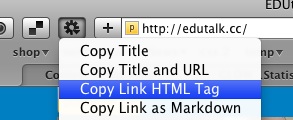
Copyhtmltag

I also save the TextMate files to my dropbox so that I can edit the posts on different boxes.

On the iPad

I am not hoping for the power of TextMate for editing html but wanted to do some blogging from an iPad. I’ve managed ok using the Notes app, and using dragon dictation to ‘write text’ but hadn’t found a solution to some other features. After a bit of testing I’ve now got a fairly useful toolkit.

Dropbox integration, html editing: Textastic allows you to open and save to dropbox, does syntax highlighting and to easily type various characters that are normally buried in the iOS keyboard.
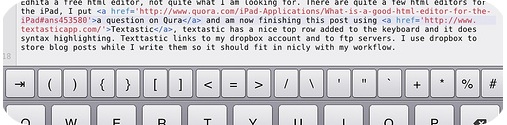
Textastickeys

Images, there is not a way to upload images to the blog that fits in with html editing, but it is easy to upload images with the flickr app to flickr. Unfortunately neither the Flickr App or the mobile version of Flickr do not provide the html code. however toy can switch to the full site which works fine on the ipad. This can be pasted into Textastic. That makes posting images simple if a little long winded: Screenshot, edit in an app, save to camera roll. Open flickr app and upload, open Safari and grab html code, switch to Texttastic and paste.

Getting links, was the last piece of the jigsaw, as well as grabbing html link tags from Safari Stand or CoLT in FireFox, in TextMate you can select some text and press command-control-shift-L and TextMate will use google to provide a link, not always the right one but very useful. Getting links on the iPad was a bit tedious, switching between Safari and Textastic and typing the code, pasting in the url. I did a bit of a google and came up with nothing. I’ve now come up with a simple, if crude, system. I’ve created a bookmarklet that adds a bit onto the top of a webpage with a text box in it, the textbox contains the html tag to link to the page:
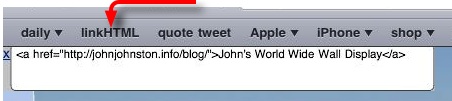
Linkhtml

The bookmarklet link has the following code:

javascript: (function(){document.body.appendChild(document.createElement('script') ).src='http://www.littlefishsw.co.uk/link.js';})();

I added the bookmarklet to Safari on my desktop which syncs with my iPad. The bookmarklet uses this JavaScript File, if you care about JavaScript I would not look at it;-) I just kept changing things till it worked for me. I can now add a link to Textastic by switching to safari, loading the page and clicking the linkHTML link on Safari’s toolbar. The switch back to Textastic and paste. As I mention the code is not exactly slick, I couldn’t get mobile Safari to pre select the link (it works in a desktop browser) which would save a couple of clicks but it does work well enough to use if I want to blog but only have an iPad.

I am an edutalkr

it is now well over a year since EDUtalk kicked off.

EDUtalk is a project to gather the voices of educators using mobile technology.The idea is that anyone can join in and post audio snippets to the site. This can be done in several ways.

Looking over the last week shows a strong and varied collection of voices:

That was a pretty interesting mix of content. I’ve got into the habit of listening to the podcast in my car and every episode has given me something to think about. There is an open invitation to anybody interested in education to post content to EduTalk in a variety of ways: How to EDUtalk fell free to join in any time. You can also contat myself @johnjohnston or @parslad for more information or help.

FeeddlerRSS icon

I’ve been neglecting this blog again for the last wee while. Not because I’ve nothing to blog about but due to lack of time.

I’ve also been neglecting most online activity, twitter, my rss reader and am just about keeping up with email.

In a, possible vain, attempt to keep it going I though I’d post links to a couple of interesting things I’ve seen recently.

>

Interesting things

purpos/ed

purpos/ed is a great source of ideas to think about.

We’re a non-partisan, location-independent organization aiming to kickstart a debate around the question: What’s the purpose of education? With a 3-year plan, a series of campaigns, and a weekly newsletter we aim to empower people to get involved and make a difference in their neighbourhood, area and country.

There are already a ton of thought provoking posts giving individual views of the purpose of education and I’ve not read half of the ones published so far. Coincidently as I am typing this I got a link to purpos/ed Summit for Instigators chaired by Josie Fraser this looks like a really exciting event. If you are thinking of going please consider contributing to EDUtalk  while you are there.

Another thing I missed was the Game To Learn Conference. I did see a fair bit of tweeting around the conference, Twitter / Search – #gametolearn,  and hope to catch up with some of the videos and presentations from the two days. some I have seen are #gametolearn – Playful Learning: Geocaching Workshop and a couple of prezi’s Nintendogs – Game to Learn by Anna Rossvoll on Prezi &2011-03-18 GameToLearn by Charlie Love on Prezi both of which make you want to have been at the presentation. As a side effect made me sort of see the point of prezi, always made me a bit seasick before, it fits well with gaming meme.

As well as bring invoved in Game To Learn Charlie Love had time to put together Computing Teachers? Time to wake up which has gathered a great deal of positive comment, interesting read even if you are not a computing teacher.

Other than that I’ve mostly been iOSing

Texttastic

We had news of the new iPad and some new iOS software, I’ve downloaded garageband and iMovie, I had hoped to write a post comparing iMovie to reelDirector but didn’t get past the screenshots: iOS Move Editors – a set on Flickr.

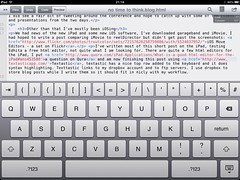
I’ve written most of this short post on the iPad, testing Edhita a free html editor, not quite what I am looking for. There are quite a few html editors for the iPad, I put a question on Qura and am now finishing this post using Textastic, textastic has a nice top row added to the keyboard and it does syntax highlighting and previewing. Texttastic links to my dropbox account and to ftp servers. I use dropbox to store blog posts while I write them so it should fit in nicly with my workflow.

i hope to manage a slightly more coherent post soon but in the mean time I think I’ve managed  to put in links to far better things than i could produce.

Great conference, here is the official blog: ISRU Conference 2011 where I believe all the slides and video of the keynotes will appear in time. The tweets: http://www.tweetdoc.org/View/9984/ISRU11 and Flickr: The ISRU11 Pool

A very interesting day with lots of food for thought. I posted a couple of Boos when I got home.

Listen!

And the second boo, apologies for the speed and ems

Listen!


iPad stand by tim_d
Attribution-NonCommercial-ShareAlike License

I was pretty impressed with the iPad 2 which was launched this week. Some nice new features and the speed bumps especially in JavaScript sound good.

I’ve continued to test an iPad and this week I spent a wee bit of time using it to access glow. I’ve talked to a few pupils who access glow at home using an ipod touch, and have occasionally used my iPhone, but find it a bit of a strain on the eyes (The pupils I’ve talked to don’t seem to have the same problem).

On an iPad Glow works pretty well. The iPads limitation on now allowing file (picture) uploads in the browser is a bit of a draw back but a lot of the other feature are fine. Editing webparts works as well as it does on Safari on a mac. The text editor continues to frustrate me but I am resigned to avoiding it use by now.

I successfully posted to my glow blog: iPad Glow blogging without trouble. Again I could not upload photos, but it is easy to workaround using flickr, I used my flickr CC search toy which did the job and sorted the attribution.

The WYSIWYG editor did not work, but I was please to see that the html editor respected line breaks, adding paragraphs. typing <p> with an iPad is a bit slow.

I also tried using the iPad to edit a wiki page. Again WYSIWYG was turned off and this time there was no auto paragraphing. Again I could paste in the embed code for a flickr photo. The font size was a wee bit small for me, but would be fine for most youngsters.

What it would be nice to see would be support for the MetaWeblog API in glow blogs, this would allow the use of various apps to post to a glow blog. I guess it is hard to enable this due to the way glow accounts are matched to wordpress ones through shibboleth, if RM can manage this it would be make glow blogs a powerful tool for mobile learning.

.