Jim Groom bw

I’ve been reading Jim Groom’s bavatuesdays for a few years and though it following ds106:

Digital Storytelling (also affectionately known as ds106) is an open, online course that happens at various times throughout the year.

DS106 is pretty off the wall, but I’ve been inspired by it several times:

It has occasionally crossed my mind to join in with the course, but the time involved and the creative focus made me reluctant. However I do feel there is a lot to be learnt and some fun to be had by following the course so I started thinking about it. I popped a question in the comment box on Jim’s blog about using pivotx, this blogs software instead of the more usual wordpress. Jim got back very quickly and set me up with an account on ds106 which makes the decision about joining in over;-)

I am a wee bit nervous about jumping into something that requires visual creativity. While I am happy enough editing images, audio and video I am not good at visual thinking or design (many webpages attest to this) I do hope to have some fun around the edges. I am encouraged by Jim’s do what you like and leave the rest and welcoming attitude. I am looking froward to finding out a bit more about how the wordpress mechanics pull the course together and investigating this openest of online learning opportunities for the perspective of a learner and with an eye on my day job.

I’d be interested in knowing if any other Scottish educators are taking the course, perhaps we could offer a bit of local support to each other.

If you are interested in ds106 and want to know more Jim Groom – Wednesday Morning Keynote on YouTube is a great, if crackly, 40 minute intro (the animated gif above if from this).

blue with white rickrack by Wendi Gratz
Attribution-NonCommercial-ShareAlike License

It has been a while since the EDUscotICT conference and longer since the Cabinet Secretary’s announcement on Glow Futures.

Recently I was re reading Glow Questions and Answers (FAQ) | Glow Scotland and notice a couple of things:

2 What happens to eportfolio content that we are starting to use?

Glow blogs are based on WordPress which are exportable at any time by the end user. We will work with you to move content from the existing services to the new services.

and

18 What should we do to prepare for the next generation of Glow?

Firstly, have your users involved in the conversation – it’s important they have their opinion heard. Secondly, once the timeline with key milestones is published after 17th October 2011, consider which pilots/beta services you want to have your users involved in, and work with us to plan moving from existing to new services.

I am a wee bit worried that, as far as I know there is not list of pilots/beta services to consider, but hopefully something will be published soon. The longer it takes the harder it will be to move smoothly to the new system:

The next generation of Glow will be delivered on time to benefit the teachers, learners and parents for the 2012-2013 school year.

What I’d like in my stocking

There are lot of interesting possibilities for online working, but my main interest is blogs. The Current glow blogs were a welcome addition to glow but there are several improvements that I’d look for in a new service.

RSS

When blogs began to be used by Scottish educators in significant numbers (say 2005) many of the early adopters were excited by the possibilities of RSS, using it to track and mashup information this excitement didn’t really spread as blogging increased and I’d guess most of the folk using glow blogs don’t really think about RSS at all. They should, especially with the huge uptake of using blogs as e-portfolios. A teacher trying to keep up with several class loads of portfolios would be able to do so using RSS if RSS worked properly with glow blogs.

There are a couple of problems with the glow RSS feeds. One, they do not work very well with some aggregators. We were disappointed to find that they failed to work with ScotEduBlogs, a workaround was suggested by glow where you used Feedburner to create a valid RSS feed from your glow blog, a step to many for a lot of folk and one that has stopped working. The second problem is that the eportfolio blogs are private and can only be seen by logged on users. The feeds therefore do not work in an RSS reader such as google reader. (I can subscribe to other ‘private’ blogs that need authentication but the way security in glow is set up prevents this.). Being able to aggregate sets of eportfolio blogs would be a huge win for teachers. I can’t really see the problem with giving public glow blogs working RSS feeds or in creating a safe and secure aggregator to allow easy tracking of many blogs.

Of course good RSS would also open up a huge number of possibilities for collaboration…

Themes, plugins and other features

When the most successful users of blogs in Scottish primary education movers her pupils blogs out of glow it is a fair indication that there is a provlem:

Many folk have been disappointed in the lack of themes, plugins and updates. Personally, having had a little experience in digging into WordPress just a little deeper I think it would be an advantage for those of us who want to to be able to develop and work on the themes themselves. Recent version of wordpress let you develop child themes based on an existing theme.

The MetaWeblog API

This is a big one, as we move away from the desktop into a world of mobile devices the metaweblog API would, among other things, let you use one of the many apps to post to glow blog. These apps, available for android and iOS devices, make blogging without the need to know any html really simple. At the moment it is possible to post to a glow blog from an iphone or ipad (examples Ipad « John Johnston), but it is less than straightforward.

So that is what I’d like for Christmas, or the new year, I hope Santa is listening.

The news ballad, like the pamphlet, was a relatively new form of media. It set a poetic and often exaggerated description of contemporary events to a familiar tune so that it could be easily learned, sung and taught to others. News ballads were often “contrafacta” that deliberately mashed up a pious melody with secular or even profane lyrics. They were distributed in the form of printed lyric sheets, with a note to indicate which tune they should be sung to. Once learned they could spread even among the illiterate through the practice of communal singing.

love the parallels with social networking.


Birds of a Feather by EJP Photo
Attribution-NonCommercial-ShareAlike License

Recently I’ve played with 3 ways of collating tweets:

Storify

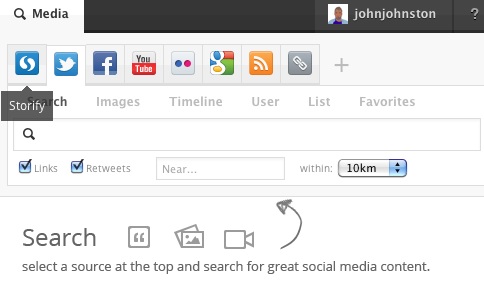
Storify allows you to search lots of social media and pull content together, I noticed Doug Belshaw using it and gave it a whirl for some twitter activity around and episode of Radio Edutalk: Radio Edutalk 20111124 · johnjohnston · Storify. Storify is pretty simple to use there is a side bar search where you can search across different social networks:

Storifysearch

Once you have found something you just drag it into the story.

List Of Tweets

List Of Tweets lets you search for tweets and gives you an HTML or plain text list:

  • Has anyone worked out an Acceptable Use Policy? What if students draw rude cartoons? #pencilchat
    Fri Dec 02 23:17:52 +0000 2011 from simon_elliott
  • So, we invested heavily on pencils, a pencil per student, but test scores are still low! Pencils do not do what they promised! #pencilchat
    Mon Dec 05 07:23:29 +0000 2011 from amberwalraven
  • RT @KathyPerret: Is the iPencil dangerous to students? Will it poke out their eye? What safety measure need to be taken? #pencilchat
    Mon Dec 05 07:22:42 +0000 2011 from RavingOstrich
  • Our school doesn’t know how to handle pencils, so we banned them. We will first give each teacher a course on holding a pencil. #pencilchat
    Mon Dec 05 07:11:59 +0000 2011 from amberwalraven
  • As a teacher I have less knowledge about pencils than my students. I fear students will laugh at me when I try to use them. #pencilchat
    Mon Dec 05 07:04:04 +0000 2011 from amberwalraven
  • So using pencils, students could write something bad about other student or teacher and post it on a notice board – I’m outraged #pencilchat
    Mon Dec 05 06:38:28 +0000 2011 from roballen101
  • Many schools forced to use GlowintheDark pencils for their mail. But would prefer ordinary ones – these are to be removed. #pencilchat
    Mon Dec 05 06:38:19 +0000 2011 from PhysicsNick
  • RT @GeorgeSwain: Does anyone know of a good program that teachers can use to monitor/limit what kids do with pencils in the classroom? #pencilchat
    Mon Dec 05 05:48:58 +0000 2011 from KarenMahonMimio
  • RT @swpax: What about the students who can’t write due to physical disabilities? could we somehow automate this pencil thing? #pencilchat
    Mon Dec 05 05:45:01 +0000 2011 from KarenMahonMimio
  • RT @mcleod: If kids can write information down on paper, soon they won’t be able to remember anything in their heads anymore #pencilchat
    Sun Dec 04 12:45:39 +0000 2011 from OlsonKirsten

Nice and simple, easy enough to style the list.

Exquisite Tweets

Exquisite Tweets has had a fair bit of linkage, it trys to catch related tweets (replies I guess) but you can paste in links to individual tweets, here is a rather strange conversation I today: Exquisite Tweets from johnjohnston, BTCare. I’ve still not heard from BT officially but tweeting seems to have fixed my line.

Useful?

If you feel the need to capture a bit of twitterage yes. I’ve not clicked the link to tell me how much of my life I’ve spent on twitter yet, but for other folks results if we spend so much time on there some of that life must be worth keeping.

Update Aaron’s Twitter Viewer

7 DEC: Just noticed Aaron’s Twitter Viewer on Daring Fireball Linked List: Aaron’s Twitter Viewer

Unfortunately site has been overwhelmed by Fireball readers so I couldn’t try it out. Here is the DF example: Twitter conversation with aaronsw. Iy looks neater than exquisite tweets.

But in a way they’re making the same mistake as those who saw ICT as a way of preparing kids for the world of work by training them to use Microsoft Office – ie designing a curriculum by looking into a rear-view mirror. What we ought to be doing is giving the kids the ability to operate in – and perhaps help to create – industries that nobody has even dreamed of yet.

What governments don’t seem to understand is that software is the nearest thing to magic that we’ve yet invented. It’s pure “thought stuff” – which means that it enables ingenious or gifted people to create wonderful things out of thin air. All you need to change the world is imagination, programming ability and access to a cheap PC. You don’t need capital or material resources or adult permission.

It is this nearest thing to magic that has attracted me to using computers. Even a wee bit of coding can be very exciting. Enthusing pupils is the challenge. I’ve noticed quite a few new, to me anyway, approaches to this;

Hackasaurus which I’ve blogged about and more recently:
Hackademy and
Hack To The Future on the Teach Computing blog by Alan O’Donohoe.

Alan contributed a couple of boos: Want to teach Python to Year 7 in 5 easy steps? Part 1, here’s how…
and
Part 2, teaching Python to Year 7s. Lesson 4&5, pros&cons
to EDUtalk

My eduHacking · linkli.st is getting longer.

But the problem, according to those campaigning for change, begins at school with ICT – a subject seen by its detractors as teaching clerical skills rather than any real understanding of computing.

And it seems school children are getting that message too because the numbers studying the subject are on the decline. The answer, according to the firms and organisations calling for change, is to put proper computer science in the form of coding on the curriculum.

Not sure the detractors are completely right, surely we have seen, in some places, a swing away from the clerical.

We have seen lots of games based stuff being written about although I am not sure how far it has penetrated into the mainstream. There is certainly a need for the more creative use of ict if not coding then the creation of media.

  • Hackasaurus
  • The Consolarium
  • Digital Storytelling | We jam econo
  • springs to mind.

    I wonder if there is a tension between a more creative use of ICT and the current drive to save money?

    The idea of Edutalk Radio is twofold, first to live stream random selections of the existing bank of audio collected on the Edutalk site and secondly to offer educators the opportunity to call or Skype into a live phone in and chat about topics of their choice.

    Joe Dale does a great job of describing the Edutalk, Edutalkr & Radio Edutalk projects. I’ve tried to do this a few time but Joe nails it. Much appreciated.

    Since the last post (Show notes without a Show Radio Edutalk episode 2.5) we have taken a few more baby steps over at Radio Edutalk.

    A week ago, I attempted a chat with Iain Hallahan over Skype. I basically started up Nicecast, and hyjacked the Skype audio. I’ve now figure out that if I just hyjack the one channel I don’t get the echo problem we had earlier. Settings Screenshot.

    Iain talked about TeachMeet Beyond and kicking off TeachMeet 365. I think the chat went really well due to his enthusiasm about some facination projects, the audio is archived as an episode of Edutalk: Iain Hallahan on Radio Edutalk

    Last night David and I tried a variation where we invited folk on twitter to come in over skype for a chat. Stephen Reid and Joe Dale kindly obliged talking about podcasting. We had a bit of bother getting them into a conference call via the dial in, but David pulled them in via their skype accounts. Stephen was on the move and joined in via 3g on his iPhone keeping our EDUtalk strapline, Audio publishing by educators, using mobile devices accurate. Again the audio is archived: Radio Edutalk 24 November 2011.

    After we finished Joe gave us a wee hand sorting out the dial in stuff, in the future people will be able to dial in using any phone to 0131 208 1084.

    Workflow

    So we seem to be getting a workflow together. Last night it worked well with David figuring out the skype bit and myself the nicecast end. Due to space at home I was using my mackbook in my daughter’s bedroom rather than hooked up to the monitor in the living room, keeping Skype, it’s chat window, twitter and nicecast organised was a wee bit tricky. The week before having the living room and larger monitor made it a wee bit easier.

    I am also beginning to understand some of the difficulties in handling live multi voice conversations. An increasing number of podcasts I’ve been listening to have had more than one presenter or voice. This makes, for me, interesting listening, but there is a bit of a learning curve, which I’ve just stared on, in doing this smoothly.

    The audo quality seems to be pretty good, I am using a cheap usb mic, but hope to get a better one sometime soon.

    So far we having been using Nicecast, but I’ve also downloaded a free application LadioCast which might do the same job, I need to do some tests and see if it can archive.

    The other 167 hours

    The rest of the week Radio Edutalk has been streaming random items for the Edutalk archive. I had also set up several Scheduled playlist, to play at 7:30 in the evening, unfortunately I’ve been away for a few days and didn’t tweet these out as I’d planned. I hope to try the same again over the next week and also try djing audio for he archive giving folk a chance to phone in at some point.

    I’ve taken out a 500mb AutoDJ disk which hold the archive, it is already filled up. I don’t really want to pay for a bigger disk, a monthly charge, so the choice is some manual shuffling via ftp or perhaps changing bit rate from 128 to 64. The later would involve converting all of the files and getting the internet radio folk to change the settings for the stream. I am not sure how much the change would effect the quality?

    Listeners

    As yet we have not had a lot of listeners, but I’ve found myself listening in to the random stream more often that I thought, it makes interesting listening and can spark off all sorts of ideas.

    Odds and ends

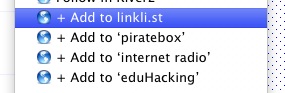
    I’ve been collecting various internet links using linkli.st internet radio · linkli.st a failry new service that makes creating list of links very simple. I love the way you can create bookmarklets for any of your links screenshot.

    I also use Storify to curate some tweets for last nights broadcast to include with the show notes: Radio Edutalk 20111124 · johnjohnston · Storify, Storify is easy to use and looks useful.

    Next Wednesday

    David and I will be talking at around 8 o’clock and the lines will be open, if you are online have a listen and if you like dial in (0131 208 1084) to put in your tuppence worth. Given the date I presume we will be talking strike along with some general eduTalk and edTechTalk.

    Radio edtalk 120

    I attempted going live on Radio Edutalk – EDUtalk this evening. David had to drop out as he was working so I just rambled about things of ed tech interest for half an hour. I forgot to archive the audio.

    I started out talking about my morning introducing some primary pupils to ipod touches and covered some iOS links. went through some recent blogs I’ve read and talked a bit about #EDUscotICT.

    I did say I'd publish the show notes so here they are:

    I had some feedback as I went on Twitter, especially from Stephen Reid (Thanks Stephen) johnjohnston's Archive on from:AHigherPlaceLtd @johnjohnston

    Cross posted on EDUtalk – Audio publishing by educators, using mobile devices