As the year draws to a close I’ve been egoistically surfing my own blog to see what I got up to over the last year or so. Last December I collected some of the posts I’d made over the year, and I am doing so again, although I’ll limit myself to one post this time. It is an interesting exercise and one I’d recommend to other teacher bloggers. One of the nice things about blogging with a class is looking back over the previous entries and noting that you have done quite a lot.
I started making a month by month list same as last year, but it is maybe more interesting to group some of my old post thematically.
Blogging (and social media) tools
This year I branched off and tried some other blog tools:
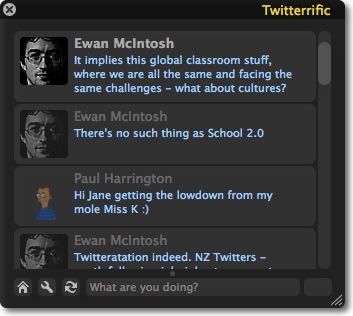
 The microblogging tool twitter is pretty interesting. I signed up and though about uses an mashups in August. Had some fun in October. More seriously I’ve set up twitter accounts to use with twitterfeed.com: ScotEdublogs on twitter which tweets links to all the ScotEdublog’s posts and one teachmeet07 which collects posts from technorati tagged teachmeet07. There are a lot of very interesting twitter mashups (collected at Twitter Fan Wiki ), I’ve played with the twitter API (in an amateurish way) and it is pretty nice.
 Tumblr I thought about it and then got a Tumbelog I’ve really been enjoying tumblr which is a great way to quickly blog about something in a more visually appealing way that twitter. I also got a kick out of refashioning my del.icio.us links into a kind of tumblelog: A Tasty Tumble (sort of).
These alternative type of blogs (harking back to the original style of weblog, e.g. robot wisdom, broken link, see the robot wisdom weblog or How Jorn Barger Invented Blogging | First Site Guide hat-tip to Ogi) are pretty handy tools for storing or sharing ideas and links.
del.icio.us for structural storage, twitter for chatter and tumblr for sharing and storing text images, video and links in a very accessible way (I love the Archive).
A couple of days ago I found kwout (Through a tweet and a post, see the post) which is a brilliant addition to tumblr (or other webpages/blogs). Kwout lets you take a screen shot of a webpage and clip and post it to your blog/tumble, it also creates an image map producing links for the links on the original page in effect letting you embed a bit of a webpage in your blog.
I am looking forward to using these tool in the coming year and seeing how they develop and how they might be mashedup.
2007 was of course the year when the ScotsEduBloggers started facingbooking, I tagged along but am not convinced that it is the place for me (I I still didn’t really get it in October).
Tools for School
I looked at toondoo which is a fantastic tool, and used it with my class but there are to many sweary words in the cartoons and comments to keep using it.
We joined Voices Of The World. VOTW kepts us busy trying new tools in class. Voki in September’s Task,was difficult as was October’s Task using Animoto. I had already played with animoto and decided it was lacking in creativity. The October Task proved me wrong the tool matched the task well. The problem with these tools was that we can’t use them in school, the flash upload is based on the RTMP protocol and that is stopped by the network in school. I had also tested voicethread during the summer and though it had great potential for use in class, but it didn’t work on the school network either.

The problem of using new social media tools in the class room should not be underestimated, time invested in testing at home often backfires on school networks and network admins can pull or change access.
For this reason I tend to favour keeping things desktop based then publishing to the blog. This year I’ve started using garageband, made a lot of use of comic life on Sandaig Otters and developing ways of posting wee movies made with iMovie.
I puttogether a simple page to produce code for posting movies to the blogs: weemovies, it will also let Sandaig Pupils upload movies to the site and produce code for the blog.
I also like the opportunity of using home made hacks that allow me rather than the pupils some creativity.
Mashups

I played with the google and flickr APIs quite a bit this year: My Maps, lickr maps mashing and some GPS questions and Maps Again. I have all my geotagged flickr photos on a map and have started mapping the voices of the world participants: Where are the Voices of the World.
I also enjoyed playing with rss and the del.icio.us API. I messed about with the twitter API too, automating posting and tried to sort followers and following.
Moaning
I did a fair bit of this for example: This week we have been mostly 403ed, moblogging as a solution to technical problems and Errors & Frustrations.
ScotEdublogs
 I posted about SEB nearly every month:Scotedublogs – A New Hub for Scottish Educational Blogs or have a look at the my scotedublogs tag cloud!
ScotEduBlogs news: index is as near to a homepage as I have and a constant source of good thing. The mix of Scots Education blogging, from movers and shakers to infants in primary schools (movers and shakers too) never stops educating and entertaining me. I am really looking forward to seeing ScotEduBlogs expand over the next year.
Conclusions?

Having taken the bet part of a week to get this post into its current form I should have come to some sort of conclusion.
Well I seem to have had a lot of fun playing with the toys, frustration with things beyond my control (along with some within it) and kept up with lots of friends.
I imagine that next year will bring more of the same, and I am afraid that the frustrations will keep these tools out of the hands of children in a lot of classes. I count myself as quite savvy for a teacher but still bumped my head more than is good for it this year.
While I am typing this two things I read struck home:
- Nick Hood commenting on Ewan‘s post and warning that glow is still a long way from being a mainstay in the classroom. Until it is (and I hope afterwards) we need better access in our classrooms. If the children had the same sort of tools and toys we enjoyed at TeachMeet07 and are enjoyed by educators across the continents, what would happen?
- Tom Barrett’s post on enjoying the thinking time that holiday’s bring, to exploit the social web, it might be that teachers need a bit more thinking time?
Happy New Year


 I guess I am now recovered from the trip last week, and starting to think a bit about the blogging.
 A couple of boys were in charge of the moblog but we tended to forget to post when things got interesting, maybe a few more phones and higher profile for the moblog would get more boys excited by communication.


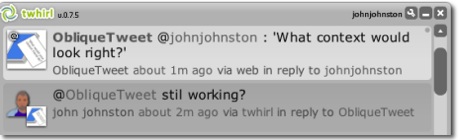
 So it seems time for my first twitterbot