For historical reasons and to give myself some sort of illusion of control I tend to write blog posts in html. I use TextMate and its blogging bundle which does all sorts of nice things to simplify the process: for example dragging an image onto TextMate’s window, uploads the image to the blog and inserts the html code to put it in the post. What is even nicer is that you can drag images from ImageWell after a quick resize or edit without saving it.

I also use SafariStand which added copy html tag to the contextual menu when right clicking on a link and to Safari’s toolbar:

Copyhtmltag

I also save the TextMate files to my dropbox so that I can edit the posts on different boxes.

On the iPad

I am not hoping for the power of TextMate for editing html but wanted to do some blogging from an iPad. I’ve managed ok using the Notes app, and using dragon dictation to ‘write text’ but hadn’t found a solution to some other features. After a bit of testing I’ve now got a fairly useful toolkit.

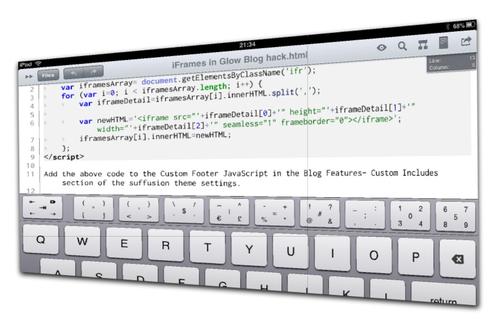
Dropbox integration, html editing: Textastic allows you to open and save to dropbox, does syntax highlighting and to easily type various characters that are normally buried in the iOS keyboard.

Textastickeys

Images, there is not a way to upload images to the blog that fits in with html editing, but it is easy to upload images with the flickr app to flickr. Unfortunately neither the Flickr App or the mobile version of Flickr do not provide the html code. however toy can switch to the full site which works fine on the ipad. This can be pasted into Textastic. That makes posting images simple if a little long winded: Screenshot, edit in an app, save to camera roll. Open flickr app and upload, open Safari and grab html code, switch to Texttastic and paste.

Getting links, was the last piece of the jigsaw, as well as grabbing html link tags from Safari Stand or CoLT in FireFox, in TextMate you can select some text and press command-control-shift-L and TextMate will use google to provide a link, not always the right one but very useful. Getting links on the iPad was a bit tedious, switching between Safari and Textastic and typing the code, pasting in the url. I did a bit of a google and came up with nothing. I’ve now come up with a simple, if crude, system. I’ve created a bookmarklet that adds a bit onto the top of a webpage with a text box in it, the textbox contains the html tag to link to the page:

Linkhtml

The bookmarklet link has the following code:

javascript: (function(){document.body.appendChild(document.createElement('script') ).src='http://www.littlefishsw.co.uk/link.js';})();

I added the bookmarklet to Safari on my desktop which syncs with my iPad. The bookmarklet uses this JavaScript File, if you care about JavaScript I would not look at it;-) I just kept changing things till it worked for me. I can now add a link to Textastic by switching to safari, loading the page and clicking the linkHTML link on Safari’s toolbar. The switch back to Textastic and paste. As I mention the code is not exactly slick, I couldn’t get mobile Safari to pre select the link (it works in a desktop browser) which would save a couple of clicks but it does work well enough to use if I want to blog but only have an iPad.

FeeddlerRSS icon

I’ve been neglecting this blog again for the last wee while. Not because I’ve nothing to blog about but due to lack of time.

I’ve also been neglecting most online activity, twitter, my rss reader and am just about keeping up with email.

In a, possible vain, attempt to keep it going I though I’d post links to a couple of interesting things I’ve seen recently.

>

Interesting things

purpos/ed

purpos/ed is a great source of ideas to think about.

We’re a non-partisan, location-independent organization aiming to kickstart a debate around the question: What’s the purpose of education? With a 3-year plan, a series of campaigns, and a weekly newsletter we aim to empower people to get involved and make a difference in their neighbourhood, area and country.

There are already a ton of thought provoking posts giving individual views of the purpose of education and I’ve not read half of the ones published so far. Coincidently as I am typing this I got a link to purpos/ed Summit for Instigators chaired by Josie Fraser this looks like a really exciting event. If you are thinking of going please consider contributing to EDUtalk  while you are there.

Another thing I missed was the Game To Learn Conference. I did see a fair bit of tweeting around the conference, Twitter / Search – #gametolearn,  and hope to catch up with some of the videos and presentations from the two days. some I have seen are #gametolearn – Playful Learning: Geocaching Workshop and a couple of prezi’s Nintendogs – Game to Learn by Anna Rossvoll on Prezi &2011-03-18 GameToLearn by Charlie Love on Prezi both of which make you want to have been at the presentation. As a side effect made me sort of see the point of prezi, always made me a bit seasick before, it fits well with gaming meme.

As well as bring invoved in Game To Learn Charlie Love had time to put together Computing Teachers? Time to wake up which has gathered a great deal of positive comment, interesting read even if you are not a computing teacher.

Other than that I’ve mostly been iOSing

Texttastic

We had news of the new iPad and some new iOS software, I’ve downloaded garageband and iMovie, I had hoped to write a post comparing iMovie to reelDirector but didn’t get past the screenshots: iOS Move Editors – a set on Flickr.

I’ve written most of this short post on the iPad, testing Edhita a free html editor, not quite what I am looking for. There are quite a few html editors for the iPad, I put a question on Qura and am now finishing this post using Textastic, textastic has a nice top row added to the keyboard and it does syntax highlighting and previewing. Texttastic links to my dropbox account and to ftp servers. I use dropbox to store blog posts while I write them so it should fit in nicly with my workflow.

i hope to manage a slightly more coherent post soon but in the mean time I think I’ve managed  to put in links to far better things than i could produce.


iPad stand by tim_d
Attribution-NonCommercial-ShareAlike License

I was pretty impressed with the iPad 2 which was launched this week. Some nice new features and the speed bumps especially in JavaScript sound good.

I’ve continued to test an iPad and this week I spent a wee bit of time using it to access glow. I’ve talked to a few pupils who access glow at home using an ipod touch, and have occasionally used my iPhone, but find it a bit of a strain on the eyes (The pupils I’ve talked to don’t seem to have the same problem).

On an iPad Glow works pretty well. The iPads limitation on now allowing file (picture) uploads in the browser is a bit of a draw back but a lot of the other feature are fine. Editing webparts works as well as it does on Safari on a mac. The text editor continues to frustrate me but I am resigned to avoiding it use by now.

I successfully posted to my glow blog: iPad Glow blogging without trouble. Again I could not upload photos, but it is easy to workaround using flickr, I used my flickr CC search toy which did the job and sorted the attribution.

The WYSIWYG editor did not work, but I was please to see that the html editor respected line breaks, adding paragraphs. typing <p> with an iPad is a bit slow.

I also tried using the iPad to edit a wiki page. Again WYSIWYG was turned off and this time there was no auto paragraphing. Again I could paste in the embed code for a flickr photo. The font size was a wee bit small for me, but would be fine for most youngsters.

What it would be nice to see would be support for the MetaWeblog API in glow blogs, this would allow the use of various apps to post to a glow blog. I guess it is hard to enable this due to the way glow accounts are matched to wordpress ones through shibboleth, if RM can manage this it would be make glow blogs a powerful tool for mobile learning.

.

Tweets 666

I am having the devil of a job keeping up with things recently. My RSS reader is bloated and twitter is streaming past far too quickly for me to keep up. I am not spending enough time on twitter to keep up with the folk I know best and have just grasped at a couple of things in the flow that look really interesting.

purpos/ed

purpos/ed is:

a non-partisan, location-independent organization aiming to kickstart a debate around the question: What’s the purpose of education? With a 3-year plan, a series of campaigns, and a weekly newsletter we aim to empower people to get involved and make a difference in their neighbourhood, area and country.

and has started with a stream of 500 word blogs posts form all sorts of educators as of now there are 16 posts with more to come. Lots of interesting food for thought and I’ve not manage to read even half of the 8000 words published so far. The posts are published on the users own blogs, which is in some ways a pity as we cant read them all on one RSS feed (AFAIK).

Primary Blogging on the BBC

I caught this just after it had been on TV. some great publicity for blogging in the primary school. I should have noticed this as I have followed the blog provider John Sutton (hgjohn) on Twitter for a long time. luckly the video is on youtube and the event is well covered in The day the nation took notice of Primary Blogging!. I hope that title is true. Various folk have been pushing blogging in the classroom for a long time now, it would be nice for it to hit the consciousness of more teachers.

I wonder what else I’ve been missing…

Republished due to a wee bit of bother with the backend of my blog.

At the weekend Robert added a new feature to ScotsEduBlogs: ScotEduBlogs Professional

ScotsEduBlogs exists to help educational bloggers across Scotland to find each other and to talk to each other.

It has been created by members of the blogging community, and is kept up-to-date by its users (that means you!), who can add blogs and tag blogs.

It also allows anyone to keep up with what is being said across all Scottish educational blogs at a glance.

You alway could subscribe to a set of blogs via ScotsEduBlogs RSS feature, for example ScotEduBlogs tagged glowscotland or physics but these are RSS feeds. Now there is a page for professional blog posts, separate from class, pupil or teaching blogs. This could be used for cpd or just to keep an eye on other teacher/consultant/whatever blogs. If you visit SEB less frequently you will be able to see the ‘professional’ posts less chance of them being buried by class blog posts.

Recently with twitter coming to the fore as a way of keeping up with online community there have been new Scots Educational bloggers who have not added their blog to SEB now might be a good time to do so. If you do and you consider yourself an educational professional be sure to tag your blog Professional.

Sebbloglisting

Glow Blogs

There has been an influx of new blogs since glow has added blogging to its toolset. Unfortunately the glow blogs rss feeds do not play nicely with ScotEdublogs. They don’t play with glows own xml web part either.

There is a workaround, if you use FeedBurner to republish your RSS feed you can use that feed in ScotEdublogs. Feedburner is a google service now, you need to have a gmail account. You visit Feedburner sign in and fill in your RSS feed address.

Feedburner 1

Your RSS url will be the url of your blog with /feed tacked on the end, for example my test glow blog’s url is:

https://blogs.glowscotland.org.uk/nl/JohnJohnston/

So its RSS feed is

https://blogs.glowscotland.org.uk/nl/JohnJohnston/feed/

After I put it into Feedburner I get a feedburner URL for the feed:

http://feeds.feedburner.com/org/NCnY

This last I can use to add my Blog to ScotEduBlogs:

add_a_blog

If you are a ScotsEduBlogger please think about adding your blog to ScotsEduBlogs and remember to tag it Professional if that cap fits.

rusty chain by shoothead
Attribution-NonCommercial-NoDerivs License

It has been a relatively long time since I posted here so I though I’d share some interesting looking things:

HiJack

is a hardware/software platform for creating cubic-inch sensor peripherals for the mobile phone. HiJack devices harvest power and use bandwidth from the mobile phone’s headset interface. The HiJack platform enables a new class of small and cheap phone-centric sensor peripherals that support plug-and-play operation. HiJack has been tested with the iPhone 3G/3GS/4G, iPod Touch, and iPad devices.

So it looks like this could be useful for all sorts of data collection on an iPod Touch or iPad.

29/365 (IPAD) by Jesus Belzunce
Attribution-NonCommercial-NoDerivs License

Fraser Speirs – Blog – How the iPad Wants to be Used Fraiser speaks with a ton of authority:

The iPad is an intensely personal device. In its design intent it is, truly, much more like a “big iPhone” than a “small laptop”. The iPad isn’t something you pass around. It’s not really designed to be a “resource” that many people take advantage of. It’s designed to be owned, configured to your taste, invested in and curated.

and I suspect he has hit this and many other nails on the head, but perhaps there are other models of use that are worth exploring. Certainly the iPad I am testing at work is an easy thing for my wife or daughter to grab for a quick wikipedia search. iPads also seem to me quite happy to be used for communal reading/watching. Given current economic climates I think we need to keep looking at these devices even if we are not in a position to implement cultural and institutional change. Although the optimal use of iPads may be as a personal device we need to keep our eyes open for other possibilities.

Locally the Glencairn iPod touch trial from last session got a nice write up in Nice touch: iPod device educates pupils subtly – Primary – TES Connect Update 2018 broken link, but found here.

I like the look of the iRig Mic which was posted to the UK ADE mail list. Not for sale yet.

I now seem to have downloaded well over 300 apps for iphone/ipod touch/iPad and need t ostart really thinking about what I want to carry in my pocket. But I just keep seeing things I want to try. The latest iPad App I’ve downloaded in Logo Draw. A free, add supported app for simple Logo programming on the iPad.

Logo Draw

I’ve always had a soft spot for Logo, even trying to make my own teaching toy. This one seems pretty straightforward, the sort of thing I can imagine a small group of children working on?

On Thursday there was a fair bit of tweeting about delicious shutting down. TechCrunch blogged Is Yahoo Shutting Down Del.icio.us? (this post is now updated).

The first thing I did was backup my delicious links.

I’ve got several years worth of delicious links so was a wee bit worried. I also prefer delicious to any other system for saving links I’d seen. It is simple, the interface is clean, the network is useful without turning into another social thing and the API and scripts are useful. I have also used the delicious tools to display sets of links on various webpages (quite a lot in glow) which I don’t want to hunt down and change.

There have been a lot of suggestions for delicious replacements Diigo seems to be a favourite. I looked at this a while ago and, for reasons I can quite recall (probably lack of simplicity), I didn’t stick with it, although a lot of education folk use it. I downloaded Scuttle again and though about setting this opensource delicious like site up but I’ve not done so yet.

Delicious Pinboard

Yesterday I signed up for pinboard this cost about £5 to signup which I hope will mean the service will not go away. I imported my exported delicious link.

I choose pinboard mainly for its delicious like simplicity and the fact it supports the delicious API.

Today things look a little brighter for delicious: delicious blog » What’s Next for Delicious? but I am quite happy to have paid my fiver. I’ve set pinboard to add any new links I post to delicious and set up an email address to post links from my phone. There looks like there are a few more useful features to explore later. I’ll keep using delicious at the moment and see how things go. It is, I feel, a good thing to get occasional reminders about our reliance on free services and to get the opportunity to pay for ones we really need.

Rss From Noun

A while back I noticed More Code Fun: Reading (or ‘to Read’) List – CogDogBlog which pointed to Reading: keeping on top of stuff I save | Helpful Technology The site has a nice byline Digital innovation for people with more sense than money when I grabbed the code to create my reading list.

My reading list pulls together various RSS feeds: my delicious, things live starred in google reader, instapaper & instapaper. I read my google reader and twitter on my phone. I don’t always want to follow the links so star or favourite them for later consumption. The reading list. pulls all of these together. Easy to use and I like the way it combines existing services rather than needing a new one. I’ll easily be able to add other feeds if I want to later on.

This week’s harvest

  • Print With Any Printer From iPad, iPhone – Wired How-To Wiki
    Which I am keeping for later reference. I’ve not felt the need to print from my iPhone in over 2 years of use or from an iPad. In fact I got rid of my home printer a couple of weeks ago (still networked to my wife’s B&W one) because it was gathering dust.
  • I registered for Skype Education as it looks as if it might be interesting.
  • Of the many What to do when you can’t get to school for pupils blog posts Primary Bits and Bytes » Blog Archive » Snow Place Like Home was my favourite, probably because of

    “REMEMBER! Real snow is the best! You should only really be here if you get too cold or fed up with playing out, snowballing or building snowmen!”

  • OOo4Kids looks like it will be worth checking out at work.
  • My Adobe Connect Recipe – CogDogBlog looks very useful for the time that Glow moves to Adobe Connect for video conferencing.
  • I am having an interesting conversation in the glow forums (login required) about video in glow blogs, this provides some food for thought: HTML5 Video Player | VideoJS it amazes me how complicated getting video onto the web is, formats, browsers etc. As someone who doesn’t understand these things it seems to me that the new html5 video tag could surely support more than one video format per browser and clean the whole thing up.
  • yesterday I linked to the NounProject on twitter this collects, organises and adds to the highly recognisable symbols that form the world’s visual language, so we may share them in a fun and meaningful way. The symbols on this site are and always will remain free.

RSS image from used under NounProject Creative Commons — Attribution 3.0 Unported

Another positive of being an airhead was that one or two folk noticed my site was down.

tombarrett
tombarrett

@johnjohnston Flickr CC is down
Thu Dec 02 17:26:13 +0000 2010 from TweetDeck captured: Sun, 05 Dec 10 18:14:33 +0000

And when it came back, in particular A flickr CC search toy, tombarrett tweeted it again with the usual effect, including this one:

xlearn
xlearn

@johnjohnston @tombarrett looks good! Have you seen http://bit.ly/hevGEF It’s what we use in FE and HE.
Sat Dec 04 08:35:34 +0000 2010 from Echofon captured: Sun, 05 Dec 10 18:16:31 +0000

Silverlining

I think I had seen Xpert Attribution tool before but it was not at the front of my mind. Looking at it reminded me of the nice way they add attribution by padding the image at the bottom rather than the way I was doing it (stamping over the image). I had tried to work out how to pad an image before but failed. This morning I spent a wee bit of time digging around the PHP: Function Reference and managed to figure out a couple of things, padding the image, and wrapping the text when it is too wide for the image.

Like the rest of A flickr CC search toy the code is surely pretty horrible, but it seems to work.

I also looked over the How do I properly attribute a Creative Commons licensed work? on the FFAQ – CC Wiki again just to make sure I am keeping within the guidelines.

Stamp icons

THe other thing that I’ve changes is to add a 3rd size to the stamped images. I’d avoided the small size as the attribution rarely fitted on the images, now I am padding them they do not present the problem.

Using the stamped image has the advantage of the attribution sticking to the image where ever it goes and as far as online use goes keeping the image under your control an avoilding problems if a user deletes their image when you hot link to flickr.

As always I am interested in any suggested improvements I can make to A flickr CC search toy the idea is still to provide pupils a practical way to use and attribute Creative Commons images from flickr.

face made of 2 green apples, an orange & a banana

Smile at a stranger by Nina Matthews Photography
Attribution License

A couple of folk might have noticed that this blog and site was down for the last couple of days. The first day or two was a problem with the host who fixed things last night. At about the same time as johnjohnston.info came back up I was checking to see if ftp was still working, unfortunately as it turned out, it was.

Somehow while using Cyberduck to browse the site I managed to drag the public_html folder inside another folder. I was intending to download as a backup, I turned round to speak to my wife and when I looked back I could not see the folder. I presumed I must have deleted it, even though Cyberduck asks for confirmation to delete. At that point the site came back up and of course everything was 404. I quickly contacted by host again and asked him to restore from backup. When I woke this morning the backup seemed to have taken place, but the site was missing except for 2 folders.

Again I contacted my host. Having a last look round the site for some reason I opened up the ruby folder, there was my public_html folder safe & sound. I’ve moved it back and all seems fine.

I have done daft things on web servers before this, but this is the silliest I think. Hopefully a lesson learnt.

It also makes me consider my rather haphazard backup strategy. Recently I’ve been editing html etc directly on the server which means no local backups. I download by blogs database occasionally but often images are uploaded while blogging and deleted from my desktop, I guess I should start using flickr all of the time for image storage.

It has also made me realise how much I value this site, mostly for the time spent on various web experiment which never see the light of day but I would not like to lose. I have a fairly robust desktop backup system, Time Machine and SuperDuper! the later has saved me a couple of times. I need something equally robust and idiot-proof for this website.