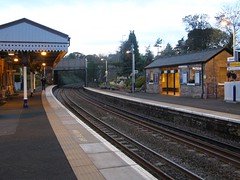
Aberdour Station Using the Social Web to enhance teaching and learning is a course listed on CPDFind.

It is being run on Saturday 1o May by David Noble who is a member of the OpenSourceCPD ‘collective’. David is best known for producing Booruch my favourite educational podcast.

last November I blogged  CPD in Aberdour about a previous cpd event David ran. As you can see from that post I had a great time.

I chat to David fairly regularly on the EdtechRoundup Flash Meetings and he has always an interesting view point or idea on Web 2 in ed, he has a deep knowledge and experience about the theory and practise.

If you want a quick start guide to or refresh of Web 2 in education you could not do better than taking a trip to Aberdour to spend a day in David’s company. Pretty railway station too.

A while back I installed pmwiki on the Sandaig Primary Site. I’ve now finished one project and am in the middle of another, so it is probably time for a few thoughts.

The Primary 6 Project was a fairly short temp project for 12 children, and just used to display the results of some Garageband and art work.

The Sound & Light section is for a longer (two term) project.
Recently I had some cpd on active learning using a challenge based approach. the leader Alisa Barr of Mount Vernon Primary was kind enough to give me a powerpoint to support the primary six topic sound & light, I decided to adapt it for the Sound & Light wiki. This meant that I was a bit slow in getting the topic up and running last term, but we had several afternoons working on it and the topic will continue until the end of the session.

I am not using the approach with my own class, but the other primary 6 who I teach one afternoon a week (we have 3 teacher for 2 p6 classes to cover learning support, some behaviour and self esteem support and McCrone cover). I have played a bit fast and loose with the time table, spending one and a half to two hours on the topic where it should only get one hour. A disadvantage is that I can’t follow up anything until the next week.

So far the children have posted various movies and some mp3 files with a few more to come.

It has not been plain sailing as we have been plagued by errors in our internet connection:

MYIPROXY ERROR: connection refused
10.250.1.9 refused to accept connection on port 80

and the like. These errors have been coming from many sites not just our own, I’ve flagged it up and hopefully it will get solved soon. The children were also using slideshare.net to post powerpoints to the wiki and to my horror, slideshare was blocked last week. The service desk quickly unblocked it once my HT had requested it.

I think I am learning quite a bit about both active learning and using wikis with children. Next time I do this I will spend a lot more time teaching the it skills and group work strategies before starting the topic. Some of the it components are quite complicated, record (video or audio), put on macbook for editing, edit, transfer to pc for uploading to wiki. I should probably just arrange for movie maker to be available and get audacity installed on the pcs and skip the mac stage. I guess I am guilty of trying to stay in my comfort zone, but for a first run I think that is excusable.

The other aspect is that the children get caught up in the experiments and recording it, so they forget what they are trying to find out. I am going to start to provide instructions on paper as well as on the wiki and see if that helps.

I really like pmwiki especially its flexibility and lack of wysiwyg but I am wondering if it is the right choice for the children. I am going to start another wiki project next week and have decided to try out wikispaces for this one. (I have an unreasonable desire to keep everything on our own site so this goes against the grain). This is for a homework project which my primary 6 will be carrying out over the next term. Each will be researching a European country of their own choice. I’ve done this sort of project with primary six for the last few years and it gives the more enthusiastic children a chance to open up. Of course not all of the children will have internet access at home, so I will be giving them all some time in the media room every Monday. I’ve not tested wikispaces with children before so I’ll be interested in comparing it with pmwiki.

I have just finished the first draft of a cpd course for OpenSourceCPD on RSS. Given an hour the amount of information that can be covered is limited. I cheated by including a good few videos as optional extras.

I’ve been enjoying editing the OpenSourceCPD site as the task is suited to my rather short term concentration. I can edit the wiki for a while, maybe change some of the design with css and add features to the wiki using pmwiki‘s Cookbook (addons). So far I’ve added recipes for quicktime, rssdisplay, slideshare, and various recipes for adding flash content. I’ve added some example of these to the Media Tests page.

I’ve even mange to produce a recipe of my own. As usual this stands on the shoulder of others, I just copied on of the recipes and used Yuan.CC Flickr Experiments to show a flickr photo with notes in a pmwiki page, this is unfinishe at the moment, but it works: Photo Sharing (the photo sharing page is not finished ether.)

The wiki is now awaiting more content. You can contribute by editing the wiki or if you are too busy by sending me material and I’ll add it and attribute. There is a Discussion section on the wiki for any sort of discussion of the project, or add a comment here or send me a mail.

I just spent a few minutes at Sprout Builder which seems to be another way to build widget.

Sprouts are interactive and portable chunks of web content. Some people call them widgets, mashups or mini-sites but we just call them sprouts.

I have not really tested may of these types of service, but it only took me a couple of minutes to build a ScotEduBlogs feed widget.

It looks like you can do a lot more with sprout builder than just pull a feed. some of the examples include audio and slideshows. The sign up made me admit I was over 13 so not something for the classroom, but it might allow you to make something for you classes.

There seems to be a ton of embedding options, click on the share button to see them. You can add to facebook, myspace, iGoogle etc. or get an embed code for a post or webpage.

Feel free to embed ScotEduBlogs on your site, or better make a slicker one for the ScotEdublogs community.

Warning, little educational content ahead, this is a holiday post.

I’ve been messing around a wee bit with the twitter api, twitter tester, Tweets to TeachMeetPerth and twitter presenter, the last in response to Ewan’s tweet: Can one present by Twit?.

None of these are what could be called polished jobs even given my limitations but the TwitterApi Documentation is pretty straightforward.

I have also created a few of rss twitter bots the most useful of which is ScotEduBlogs which tweets the blogs post title as they arrive on ScotEduBlogs this uses the twitterfeed.com : feed your blog to twitter – post RSS to twitter automatically I think.

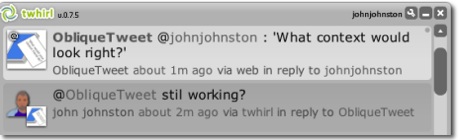
So it seems time for my first twitterbot ObliqueTweet, tweet anything @ObliqueTweet and it will reply with a random Oblique Strategy (currently the 4th edition).
The Oblique Strategies are a set of cards devised by Brian Eno and artist Peter Schmidt to solve (artistic) problems by drawing a card randomly. There is a lot of information at The Oblique Strategies. There have been a number of computer programs to show Strategies at random, web and download versions. (I even made a supercard project back in 2002). There is a nice php version, minimal design | Oblique Strategies, which you can download.

The ObliqueTweet twitterbot, just grabs the most recent @ replies to ObliqueTweet and then grabs a random Oblique Strategies and sends it back as a reply.

The script is automatically run using http://www.webbasedcron.com once every minute.

I am wondering now if I can think of a useful twitterbot, any ideas?

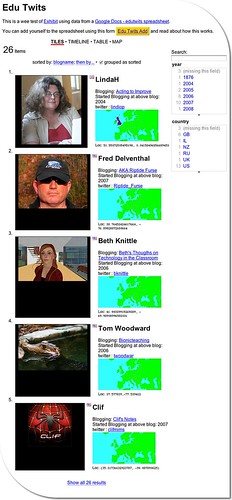
edutwits_exhibit_tiles

Edu Twits is a pretty quick and dirty test of creating a no-code-mashup in the style of Non-Programistan and an exploration of how far you can get creating a useful tool without really reading the manual.

I am not suggesting Edu Twits is all that useful, but I can image how we could use this in the classroom in interesting ways.

Background
I mentioned Exhibit yesterday and made a wee test exhibit of EU data, in the same way as I imagined my class would be able to do. In my imagination:

  1. I’d start a spreadsheet with the correct column headers
  2. Put together a webpage to pull the data via exhibit.
  3. The children would research the required info (wikipedia)
  4. the children would add the info to the spreadsheet, directly or via a form
  5. The children would query the webpage to compare EU countries.

Which seemed fine. Then Tom’s comment:

The pure spreadsheet can be confusing and does look intimidating but with the data entry wrapped in a nice friendly form you?re looking at a much more pleasant interaction (and the ability to restrict choices some for data integrity)- all good things.

got me thinking about data entry a little more. A form seemed the way to go, but my class do not have individual email accounts and I could not send them individual invites to a google docs form.

A quick google gave the the idea that a google form could be embedded in an iFrame. I wanted to test this out with real people rather than just add a lot of data myself (avoiding boredom and rsi), so I though of inviting educationalists from twitter to add themselves to a exhibit. This seemed to be a fair test of data entry.

Implementation

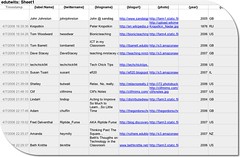
  1. edutwits_spreadsheet The spreadsheet: all I did was set up a Google Spreadsheets, I set the first Row to:
    {label:Name} | {twittername} | {blogname} {blogurl} | {photo} | {year} | {iso} | {latlon} | Notes
    following the Exhibit instructions, you need to property names in the first row, with curly brackets round ’em, the first must be {label}. The spreadsheet is set to publish.
  2. I then set up a web page using the information from Exhibit Authors based on the EU test from the day before. If you know a wee bit of html is is pretty simple to copy-paste-adjust the example pages. also because the editing is done in html it is easy to check the Exhibit examples and view source to find out how to use the straightforward stuff. The Getting Started page should get of off and running, combined with the from a Google Spreadsheet guide if you are going to use a spreadsheet. Part 2 of this post will go into the html in a bit more detail, if anyone is interested.
  3. Using the share tab on the spreadsheet, I set up a form and emailed it to myself.

    I’ve invited you to fill out the form ” edutwits ” which can be accessed at the following link: http://spreadsheets0.google.com/viewform?key=pIE8c8hh-DgLLHXJQQ8eEfQ&email=true

    This form can be used to update the spreadsheet. I filled in the first couple of rows on the spreadsheet and sent off an invite to a couple of folk to try out. At that point I discovered a couple of mistakes, I had {year] as a column header and the form posted the locations to the wrong column, the first was easily fixed and for the second I just moved the location column header to the column that the form was filling in. I probably should find out a bit more about google forms.

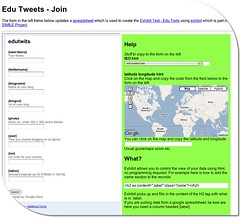
  4. I then embedded the google form in an iframe on a webpage:

    edutwits_exibit_add-form2 I added a popup to get iso country codes from the name of countries, borrowed for a wee google chart experiment (that helped get the maps and flags onto the exhibit too), and a link to an old page for getting latitude and longitude from a google map.
    Later on the form was improved by moving stuff around a bit and adding the location map to the actual page rather than opening in a new window.
    One problem is that the iso codes and locations need to be copied from the form on the right to the google form on the left, but it seems to work.
    At this point (well before the form improvements, I tweeted inviting folk to try the mashup out).
  5. The tweet was picked up by a few folk, one Tom Barrett who has a considerably bigger network than me, Tom’s retweeting has done much to spread the word., at the time of writing 34 folk are on the Edu Twits page.

Initial conclusions

  1. Exhibit and google spreadsheets make it fairly easy to create a usable database.
  2. Editing via a form works for adding new data, but users can’t get in to make changes once data is submitted.
  3. Out the box google forms lack validation, I don’t know if using the data api would be any better?
  4. I am keen to try this with a class(es) as I believe it will meet some of the curricular targets for using databases (and it is fun.)

Blue Sky
so far I’ve not broken any Non-Programistan guidelines, other than the addition of the google map. This could have been avoided (at least for the US) by using the address to location translation the Exhibit seems to provide. the next bit might overstep the mark a little.

  1. Use google data api to build forms that would add and edit users data, load form in password protected page to stop folk messing with others stuff.
  2. Add validation and auto addition of locations, iso codes etc. to said form.
  3. php to create new spreadsheets and templates for exhibit displays.

In this case blue sky means ‘I have no idea what I am talking about, maybe someone has already done this stuff, maybe it can’t be done‘.

Next steps

  • Try this out in class after the holidays, use EU idea.
  • Try a combo with another class.

If you got all the way to the foot of this page you might want to add yourself to the app.
You could let me know if part 2: details of the little I’ve learned about the html bit of Exhibit, is wanted.
Many thanks to the folk who have added themselves so far, and if you want your details changed, let me know.

Looking back on this post before I fire it off it seems even more of a mixed bag than usual. As usual fairly garbled, but the first half contains some wonderful links and the second what looks to me to be a great resource.

I spent the first part of yesterday morning (and the last hour or so this morning) following a trail that either started in a tweet from cogdog or a post recent addition to my feed reader.
Tony Hirst’s OUseful Info is a great source of ‘mostly over my head’ mashup info and other stuff, eg: We Ignore RSS at OUr Peril or « feedshow – A Feed Powered Web Page Presentation Tool

To Comrades in Non-Programistan – A Message from Feedistan included a great youtube: DataPortability and Me (Get Your Data Out!) and had me laughing. It also pointed to The Party Line of The Peoples Republic of Non-Programistan which was created (as far as I can see) to support a presentation at the Symposium on Mashups, you an watch the recording of the Welcome to the People?s Republic of Non-Programistan session which features laugh out loud fake Russian accents.

The point of the Non-Programistana is to open up mashups to non-coders, although they will allow some html. They point to Exhibit and give interesting examples: Industrial Warfare – Version 4.

This lead me to Exhibit part of MITs SIMILE Project:

SIMILE is focused on developing robust, open source tools that empower users to access, manage, visualize and reuse digital assets.

Exhibit can be used to

Create interactive data-rich web pages

and there are some great examples that can be popped from the Exhibit homepage.

I have been talking to some Glasgow colleagues about filling the 5-14 database gap that has appeared when we got upgraded to windows xp. I had suggested a few online examples that children could use for querying databases and Zoho Create for creating databases. While the querying examples went down well, Zoho seemed too imageless for catching primary children’s imagination. It also look a little like a spreadsheet for some teachers. likewise lazybase.

Exhibit looked like it might fill this gap, so I’ve spent the rest of yesterday morning playing with it. The Getting Started tutorial is very straightforward and will allow you to work through an example on your own desktop. I started with an idea from our own curriculum, information about the EU. The idea is that the children could research basic facts about the EU and add them to a google spreadsheet. With the number of countries in the EU a fair sized class could get one country each.
Exhibit allows you to build a simple html page which will read the spreadsheet webpage and create an interactive database. Amazingly it allows multiple views including a nice timeline and table views. One of the Exhibit examples incorporated famfamfam.com flag icons, interestingly these are name with ISO 3166-1 alpha-2 country codes, I could add a column to the spread sheet and include these, it was the easy to show the flag on the records:

I have been playing with Google chart maps, which use the same iso code so it was simple enough to add these.
Anyway in a couple of hours i was able to put together a google spreadsheet and a Exhibit Test. The latter will need more work, but you can get the idea. I think this will work in class and hope to try it out next term. I need to know a bit more about logging on multiple uses with the same ip address to a spreadsheet, but I hope to quiz Tom Barrett about that. I also need to find out a bit more about creating forms for google speadsheets.

The workflow would go like this:

  1. I’d start a spreadsheet with the correct column headers
  2. Put together a webpage to pull the data via exhibit.
  3. The children would research the required info (wikipedia)
  4. the children would add the info to the spreadsheet, directly or via a form
  5. The children would query the webpage to compare EU countries.

At the moment this would only work as a one off, a webpage would have to be created for each time the lesson was carried out for a class. A quick look at the Google Spreadsheets Data API would suggest you could create a spreadsheet automatically, by uploading a blank this could then be loaded by a hph version of the Exhibit Test page which would dynamically load different spreadsheets (with the same headers). Unfortunately this would violate the Party Line of The Peoples Republic of Non-Programistan, and more realistically be beyond my limited skills.

As I just wrote at the start of this post, it is a bit of a rag bag, but it tells the tale of my Sunday morning’s fun, following a web of links and playing with a great tool. In the afternoon I went for a walk

Oscpd Logo Rndds

About a month ago I wrote about the beginnings of OpenSourceCPD at TeachMeetPerth. Since the the site has moved to a suitable host and we have started making some links with CPDFind.
There are now several very knowledgeable people listed on the Profiles page and more have shown interest in joining in the fun. I’ve added an Introduction to blogging course as an example and the beginnings of some general CPD Materials.

I’ve been enjoying setting up the wiki as there is quite a lot of cpd for me involved. PmWiki is proving interesting and flexible giving an opportunity to play with the tech as I figure out how to organise the site.

So the wiki is now awaiting more content. You can contribute by editing the wiki or if you are too busy by sending me material and I’ll add it and attribute. There is a Discussion section on the wiki for any sort of discussion of the project, or add a comment here or send me a mail.

Blogged from tm

For a blog that claims to be mostly what we are doing with ict in class I’ve not posted much about that recently. Things have be coming a bit thick and fast for reflection. This is just a wee note about some things that have been going on over the last couple of weeks.

cd lauren 180

One afternoon a week I take a bunch of children from or primary six classes to work on self esteem, emotional literacy and the like through practical activities. The most recent activity is drawing to a close. It this the children created short tunes with GarageBand, then designed covers for a cd. The covers were further edited with picnik. We then burned cds with all 12 tracks and published the mp3s and art on the website: Sandaig Primary Wiki Primary6Project. The children are in the middle of adding a bit of writing to the wiki to round up the project.

Juke tn

We have been using GarageBand around the school too. My musical ability has been taken to its limit just making a minute of loop music so I’ve roped in our peripatetic music teacher Martian Douglas who is working with groups of children on a Friday afternoon. At the moment they are just using the loops provided, but Martin is working on incorporating drumming and guitar played by the children. The music made so far can be heard on the Sandaig Jukebox.

On Wednesday afternoons I teach ‘the other’ primary six class to cover NCC time. This term I am teaching the Sound part of the glasgow Sound and light topic. I am using a modified topic created by Alisa Barr of nearby Mount Vernon Primary when the children work in groups on challenges to cover the learning outcomes. This has been quite challenging for me and i am not sure I spent enough time on preparing for group work, despite the fat I had attended a couple of cpd events by Alisa on just that.
I’ve give the topic a slight web 2 spin as I present the challenges on the Sandaig Primary Wiki SoundAndLight. The first challenge we did as a class and published our findings as a mp3. The next section was on The Ear and the groups tried a variety of ways of reporting their findings. In the current challenge Sound Travels different groups have been set different tasks and seem to be widening there reporting methods (not published yet).

These two project have been my first step of using a wiki at school, at the moment the children need support for publishing but hopefully this will improve. Some of the publishing is a bit tricky, eg powerpoint to slideshare and then a recipe to put on wiki. I am using PmWiki which is not wysiwyg but seems to be working out well enough.

The topic was interrupted this week by health week which should have been a excellent chance to get the children blogging, but in reality they were to busy with activities, there is a wee movie in the works and hopefully it will be blogged next week.

In the midst of the Health week we had a visit from Johanna Hall from BBC Scotland, Johanna had commented on the Sandaig Otters’ blog about Radio Sandaig. She came in to give the children a chance to work on recording some content for the BBC (links when I know them). She also gave a masterclass on speaking and recording for the 12 children involved which I hope they will cascade to their classmates. This also gave me a bit of impetus to get the podcast flowing and we put out a special this week with another one nearly finished. My HT kindly gave me some time out of class to work on these before Johanna’s visit. Johanna took them away with her recording to work into an up and coming BBC production.

I am sure I’ve missed one or two things out, but that is probably quite enough for now.

Blogged from tm

Seb Header_448

The ScotEduBlogs site is dear to my heart. An opensource effort by teachers in Scotland to aggregate and redistribute the posting by Scottish educational blogger of all shapes, ages and sizes ScotEduBlogs has become an more than every day read for me.

At the Scottish learning Festival side dish TeachMeet07 4th Edition I made a plea for support for ScotEduBlogs. At that time it was being hosted by Jonesieboy, Robert Jones, who was also the main programmer of the site. I was approached during the dinner following Teach Meet by Joe Wilson of the The Scottish Qualifications Authority, who proposed that the SQA and Learning and Teaching Scotland should support ScotEduBlogs. Ewan who is National Adviser: Learning and Technology Futures at LTS was quick to agree.

To cut a long story short; ScotEduBlogs has now moved to its very own server which should lead to (and Robert will correct me if I am wrong) more stability, better updating etc, etc. The SQA and LTS logos now sit prettily on the ScotEduBlogs sidebar.

It might take a few days for ScotEduBlogs to settle into its new home, so if you notice anything strange let us know.

If you are a Scots Educational blogger you can do your bit to support ScotEduBlogs too:

  • Make sure your blog is listed.
  • Make sure the tags on your listing describe your blog.
  • Link from your blog to ScotEduBlogs (there are some images and help on the wiki).
  • You might want to help out by designing a new graphic or in other ways, see the wiki again.

As well as just reading the front page ScotsEduBlogs can be used in lots of other ways:

  • The front page has an rss feed.
  • On the Blogs page you can filter blogs by tags and get a rss feed for your tag or set of tags.
  • You can even follow the ScotEduBlogs tweets on twitter.

See the wiki for more ideas.

As there are more and more ScotEduBloggers ScotEduBlogs will become more and more useful as a learning tool, enabling you to get ideas that you might not pick up through your favourite feeds.