I’ve been quite interested in finding out how my iPhone could be used in teaching and learning. last week I and my class making GPS MathTracks inspired by the LearningTracks flickr group and Tom, Andrew and David‘s ideas about Art tracks and spelling with a trackstick. I also read Ollie’s post about Geography Fieldwork with the iPhone.

What I did

Yesterday I was going for a walk and tried out a few ideas with the phone. This is not of course the same as using it with a class but gave me some food for thoughts.

The first thing that I did was record the point of the walk with SnailTrail with which is is simple to collect points and mail them out of the phone. these can be put into a kml template to create a kml file that you can view in google earth or upload and show in google maps. The google map example here show that one or two points went astray. It is easy enough to review these in google earth and remove them. (edit example).

I took a series of photos with the iPhone, these were uploaded to flickr today and automatically placed on the map: Glengoyne to Earl’s Seat set on the map this is a pretty straightforward was of getting the photos onto the map. You could also use the flickr description to add text, the note facility etc as well as discuss the pictures with the comments.

Next I took the photos got the location from the Exif data in the files, I used this to create a kml file and combined that with the snail trail. I also added the time taken and an occasional title to the kml file. I am not sure of the best way of doing this, I made a wee supercard project to script most of this.

Which produces this kml file and looks like this in google maps

The project is pretty rough at the moment and I am sure there are applications out there for doing this, but I wanted to learn a little more about kml files. This sort of thing could be a way of displaying findings for a trip or outdoor activity.

I tweeted occasionally while walking, this produces a list of tweets on Twitter Search as I was using twitterific it was easy to add locations and photos to the tweets, I guess the RSS feed could be parsed to show the pictures and locations or mini maps.

I also added a few notes with YouNote, this application lets you take photos, write notes, record audio and even sketch with a finger. Which would cover most of what you would need on a field trip or excursion. Future editions will let you email notes to get them out of the phone. At the moment you can sync or backup your notes via a desktop application. This results in a zip file on your computer, inside are folders for each note containing multi-media material and xml files with descriptions this information includes geo locations. I suppose that a script could be written to combine this media and xml to create a web page/ map / kml file.

I feel younote is approaching what I would like to see in an iPhone application, if it was combined with a blogging facility or export to a webpage with media it would be ideal.

So what I would like to see would be a combination of the thinks I’ve tried that saved and exported in a usable format. I’ve looked at a few of the blogging application but not found one that does what I want yet.

What I want

My idea application would allow the recording and combining of information in many forms, text, photos and audio recording. It would automatically add location and date and time information. These could be published to a blog and geo rss feed, either on the go, or at a later time if connection to the network is poor. It would be match with a desktop publishing application, this would get the data and media from the phone and allow additions, editing and mashing up, it would output in a multitude of formats.

I’d also like some additions to the iPhone itself:

  • Copy and paste
  • A camera that can take close ups: I often take photos of flora, fauna, fungi and bones I’d like to take close ups, it might be worth testing putting a magnifying glass in front trick.
  • Video
  • Temperature recording
  • A compass on the Map application
What I’d use it for

The obvious thing is geography, but I would be more likely to use it for art and maths tracks as mentioned above. It could also be used to record any outing, not one that covers space on a map. I’d love to do a poetry or painting walk, where a class would record reactions to surroundings, typing would probably be limited to haiku(ideal for snapshot poems), but longer ones could be recorded. A class trip to the beach could spark drawing, writing and photos to produce an online gallery.

In the huge number of iPhone apps now available my ideal application may exist, if it does let me know.
I am moving from John @ Sandaig to John’s World Wide Wall Display. The RSS Feed url will stay the same.

I’ve been blogging at Sandaig since February 2005 and worked at Sandaig for over 15 years. I’ve had a wonderful time working there but am now moving on to take up a post as an ICT development officer with North Lanarkshire Education. At Sandaig I had an amazing opportunity to playfully experiment with emerging technologies. As you can imagine such and enabling and supportive environment is hard to leave, not to mention the feeling of leaving a class mid session. I am not sure what the future will bring but I hope to continue blogging about education and technology from a slightly different perspective.

I hope that the children at Sandaig will continue to blog about their learning and fun and I’ll still be trying to support that effort remotely if I can.

I could have continued to host my blog with Sandaig but feel that might lead to some confusion.

I am not sure how this move will work out from a technical angle, I’ll leave the old content were it was and I’ve copied it over to the new place. I’ve replace the comment box at Sandaig with an explanation. The RSS feed now points to the new blog.

If you are kind enough to link to me I’d appreciate it if you updated your links.
In a week or so I’ll replace the blog page at Sandaig with a redirect of some sort.

After an exciting twittersation between Andrew Brown and Tom Barrett reported on David‘s blog EdCompBlog: Can you guess what it is yet? and Ollie’s iPhone posts (starting with iPhone in Education – Introduction) I was keen to try out gps drawing with my class.

I do not have a gps recorder but I do have an iPhone, I had been a little disappointed with the first GPS app I tried, a freebie, which only worked if you had a connection to the internet so I had invested 59 pence in SnailTrail

SnailTrail records your gps position and saves it to a list, you can add a name to the point and date and time is recorded. The list can sent via email. The points are saved until you delete them. The email arrives with a simple list of points, a second list with names you added and date time and a link to a simple kml template. You can download then open the template, in a text editor, paste in your points and see the trail in Google Earth by opening the template file.

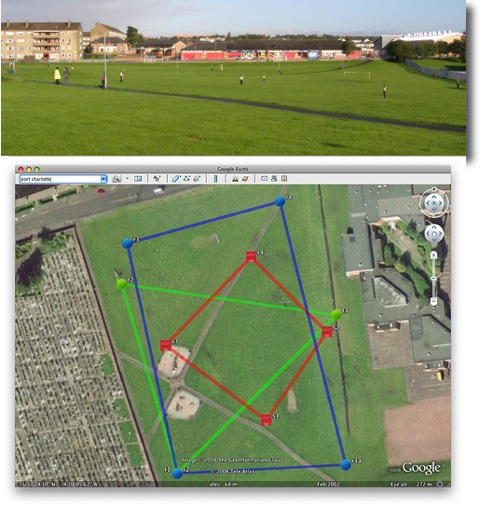
On Tuesday last week I had a few early finishers in Maths draw some 2D shapes onto printouts from Google Earth, of the park next to the school. On Wednesday I split the class into groups, issued colour coded gym bibs and explained that they were challenged to make a shape on the park. We talked over some ideas for making straight lines and figuring out where they should be on the map. The children then scattered very quickly indeed, splashing round a rather wet park. Once they were in position I walked round gathering the locations on my phone. I had planned for one child in each group to run round recording but the field was so wet I though it better to keep them still. We emailed the waypoints to my email and returned to school.

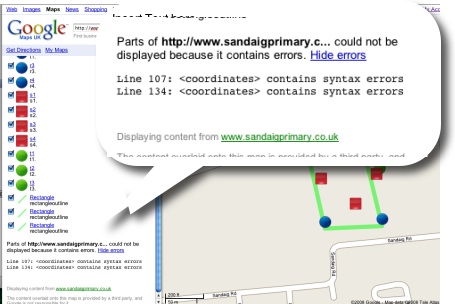
A quick paste of the points into the template showed up a few flaws in my implementation. I had not collected the points in sets of shapes, rather just walked down the field, so they points were all mixed up. The template was designed to show a simple trail rather than shapes.

I took the points and template home and played around a bit, the above screenshot was the result, our five pointed star was a bit of a mess so I left it out.

This morning I tried opening the template via google maps, and it showed a couple of errors.

I had another wee dig around the file and now have one that shows up correctly in google maps.

I found it a bit tricky to fix as updating the file did not update in google maps, I had to rename the file with each test to view the results, I have got a lot to learn about kml files.

This is a pretty nice lesson, you can cover quite a lot in it. The properties of shapes, this challenges children to really understand these, working as a team, problem solving, co-ordinates, and a way to introduce latitude and longitude. The children really enjoyed it.

You do need to organise a few things, I had a PSA and link teacher from our local secondary with me, neither had very suitable footwear;-) Next time I’d record the shapes in order and have a template ready to draw the planned shapes as soon as we came back.

Tom Barrett has started a flickr group LearningTracks for sharing ideas about using tracksticks and other gps devices to draw on Google Earth.

Given the September weekend weather and having a cold I spent a lot of time the weekend in front of my computer.

I spent most of the time following up links from the Scottish Learning Festival and teachmeet and smoothing out some idiosyncrasies in the way that the Sandaig Primary website works.

I also spent some time thinking about ScotEduBlogs.org.uk and footering with my latest toy. This lead to the discovery of iPhone Navigation an example of a web interface for the iPhone, you can see it your browser if you do not have a phone. I was able to create a webpage that grabbed the RSS from ScotEduBlogs and present in using the iPhone Navagation design. I wnt on to discover iui – Google Code based on Joe Hewitt’s iPhone navigation work, iUI has the following features:

  • Create Navigational Menus and iPhone interfaces from standard HTML
  • Use or knowledge of JavaScript is not required to create basic iPhone pages
  • Ability to handle phone orientation changes
  • Provide a more “iPhone-like” experience to Web apps (on or off the iPhone)

I also got external links to work better. This ended up on ScotEduBlogs iPhone The pages provides a list of the latest posts on ScotEduBlogs which can be clicked to show the contents of their rss description, link etc. I gives in my opinion quite a nice way to keep up with ScotEdublogs on your phone, you just load the page in Safari. On the iphone you can bookmark a webpage and have it on your iPhone home screen I quickly discovered (thanks google & tweets from dalzinho ) that you can create a custom icon: How To Make iPhone Webclip Icons.

I’ve since discovered there is at least one other kit for creating iPhone ‘web apps’ WebApp.Net. I guess since the opening of the app store on iTunes the web app development has slowed a little but it looks like an interesting area t oplay in if you have not got programming ability.

Of course ScotEduBlogs iPhone is pretty simple, much simpler that the demo apps it is base on, just a basic rss reader, but it has me thinking if there are any developments that could be useful in school, I believe that some schools are buying sets of iPod touches for use in school and this might be an easy way to develop simple specific applications for them. It might be simple enough to create database/ key type pages for animal or plant identification. I also wonder if pupils could create pages for the iPhone/itouch, after seeing Neil Winton present about his pupils text based adventure game in a wiki The Caves Of Mull I wonder if something similar could be done for the iPhone?

At the Scottish Learning Festival on Thursday I was asked to do a wee turn in the Glowing Lounge talking about glow. As my Authority have not started to roll out glow yet, my experience of glow has been limited. One area I have worked on, as a Masterclass facilitator, is the National ICT group where I’ve been working on a page giving information on Web 2 technologies.

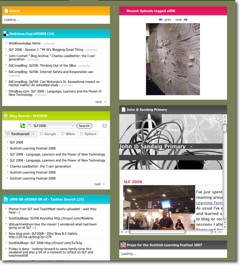
I started by giving a very quick overview of a few websites and explained using ScotEduBlogs.org.uk and a netvibes page SLF2008 the idea that these services are mashable.

The SLF2008 page may be useful for find information about the festival as it gathers:

  • Links tagged slf2008 on delicious
  • A blog search for the tag SLF2008
  • Twitter tweets tagged SLF2008
  • Flickr photos tagged slf08 (at this time more than tagged slf2008)
  • My blog post about SLF2008
  • A youtube movie

I explained I wanted to do the same sort of thing on glow, to be able to pull in information using RSS (I used grazr for producing rss widgets) and embed-able widgets. At first I used a text editor webpart in glow, but was frustrated when that part strips out javascript rendering and multi-video youtube players ended up playing a random video.

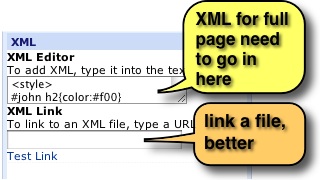
I found that the xml webpart was a much better option the only problem is that in Safari and firefox on a mac the xml editor is somewhat small. I discovered, live in front of my audience, that IE on a pc has a bigger popup field which is easier to work with.
However by that time I had discovered a better solution, if you put all the code and script you like in a text document and upload that to glow you can use the url to that file to put in the xml field. It is a lot easier working with this that in a field on a web browser. Another advantages is that if you keep a local copy of your text file you can change it and re-upload to automatically update your page, much easier than going through the webpart editing again.

You can also if you like and know how, add style sheet information and other html. For those that can, it is better to wrap all your html in a div and refer to that, as you can find your styles taking over the glow page’s own. It is probably best to only use the body of a webpage if you are using an html editor to get the bits you want embedded organised, I somehow managed to remove the glow sidebar from a page while testing it.

As an aside I had an interesting discussion with a member of the audience as I finished, she said she would not be happy embedding youtube for her pupils on glow as they could follow the link back to youtube and find unsuitable material. I explained that I was using a youtube custom player to show web 2 related videos to staff. you can see the custom player if you are interested in my selection and not in glow. I explained that if i wanted t oshow pupils youtube videos I would do so via Edublogs.tv a service that will allow you to upload your own movies or copy them across from youtube, these can then be embedded in glow for your class.

As I said there may be easier ways to do this, and when I get my glow mentor training I should find out, but this is a pretty practical way to get some Web 2 content into glow.

Uploaded - 2492008

I’ve just spent the last 2 days roaming around the Scottish Learning Festival for another year. As usual I’ve enjoyed the experience and learned a lot. I’ve not attempted to blog or record any of the sessions I attended this year, as my finger and brain speed are not up to it. I do have a collection of reports to recommend which are full of reflection, linkages and information: glowict’s blogpost and slf2008 Bookmarks on Delicious (glowict in a delicious account I’ve set up to use in the ICT national glow group).

This year I was fortunate enough to spend a lot of time with Tom Barrett Tom seems to know about and have tried just about every good teaching idea I have heard of and more. His positive view on things is inspiring.

Even more than usual the best bit of SLF was the chance to meet with all of the colleagues whose blogs I have been reading and ideas that I’ve been following over the past year.

I had decided not to carry anything but my new iPhone to see how I got on without lugging a laptop around. I practice this meant that I could check links, take some photos and use twitter. My typing on the phone is not up to more that twitter’s 140 characters for notes. It was nice not to carry anything, but I’d have liked to be able to type a bit faster or have used the VoiceNotes app a bit more, I did record David Noble asking Fiona Hyslop a question at her keynote and to my surprise it came out well (huge auditorium ), quite clear after a quick run through the Levalator and application I continue to be impressed with. Not quite as good quality as the official Fiona Hyslop Keynote SLF 08 from LTS.

Fiona_Hyslop_crop

Wednesday

Fiona Hyslop’s keynote was fairly interesting, she seems to be very much in favour of lots of good stuff™ and after the rather disappointing glow chat it was very refreshing to hear her take questions from the floor. I had always, cynically perhaps, thought that questions to politicians would be prepared in advance. Much to the delight of the ScotEduBloggers in the audience the first question was from Neil Winton questioning the internet filtering for staff and pupils common in Scottish schools (38 minutes in on the LTS video), the minister’s answer was that while she would be happy to have teachers in control of her child’s access, it was a local Authority issue. This made me reacall John Connell’s call, last year, for a national conference on the issue. A quick search for filter on John’s blog is an excellent read.

Many of the other questions had similar answers the minister explaining her sympathy with the questioner but laying responsibility at the LA door. The minister did promise to discuss this and to help liberate the learning experience (40 minutes in on the vid).

ScotEdubloggers were well represented in the questioning as well as Neil, we heard David Gilmore, Adam Sutcliff and David Noble all asked questions.

The Minister has little time of league tables and stated that employers want folk with the 4 capacities rather than exam results (slight paraphrasing there). On watching bits of the video I am more impressed than I was the first time through, close ups may communicate more than a long distance view.

For the rest of the day I avoided keynotes and presentations, wandered the stalls and networked. At 2 I headed for the Education showcase and laughed with the children from Down the Pan ? a financial drama from West Dunbarton before taking part in The Discovery Hour: Inspiring Stories of Technology, Education and Design which was a series of 10 minute or so talks on interesting tech and teaching, my own tail was of two international collaborations that my class have been involved in most recently the weetom travelling healthy art show exhibition suitcase to Russia a combination of cardboard glitter and mp3 technology and our wrapping the world in poetry with students from Georgia USA (see posts in this archive and the McClure – Sandaig – blogs if you are interested). My point is that personal contact with participants is vital and keep task short and fun.

Wednesday Evening

tom_barret_crop

Wednesday evening I went to teachmeetSLF08. Having tweeted an invite to Tom I was delighted that he was first up talking about work his school had carried out with the Philips Entertaible a fantastic looking multi touch table (see Tom’s TeachMeet’08 Philips – a set on Flickr). The rest of teachmeet was perhaps slightly subdued compared to usual, maybe because of the uncertainty of the future of the even with Ewan‘s departure from the Education field for channel 4. This seems to have been resolved by Joe Wilson’s tweet. Ewan’s organisation and leadership on the evening were taken over ably by David Noble for both some of the preparation and the second half of the night. As usual the ideas from the presentations came quick and fast, a new feature was to split into groups for some. I followed Theo to the escalator outside to see his Canaletto at the SECC presentation, where he showed a dislike of categorising media into any particular corner and some lovely examples or rich media. Ian Stuart presented live from Islay which I think is a first for teachmeet and flashmeeting did not let us down, strange watching a presentation without a presenter!

Teachmeet was followed by TeachEat at Konaki Greek Taverna where we were fed by RM. I alway enjoy the idea of sitting down in random order and talking to random folk, this time Theo, Mike from Radiowaves (who I forgot to thank for the teachmeet sponsorship), he told me of the very exciting NUMU project (NUMU is a safe community for young people to showcase their music; collaborate, compete and develop their talent) and the guy from WildKnowledge whose name I can’t recall but who I had a great talk to about his products and could see that these could be extremely useful for recording trips. I popped into their stall on the floor next day and had another rundown of their products.

Thursday

IMG_0079

I started in Neil Winton‘s Wiki presentation, where he covered the use of wikis in the class, beautiful slides (Neils slideshare version SLF2008 Wikis (Simplified) is not quite as wonderful as the animations in the real thing), great examples and a warm delivery of a powerful message.
I stayed in the same room to hear Ewan talking about professional development. Ewan was as usual inspiring and reaffirming helping teachers move outside their comfort zone and share. twitter as a tool for all sorts of things including writing an article for the Economist from tweets was a left field example! Ewan will have notes for us on his blog very soon.

In the afternoon I was speaking about getting Web 2 into glow in the Glowing Lounge for a quick 10 minutes, I hope to write this up as a post sometime, but for the moment the easiest way I’ve found to pull rss and widgets into a glow page is to upload a file filled with html fragments and use that in an xml webpart.

Most of the rest of the day was spent chatting and exploring ideas and technologies. Lastly a couple of interesting random things tracksticks and Easi-Scope, inexpensive toys I would like to use in the classroom.

So I had a great couple of days at SLF this year thanks to my head teacher for releasing me, the main downside of SLF is the inability of many classroom teachers to attend maybe there will be a weekend version or Saturday morning added one year.

I am of to the Scottish Learning Festival in less than an hour didn’t know I’d be making it today until a few days ago so am very pleased. I was always planning to go to Teachmeet this evening for what Ollie famously called the best cpd in the world and which is certainly be best night out you can have talking about schools and education! Think standup comedy with less jokes and more teach’n tech.
Quite a few of the ScotsEduBloggers have published their timetables, Ollie (who is speaking 6 times!) and Neil have very full days organised.
As I booked late I’ve not organised myself at all, I am going to get there early and follow my nose, try, as has be suggested to move out of my comfort zone.
The best bit of the SLF is not in my opinion the presentations, and certainly not the trade show, but the chance to meet and chat with colleagues from all over the place. I am particularly looking forward to meeting Tom Barrett from south of the border, who writes one of the most detailed and exciting blogs in primary education.

I’ll not take a laptop today and am hoping that twitter will keep me on track with what others are doing, if you want to meet, suggest a good presentation etc, duing the next couple of days then tweet me Twitter / johnjohnston.

Last week on Thursday I had a big day. I reached my half century, got an iPhone and had a job interview. I was very pleased with the phone, not particularly happy about hitting 50 and unsure about the interview until yesterday. It looks like I am going to be an ICT Development officer in North Lanarkshire.
I took a wee risk with the interview, I actually got the iPhone before my big day so the night before the interview I knocked together a quick imovie for a few stills as a self advertisement and put it on the iPhone, at the is there anything else you want to tell us bit I pulled out the phone and showed the video.


John @ Sandaig from John Johnston on Vimeo.

I don’t know if it helped or I got the job in spite of the movie, I’ll need to enquire.

The upshot is it looks as if my life will be changing quite a bit. It has not really sunk in yet, but I know I’ll miss Sandaig, staff and pupils and the school website, they have all been a big part of my life for the last 16 (or is it 17) years.

A couple of asides, vimeo quality seems better than youtube, and how amazing is twitter, when I heard about the job I tweeted and was overwhelmed by good wish tweets, thanks folks

I should probably also move and rename this blog, any ideas for a new name will be gratefully received.

 
the sevens
I’ve got the the end of a quick first week back at school. The first time in a couple of years I’ve had a class to myself, year before last I was doing ICT and last year involved a lot of learning support and team teaching. I am also back in Primary Seven.

A shock to the system as all my mushroom boxes have vanished and I need a quick trip to Pound Land.

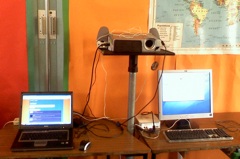
I am beginning to get the classroom they way I want, I have a projector and a big bit of white paper on the wall along with a gyro mouse and wireless keyboard. A networked xp laptop and non-networked mac mini are positioned beside the projector so that I can easily switch back and forth between platforms. So far I am missing the ability to draw quickly on the board but enjoying the shadow free screen.

The children have used ICT in the previous year a fair bit, mostly research, word-processing and powerpoint and I worked with them on the wiki for a Sound & Light project.

I always like the first week or two of term and other times when the timetable and curriculum is not so fixed in stone and decided to get the children introduced to online tools, cameras blogging etc.

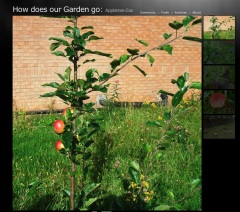
We got the Photo -a-day How does our Garden go galler off the ground to start with.

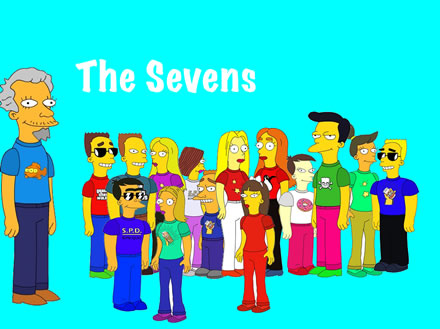
Next we started with the Simpsons Movie site making avatars which, I hope, will be used throughout the year as signatures on blogs and wikis. We had to use a horrible amount of kluding to work around the fact that we do not seem to be able to download the files on the school pcs (unblocking popups not withstanding). This become a good exercise in lots of things: print screen, cropping in picture manager and exporting as jpgs, allowing me to harp on about files etc. I had to download the saved images at home to slap together the pic at the top.

The children had more cropping to do to get a nice wee head shot of their avatar too.

We worked on one of my favourite start of session lessons, Bio-Poems, these use a strong template and give the children a lot of fun, this year we blogged these with the Simpson head-shots on the Sandaig Poets blog which give everybody a chance to blog. If you have a minute please leave some one a comment.

Finally, have talked about adjectives and watch a couple of youtube downloads on the subject earlier in the week, we made a quick photo movie about Feelings today giving the children more practise with the cameras and their first use of iMovie, it was also a great way to end the week as non of them though they were working.

Next week we start with a trip to Ayr so fingers crossed for the weather.

On Ewan’s Invitation I toddled along to Inspiration Session No. 4: The Best Stats You’ve Ever Seen. This was the second ‘open’ session and quite a few of the regulars from ScotEduBlogs were there in addition to LTS staff.

Ewan has given a rundown, LTS Inspiration Sessions: Run your own, (archive link) on the purpose and content of these sessions over at connected, number 4 was on improving presentations. Ewan has gathered a pile of useful links on delicious tagged ltsinspirations4, Andrew Brown live blogged the session: Do your presentations suck? very effectively, and Tessa used it as an excuse to return to blogging after the summer.

This is the first post here for a while too, although I’ve been posting to posterous, tweeting and keeping my photostream uptodate.

The others have covered the meat of the session so I’ll just pick over some bones here (in no particular order and with little organisation).

As usual it was a lesson in itself to see Ewan present he is both well prepared and able to respond to the audience flexibly. He also kept things light with plenty of ‘jokes with a purpose‘ Having said that he was not following any of the simpler styles of presentation he discussed (pecha kucha and the 10-20-30 rule for example), most of his presentation, was video from the web, discussion and analysis.

The classroom at LTS was beautiful and great space for this sort of meeting. Unfortunately I could not find ant creative commons photos of the building or space on flickr although Ewan gave a quick but thorough overview of finding images and using them legally which is always good to hear.

Although I was familiar with most of the videos shown it is a very different experience watching with a group, without the distraction of, email, twitter, todo.txt or the fact that you have to make dinner. Face-to-face sessions like this are worth ten time the same amount of browser time, the presence of others sharing the space really helps concentration and other folks ideas spark off your own. Class teachers often miss this sort of experience of discussing things that are of interest and do not have to be acted upon immediately.

As a primary teacher I felt a fair bit of tension between the role of a presenter to adult audiences, Steve Jobs rehearsing his 2 hour stint 6 times, and my own efforts in class, speeding round Scran for pictures of Victorian toys in my 45 minute lunch hour and plastering them onto a powerpoint. Many of the ideas were applicable though, repetition (some of my wee guys need more than three times) keeping it short an too the point. Shared reading of text has more of a place in the primary classroom than more adult settings. One of my new sessions resolutions it to review my use of projector/whiteboard and Ewan and his audience has given me plenty to think about.

On the few occasions I’ve formally presented to adult audiences it has been talking about my own practise and I hope the passion and experience has let me overcome the hurdles of imposed format, poor graphics and instinctual rather than trained design. I’ve also usually been so nervous in preparing a talk I’ve distracted myself by using a different technology each time. Ewan challenged the group to end the session by working on one of there own presentations to be posted to slideshare for review. I skipped that part ending up in a huddle of ScotEdubloggers (Mr W reported a unrepeatable collective noun for teachers, I wonder what a group of edubloggers is?). A couple presentations I’ve given are here (voicethread) and here (enhanced podcast), the second proving my point about horrible dot mac urls at least. Both break a fair few rules of presentation but they worked for me I would like to have spent some time getting some feedback and criticism.

One of the subjects talked about in the huddle of ScotEdubloggers was TeachMeet08 @ The Scottish Learning Festival 2008 this is approaching fast, and some community organisation is needed, if you can lend a hand with organisation equipment, sponsorship of food and drink( or know a person who can) you should head over to the wiki.

Zz79882878

We also talked over glow, wordpress, exams etc. and transferred the conversation to the horseshoe to continue the informal CPD.

Ewan has provided an online kit for running your own inspiration session which unfortunately does not come with a Ewan. Thinking about the session yesterday I think the big takeaways were the importance of personality and preparation which to my mind are probably more important than the tools and design.

I should suggest that you get together with some colleagues, watch the videos and check out Ewan’s links and Andrew’s post I am only reluctant to do so because I realise that one of the key parts of that process would be the leader unless you can find a friendly huddle. Even alone the linked video, sites and tools will provide plenty of food ofr though.

I am still churning a lot of the ideas the session and informal follow up just in time for starting school next wee.

Many thanks to Ewan and LTS for inviting me to an inspiring session.