The best way of thinking about the grid is as the areas that we think it’s important to pay attention to when teaching others how to read, write and participate on the Web.

from: First draft of Mozilla’s Web Literacy standard now available! | Doug Belshaw’s blog

I’ve kept half an eye on this developing on Doug“s blog, I really like this idea of it as something important to pay attention to, rather than something that should be attained in a. measuarable way.

Doug Belshaw shows his iPhone apps and asks: Which apps do you recommend? Why? I started a comment but it got a wee bit long.

Instacast 2.2.4.ipa

Instacast a podcatcher, I’ve not revisited apple’s podcast app, but instacast downloads on wifi, streams near the end of my data month, auto deleted old episodes with different settings per podcast.

FeeddlerproFeeddlerPro, RSS reader, uses google reader at the moment. pretty good rss reader with customisable sharing menu. I mostly read RSS on my iPad but use the iphone one in odd moments.

Cameraplus ex
Cameraplus

Camera+ is my favourite photo editor, I’ve far too many photo editors on my iPhone but I usually end up with Camera+ unless I am using a one trick pony like ShockMyPic.

Glen Luss
Fstream 1.0.7.ipa

FStream for listening to internet radio, mostly for checking Radio #EDUtalk and the odd listen to ds106rad.io

Googleplusa

Unlike Doug I do use Google+ found it good for keeping up with #etmooc, when I was keeping up. I hope it is useful for the Mozilla Webmakers – Google+ mooc.

Drafts 2.2.1.ipa

Drafts, is a great note taking app, lots of saving and exporting possibilities, twitter, dropbox and the like. Drafts can also use url actions to do lots of geeky stuff I’ve not really checked out so far.

Droptext 2.0.1.ipa

Droptext, a dead simple text editor for dropbox, I use this and drafts to save various text files to dropbox that trigger folder action AppleScripts on my mac. The most useful takes a url, finds any audio files linked on the webpage and adds them to a rss feed in dropbox. Instacast is subscribed to this feed. this allows me to listen to single episodes of podcasts without subscribing to the podcasts own feed. I use drafts for this too.

Scratch 1.2.1.ipa

Scratch another text editor, a wee bit like drafts, but the notes persist, so I use it for shopping lists, and taking notes at meetings if I only have my phone.

Wifi Photo 1.5.3.ipa

Wifi-photo transfer. there are a few of these apps tht let your phone act as a webserver for you photo library. Very handy for getting an image from the phone to one or more desktops.

Trails 5.4.ipa

Trails, produces lovely gps trails, shows you where you are. I love trails

.

Apple maps I’ve been finding is not as bad as it is painted. I usually use the free UK and ROI satnave app but maps is handy as it connect to your Contacts app. Unlike Doug I use the contacts: having the 120 or so schools I deal with in there, including details like addresses, head teacher’s names, IP addresses and clues to wifi passwords.

Other apps in daily or regular use include: clock (for cooking), FirstClass (work email), weather, mail, safari, google maps, dropbox, 1 password, twitter, tumblr, instagram and cinemagram.

Apps I use less regularly, iMovie, sonicpics, audioboo, flixel, skitch, icab mobile, wordpress, a bunch of todo apps(I’ve never managed to get this organised but am always trying), chrome, thetrainline, lots of photo apps and recording apps.

I note that I use a quite different set of apps on the ipad, a lot more typing and creating there.

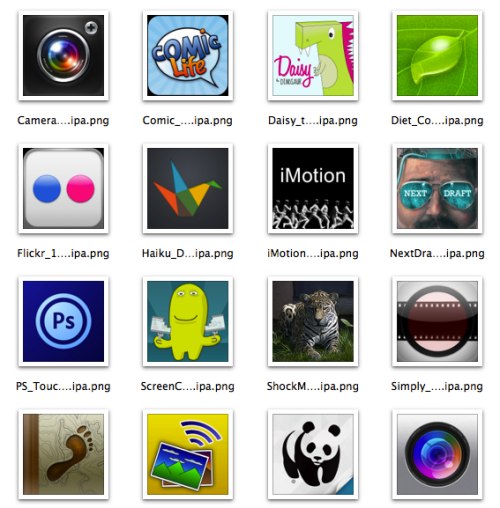
The icons in this post were grabbed via appleScript from my mac’s mobile apps folder, and quickly resized, I blogged about this: iOS Icon Extraction

And I took a quick trip through my screens and posted on flickr: iPhone Apps – a set on Flickr

Live Code Icon 110

A while back I backed Next Generation LiveCode (Open Source) by RunRev Ltd on Kickstarter this week RUNRev released the Community Edition of LiveCode.

North Lanarkshire, where I work, is just starting to roll out Livecode to the high schools to their computing departments. Although I deal with primaries, this is quite exciting, I am a fairly longtime HyperCard and SuperCard user and Livecode shares the philosophy and english like scripting language of these wonderful tools.

Pinboard

Some of the links added to my pinboard this weekend:

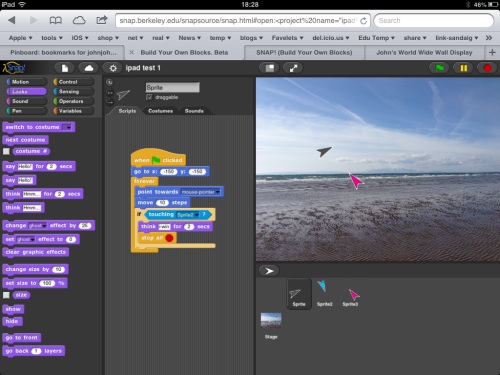
I’ve noticed SNAP! (Build Your Own Blocks) for a while, this Scratch clone, runs in a browser and works fairly well on an iPad. I took it for a brief spin this afternoon.

Snap.Berkeley

Sometimes dragging was a wee bit sticky and obviously arrow key message and the like are not present on the iPad, but worth a deeper look.

After updating a couple of simple web apps last week, I was greatly impressed by Forecast, its not a web app its an app you install from the web., of course in a completely different league from my scratchings, very impressive.

I’ve been struggling to move Radio Edutalk away from posterous. Just for fun I tested Justmigrate which claims to Move Posterous to Tumblr in few clicks and it does: enviable stuff. The first 100 posts are free, after that it cost money. I just move 100. (I now seem to have 3 tumblr blogs, one auto posts using ifttt, one for animated gifs and now this new one.)

Whipit

Speaking of animated gifs: The increasingly hairy Doug Belshaw (That is not him on the left) was collecting animatedgifs I did a wee bit of scraping to throw the etherpad list of urls onto a page: Doug’s Gifs which should get your laptop fan blowing.

I’ve done a wee bit of webscraping in the past (for instance Which Way? which users ScraperWiki which didn’t exactly stretch the power of scraperwiki), but this is even simpler, just a php page with a regularExpression to grab all gif urls. I still do not really understand the magic of regEx but you can get a lot from google.

Tweeting my last post here I got a reply from Theo pointing to his new blog “Things May Come and Things May Go which I’ve been enjoying, this post: Open Education Priorities (Schools) asks some good questions of schools, I suspect the answers might disappoint.

the pinboard icon above if from The “Flat Web Icon Set” and distributed for free by Icons & Coffee under the “Creative Commons Attribution Share-Alike 3.0 Unported License”.

Last week I posted about open and close systems. Ironically I then got into a very interesting conversation with Peter Dickman (Engineering Manager at Google Zürich)
in the Scottish Education – Google+ community. You need to join the community to read it, hence the irony, but anyone can join. (I’ve still not got my head round g+ yet)

This morning I had a bumper breakfast from my RSS reader, mostly about the open web, open education and the like.

Alan Levine:

And so it goes with the lost web. It’s the individual who is finished. Blogging is dead, and our remaining bits of expression are locked into the data churning ad returning machines of GoogleFacebook, a web of two billion million data analyzed, ad-served, status messaging, app infested bots, totally unnecessary as human beings and as replaceable as …

from: It’s the Individual That’s Finished – CogDogBlog

Audrey Watters:

When I think of “open learning,” I think about the “open Web.” And for me, it isn’t simply a matter of what’s becoming a rather tired cliché that “you can learn anything you want online.” (You can’t. Lots of great stuff isn’t available there, or it's behind a paywall.) Rather, the open Web has allowed me to write and share and learn and collaborate with others — in public, in open and informal spaces, with openly licensed content, with open-ended and unscripted inquiry.

from: Reclaim Your Domain: A #ReclaimOpen Hackathon Project

Jim Groom:

Reclaim Your Domain has to be about a variety of hosting options, services, resources, and possibilities to manage your identities online across a variety of services, this is not necessarily “give up all social networks, drop offline, and feed the rabbits” —rather it’s about controlling (to the extent you can), backing up, and syndicating the work you do on the web. A home for your data that can be as distributed and decentralized as the platform it’s designed for.

from: Reclaim Open Learning | bavatuesdays

From Alan’s fears, through Audrey Watters’ mapping of what is good to Jim’s action plan.

Talking about it isn’t good enough / But quoting from it at least demonstrates / The virtue of an art that knows its mind. // Seamus Heaney : Squarings

By which I mean I don’t have anything deep to add other but I am enjoying and nodding along.

I’ve made a updates to a couple of simple web pages/apps aimed at pupils and teachers using iOS and images.

Photoblitzer

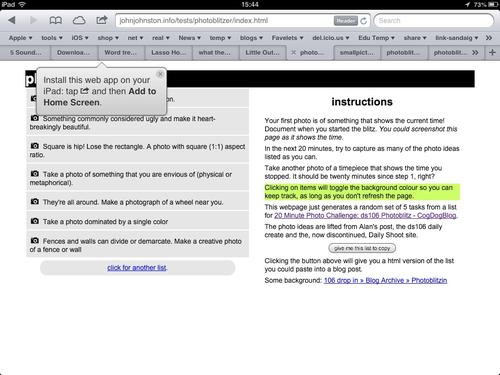
photoblitzer is a really simple page that just gives a list of ideas for taking photos. I originally made it for a #ds106 project (20 Minute Photo Challenge: ds106 Photoblitz – CogDogBlog) and blogged about it on my 106 blog 106 drop in – Photoblitzin.

Since then I’ve used it as a starting activity on a couple of iPad training courses for staff and it worked well.

Originally I was thinking of this as being used on an iphone or ipod touch, but we have seen a lot of schools buying iPads and running a fair number of training twilights on useing these so I updated the app to look a bit better on an iPad:

Staying the same on an iphone or ipod touch:
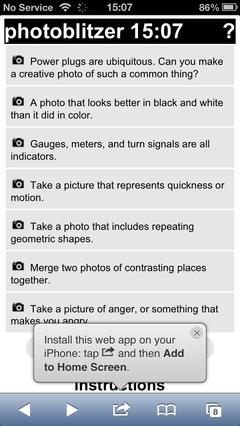
The idea of the app is to generate a list of ideas for taking photos from a list of over 106 and let people mark them off as they take them. This seems to get people started in thinking about making interesting photos even in the rather limited places we run training courses in. This leads in turn to more interesting possibilities later when working with application to use the photos, say SonicPics, comic makers, iMovie and the like.

FlickrStampr

After I had played with photoblitzer I though I’d do the same sort of thing for FlickrStampr ( a new slightly catchier name for flickrcctouch). I made this way back when I first looked into using iPod Touches in class and neglected it after that.

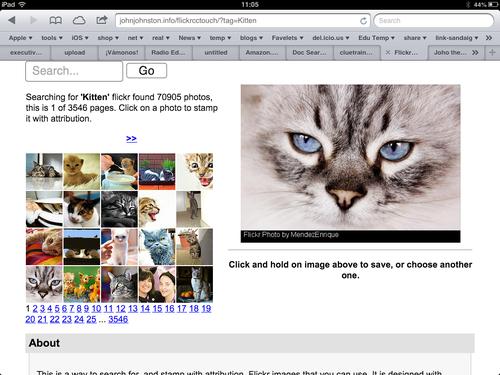
The idea behind FlickrStampr is to give pupils an easy way to use creative commons images with the required attribution. The app lets the user search for flickr photos by tag. and provides a set of thumbnails. Clicking on a thumbnail creates (on the server, a copy of the image with a strip at the bottom with a simple attribution text. The means the user can download the image and use it on blog posts or presentations and the attribution is on the image, easier, I hope, for pupils than copying both the image and the attribution and then useing them together.

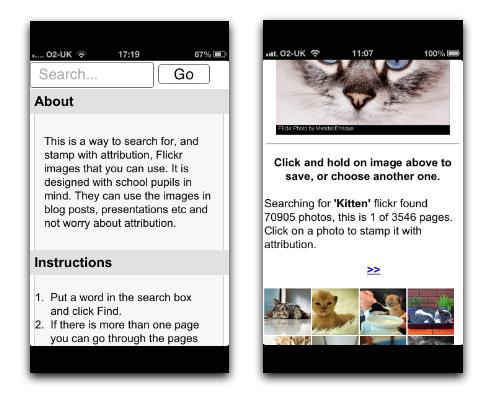
I started by cleaning up the iPhone interface a wee bit, before it did a fair amount of hiding and showing, now it just shows everything: flickrstamper iphone I messed about with the CSS a little and the page looks a bit different on an iPad screen; FlickrStampr iPad The main problem with the interface as it stands is that if you want to just see a bigger version of the image the image is processed on the server adding the text. This is, I suspect, a little inefficient but it makes for ease of use: you don’t need to preview them click a create button, then download the result. Just press the ‘preview’ and choose save. 

Not exactly responsive

The design improvements falls quite short of what is normarly thought of as responsive. In FlickrStampr the layout just squishes as the screen gets smaller, pushing one secion below the other. I photoblitzer I’ve used a media query in the css for the first time: @media screen and (max-width: 480px) there are a lot of possibilities for improvment. I am slowly learning hopefully more improvements to come.

Icons

I’ve now given both an icon to make it look a bit nicer when added as a bookmark on your homescreen, Ive also use a useful bit of javascript that alerts folk to the fact they can do this:Add to home screen, you can see it in action on some of the screenshots above. iOS web apps are a lot less powerful that native apps, especially ones developed by peole like myself with pretty limited knowledge, but they do offer the possibility of simply addressing niche uses. I hope that some folk will find these things of interest or even useful. I’ve had a ton of fun working/playing with this stuff and am open to suggestions for improvments.

The value of free

As an aside, testing the flickr API, and some recent play with the freesound API reniforce for me the value of sharing under a CC license with the proviSion of a powerful API, there are some amazing people sharing wonderful captures and creations freely, this need to be vslued, used and protected.


A decade ago, metadata was all the rage among the geeks. You could tag, geo-tag, or machine-tag Flickr photos. Flickr is from the old community. That’s why you can still do Creative Commons searches at Flickr. But you can’t on Instagram. They don’t care about metadata. From an end-user point of view, RSS is out of favor. The new companies are not investing in creating metadata to make their work discoverable and shareable.

from: Joho the Blog – [berkman] Anil Dash on “The Web We Lost”

Some great reading this morning starting at How the Web is being body-snatched ~ Stephen’s Web through Doc Searls Weblog – How the Web is being body-snatched to the post with the above quote.

This quote really jumped out at me, I’ve loved the flickr API for a long time and used it for lots of fun. I enjoy Instagram too, for its easy, quick hit, and lightweight community.

I really hope that we are not drifting away from such valuable resources with apis and rss feeds to the easy and locked in.

One of the things that makes the huge gap between sites like flickr and facebook is who has access to data and how they access it. When you share on flickr you are doing something quite different, and potentially much more valuable than sharing on facebook or google+.

I hope that open never gets old.

Newspaper dog thinking RSS by stylianosm Attribution License

Over the last few days I’ve been reading a lot of blog posts about the passing of Google Reader. Although it has been apparent for a while that google was not really interested in reader I was very upset to hear this. Google Reader has become central to my use of the Internet.

RSS

RSS stands for, in one interpretation, for Really Simple Syndication.  This is the definition that describes it use to me. The power comes from the simplicity. RSS give you a way to read a sequential website; blog, YouTube users activity, Flickr stream, delicious links and many more is a standard format that is simple to read. This allows you to display the latest posts of one blog on another, aggregate videos from YouTube with a particular tag with blog post, delicious links etc all in the one place.

It also allows developers to create Feed Readers that will list and organise multiple blogs allowing you to read them in the one place and keep track of what you have read. Most readers will also allow you to export or share information with ease to a vast array of different services.

I first stared using RSS not long after I got my own mac and became interested in ict. In those dialup days I got new software from magazine cover disks and I installed NetNewsWire light a desktop aggregator. This I used on and off but did not really pay much attention until the first flowering of educational blogging in Scotland and the birth of TeachMeet. It then became fairly obvious that you could pull in valuable information about events to one place automatically. At that time  Technorati did a pretty good job of aggregating blogs posts, you could pull together delicious links, Flickr photos and posts with the same tag, say teachmeet06, with a pretty minimal knowledge of php. You could also do the same thing with various online aggregators, netvibes for example, with a bit less hassle or fun.

Syncing

One of the features of Feed Readers that I didn’t get at first was the ability to sync your reading. I only read RSS feeds on my home computer, I only owned one device. It was not useful to me.

Mobile

With the rise of mobile computing and my first iPhone the ability to sync became very useful to me. On the train I could pull out my phone and skim through my feeds, I didn’t do a lot of reading of long posts but marked, linked, instapapered, and even emailed then for later consumption.

Around this time google reader became the syncing solution of choice for the vast majority of Feed readers both desktop and mobile. This made a lot of sense; no matter where I read my feeds, on any device and on different applications on the same device everything was kept in sync. This made it easy to test a variety of applications, catch up on the web on any computer all with the help of Google Reader.

All your Eggs belong to Google

The obvious flaw in the ointment. Like posterous, you get what you pay for. Some folk argue the google did RSS and us a disservice, we did not see development of different solutions as it is hard to compete against free.

Some folk didn’t like feed readers anyway

Quite a few folk reacted to google reade going way with so what:

‘Oh no, Google Reader is gone! Whatever shall I do?’ Get a life;-)

from: @kvnmcl on Twitter

Dave Winer who had a lot to do with the creation of RSS famously does not like readers, preferring a river of news, tabs.mediahackers.org. There are lot of good things about a stream of new, Dave’s solution is self hosted, Dropbox even, so does not relay on google or anyone else. I’ve set it up a few times, I guess it would be better for someone who reads their feeds regularly, throughout the day, as part of their job. I think reading lots of blogs is good for me professionally but do it in my own (usually breakfast on an iPad) time.

Similarly many people get links from twitter, this for me is a bit haphazard, I also mostly follow education folk on twitter, my feed reader has a wider range of odd blogs which can be useful.

Google Plus

Many folk are suggesting that google has shut reader down in part to encourage the use of google plus. I have a problem with this. As it stands google plus is hard to share out of. In most of the RSS readers I use it is simple to favourite a post, share it to many other services, bookmark it etc. Google plus does not help with this. I recently found that ‘plus oneing’  other folks google plus posts in google plus communities does not save that any where I can find it! I can’t see a way to share or bookmark links to google plus content with any sort of ease. There is not feed or API in google plus that allows me to extract and auto share content. I am beginning to see G+ as a longer twitter with even more opaque content.

What I’d like

There are a plethora of solutions being thrown up in response to google reader shutting down. This is what I’d like to see:

    • A reader that stores it’s sync data in a open and standardised form. This would allow for the testing of or swapping between different client applications.


  • A reader that allows the easy sharing, collection and organisation of data.


The Bright Side

I guess there will be plenty of activity around replacing and improving on Google Reader over the next few months. I am looking forward to doing some testing of the different applications and systems and finding out what fits for me.

What I’ve been reading (mostly on Google reader)

Iosicons

Update: 8 Jan 2025. I’ve had a query or two about his post recently and a comment today. I doubt very much if anything in this post still stands.

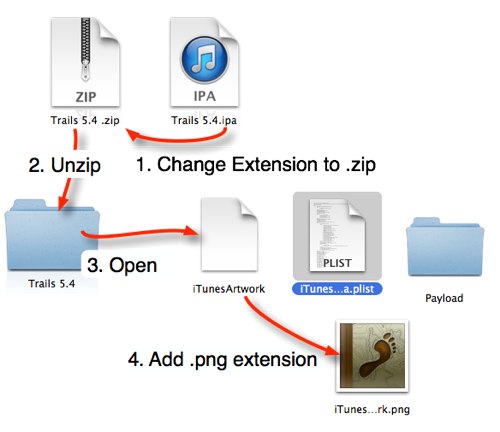
The other day a colleague and I were trying to remember how to get the icon art for iOS apps to help write notes. We though we remembered a way to get them out from examining the package. Later I was reading the ADE list, where there was a bit of bemoaning that you can no longer copy the art from iTunes. Someone mentioned that the art was now is a file iTunesArtwork inside the .ipa files in the iTunes folder, the .ipa file being zip files.

Icon Extraction Manual

This means you can get the art work by, changing the extension on an ios app file to .zip, expanding the archive, adding a .png extension to the iTunesArtwork file. You end up with the artwork png file.

Automating

This seems like a fairly long road for a short cut. A wee bit of though lead me to try a few shell scripts. Basically you can use the unzip command to extract the iTunesArtwork file with a png extension and you get a png file of the artwork.

To make this a little easier I wrapped up the shell script in an AppleScript. Drag a bunch of .ipa files onto the droplet and it will create a folder on your desktop and extract the art work as png files. Double click the droplet and it will prompt you for a file and do the same. The files are named the same as the .ipa files except I replace all non alphanumerical characters with an underscore. I’ve put the script in my dropbox in case anyone would find it useful, and uploaded the text so you can View the Script.

BTW: Rounded Corners

So the artwork extracted does not have the rounded corners:

I Movie 140.ipa

You can change the way that looks on the web with a bit of css:
I Movie 140.ipa

style="-moz-border-radius: 20%;-webkit-border-radius: 20%;border-radius: 20%;"

This might help other folk documenting iOS stuff. I’ve now got a folder of >600 icons ready to go.

Grain Tower by Alan Denney Attribution-NonCommercial-ShareAlike License

At work we have an occasionally used glow blog, ICT. I am trying to post there more regularly. This week I used to to post a couple of sets of useful links.

iPad Sharing

We have been running a lot of ipad twilights, mostly introductions, but some on digital storytelling. Last week we had a couple were we invited staff along to share what they were doing with iPads in class. This generated a lot of interesting conversation, short demos and links. I’ve collected the links: iPad Sharing.

Finding Digital Media to Re-Use

We shared this links on an iBooks Author course and the digital storytelling with iPads one. Finding Digital Media to Re-Use hopefully helping folk to talk about copyright, attribution and avoiding the quick google search as a way of getting images for presentations etc.

Composition: manhole and chain by 10b travelling
Attribution-NonCommercial-NoDerivs License

Why you should learn to code

Primarily you should do it because you love it, because it’s fun — because it’s wonderful to create machines with your mind. Hugely empowering. Emotionally gratifying. Software is math-in-motion. It’s a miracle of the mind. And if you can do it, really well, there’s absolutely nothing like it.

from: Thread: Why you should learn to code by Dave Winer We seen lots of arguments about why kids should learn to code recently this is to my mind the best. I could not describe myself as a programmer but I’ve tinkered with various things in a amateur way for years and had a ton of fun. Some interesting comments on this one.

How you Should learn to code?

LiveCode is like a next generation version of HyperCard. It is used to create #1 one app store apps, real-time flight booking systems and control satellites. It is used to create simple one off apps and utilities to solve day-to-day problems.

from: Next Generation LiveCode (Open Source) by RunRev Ltd — Kickstarter RunRev, Edinburgh based, had a kickstarter project to opensource their programming environment, this project successfully raised its funding goal (I backed it). You will soon be able to download an opensource version to use on non commercial projects.

Future Glow

Mr Russell, it is timeto form the agile group to start moving things forward. The technologists within ScottishEducation are some of the most passionate practitioners you will ever meet withinternational reputations and growing global experience. We will continue tosupport and advise when we are asked – but you need to ask and wewill always be honest.

Unfortunately it is ourhonesty that scares some of the bureaucrats who work within our system,

These are exciting timesfor Scottish Education and Technology for Learning, but I hope we can now startto move forward together and not in isolated silos of innovation.

from: OllieBray.com: Scotland’s Technology for Learning: A Tipping Point by far the best thing I’ve read about glow, if you are a Scottish educator please read this now. If you are Mike Russell please do this now!

Why I love DS106

Rust on rust, as a metaphor doesn’t really get me far, in fact, in explaining myself, so I’ve decided to switch metaphors yet again, and talk using a cooking metaphor.

[That should help to make the purpose of this post even clearer.  (Least you wonder too much, this is a digitally-told story, after all, about computer stuff and coding, and framed with a historical reference to a truly great science-fiction TV show and some geeky characters, and built around ds106radio, so indulge me …)]

from: My Kung Fu has Rust on Its Rust | de•tri•tus I got a mention in this post but that is not why I love it and ds106

Good News

Good news for audio on the web: the latest nightly builds of Firefox on Windows 7 have H.264 and MP3 support enabled by default! Work is ongoing to bring these features to the Mac OS X and Linux versions.

from: Firefox on Windows 7 gets H.264 and MP3 support – HTML5 Audio great news for folk interested in simplifying the playing of media on the web.

Five Bucks or £2.99

Think about this — for five bucks, Adobe Photoshop Touch for iPhone can do more than the Mac desktop version of Photoshop 3.0 which cost hundreds. I still have those floppies.

from: Photo App Review: Adobe Photoshop Touch for iPhone » Life In LoFi: iPhoneography mobile apps are interesting in that they bring a lot of power to users very cheaply.