Walk round the glen Douglas ‘Trio’ today, Beinn Bhreah, Ben Rioch and Tullich Hill
Started cloudy with a bit of drizzle as I squelched up Beinn Bhreah. cheered up by a few groups of Red Deer and a Raven croaking overhead.

Red Deer
I’d forgotten my camera and an iPhone is not the best wildlife at a distance camera.
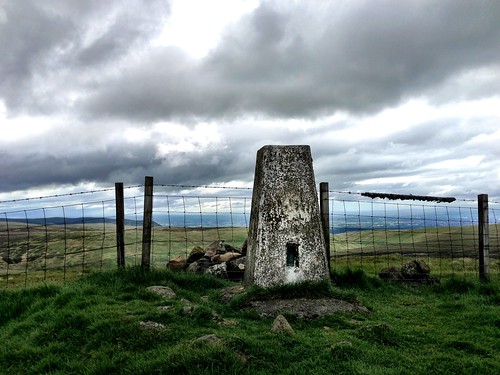
It began to clear up a bit after I got to the first top:

Untitled

Walked along to Rioch had some coffee and dipped down to climb up Tullich Hill.
One of the things I like about these hills is how quiet they are, I did not see another walker today, great view of the more glamorous Arrochar Alps too.

Untitled

Lunch at the top of Tullich while my phone made a wee timelaps video of the cobbler:

Although these are just about highland hills they are covered with rough grass rather than heather. Lots of Bedstraw and Tormentil along with some pink and blue jobs. Some orchids on the wetter parts of Tullich.

Untitled

Grass filled with vole tunnels too, I nearly stepped on a couple of the wee beasts scooting along the tunnels.
Back down to the road I noticed some new signage pointing to the hills. Selfish twinge that this might mean the walk is a bit busier in the future. Amazing that you can get so alone a short hour from glasgow.

View Larger Map

5 hours 20 minutes, 10 and a half km, 1012m of up.

First published on Fargo moved here 22 Jul 2019

Given the weather was drizzle and rain we waited until after 4 to start this walk. The forecast promised some sun in the evening. This didn’t quite materialise but the rain stayed off.

Plenty of fox gloves and other flora to peer at.

White foxglove #walknote #floraFoxglove

By the time we were heading back to the car it had brightened a wee bit and the clouds had cleared from Ben Ledi across the loch.

23643892

About 7 and a half km

View Larger Map

The weather promised to be rainy so I decided to rein in my plans and go on this closer to home walk.
14 deg C in the car when I set off rather late at about 9:30, cloudy and a we bit muggy.
Arrived at the distillery around 10, the weather stayed dry for the whole walk. Low cloud and a stiff breeze. Quite nice to walk in.

Untitled

Dumgoyne very green now. As usual provides a bit of aerobic exercise before a gentle walk to Earl’s Seat.
Lots of bog cotton bobbing across the moors. A couple of ravens in the distance and a few noisy larks at the trig point.

Untitled

Needed to put on a jacket after eating lunch at the trig point but in general warm enough.

Here is the kml file on google maps. About 10 and a half k in around 3 and a half hours.

View Larger Map

First published on Fargo moved here 22 Jul 2019

Dull and overcast, looked like it might rain but didn’t. Dorothy and I took a short walk to the Whangie and back.

flower

Pleasant walk lots of bog cotton and larks. Nice Woolly Bear on the path.
#woolybear #walknote
Surprisingly quite for a Saturday morning.

There are only a few days until Google Reader grinds or snaps to a halt.

I can’t say I am ecstatic about this but I have been doing a little planning and thinking.

My current use of RSS and google reader is as follows: I read, I bookmark to pinboard, tweet links, collect some articles on Instapaper for reading again and I email links to my work and home accounts.

Most of this is carried out using Feeddler pro on an iPad, I occasionally also Reeder or more often the GoogleReader site on a mac. I use Feeddler on my iPhone too.

Feeddler is, in my opinion, a really good fit for the way I use rss.

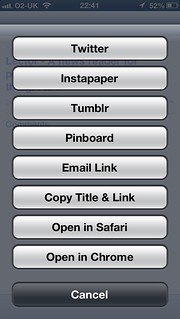
For example it lets me set a preferred address (well two) which are already filled in with my home and work address, so it is very few clicks to send an interesting link to my work address from my breakfast table. Feeddler also lets me trim down the services it shows, which saves a bit of scrolling.

Untitled

What I’ve done to prepare:

  • Read a lot of blog posts collecting links on pinboard tagged googlereader
  • Bought the new version of Feeddler: iPhone-only Pro version. To go with this I got an account on The Old Reader and a trial on BazQux both which sync with the Feeddler. I’ve taken up an account on Hive too.
  • The Free Feeddler app has been updated too, I am really hoping the paid version of the iPad one is updated or there is a new version to buy that supports the pro features, especially the link menu like the iPhone one above.
  • When things settle down a bit, I’ll choose one service to either pay for or donate to. I pay for flickr, pinboard and a few other services, I use RSS a lot more than those and would be delighted to support a good service.
  • I’ve installed the beta of NetNewWire which was the first rss app I ever used.
  • I’ve also set up a few rivers with some of the feeds from my greader export. This is the most interesting development. This uses Dave Winer’s River3 and is starting to get useful. I’ve had a few experiments with river2 and the OPML editor before this, but this one is up and running.

I’ve been messing around and tinkering with Fargo.io a wee bit more today.

Fargo started as an outliner, I found it because I read Scripting News after messing with the OPML application on my mac.

Fargo is still an outliner but it has developed quite a few interesting features in a very short time. Early on one could post to a blog that supported the metaweblog api and I made a couple of posts to my blog.

This does not work perfectly with my blog as it is not WordPress and does not seem to return the correct id to Fargo, this means I cannot update the post from Fargo.

Now Fargo is developing into a publishing engine. For example this ‘post’ is published and is part of a blog. I’ve not really got my head around how the blog is setup I’ve just copied settings from some other users and messed about a wee bit.

The main aim of fargo at the moment seems to be:

  • But we want to emphasize that if you’re a writer and non-technical, you don’t need to understand what’s in the engine. It’s our job to make this simple for you, a job that we take very seriously! ;-)

So I am going to hit the wordpress icon on the left and see if this ends up on my blog.

Update: Well that worked fine, updating from Fargo didn’t, so this is copied and pasted from the Fargo Post:

The post got published on my blog, but the wrong id was returned. Even changing the id in the outlines attributes did not fix this. I can’t update the post.

The other thing I noticed is the type is changed to metaWeblogPost so that seem to change the formatting on the published post, losing the styles and menus. I got this back by adding another type attribute, this replace the original. I guess, if it worked with my blog, updating would not work? When I click the wordpress icon i get Save “Fargo.io is getting interesting” as a blog post? So I guess if I clicked OK I’d get a new post on my blog ant the type would be set to metaWeblogPost.

In fact the type attribute seems to be changed even if I cancelled. I changed it back manually.

Update 2 22-06-2013 I’ve managed to get a slightly better blog with a sort of purpose going with fargo: Walk Notes. Mostly by copying stuff from kyle<.a> one of the fargo devs outline.

Pulp o Mizer rtc Nuggets

TL:DR or Highlights

  • A chat with Jenni Robertson about meraki and VPP
  • John Hurst’s talk, a flavour of which is in this boo: Audioboo / An open approach to web filters
  • Ian Wilson‘s demo bossjock
  • OscarStringer: making iMovie title screens with Explain Everything
  • Joe Moretti Showbie, looks like the best thing on the iPad for handing out and gathering in work from pupils.
  • Dalry Primary School

I’ve spent the last couple of days at Dalry Primary School for the Apple Regional Training Centre Conference. I’ve been to two or three ADE events but this was my first RTC.

Apart from the obvious focus on pedagogy and learning other than tech, the main subject was the iPad, not much about macs other than as content creators, iBook Author, for the iPads.

The school itself was a pretty amazing building. The school is a ‘flagship’ building and worth looking at inside and out (pictures here).

Day One

The first day consisted of a series of half hour presentations, the stand outs, for me, were:

  • Jenni Robertson from Edinburgh talking about how they delivered courses on the other side of Scotland. Afterwards, in conversation, Jenni explained how they use Meraki and volume purchasing . some of the North Lanarkshire schools already use Meraki, but Jenni had a good model for covering a whole authority. They way Edinburgh has accessed VPP sounds as if it might be possible in other LAs too.
  • Torstan B Stauch, demoed AppShed which allows you to Build HTML5, iPhone and Android apps online for schools, education and business, and looks like it is worth following up.
  • John Hurst HT of Lever House Primary School tyalked about his schools approach to education, having taken control of their networking from the LA without Going Academy; risk assessment, outdoor fun, starting fires, getting mud between your toes and more. This was a great presentation and I managed to get a quick audioboo with John later for edutalk talking about filters:

    We hope to have John as a guest on Radio #EDUtalk next session.

  • Babar Baig and Kim Byrding talked about an app WriteReader, but their Danish approach to getting very young children to record their activities was fascinating. A combination of taking photos and have a go writing was great.
  • Ian Wilson, Mark Bunyan and Mike Watson gave a quick fire Golden Nuggets section with some great app suggestions and ideas for using them.

    Many of these are captured on twitter, and I’ve bundled a lot of the tweets I made or liked during the first day into Storify #AppleRTC Thursday 13 June 2013..

    One of the most interesting was Ian Wilson‘s demo of bossjock, I’d looked at that before but turned it down due to price. If I had a class I’d buy it in an instant now. Really good for audio storytelling with sound effects.

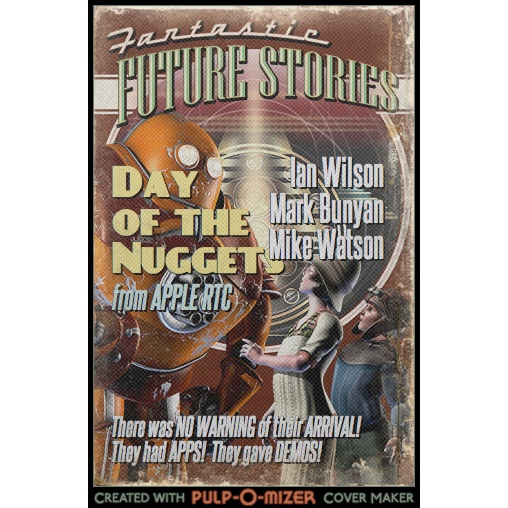
    Another goodie was sent to me from my NLC colleague Ian, PULP-O-MIZER: the custom pulp magazine cover generator with which I knocked up a quick cover(works on an ipad) in a couple of minutes and tweeted as a golden nugget.

This last activity was the only audience participation in the first day via twitter. This would be my only criticism, given that one of the themes was: Conversations, collaboration and community, a semi-formalised sharing for all participants, would I am sure, have produced some interesting stuff. But there is only some much time and almost everything we heard was of value, a good day.

Day Two

Most of day two was spent in three different workshop sessions, in order I took them:

  1. Oscar Stringer covered the workflow for Keynote to Explain Everything to iMovie and iBooks Author.

    One great tip was to use Explain Everything to create, credit or the end animations for import into iMovie, dead simple and very effective, this example took about 2 minutes to make

    Although I used iBook Author a bit last year it was nice to have a refresh of the basics and to hear the answer to our problem of importing books over Wifi to ipad: don’t make the books so big. iTunes U would seem to be the way to go, splitting the books up into chapters. The guy siting next to me in the session had a nice example of this.

    We also saw a new version of wallwisher, Padlet which works really well on the iPad for classroom collaboration.

  2. Next Dalry Primary HT Maureen Denningberg talked to the, mostly english, attendees giving an overview of Scottish Education and CfE. A few english folk now seem to be looking for a job in Scotland.

    We then were allowed to tour the school and chat to the pupils. Given the unique design of the school and the integration of technology I think the pupils are used to this. There are some interesting reviews on the school website.

  3. My final workshop of the day was with Joe Moretti. After a discussion of how to introduce iPads to staff, most of the session was dedicated to Showbie which badges itself Assignment workflow for iPad. This was the best piece of information I got in the whole show. Joe went through the basic features of the app, giving us the chance to act as pupils. We:

    1. Joined a Class
    2. Received Tasks
    3. Submitted work (from any app that can use ‘open in’ or from the camera roll, camera or via direct text or audio)
    4. Got feedback, in lots of different ways, stand out was by the teacher recording direct audio. how quick and easy it that!

    All this with the free version of Showbie which the devs have assured us will always be around and keep at least the same feature set. Although nothing lasts forever 1, showbie takes so little effort to set up for such valuable results it would be daft not to use it if you have a few ipads in class.

Joe has an iPad app Teaching With ICT which covers Essential Settings, Book Creator, Showbie, Pages, Explain Everything, Puppet Pals and iFiles. This would be a good starter selection for any classroom, based on this session would be well worth getting. I’ve certainly bought it as a thank you for the intro to Showbie.

The PirateBox

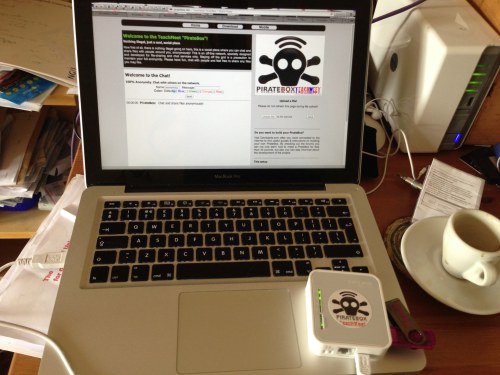
After the piratebox’s first non appearance, I was hoping that here might be an opportunity to give it a wee go. A previous ADE conference I had attended made me think the Golden Nugget session would be a bit like TeachMeet nano presentations so I packed the box. Turned out this was not so.

So on the second day I just plugged the box in and tweeted out an invitation or 3.

I must not have been inviting enough, or there was more interest official stuff going on or perhaps apple fans lack a pirate attitude? My only disappointment of the two days. I did see the lights on the box flicker a connection or two, but no one uploaded anything or left a note in the chat. I still hope that the pirate box will one day sail distributing and gathering booty. I am also wondering about using it to distribute content, say iBooks to a class without slowing the main network down.

RTC Stuff

There was also a fair bit of information on the Apple Regional Training Centres setup and it was good to clap eyes on the folk supporting the program and find out what is going on in other centres.

1.podcast producer, posterous, google reader, I am looking at you.

I found this interesting project from One Thing Well‘s rss feed, in my nearly done for, google reader.

Levinux is A Tiny Version of Linux for Education byMike Levin.

Levinux (download ~18 MB) is a tiny virtual Linux server that runs from USB or Dropbox with a double-click (no install) from the desktop of a Mac, Windows or Linux PC—making it the perfect learning environment, and a great way to run & keep your code safe for life! Think of it as an introduction to old-skool “short stack” development—more relevant now then ever as Linux/Unix gets embedded into everything.

from: Levinux – A Tiny Version of Linux for Education – Mike Levin

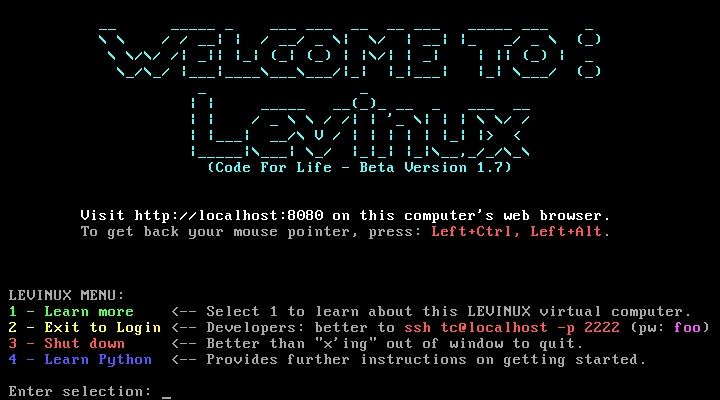
Basically when you run the application (on mac, windows or linux) you get a very small linux server running in a virtual machine:

Q Screenshot 3

After that you can create and edit html files on the server via ssh and the commandline (or PuTTy on windows).

This fits in very nicely with mty recent excursio into editing on a server via ssh on the PirateBox.

Python git and vim

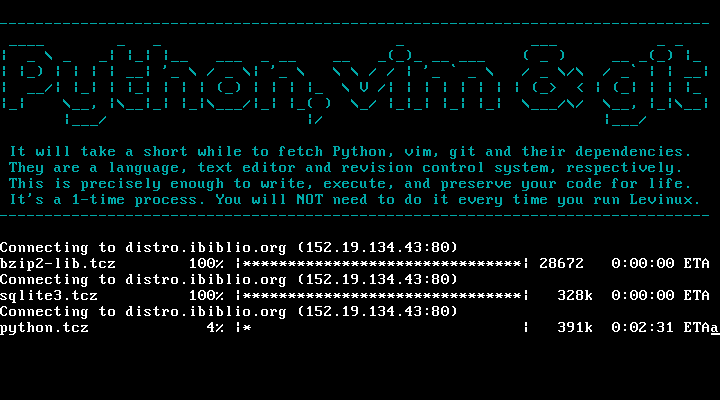
You can also install Python, vim and git very easily, basically by typing 4 and enter at the screen above:

Q Screenshot 2

This gives you a simple environment to learn python git and vim.

Mike Leven has produced a nice YouTube playlist of instructions to get started: Levinux – YouTube, I’ve followed the first few without any problem at all.

With added dropbox

On of the interesting ways this can be used is by adding the Levinux folder to your dropbox, you can then run the same server on different computers and even different operating systems.

Why this might be useful in the classroom

One of the thing I feel might be tricky in getting young people started with programming might be the complexity of a modern operating system. Even relatively recently when I started using my first mac, it had a tiny hard drive, and after a short while I had seen about every file on it. A simpler setup might be a lot quicker to get started making on. A virtual server that can be reinstalled in a couple of minutes gives a very low risk playground.

Finally here is a quote for a parent, using levinux to teach his child programming which points to some interesting possibilities:

Now one week later I see something happening with my oldest son that was not happening before. He is spending his free time sitting in front of the computer with his Levinux terminal open feverishly typing away on simple little scripts and creating ASCII art while games and movies are just a click away.
Something has changed in the way he sees a computer that I was not expecting. He is no longer consuming media he is creating. The family computer has changed from a flashy pass time to a tool for creativity.

from: ken morgan – Google+ – Something occurred to me today when I was going over Python…

and there is a Levinux Google+ community.

Piratebox Running

I was hoping to catch up with the Webmaker teachtheweb mooc and get some DS106ing done this weekend, but I got carried away hoisting a jolly rodger.

Almost two years ago I had a go at getting a PirateBox going.

A PirateBox is a self-contained mobile communication and file sharing device. Simply turn it on to transform any space into a free and open communications and file sharing network.

and

The PirateBox solves a technical/social problem by providing people in the same physical space with an easy way to anonymously communicate and exchange files. This obviously has larger cultural and political implications thus the PirateBox also serves as an artistic provocation.

PirateBox site

As I wrote then Obviously TeachMeets do not need the subversion of tracking and preservation of user privacy that a PirateBox offers. Nor would sharing of copyrighted material be desirable, but It might be fun to have a PirateBox at TeachMeets.from: A PirateBox for TeachMeet?

I thought a teachmeet pirate box:

would allow folk to share files with others at the meet. If it was a traveling project, the box could go from TeachMeet to TeachMeet spreading files as it went. This would provide a sponsor-less goodie bag. Folk would be free to share what they liked, perhaps presenters would share presentations, digital musicians give away background music etc.

Obviously lots of the TeachMeet crowd already share many things online, A TM PirateBox would be a fun side project that might add to the buzz during a TeachMeet and be a concrete way of connecting different events.

I ask for donations of a fiver on twitter and several folk stepped up. I then started trying and repeatedly failing to sort out the router I bought. It turned out to be the wrong model (not apparent on the box) and it left me with a bricked ruler and a little guilt.

I mostly forgot about it except when visiting CogDogBlog where the links to The StoryBox rubbed a bit of salt in my wounds. Then as part of the webmaker mooc I read, Open Web Projects on Vibrant Outlook which had some details about LibraryBox an offshoot to the original pirate box. I ended up on the pirate box site again and saw that there was a new router in town

As I was shopping for some hard drives on Amazon I added a TP-Link TL-MR3020 Router to my basket.

Yesterday I went through the instructions and they worked. Apart from one wee problem when I made a mistake in setting an ip address (exactly the same problem @cogdog had, so I am in good company). Today I set out to customise the interface a little, I used some of the files from Nargren/PirateBox · GitHub and manage to do some. I found this quite an unusual way for me to work, using the ssh command in the terminal and the vi editor. After a few gulps I managed to start work on the interface.

I am hoping that someone might try the box out at TeachMeet TMTablet the week after next….

Thanks to

The folk who supported my initial router, I have a PirateBox TeachMeet sticker for you, in no particular order:

Neil Winton, Caroline Breyley, Olivia Wexelstein, jen Deyenberg, David Muir, Ian Hallahan, Katie Barrowman, Doug Belshaw, Drew Buddie, Drew Burrett and David Noble.