Sugata Mitra Slf10

Just back from this years SLF which proved to be a interesting couple of days.

Arriving on Wednesday, I spent the morning taking a turn round the hall and the serendipitous catching up with various folk to swap information. This is one of the best parts of a large meeting although there were several regular attendees who did not show up and were missed. There was also the usual failures to see folk I was looking for or passing them with a ‘see you shortly’ which was not achieved.

I did get my usual wake up call from Nick Hood (always taking an interesting angle), and Joe Dale put up with my ‘ipod touchs are the best thing since sliced bread’ speech with patience.

I met up with David Noble for a wee bit of last minute planning of our EDUtalk presentation. This was titled:

Sharing Curriculum Change through the EDUtalk Project

Sharing Curriculum Change through the EDUtalk Project was a look at the EDUtalk mobile podcasting project that David and I have been running after last years successful SLFtalk. We are both pleased with the way I went. As part of the presentation we asked the audience to record and post some audio, as we did this I suddenly became rather nervous in case the audience balked, luckily they did not. A fair bit of credit should go to Doug Belshaw who immediately, in a clear voice, started interviewing his neighbours. Hopefully we got across how easy and powerful mo-blogging is and the potential it has for CPD and classroom use.

Hardware & Software

I didn’t see a lot of exciting new things but met with a few of my favourite things and folk on the floor:

  • TTS continue to supply inexpensive and simple to use hardware, TTS: Easi-Speak MP3 Mics look a wee bit plastic, but are being used very effectively in a lot of classrooms. I saw a nice wireless Easi-Scope Microscope and was told a mac driver was in the works for their inexpensive visualiser.
  • I had a brief chat to Alan Yeoman of 2 simple, purple mash is a great addition to glow and I liked the look of a beta of a simple 3d game creator.
  • In innovation alley I had a chat with video conference guru Tom Kane and brief look of some of his recent projects. Tom is an inspiring guy and I think full video conferencing can be a powerful tool in the classroom, Tom helped me have a lot of fun at Sandaig.

Keynote fatigue and its cure

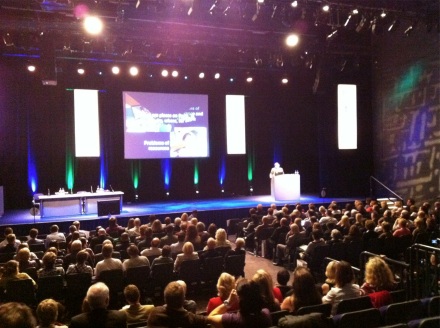
I went to a few of the keynote speeches, I find with successive SLFs I am less and less impressed with most of these, often seem to be about buzzwords wrapped in anecdotal stories and entertaining jokes. Luckily this year I went to the last one, featuring Sugata Mitra talking about his “Hole in the wall” experiments and more. I tweeted:

Http://sugatam.wikispaces.com faith in keynotes restored #slf10 #slf2010

but islayian said it best:

Sorry no tweets I just can’t do this keynote justice #slf10

amd David Muir live blogged it: The Hole In The Wall: Self Organising Systems in Education. I left keynote with lots of interesting questions running round my head. I’ve not watched Sugata Mitra on TED.com but will soon and would recommend anyone who didn’t see the SLF presentation to follow the many links to Sugata Mitra and his work.

I’ve not mentioned TeachMeetSLF2010, again David Muir has blogged it, I will leave it for the next post. It was outstanding in many ways. I’ve started posting audio to EDUtalk tagged tmslf2010.

Edutalk

Sharing Curriculum Change through the EDUtalk Project

A bit of a mouthful, but this is the title of our Scottish Learning Festival Seminar.

David Noble and myself will be running a seminar: Sharing Curriculum Change through the EDUtalk Project to talk about Edutalk on Wednesday 22 September at 12:30

We will be explaining how the EduTalk project kicked off at the Scottish Learning festival last year with SLFtalk which recorded the voices of educators attending the Scottish Learning Festival 2009. and grew from there.

We will hopefully give practical demonstrations of how the technology works and explain the thinking behind it. It should be fun.

SLFtalk 2010

As part of EDUtalk we hope that folk will be creating short reports and thoughts about SLF on EDUtalk, in the same way as last year but using the tag edutalk on audioboo and iPadio. Participants can also email audio to post@EDUtalk.posterous.com or phone Gabcast (033 0808 0214 channel 30938 and # password 1234 and # when asked
record your audio and press # when finished)

Full details of how to send audio to EduTalk are on the How to EDUtalk page. Further help from twitter: @johnjohnston or @parslad

Last session I was lucky enough to be involved with a small ipod touch pilot; Glencairn iPod and blogged about it and various iPod Touch things several times.

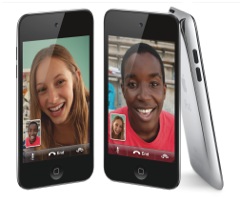
10ipodtouch FtgroupImage Courtesy of Apple

A few things have made me think about iPod touches in class recently that I though might be worth a blog post.

I’ve been using some new, to me, bits of software on my iPhone which have either classroom potential or some concepts that could be transferred to the classroom.

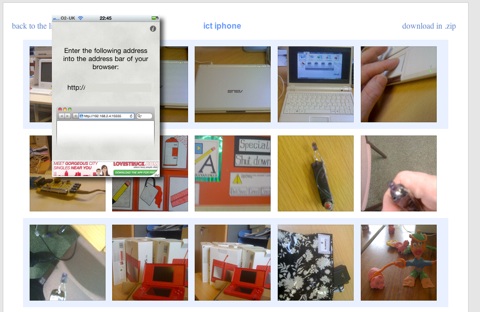
Wifi Photo Transfer (App Store) is a simple application that turns your iPhone or ipod touch into a web server which displays the photos on the device on a web browser on any computer (or iPad) on the same WiFi network:

Wifi Photo Transfer

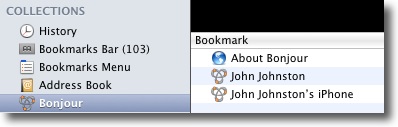
The photos can easily be downloaded to the computers. The application show a single screen on the phone with an IP address that can be typed into your browser to see the photos. Even better with Safari you just click Bookmarks and then Bonjour where you will see your phone listed:

Bonjour

A click opens the webpage with out any tricky typing.

I imagine photos taken with a new camera equipped iPod being distributed to a class full of children without resort to cables or pen drives.

I mentioned The UK SoundMap in the previous post this mashup which adds Audioboo audio to a google map could be replicated for all sorts of sound recording in class. A map full of music recorded in classrooms around the world or some language swapping springs to mind.

I’ve also been using mappiness, the happiness mapping app to record how I am feeling when the app on my phone prompts me twice a day. This sort of collaborative data logging could be done through a google form on a touch.

The other stimlus for this post is the new ipod touch, this adds the long awaited still and video camera and in my mind turns the iPod touch into one of the most useful bits of tech you could have in a classroom.

A few possibilities:

  • A replacement of your camera and easy photo distribution. The low res (960×720) is not any sort of problem for classroom use when huge digital camera images can slow things down.
  • A replacement Flip (you can use Wifi Photo Transfer to download videos).
  • A video editor, I’ve tested ReelDirector (App Store) briefly and it seems as good a video editor as you would get for £2.39.
  • Air mouse, pass a touch around the class to control the computer connected to a projector for a Whiteboard substitute.
  • With the right software and a class set you have a response kit.
  • Nintendos lots of brain training type apps.
  • Many tasks that are normally carried out on desktops or laptops.

Comparing the £159 before vat price of iPods with the cost of a smartboard or a couple of laptops makes these a real option for expanding technology in the classroom.