Last year Radio #EDUtalk was at the eAssessment Scotland 2012.

I had a great time and we broadcast some great folk and recorded for the podcast: eAS12 | EDUtalk

This year the Programme looks really interesting.

Kenji Lamb has asked us to cover the conference again! I am really excited about going again and getting into some great conversations that will be a bit over my head.

Last year it worked, IMO, really well by having two knowledgable folk in most of the broadcasts (ie as well as me). I hope to repeat this method again.

You will be able to listen to the live stream on Friday 23 August.

We are also going to run a couple of eAssessment Scotland episodes on Radio #EDUtalk on the Wednesdays before and after the conference.

As usual I am amazed at being able to talk to interesting folk just by sharing the conversation.

I’ve blogged a fair bit about badges but still am conflicted about their value in the classroom. Perhaps because I’ve not used them in anger.
Doug Belshaw when talking at the SQA assessment event last month, lit a wee lightbulb, he said something like: Badges from you community to show others, that is it for me, it is the community that issues the badge that is important. I love my talktina badge badge as I value the community that issued it.

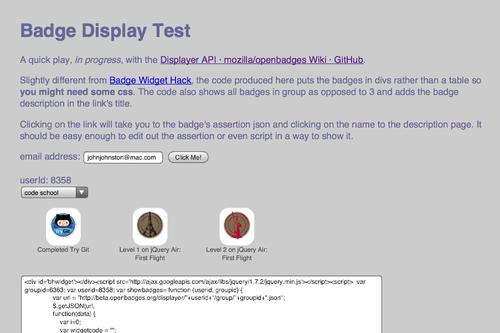
Anyway yesterday I had a quick play with the Displayer API · mozilla/openbadges Wiki · GitHub and came up with a wee page that produces a script that will display a public collection from your open badges Mozilla Backpack

Show My Badges

More an effort to improve my baby steps JavaScript than anything else, this might be of use until something more professional comes long.
screenshot

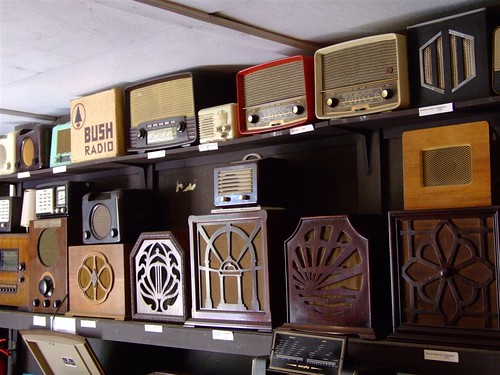
Wirelesses by Elsie esq.
Attribution License

Why would you?

  • Listening to audio is more time consuming that reading. It is hard to bookmark interesting section, to scan quickly through content and to skip back and forward.
  • Alternatively audio provides extra information, the sound of voices. Audio can also be consumed while doing other things, driving, washing the dishes walking the dog etc.
  • We have had many wonderful folk send us audio and a tremendous lineup of guests on our live show. Well worth listening to.

On the site

  • Podcast and Radio EDUtalk
  • You can listen to both podcast and the internet radio stream just by using the players on the site. The audio should be played via html5 players when possible falling back to flash. You can also download the audio using the links provided.
  • Listening on the site or downloading individual audio files is fine for casual listening but there are other ways to get the content with less effort and while you are away from your computer..

By subscribing to the podcast feed

  • The podcast has an RSS Feed. This allows folk to ‘subscribe’ to the podcast with podcatcher software. This software will automatically check the feed and download new audio that appears on the site automatically. Most podcatcher can be configured to discard older audio files and can organise the audio in different ways.
  • List of podcatchers – Wikipedia, the free encyclopedia
  • On a Computer
  • Mobile
    • Having podcasts on a mobile device is very useful. It means you can listen to podcasts as you travel. Personally I listen t opodcasts while comuting.
    • If you use iTunes you can sync your podcasts to an ipod or iphone.
    • There are also apps which will sync podcasts directly over wifi. Apple provide the podcast app for free. I use Instacast 2, version 3 is now avaliable.
    • Another popular iOS app is downcast.
    • On the android front here are some suggestions. I’d love to have some recommendations from folk I know.

Listening to the radio stream

There are many ways to listen to Edutalk, and other podcasts and Internet radio. You may find this is a great way to get information in addition to reading and watching.

TL:DR Some improvements for listens to Radio EDUtalk including some scheduling. We have an very varied and rich set of content on edutalk contributed to by a wide range of folk.

Over the Summer I’ve got a few things I want to work on. A couple of, to me, big ones. ScotEduBlogs is one, but more of that later on. First I want make a few improvements to the Radio EDUtalk stream.

Until today the stream just plays random pieces of audio from the archive files we uploaded. The files sit on the internet-radio.com server.

I had just been creating 64 kbps versions of any files submitted to the podcast and uploading them. the 64kbps files are fine for voice and keep the cost down. Unfortunately this process, or the way I carried it out had stripped the tags from some of the MP3s which meant that the information displaced on the webpage was not great.

For the last couple of days I’ve been sorting out all of the files I’ve gather over the last couple of years in a haphazard fashion. For the Radio Edutalk live shows this was easy, I’ve exported these at 64 kbps and tagged them in a reasonable fashion, eg they are titled, in the Radio EDUtalk album etc.

Scripting

Some other files I had exported at 64kbps without tags. I had to add tags to these files, a couple of hundred. To do this I used a combination of SuperCard, applescript and a couple of shell commands, exiftool and id3tool

The same tools were used along with lame to export lots of other audioboo files and add the tags back in. The only problem is with id3tool which can only handle short ID3 version 1 tags, so some longer titles are truncated. (if you really want to see this in action check a quick video. I’ve deleted a chunk of this post which gave details, in the unlikely event anyone else needs to do this sort of thing, get in touch.)

This is not perfect but gives a bit more information to the viewer about what is playing on the radio.

We have space for a couple of GB of mp3 and I have more files than that. The idea is to start a rotation, where I’ll swap out a subset of audio every month or so. Took overnight and a bit to get the first rotation of 370 files up.

Organising a Schedule

Having files with a better set of tags on the server has allowed me to create some playlists which will play at certain times.
For example at 8pm we will have a random episode of the live show, or on alternative days at 7pm Ian Field and Leon Cych will take over for half and hour. The Eduhacking Daily is mostly some teknoteacher with some other contributions. These three folk have contributed the most to edutalk.
Going through the files had an added bonus for me, I now appreciate even more the varied and rich set of content we have.

The Schedule

  • Drive Time 5pm 60 minutes a random selection of shorted episode, eg, not the Radio EDUtalk shows.
  • TeachMeet daily 6pm
  • Radio Edutalk 8pm, one random track from the live shows.
  • EduHacking Daily 9pm 30 Minutes, mostly @teknoteacher
  • Purposed Daily 10 pm 30 minutes
  • IanInShefield Mon Wed Fri 7pm 30 minutes
  • Eyebeams Tue Thu Sat 7pm 30 minutes

I’d love to get some ideas for different selection that we could schedule.

More Info

The changes also mean we can provide more information on the Radio Page, just like this:

Current track: Loading…


An invitation

An invitation to listen to edutalk audio is always open, as I am not responsible for the quality of the content I have no hesitation in saying it is great. I’ll be posting more about differnet ways to listen soon.

There is also an invitation to join in and contribute to the site, in several ways:

  • Record and audioboo or ipadio and tag it edutalk.
  • Record audio anyway you like and email it to audio@edutalk.info
  • Let us know if you are interested in joining in a live show as a guest by emailing edutalkr@hotmail.co.uk or audio@edutalk.info
  • Let us know if you would like your own live show, we have lots of time in the week.
  • We are open to any other suggestions too.

I’ve been using Fargo for a bit of blogging recently. This is a test of using markdown to format posts.

Fargo is a simple idea outliner, notepad, todo list, project organizer.
It’s an HTML 5 application, written in JavaScript, runs in any compatible browser, including Chrome, Safari, Firefox, Microsoft IE 10.

A h3 Markdown header

I am hoping that using Fargo to write blogs posts might improve my blog posts by helping me to think about the structure a bit more. I am impressed with how easy it is to move blocks of content around in Fargo.

A html tag H3

I am not sure about Fargo’s business plan, here is what they say (html blockquote)

There is no charge to use Fargo.
We don’t want any limits on the growth because we think outlining is vitally important to the growth of the net as a thinking person’s platform.
We will eventually offer for-pay services to Fargo users.

I’ve put a screenshot of the editor in my dropbox to show what this looks like in Fargo.

There are only a few days until Google Reader grinds or snaps to a halt.

I can’t say I am ecstatic about this but I have been doing a little planning and thinking.

My current use of RSS and google reader is as follows: I read, I bookmark to pinboard, tweet links, collect some articles on Instapaper for reading again and I email links to my work and home accounts.

Most of this is carried out using Feeddler pro on an iPad, I occasionally also Reeder or more often the GoogleReader site on a mac. I use Feeddler on my iPhone too.

Feeddler is, in my opinion, a really good fit for the way I use rss.

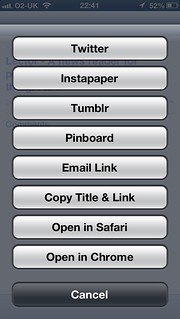
For example it lets me set a preferred address (well two) which are already filled in with my home and work address, so it is very few clicks to send an interesting link to my work address from my breakfast table. Feeddler also lets me trim down the services it shows, which saves a bit of scrolling.

Untitled

What I’ve done to prepare:

  • Read a lot of blog posts collecting links on pinboard tagged googlereader
  • Bought the new version of Feeddler: iPhone-only Pro version. To go with this I got an account on The Old Reader and a trial on BazQux both which sync with the Feeddler. I’ve taken up an account on Hive too.
  • The Free Feeddler app has been updated too, I am really hoping the paid version of the iPad one is updated or there is a new version to buy that supports the pro features, especially the link menu like the iPhone one above.
  • When things settle down a bit, I’ll choose one service to either pay for or donate to. I pay for flickr, pinboard and a few other services, I use RSS a lot more than those and would be delighted to support a good service.
  • I’ve installed the beta of NetNewWire which was the first rss app I ever used.
  • I’ve also set up a few rivers with some of the feeds from my greader export. This is the most interesting development. This uses Dave Winer’s River3 and is starting to get useful. I’ve had a few experiments with river2 and the OPML editor before this, but this one is up and running.

I’ve been messing around and tinkering with Fargo.io a wee bit more today.

Fargo started as an outliner, I found it because I read Scripting News after messing with the OPML application on my mac.

Fargo is still an outliner but it has developed quite a few interesting features in a very short time. Early on one could post to a blog that supported the metaweblog api and I made a couple of posts to my blog.

This does not work perfectly with my blog as it is not WordPress and does not seem to return the correct id to Fargo, this means I cannot update the post from Fargo.

Now Fargo is developing into a publishing engine. For example this ‘post’ is published and is part of a blog. I’ve not really got my head around how the blog is setup I’ve just copied settings from some other users and messed about a wee bit.

The main aim of fargo at the moment seems to be:

  • But we want to emphasize that if you’re a writer and non-technical, you don’t need to understand what’s in the engine. It’s our job to make this simple for you, a job that we take very seriously! ;-)

So I am going to hit the wordpress icon on the left and see if this ends up on my blog.

Update: Well that worked fine, updating from Fargo didn’t, so this is copied and pasted from the Fargo Post:

The post got published on my blog, but the wrong id was returned. Even changing the id in the outlines attributes did not fix this. I can’t update the post.

The other thing I noticed is the type is changed to metaWeblogPost so that seem to change the formatting on the published post, losing the styles and menus. I got this back by adding another type attribute, this replace the original. I guess, if it worked with my blog, updating would not work? When I click the wordpress icon i get Save “Fargo.io is getting interesting” as a blog post? So I guess if I clicked OK I’d get a new post on my blog ant the type would be set to metaWeblogPost.

In fact the type attribute seems to be changed even if I cancelled. I changed it back manually.

Update 2 22-06-2013 I’ve managed to get a slightly better blog with a sort of purpose going with fargo: Walk Notes. Mostly by copying stuff from kyle<.a> one of the fargo devs outline.

Pulp o Mizer rtc Nuggets

TL:DR or Highlights

  • A chat with Jenni Robertson about meraki and VPP
  • John Hurst’s talk, a flavour of which is in this boo: Audioboo / An open approach to web filters
  • Ian Wilson‘s demo bossjock
  • OscarStringer: making iMovie title screens with Explain Everything
  • Joe Moretti Showbie, looks like the best thing on the iPad for handing out and gathering in work from pupils.
  • Dalry Primary School

I’ve spent the last couple of days at Dalry Primary School for the Apple Regional Training Centre Conference. I’ve been to two or three ADE events but this was my first RTC.

Apart from the obvious focus on pedagogy and learning other than tech, the main subject was the iPad, not much about macs other than as content creators, iBook Author, for the iPads.

The school itself was a pretty amazing building. The school is a ‘flagship’ building and worth looking at inside and out (pictures here).

Day One

The first day consisted of a series of half hour presentations, the stand outs, for me, were:

  • Jenni Robertson from Edinburgh talking about how they delivered courses on the other side of Scotland. Afterwards, in conversation, Jenni explained how they use Meraki and volume purchasing . some of the North Lanarkshire schools already use Meraki, but Jenni had a good model for covering a whole authority. They way Edinburgh has accessed VPP sounds as if it might be possible in other LAs too.
  • Torstan B Stauch, demoed AppShed which allows you to Build HTML5, iPhone and Android apps online for schools, education and business, and looks like it is worth following up.
  • John Hurst HT of Lever House Primary School tyalked about his schools approach to education, having taken control of their networking from the LA without Going Academy; risk assessment, outdoor fun, starting fires, getting mud between your toes and more. This was a great presentation and I managed to get a quick audioboo with John later for edutalk talking about filters:

    We hope to have John as a guest on Radio #EDUtalk next session.

  • Babar Baig and Kim Byrding talked about an app WriteReader, but their Danish approach to getting very young children to record their activities was fascinating. A combination of taking photos and have a go writing was great.
  • Ian Wilson, Mark Bunyan and Mike Watson gave a quick fire Golden Nuggets section with some great app suggestions and ideas for using them.

    Many of these are captured on twitter, and I’ve bundled a lot of the tweets I made or liked during the first day into Storify #AppleRTC Thursday 13 June 2013..

    One of the most interesting was Ian Wilson‘s demo of bossjock, I’d looked at that before but turned it down due to price. If I had a class I’d buy it in an instant now. Really good for audio storytelling with sound effects.

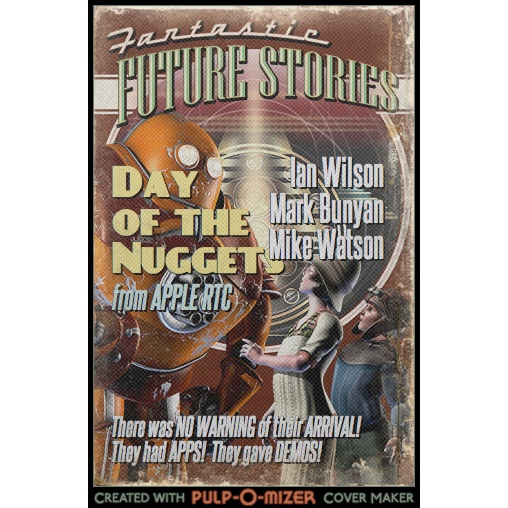
    Another goodie was sent to me from my NLC colleague Ian, PULP-O-MIZER: the custom pulp magazine cover generator with which I knocked up a quick cover(works on an ipad) in a couple of minutes and tweeted as a golden nugget.

This last activity was the only audience participation in the first day via twitter. This would be my only criticism, given that one of the themes was: Conversations, collaboration and community, a semi-formalised sharing for all participants, would I am sure, have produced some interesting stuff. But there is only some much time and almost everything we heard was of value, a good day.

Day Two

Most of day two was spent in three different workshop sessions, in order I took them:

  1. Oscar Stringer covered the workflow for Keynote to Explain Everything to iMovie and iBooks Author.

    One great tip was to use Explain Everything to create, credit or the end animations for import into iMovie, dead simple and very effective, this example took about 2 minutes to make

    Although I used iBook Author a bit last year it was nice to have a refresh of the basics and to hear the answer to our problem of importing books over Wifi to ipad: don’t make the books so big. iTunes U would seem to be the way to go, splitting the books up into chapters. The guy siting next to me in the session had a nice example of this.

    We also saw a new version of wallwisher, Padlet which works really well on the iPad for classroom collaboration.

  2. Next Dalry Primary HT Maureen Denningberg talked to the, mostly english, attendees giving an overview of Scottish Education and CfE. A few english folk now seem to be looking for a job in Scotland.

    We then were allowed to tour the school and chat to the pupils. Given the unique design of the school and the integration of technology I think the pupils are used to this. There are some interesting reviews on the school website.

  3. My final workshop of the day was with Joe Moretti. After a discussion of how to introduce iPads to staff, most of the session was dedicated to Showbie which badges itself Assignment workflow for iPad. This was the best piece of information I got in the whole show. Joe went through the basic features of the app, giving us the chance to act as pupils. We:

    1. Joined a Class
    2. Received Tasks
    3. Submitted work (from any app that can use ‘open in’ or from the camera roll, camera or via direct text or audio)
    4. Got feedback, in lots of different ways, stand out was by the teacher recording direct audio. how quick and easy it that!

    All this with the free version of Showbie which the devs have assured us will always be around and keep at least the same feature set. Although nothing lasts forever 1, showbie takes so little effort to set up for such valuable results it would be daft not to use it if you have a few ipads in class.

Joe has an iPad app Teaching With ICT which covers Essential Settings, Book Creator, Showbie, Pages, Explain Everything, Puppet Pals and iFiles. This would be a good starter selection for any classroom, based on this session would be well worth getting. I’ve certainly bought it as a thank you for the intro to Showbie.

The PirateBox

After the piratebox’s first non appearance, I was hoping that here might be an opportunity to give it a wee go. A previous ADE conference I had attended made me think the Golden Nugget session would be a bit like TeachMeet nano presentations so I packed the box. Turned out this was not so.

So on the second day I just plugged the box in and tweeted out an invitation or 3.

I must not have been inviting enough, or there was more interest official stuff going on or perhaps apple fans lack a pirate attitude? My only disappointment of the two days. I did see the lights on the box flicker a connection or two, but no one uploaded anything or left a note in the chat. I still hope that the pirate box will one day sail distributing and gathering booty. I am also wondering about using it to distribute content, say iBooks to a class without slowing the main network down.

RTC Stuff

There was also a fair bit of information on the Apple Regional Training Centres setup and it was good to clap eyes on the folk supporting the program and find out what is going on in other centres.

1.podcast producer, posterous, google reader, I am looking at you.

I found this interesting project from One Thing Well‘s rss feed, in my nearly done for, google reader.

Levinux is A Tiny Version of Linux for Education byMike Levin.

Levinux (download ~18 MB) is a tiny virtual Linux server that runs from USB or Dropbox with a double-click (no install) from the desktop of a Mac, Windows or Linux PC—making it the perfect learning environment, and a great way to run & keep your code safe for life! Think of it as an introduction to old-skool “short stack” development—more relevant now then ever as Linux/Unix gets embedded into everything.

from: Levinux – A Tiny Version of Linux for Education – Mike Levin

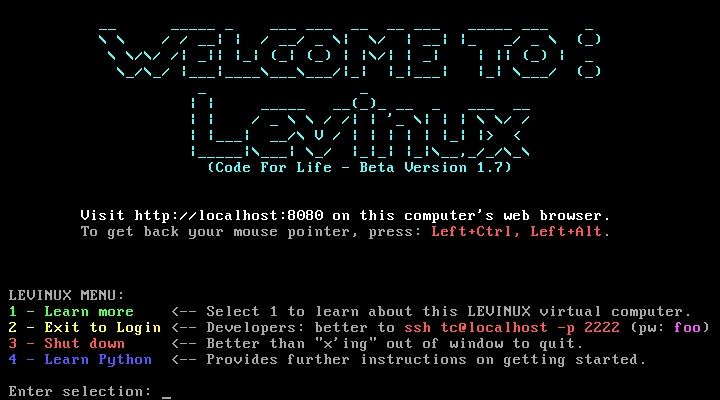
Basically when you run the application (on mac, windows or linux) you get a very small linux server running in a virtual machine:

Q Screenshot 3

After that you can create and edit html files on the server via ssh and the commandline (or PuTTy on windows).

This fits in very nicely with mty recent excursio into editing on a server via ssh on the PirateBox.

Python git and vim

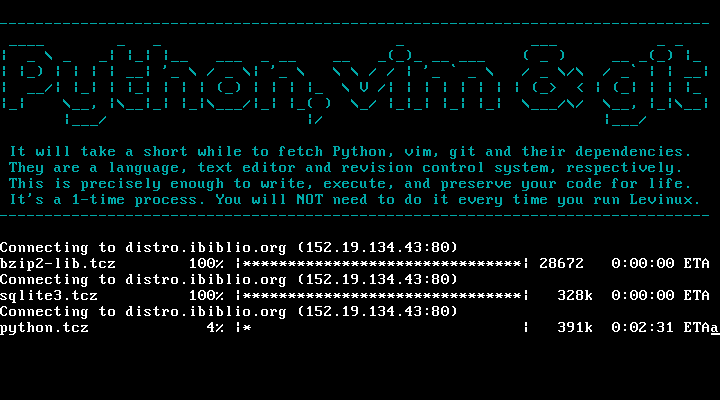
You can also install Python, vim and git very easily, basically by typing 4 and enter at the screen above:

Q Screenshot 2

This gives you a simple environment to learn python git and vim.

Mike Leven has produced a nice YouTube playlist of instructions to get started: Levinux – YouTube, I’ve followed the first few without any problem at all.

With added dropbox

On of the interesting ways this can be used is by adding the Levinux folder to your dropbox, you can then run the same server on different computers and even different operating systems.

Why this might be useful in the classroom

One of the thing I feel might be tricky in getting young people started with programming might be the complexity of a modern operating system. Even relatively recently when I started using my first mac, it had a tiny hard drive, and after a short while I had seen about every file on it. A simpler setup might be a lot quicker to get started making on. A virtual server that can be reinstalled in a couple of minutes gives a very low risk playground.

Finally here is a quote for a parent, using levinux to teach his child programming which points to some interesting possibilities:

Now one week later I see something happening with my oldest son that was not happening before. He is spending his free time sitting in front of the computer with his Levinux terminal open feverishly typing away on simple little scripts and creating ASCII art while games and movies are just a click away.
Something has changed in the way he sees a computer that I was not expecting. He is no longer consuming media he is creating. The family computer has changed from a flashy pass time to a tool for creativity.

from: ken morgan – Google+ – Something occurred to me today when I was going over Python…

and there is a Levinux Google+ community.