
A bunch of parakeets were settling down for the night in Victoria Park this evening. A quick recording with a bit is speach at the end. 🎙
Listening to the Parakeets
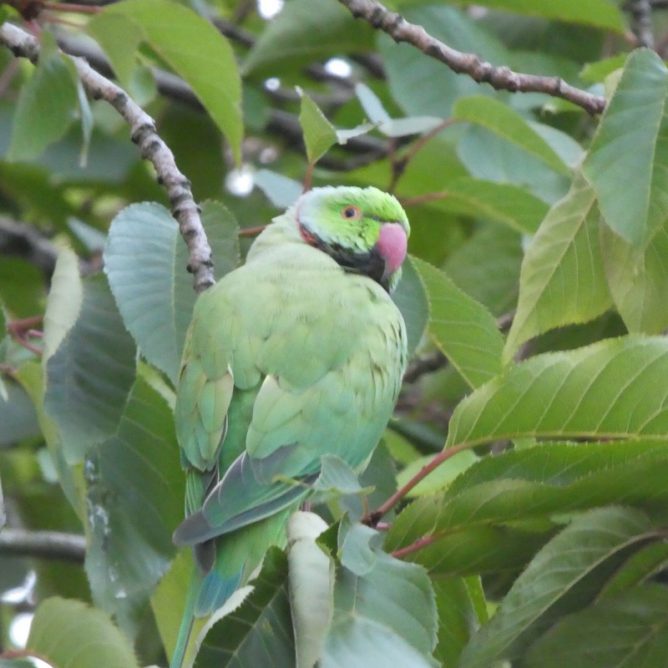

A bunch of parakeets were settling down for the night in Victoria Park this evening. A quick recording with a bit is speach at the end. 🎙
Read NeuroTribes: The Legacy of Autism and How to Think Smarter About People Who Think Differently by Steve Silberman
I was, for some reason expecting more about ‘long sought solutions to the autism puzzle’ from the blurb. This was more of a history lesson. Easy to read in a Sunday supplement sort of way.
The last couple of chapters were the most rewarding in helping to think about autism a little bit smarter. 📚 ★★★★☆
The line up for next week’s broadcast now online: Radio #EDUtalk 29-08-2018 ALT Annual Conference 2018 Preview #altc
Will be live at Live Shows – EDUtalk at 8pm next Wednesday. My first broadcast of the session.
It has taken me a while to get this one together. I am still experimenting with recording on the hoof. This time I decided to record a series of short clips in Voice Memos. the intention was to string them together quickly with Ferrite. I found that a bit footery on the phone and ran into the three track for free limit.
Returned to the problem on the iPad and Hokusai. Only took a few minutes. Both ferrite and Hokusai are made by the same developer! I think I might read Difference: Between Hokusai Audio Editor and Ferrite Recording Studio — Wooji Juice I need to get a bit more practice with these apps.
A great post Starting Your own Digital Leaders Team. Perfect example of why I love blogs. #glowblogs

Here are some of the things I’ve tagged classroom over the summer holidays.
Inspired by the art of ikebana – a traditional style of Japanese flower arranging – Montreal-based artist Raku Inoue hand-crafts bugs using materials from his garden. He transforms his garden waste, including sticks, seeds and petals, to create his Natura Insects series. “I think about the main shape of the insect,” he says, “and try to find something to satisfy that. It’s very much like a puzzle.” As the year progresses, his creative options change. “I choose the materials according to what nature offers during that time. All four seasons offer many different materials to play with.” The series started as a morning routine over coffee to sharpen his thoughts for the day. “It was never meant to be a complex process, but rather an easygoing, morning mind-stretching exercise.”
To prove this I have used Google Sheets to create a “Random Writing Prompt Generator” that randomly pulls from a list of about 2,000 adjectives and 1,000 nouns to create over 2 million unique prompts. See below to get your own copy of the Sheet, learn how it works, and get more ideas on how to help your students write poems, stories, or other creations.
A Bio Poem is all about you. It is a way for you to introduce yourself to others. Take some time to think about yourself – your thoughts, feelings, and beliefs. Then, use the template and example below to write your own Bio Poem.
Featured image: my own, I spent a fair bit of the summer trying to get close to butterflies.
Another experimental microcast. I recorded this on a walk last week using the iPhone audio memos app. Just kept a memo open and recorded fragments on the go. Unfortunately at some point I hit done and when I added more, without looking, I recorded over the start.
On editing in ferrite the app crashed everytime. So I switched to Hokusai 2 cut the start pasted it to the end and then levelled in Auphonic. Finally back in Ferrite I added the intro (recorded in Ferrite and run through Auphonic).
This if far too complicated. I also need a dead cat from the phone to cut down on wind noise.
As part of my summer holiday fun with WordPress I though I might create a ‘proper’ RSS feed for my microcast.
There are quite a few podcast plugins that would do the job but I though it might be interesting to try a bit of DIY.
Back when I started a class podcast at Radio Sandaig I used to create the RSS feed by hand with a text editor and a fair bit of copy and paste. Over at Edutalk we use feedburner to massage the feed for iTunes.
I used information from How to Roll Your Own Simple WordPress Podcast Plugin | CSS-Tricks to get me started with the template.
I copied the feed-rss2.php file from the wp-includes folder to my child theme folder renaming it feed-microcast.php
wp-content/themes/sempress-child/feed-microcast.php
I adjusted the query to get the posts from my microcast category. I also hard coded the title, link, image and a few other things to simplify the process a little.
I then used the template from CSS-Tricks as a guide to adding the various podcast tags to my template.
This ended up with a pretty broken feed, mostly due to my lack of care, but I fixed it up later I got it linked up.
I didn’t want to use the custom post type approach used in the article because that would involve editing all the old posts or converting them to the new type somehow.
My first idea was to create a feed template and switch to that when the RSS feed for my microcast category was called for.
After failing to get the template to switch for the standard category feed, /category/microcast/feed I ended up with a custom feed at /feed/microcast.
and I add
add_action('init', 'customRSS');
function customRSS(){
        add_feed('microcast', 'customRSSFunc');
}

function customRSSFunc(){
        get_template_part('feed', 'microcast');
}
to my functions.php file.
I then spent a bit of time using the W3C feed validation service until I fixed the feed up to valadate.
I’ve still got to get a link to the feed into the microcast category page head tag and I hope to do that as soon as I’ve gone a bit of research. For now I’ve a link in the sidebar.
Here is the template: WordPress RSS feed template for my microcast

You can’t do without an RSS reader, for the last few years I’ve liked Inoreader.
Surge is a useful tool to play about with making webpages. It is aimed at developers but I think it is handy for dabblers too. Works for static sites. A lot of the documentation is for things beyond my ken (Grunt, Gulp and other things I do not recognise). You can however build la local webpage and easily push it online. Here is a very silly one: Sounds Bad!.
The Daily Stillness | daily small exercises to help you find stillness: a bit like the daily create on #DS106 or this #dailyponderance bu for thinking about your relationship to technology and life.
FlickrCC Stampr This is one I built myself for my primary pupils. The idea was to make it really simple for young children to attribute but ‘stamping’ the attribution onto the image.