A short while ago I wrote about using JavaScript in glow: Glow Kludges and noted that Fraser Davidson had briefly showed me his use of XSL in glow. I had hoped to catch up with Fraser to find out more about this, but have not managed to yet. He had mentioned that it should be possible to combine Javascript with the pages produced from xml (say a rss feed) and styled with XSL.

This weekend I was looking at this again, due to the horrible weather, and started googling XSL, while I’ve not got a real(any) understand of XSL I have managed to do my usual copy, paste & mangle and got some interesting results. I was able to take various rss feeds, format them with XSL and then insert media players with JavaScript. I don’t really know enough to understand this, but have made a wee screencast to some of the things I’ve been playing with.

One tip I do have for editing xml and xsl in glow is not to use the glow interface, just set links to your XML (and optionally XSL) in the XML webpart. These file then can be edited and updated without going into the glow ‘modify shared page stuff’ trying to edit the xml or xsl in Safari or firefox in a tiny text box is a pain.

I’d be interested in working with other glow folk to see where this could go, I wonder if a national group could be set up for discussion and testing.

It does make me wonder why these potentially powerful techniques have not been explained or documented by LTS or RM they would have answered many of the folk who were disappointed by lack of RSS support in glow.

The screencast is pretty rough, more of a thinking aloud one while looking at the screen than a planned out video, but I’d be keen to know what you think about this.

Original video replaced by vimeo copy (11.07.2011)

Glow will soon support user blogs and wikis, allowing pupils and classes to create web pages and online diaries to showcase their work to other schools across Scotland. Promoting individualised learning and collaboration, this will be the first time Scotland has had access to a national education blog and wiki service.

This sounds like the best glow news I have heard

Posted via web from enviable stuff

Slftalk Screen

I’ve had a bit of time to think about David Noble and my experiment at the Scottish Learning festival. I blogged about the preparation and have been thinking about the actual event for a while.

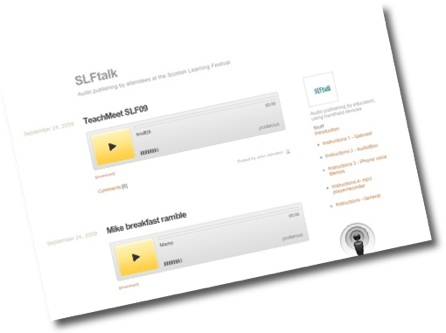
SLFtalk was an experiment for using posterous to aggregate short audio reports from mobile devices at the Scottish Learning festival.

Over the 2 days of the festival and with a couple of late entries we had 29 posts to SLFtalk from a dozen people. There was a wide range of type of poster and content. We had fairly recently qualified classroom teachers and HMI. The content went from recording of segments of seminars through interviews to reflection. Many of the posts have had more than 400 views. Most of the hits came from the time of the festival and just after.

We had offered several routes into audio publishing and most were used:

  • 15 boos tagged slftalk using audioboo by 5 people
  • 12 files posted directly to posterous by 6 people
  • 2 recordings made on the gabcast.com channel by 2 folk

Obviously all of the the audioboos were made using an iPhone, the posts to posterous were made with several different devices; iphones, a HTC Touch Diamond and desktops.

For myself I intended to use the iPhome Voice Memos app, and just email it in. But I ran over the 2 minutes limit for mailing memos so ended up transferring the audio to my macbook, converting to mp3 (cutting down file size) and posting via email. I think I was the only person using a computer rather than a phone.

No one took us up on the offer to borrow mp4 recorders, Joe Dale did use his iRiver to chat to me at the end of the 2 days and later sent me the file to post to the site.

I think it was well worth offering multiple ways of posting, although audioboo was the most popular, if we had just used that several contributors could not join in.

Technically everything seem to work out fine, the main thing I would change is the way the gabcasts and audioboos were posted to the site. basically I just used the posterous API to send the url of the audio to posterous. This meant that the recording were not enclosed in the RSS feed. I have made a few tests and worked out a workaround, if an actual html link in sent to posterous, eg <a href="path_to_audio_file">Listen</a> and we use feedburner to provide the RSS, feedburner will produce an rss feed with all of the enclosures. The file would also play on an iphone.

From a organisational and technical point of view I really enjoyed working with David on this wee project, but the thing I enjoyed most was listening to the audio, given the background noise and less than ideal recording conditions I was surprised at how engaging they were, there is something special about listening to the human voice with all the extra information the signal carries over reading a text.

I think we may have discovered an interesting an powerful addition to our community communication toolkit and hope this concept can be taken forward and more widely used. I would be interested in hearing more from others who used or listen to the podcasts and getting ideas of how to improve the system.

Posted via email from John’s posterous

Commentcompare

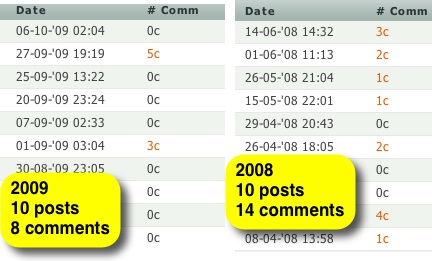
There has been a fair bit of comment recently on how twitter is taking over from blogging and commenting on blogs. My own blog has never had a high number of comments, but the number has dropped. Recently I’ve noticed that posts are tweeted and retweeted, but not commented on.

Every so often I try to up my own commenting, without posting ‘me too’ or suchlike and to keep track of the comments I make. In the past I’ve used coComment, but found it did not always work for me and sometimes reports posts have new comments when they do not. I’ve also just bookmarked the posts I comment on in my browser, but that gets a bit messy and is not portable.

So I’ve come up with the following solution, it uses AppleScript so is a mac only method, but I am sure someone could do, or has done the same sort of thing with greasemonkey for firefox.

It consists of two simple scripts, the first based on one called @review (I think) that I downloaded a few years ago and can’t find a reference to credit. This script takes the current url in Safari and posts it to delicious tagging it with @comment and making it private. The private part is to stop the links showing up in my RSS feed with my other links. The script: @comment.scpt.html is pretty simple, and uses the delicious API.

The second script just retrieves the last 10 links from my delicious tagged @comment, opens a new window in Safari and tabs for each of the links. Again a simple enough script: opencomments.scpt.html. It relies on the private RSS feed supplied by delicious, you can copy yours from the delicious page listing links:

Deliciousrsslinks

Fastscript Grab

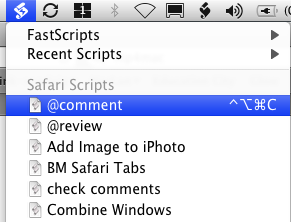
I run both of these scripts from FastScripts. FastScripts is a replacement for the mac’s Script menu. It lists scripts, current application at the top, and allows you to add keyboard shortcuts. So my @comment script is invoked with control-alt-command-c which is easy to hit. I just post a comment and hit the key combination, growl notification is built into the script and lets me know if the submission to delicious was successful.

The scripts can be copied and pasted into the Script Editor if you want to use them, all you need to do is add your username and password to both and get the private delicious RSS feed url.

I would be interested in finding other ways of keeping track of conversations, so please let me know if you have a good way.

Adecon 09

At the weekend I was down at the ADE conference in Liverpool. I drove (was driven down) on Saturday morning with Ian and Ann, colleagues from North Lan.

Saturday kicked off with an intro by Jim Elder, a side screen was displaying Adecon09 – twazzup and we were encouraged to tweet during the conference. Jim handed over to apple’s John Hickey do gave the Key Education Message from Apple. He touched on a lot of things, the challenges and changes facing Education, not surprisingly his slides were minimal and powerful/ He touched on the fact that many aspects of apple design were driven or suited to the Education market before going on to talk about he changes in Education, and the need for thinking ahead and being ready for change. The demand for skills has changes, learners now need creativity and innovation and to be able to communicate and collaborate.

John spoke about the skills and standards of young people showing a 10 year old video blogger with bags of confidence and editing skills. He spoke about how you people understand elements of video editing and demnmand a certain standard from themselves. I am not sure this holds for all the learners I know, just as a good reader may not be a writer, a consumer of film may not know or understand much about editing. Some of the tweeters were sad that books were losing out as a source of information. I was struck with the parallels with what Derek Robertson spoke about at the Scottish Learning Festival (blogged) and I am still of the opinion that there is a place for all types of communication.

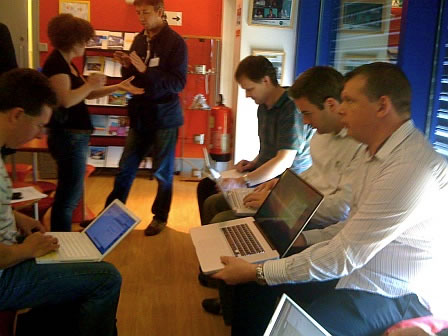
After lunch we broke into ‘stage’ groups to discuss the mornings presentations and look at the ADE online community. Later in the afternoon there was the “The Golden Nugget” session, we again broke into groups and everyone had a chance to talk about some piece of tech or learning for 3 minutes, the groups voted and the best were shown to the whole conference, a light-hearted vote lead to he winner getting a new nano. My group saw some nice things, geo tagging from Adam Burt, comic life as frames for picture in picture movies, and a lovely wee tip for getting 4 frame animated gifs out of Photobooth. I talked about SLFtalk and posterous which Ian described as very interesting but completely incomprehensible, so I guess I might have gone a little quickly. The overall winner showed an iphone game SmackTalk which seemed to make a gunnipig talk:

SmackTalk! is a voice-altering app that features an animated guinea pig, puppy, kitten, and chihuahua that repeat what you say in high-pitched Squeaky voices, or low-pitched Freaky voices

I’ve been gathering links to some of the nuggets from other rooms from the twitter feed, but I hope someone in each room collected them and will share it.

Although the competition was good fun I am not sure if I like that or the splitting up of the groups to different rooms as much as all in together. I am sure I’ve missed some great ideas.

This is a twitter search to get all the links: #adecon09 since:2009-10-02 until:2009-10-05 filter:links – Twitter Search from the conference tweets.

Saturday evening was dinner and karaoke, hard to speak, but I had a few interesting discussions, including one with arch geotagger Adam Burt who kindly handed me som interesting apple scripts.

On Sunday John Hickey was back on stage, now talking about Snow Leopard Server. This was really interesting, I’ve recently started using Leopard Wiki server (here and ICT & TS Podcast) and was keen to find out what was new. Quite a lot as it turns out.

Wiki Server 2 has had quite a few features added, it is now optimised for iphone/touch which fits well with the mobile anywhere/anytime learning message we are getting. The other big feature is the addition of QuickLook. If you have a mac with leopard or snow leopard you are probably used to Quicklook, select a file in the finder and hit the spacebar, you get a preview of the document, many formats are supported including MS doc, powerpoint, movie, audio, images and most apple app files. When this was announce I though it would just be some sort of lightbox effect for images, but was surprised to find out it will let users with a recent browser preview all sorts of files including MS documents even if they do not have a copy of the application need to open the file.

Podcast Producer 2, podcast producer is a server setup to process media and post it to podcasts on a wiki server in all sorts of interesting ways. It can add an introduction to movies, process media for different platforms, submit to itunes and more. Mac come with an application Podcast Capture for submitting, or recording and submitting, media to Podcast Producer. Podcast Capture now has a web version allowing Windows pcs to submit podcasts to the server.. Podcast Producer is controlled by xml workflows, I did a bit of editing and modifying these at a very simple level and struggled quite a bit. Podcast Producer 2 now comes with a Visual workflow creator, no more xml.
Acuade 09

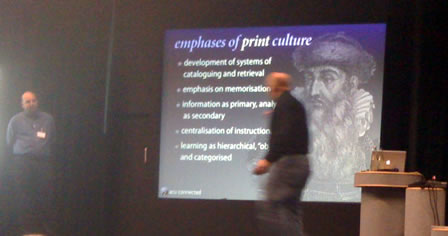
Finally we heard from Bill Rankin and George Saltsman of Abilene Christian University in Texas. They took us through some changes in learning and distribution of information, Miles Berry summarised nicely on twitter:

#adecon09 Problem in the middle ages was accessing information, problem in the print age was finding information. Problem now filtering?

They then explained that ACU provides iphone or ipod touch to all freshmans in 2009. iPhone_first – Abilene Christian University. They had a lot of analysis to show the positive effects of the devices so far and showed their mobile platform: ACU provides iphone or ipod touch to all freshmans 2009. They provide a web based app: ACU

This was a really exciting presentation and I’ve not really started to digest all of the information of which there is a lot online: ACU Connected: Mobile Learning. I believe that the slides, which were beautiful as well as informative will be made available.

That pretty much wrapped up the conference, the major drawback being the fact that I didn’t have enough conversations, looking back over the twitter stream I realise I missed a lot of chances, next time I’ll take another body;-).

As well as twittering I published ADE Conference photos, Ade conference 1 (audio) and ADEcon09 Sunday (audio too) on my posterous. Im using adecon09 as a tag on Delicious, hopefully others will too. I am following the tags on various services.