Sandaig Home 0707

I’ve spent most of today messing about with the bits of school website that are not blogs, doing a wee redesign. Mostly I’ve just made the existing site a little more curvy using the lovely Nifty Corners Cube Javascript/css technique.
Unfortunately the site has been built on the hoof over quite a few years and has some really tangled stuff in the mix. Still at least the home page validates (except for the cluster map). I should really pull it all down and start again, but I think that would take a wee bit too long, one day perhaps. I was hoping to redo all the header graphics, but it seems that I’ve left all my photos of the school building in school.
Someone recently suggested I move to some sort of CMS but I’ve not found one that has the flexibility of a separate blogging system and they seem a bit of overkill for a wee school site. The bit that really needs a clean up is the photo gallery a guddle of html, flash, html with lightbox posted over the last few years as I’ve changed my mind about how to upload and present images without too much work. What I would really like is to turn it all over to Flickr and just play with that. Maybe with the youtube dust being kicked up by panorama we might be able to get flickr past the filters next session.

Tasty Tumble

I was talking to Ewan yesterday about tumblr and how nice it was. I didn’t explain to well at first and he was thinking of something like del.icio.us.
so this got me thinking and here is my del.icio.us feed as a tumblelog.

Produced using the Magpie RSS – PHP RSS Parser from my bookmarks on del.icio.us

The more I’ve used tumblr the more impressed I’ve become, very slick and easy to post to. I’ve moved mine to its own domain, just because I could tmblr.johnjohnston.name

technorati tags:

&my_tumblelogTumblr

After talking about it I decided to try out a tumblelog, using in this case Tumblr: John’s Tumbelog. Tumblr is a very nice application and keeps things clean and basic, there are half a dozen types of post; text, photo, quote, link, chat and video which are all easy to make either from the dashboard, a bookmark flavlet, mobile or a OS X widget. The bookmarklet is pretty smart, if you are on a flickr page it pretty much does it all for you, same with youtube, if you have some text selected on a web page and hit the bookmarklet it knows you want a quote, pulls the text and link into the popup window and all you need to do is click Create Quote. Nothing selected and it knows you want to create link.

It takes about 2 minutes working slowly to set up Tumblr the whole interface is clear, the blogs created look good and you can tweek the css with a nice web interface or just choose a template.

I don’t think tumblr blogs would be useful for primary pupils but they might have a place in sending interesting videos, links etc to you pupils if you don’t want the hassle of setting up a blog and just want to let the children see the content. For someone with a large numbr of readers it could be a nice way to share links and ideas alongside del.icio.us.

For myself It seems a fun tool but I don’t know if I would get the readership. For the moment I’ve folded my into my SuprGlu aggregation..

Interestingly the official tumblr blog uses wordpress the explanation highlights some of the differences between tumblelogs and blogs as does kottke: tumblelogs and Wikipedia

Tumblr is in very active development, scanning the last few post on the Davidville blog gives hints, there is an API, quicksliver hooks, a Pro version in the works and some community building.

Tools

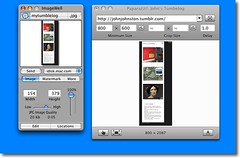
imagewell_paparazzi I’ve been using a few new to me/rediscovered desktop tools over that last couple of weeks (pc users can turn away). I already blogged about ImageWell which is a great image prep and upload app for quick annotation, resizing and adding drop shadows without opening a big image application. The more I use it the more I am impressed.
my Flickr tagged imagewell.

I’ve also been using Paparazzi! which is a screenshot for webpages application.
I wanted to get a screenshot of my tumblelog but include more than one entry which was way off the screen Paparazzi lets you do that. You then can drag the image from Paparazzi to ImageWell resize it, optionally add a drop shadow and notes and then upload to flickr (or dotmac, or ftp etc), very quickly indeed.
The top image I dragged to the desktop and then dragged that file to TextMate while writing this post, the one on the right I sent to flickr with ImageWell. (I really love the drag and drop stuff when using a mac, especially when combined with command tab to move through applications).
Another handy free tool for grabbing screenshots is desktopple this hides the icons on your desktop so you can get nice clean screenshots, and set the background colour. Together with the usual screenshot keystrokes these apps make a great image to blog workflow at no cost.

desktopple


ImageWell
Originally uploaded by troutcolor

I just noticed and downloaded a mnew version of ImageWell which looks like giving Skitch a run for its money.
ImageWell is free with paid extras, I’ve only tried the free version, you could use it for quick editing and upload of photos (dotmac, flickr, webdav, ftp, sftp ImageShack and smugmug supported) but it is the annotation tools that look really good to me.
Text, bubbles and shapes can all be added and all support colour and drop shadows. skitch has drop shadow text but ImageWell can drop shadows on the bubbles and lines, Skitch’s arrows look good but Imagewell’s are bezier curves.
I could also paste another image onto the first one (the imagewell image on my imagewell pic).
The ImageWell Xtras cost $14.95 and adds batch processing and upload and a pile of extra shapes.


weeme
Originally uploaded by troutcolor

Posted from SuperCard using the flickr API.
This picture is my weemee created at WeeWorld.com. I am playing with using the Flickr API in SuperCard, the flickr api lets you do pretty much everything you can do in a browser via the flickr api. This is not a serious effort just some holiday fun.

The questions are at the end feel free to skip down there if you know anything about gps.

I spent quite a while over a year ago messing with the google maps api. eventually I made an interface for creating maps, uploading photos and placing them on the map. This gave me a lot of fun, but I found it too time consuming for children to use.
The earlier this year Google My Maps came out which was a lot neater than my effort, and I’ve used it a few times, mostly pasting in the links flickr provides to add photos.
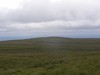
Cort-ma-Law from Lecket hill This week I stared another one with a few photos from a walk.
I was a bit frustrated about placing the photos on the map as I found it hard to figure out where place where in the rather featureless Campsies.

Flickr map Sorry

I switched to using flickr own maps but found them it a bit slow (that might be my aging mac).
I found it even more difficult to get the photos placed with any accuracy on flickr maps, although the interface for adding and looking at the photos is very slick, especially when you grab a bunch of pictures and throw them on a single spot.
Perhaps I just do not go far enough so need to much detail on a map to make my walk look like a walk rather than a spot.

All this made me think about my previous experiments, especially as there was an article in macuser about using the flickr and google maps apis combined. I had just finished using phpflickr to make a community gallery so though this might be quite quick.

Unfortunately the macuser article relies on a flickr api flickr.photos.geo.getLocation which depends on you having placed the photo on the flickr map (I was beginning to go round in circles).

Then I remembered Adam Burt‘s Applescript for getting geo tags from Google Earth ready for pasting into flickr. Adam does amazing things with blogs, google Earth/maps and geoblogging.
The appleScript copies to the clipboard geo tags of the location showing on google earth at that time.
It is much easier to figure out where you are on google earth, it has a smoother gui than google maps and a better resolution (of where I was at least). so I geotagged a bunch of photos, grabbed a new google maps API key and got busy.

Flickr googlemap mashup

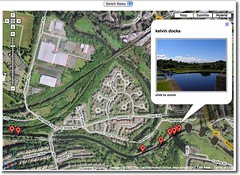
Of course at that time I didn’t know about flickr.photos.geo.getLocation depending on flickr maps.And I didn’t know a tag geo:lon=-4.704382114809 would be returned from the API as machine_tags=”geo:lon=4704382114809 geo:lat=56258859999999″ ie without the minus sign or point so I spent a fair bit of time staring at a blank map, as the google maps API didn’t understand what I was sending to it. Anyway to cut a very long afternoon short, I delved deeper than I had been before into the data returned from flickr.photos.getInfo and finally clunked together a couple of files, the first uses phpflickr to grab the info from flickr and store it in a file, the second pulls that info using the google maps api and create a map.
I did try pulling the information and creating the map all at once, but that took too long. The data from flickr obviously does not need to be updated very often so that job was hived off, speeding up the maps creation. The unfinished product is here: John’s Flickr Map Mashup.

This is just scratching the surface of what could be done, it would be better maybe to create different maps for different days or for particular tags. if all of my tagged photos go on the same map it might eventually be too crowded and need some pagination.

Help wanted: I’d like to know a bit more about geo tagging and perhaps GPS:

  1. Would it be possible to get data from a GPS device and add it to the EXIF data of a photo before uploading it?
  2. Does Flickr undersatand embeded gps data?
  3. Is there a cheap enough GPS device that would work with a mac?

I am thinking of a work flow that includes the tagging of photos before uploading, maybe in iphoto with AppleScript or a SuperCard project, I think I’ve done some EXIF data extracting so imagine that adding can’t be that much harder.

Any ideas that do not involve a lot of expense gratefully received.

It looks like a pile of the ScotEdubloggers are holidaying on facebook.

I was invited a few weeks ago and joined up.
Compared to bebo and myspace the interface is pretty calm. I’ve messed about with a few tools and gained a few friends but I have not been convinced.

I was planning to blog something about this, but serendipitously in this morning guardian I saw Jack Scofield’s article: If Facebook is just this year’s version of AOL, is that bad? which linked to Facebook is the new AOL (kottke.org) which I followed to Facebook vs. AOL, redux (kottke.org).
Kottle pretty much sums up my feelings:

As it happens, we already have a platform on which anyone can communicate and collaborate with anyone else, individuals and companies can develop applications which can interoperate with one another through open and freely available tools, protocols, and interfaces. It’s called the internet and it’s more compelling than AOL was in 1994 and Facebook in 2007

and

If you’re not a Facebook user, you can’t do anything with the site…nearly everything published by their users is private.

The bit about blogs and Web 2.0 I really like is the fact that most of them produce rss, which is the basis of the Small Pieces Loosely Joined argument. (I am guessing as I’ve never read the book, but the title sounds cool).

Facebook seems fine, fun etc but it misses the serendipity and easy linking and mashing of data. From my, admittedly very limited experience, it seems you can pull information into facebook but not get too much out.

With more open tools it is easy to gather, mix and redistribute information, blogs, wiki updates, podcasts, flickr, del.icio.us etc. can all be mashed with existing tools or a bit of scripting. Facebook seems exclusive rather than inclusive, closed rather than open. I am happy to vist but I would not want to live there.

Or am I missing something?

facebook rss blogging web2.0