It’s doesn’t seem that long since I posted about leaving the classroom and now it looks like it is time to go back!

In the latest round of council savings my post has been deleted. In fact the whole team I work has been too (posts not people).

The council’s policy is to redeploy staff and it looks like I’ll be redeployed to a school in August.

Although I’ve just written that it does not seem my current post has lasted long, it does feels like a long time since I was organising learning for a primary class.

A lot has happened in that time. I suspect I need a fair bit of re-skilling, apart from changes in curriculum and practise, I’ve not written more than a few words by hand in the last eight years. Perhaps I should stop blogging and start a notebook to get in some handwriting practise.

I am now regretting the abandoning of resources, notes, lesson plans and the like!

I’ll need to think hard about my use of technology. In my previous school I added a lot to my workload by following personal interests and ideas with a bit too much enthusiasm.

I hope this time round I’ll be able to step back a bit and resist the tendency to spend my evenings preparing experimental tech. It may be a good idea to step as far from the keyboard as I can for a while to concentrate on the many other aspects of classroom practise I need to catch up on.

I do want to use technology for now to ask if there is any tips for going back to school after a break of this length. What have been the challenges? Were there any advantages in having a break?

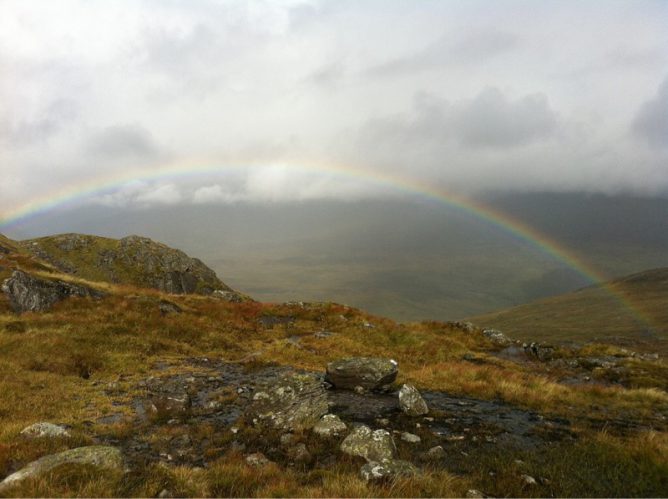
the photo is my own. Chosen as I found it on searching ‘return’, I am not sure if it is appropriate to this post or not but I reckon that a mix of clouds and rainbows probably hints at my feelings.

Top 10 Reasons for Students to Blog by sylviaduckworth CC-BY

I tweeted this lovely image the other day when I saw it on Classroom Blogging Options. The Glow Blogs option was not discussed 😉 but I’d hope that it would be under consideration for Scottish learners and teachers.

Saw the graphic again today along with this advice from Stephen Downes:

It has been a while since I ran a good ‘blogging in schools’ post, but the activity – and the advice – still makes as much sense today as it did in the heyday of blogging. Maybe even more sense, because unlike the early 2000s, there are many other shorter and less-structured ways students can communicate online, and blogging pulls them back into the realm of extended descriptions, arguments, explanations, and actual efforts to communicate thoughts and feelings rather than quips and reactions (or should I say, reax). Theere are many reasons to write; conveying information is just one of them. Wes Fryer also summarizes a number of the tools available as we start the 2015 fall session. Nice graphic, too.

Classroom Blogging Options (August 2015) ~ Stephen’s Web

Some great advice.

Just in time for Blogging Bootcamp #2 | Get your blogs up and running Autumn 2015 which we are starting to organise. If you want to learn a bit about classroom blogging over 5 weeks you can sign up

A while back on Radio Edutalk I had the pleasure of talking to David McGillivray about the Digital Commonwealth 1. It is a pretty exciting project:

The ambition of the Digital Commonwealth project is to enhance the capacity of individuals and groups to use freely available mobile digital (and social) media tools and techniques to ensure their voices are heard in a saturated (and often commercially) motivated media landscape. The Digital Commonwealth project focuses on lowering the threshold for involvement for individuals and groups so that they can be empowered to exploit creative tools and technologies to tell their stories, digitally. The project reaches out to individuals and groups experiencing social, cultural or economic marginalization, whether related to age, ethnicity, poverty, disability or social isolation.

Digital Commonwealth

Since then I’ve heard that there are now 60 schools involved with the project along side a host of other community groups. The twitter stream is filled with delight: Twitter / Search – #digCW2014.

David tell me there is still room for a few more schools and you can get in touch via email or twitter: Digital Commonwealth (DigCW2014) on Twitter. They are particularly looking for:

Some highlights of the project include:

You can find out more about the projects on the Digital Commonwealth site fascinating to see social media being used across sectors.

1. Radio #EDUtalk 11-9-2013: David McGillivray | EDUtalk


I want to help empower our learning community to design, hack, build, collaborate, remix, share and explore in all sorts of ways. In essence, I strive to contribute toward building a learning community that is open-source, accessible and inspired by principles of DIY. Is the iPad the best platform for cultivating such an ideal?

from: The Digital Down Low: Some critical questions about iPads and 1-1 learning

Along with some other interesting other ones questioning the idea that ipad 1-2-1 is a good idea.

I do not think that we, in the UK, are yet in a position where there is an overwhelming belief in the iPads as a good thing in the classroom.

I do think that iPads are a good tool for some aspects of collaboration, remixing, sharing and exploring. They are, in my opinion, excellent digital story telling devices.

I wonder how many school with more open devices are doing much in the way of DIY hacking and building. There is a lot of online discussion: eduHacking · linkli.st but I don’t think much penetration into mainstream has happened yet.

I do believe that we are seeing some extraordinary effects in iPad 1-2-1s. Some of this my be the novelty effect, but there seems to be something special by having ubiquitous instant on, easy to access computer power in everyones hands.

It may be that the collaborative and creative environment that 1-2-1 ipad use seems to foster will grow into a desire for the complex making that Matt Montagne wishes to foster. This may lead to interesting apps or a demand for more open devices.

Lots of information about glow and glow2 trickling through twitter recently. There seems to be a change in timescale for Glow2. This was discovered: View Notice – Public Contracts Scotland which is a strange way to find out about the change, especially after Mike Russell’s initial announcement how Glow will be developed in September 2012 on YouTube. That announcement and the following summit last October lead me to expect more regular and open engagement.

Glew

On monday Charlie Love sent me an interesting link and which I then discussed tonight on Radio EDUtalk, after which Charlie tweeted:

Glew Tweet

What is Glew

Glew is beta software of a single sign-on framework which can be used to integrate Google Apps for Education and other services such as WordPress Blogs, Media Wiki, Moodle and many more. This is a test site so please accept that authentication and users may be removed during testing.

So pretty much a glow 2 style site with a lot of tools I’d expect from Glow 2. Although a Beta you get a really good idea of how this would work. The most interesting feature, to me was the expandability of the site, I asked Charlie about the possibility of adding a wiki to the feature set, in 15 minutes he had added a MediaWiki (the software used in Wikipedia!)

Glew

I highly recommend you pop over to Glew and have a look around.

Hopefully the 15 months that the Government have to work on glow will let them build something like this, if I was the Cabinet Secretary I’d give Charlie a call.

Flickr cc Picmonkey

Every so often something nice happens:

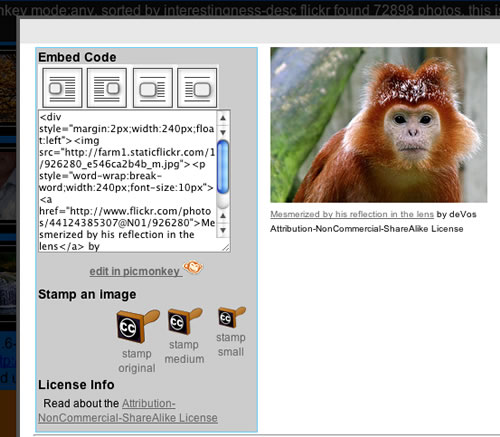
Which made me look again at the flickr CC search toy. A while back I posted about Picnik closing and then about PicMonkey which is a picnik replacement. The nice folk at PicMonkey let me know that the picmonky API is the same as the picnic one, so I thought I’d swap them out. As you can see from the screenshot, if the images found in the flickr CC search toy allow editing (ie NoDerivs is not in the License) there is a link to edit the picture in PicMonkey. I’ve changed the way this works so that PicMonkey will load the medium sized photo with the attribution stamped on it, rather than the original flickr image. Before I was expecting pupils to be able to add the attribution themselves if editing the picture.

I’ve also added a checkbox to the search form to only search for pictures you can edit.

The code behind this, php and javascript is a very messy affair. I intend to work thorough the whole thing sometime and make it more efficient etc.

If you have ideas of how this could be more useful to primary aged pupils please let me know.

Last week I was in a class doing another setup a blog/eportfolio session using Glow blogs. The process is a bit long winded due to the way glow blogs are set up. Usually there is little time to do much more than set them up and get the pupils to do a quick test post. I usually just get pupils to use a bit of clipart to show tem how to add an image. O this occasion there was a fair mix of machines and operation systems in the room and not all had clip art. I decided to use A flickr CC search toy to let the pupil download photos with attribution stamped on. This worked fine, but there was a little confusion about naming saved files, the file name suggested is stamp.php.jpg as the images, with attribution, are generated on the fly.

This weekend I had a quick google to see if I could find out how this can be improved. I am now using:

header('Content-Disposition: inline; filename='. $title .'.jpg' );

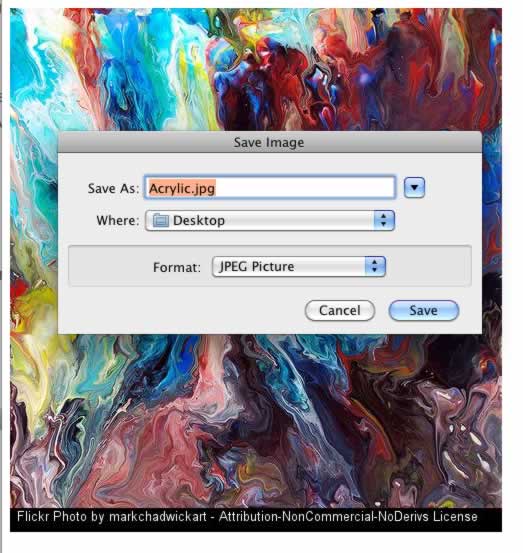
To give the files a title derived from the flickr image title. I also found I could cause the image to be downloaded by using Content-Disposition: attachment but decided against that at the moment. Now when pupils right click on an image they should see something like this:

Flickrcc File Dialog

Another alternative would be to show the image on a page with instructions on right clicking to get the save dialog. Again I’ve not implemented that either.

Last week at work (North Lanarkshire Educational ICT & Technical Services) we were being supported by Oggy East of Semantise, who is helping update the setup of our school websites. Oggy is an expert in FirstClass which NLC uses for emails, collaboration & school websites.

My colleague Ian suggested that Oggy entertain me with his interesting career path. This passed through doctoral study, pub management and educational technology.

At one point Oggy started telling me about an educational project he had worked on. This involved collaboration between pupils in the UK and France. They used text based chat to talk (alternating languages), translated each others horoscopes, passed audio and video files back and forth helped each other produce CVs and more. As I was becoming more and more excited about the project Ian suggested that Oggy tell me when this happened: 1998.

Edutalking

I got Oggy to record a quick podcast about this project for EDUtalk which you can listen to: Dialogue 2000 Electronic Village

Oggy is also involved in the wonderful Not School 1. I got a podcast out of Oggy about this too: Not School – EDUtalk.

Repeating

The fact that Oggy was successfully involved in the kind of project that is still seen as innovative 14 years later is telling. I remember in 2005 feeling very proud of jumping of the blog wagon with my class the previous year and meeting Peter Ford who had pupils blogging several years before that. We had a flowering of blogging in Scotland in 2006 and this year pupil blogging has been hitting the headlines again.

What is interesting is that quite often these bit of innovation don’t seem to be connected, wheels are reinvented.

I wonder when ideas of audience, purpose, collaboration and connection using technology will really become part of the mainstream. Perhaps Glow, with all is faults, is driving this in Scotland. I certainly hope so.

1.I became aware of not school when I went to Be Very Afraid and was very impressed by the Flash skills of the a Not School ‘student’.


I’ve been aware of the Primary Games Arena 1 for a while. I only noticed yesterday that it had an API The api lets you search for games and returns some xml. XML makes me think of Glow 2. Glow handle xml quite nicely, unfortunately for most teachers this needs a knowledge of XSL, which I do not think is common. I’ve managed in the past to figure out way of displaying RSS using XLS so though I’d try to do the same with the Primary Games search results. It turned out to be pretty straightforward as the xml returned by Primary Games is nice and simple.

Displaying a set of Primary Games in Glow
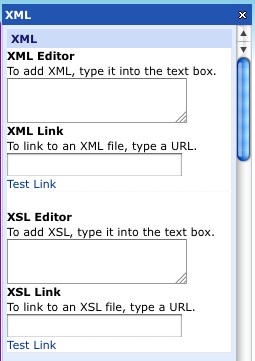
Glow xml Webpart Empty

You use the xml webpart. This part has 4 main fields: xml link, xml editor, xsl link and xsl editor, of these you only use 2, using either the link the direct editor field for both xml or xsl.

The way it work is that the xml is loaded and modified by the XSL. The XML webpart can be usefully used to display any html fragment without any XSL at all, but in the case of RSS or xml from the primary games arena it need to be formatted.

For example the url:
http://primarygamesarena.com/
searchapi.php?q=money

in the XML Link field produces an XML list of games tagged money. Clicking that link will show you what you would get in glow if you do not use XSL, not pupil friendly at the moment. We can use XSL to transform this. As a first test I used this xsl in the XSL Editor field.

This produces this: (click for flickr page):
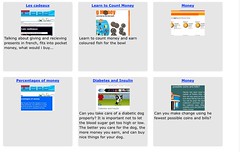
primary games in glow

On the glow page the images launch the Primary games page with the game in an iFrame.

It then becomes simple to repeat this for other searches and give pupils sets of games, just replace money in the xml link with another word.

We can also pass around webparts already loaded with the xml address and the xsl and these can be imported onto a glow page. Here is a the money one. You could import that onto a glow page and just change the search string at the end of the url to get a different set of games to display.

Taking it a bit further

After doing the above brief test with glow I asked @johnmclear, one of the folk behind Primary Games, if there were any other parameters that could be used on the search, this is what I got back:

johnmclear
John McLear

@johnjohnston can add it. Email me an ideal request/response
Sat Jul 09 12:19:28 +0000 2011 from HootSuite captured: Mon, 11 Jul 11 16:11:04 +0100

A few hours, a couple of email and some tweets later John had updated the Primary Games API to include subject, year, keystage, topic, unit and gametype!

This man we can now use, for example: ?q=money&y=3&g=Strategy as a query and get all the money games suitable for year 3 (=primary 4 in Scotland) that are categorised as Strategy games.

Of course the API can also be used outside Glow on the web via php. Here is a page that lets you search and display games: Primary Games Arena API and here is the Source.

I’ve extended this a little to create a page that can search and display games in the same way but also supplies an embed code to embed the code on webpages, blogs or glow.

Primary Games API with Embed codes

To embed in a blog you just need to switch to the html view in the editor and paste in the code. In Glow you can use an XML webpart and past into the xml editor field.

Simulation

Can you organise the planets in our solar system?

The embed code here was edited to make the background yellow.

Of course you could simply create a screenshot of a game page, upload it and make it a link, but this is quicker and loads the games inside the Primary Games ecosystem this has a nice wee toolbar allowing pupils to gain achievements by playing games, rate games anonymously and get links to other games. You also get the advantage of the folk at Primary games having already categorised a huge range of games suitable for primary aged pupils. Many thanks to @johnmclear for the extremely quick additions ot the API.

Footnotes:

1. Primary Games Arena run by Primary Technology an company who run a fleet of commercial and free ICT services for primary schools.

2.When Glow was introduced I was one of the many folk who were very disappointed that Glow did not have tools for handling RSS: At the Scottish Learning Festival, on RM developer was asked about RSS and answered, ‘What is RSS?’! It turns out glow did and does support RSS and XML in general.

The footnotes are a wee experiment to make my posts a little less verbose, I used a technique describe on Daring Fireball: About the Footnotes.