
Heh, just catching up with the bava blog and I missed this;-)
I need a password reset Jim if you can send one.

Heh, just catching up with the bava blog and I missed this;-)
I need a password reset Jim if you can send one.
Office Lens has been quitting as soon as I open it on my iPad every time. Today I deleted the app and reinstalled immediately. Fixed.
Alan, I am with @mrkrndvs, ”“. Even cookies/local storage handy to store state without DB. (This is a fascinating thread)
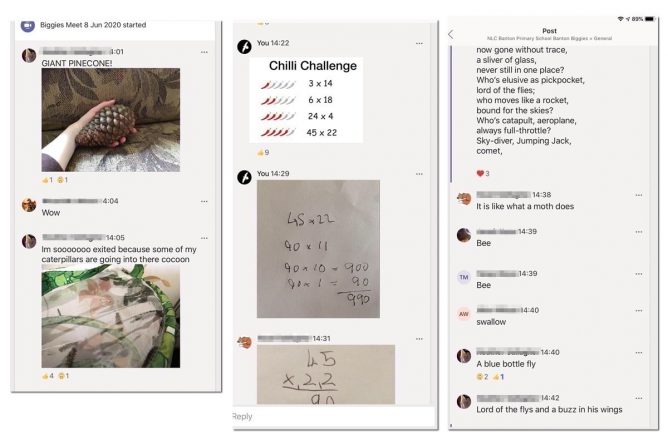
BacK to school tomorrow, ironically I had the smoothest teams meeting yet today. Relied on the chat for all display. This is how it went.
Everyone get chance to talk, some posted images at the same time into chat.
A pretty smooth, IMO, hour. Almost no time wasted waiting for pupils to see a slide. Preparation was a lot quicker too. A text file to remind me what was next and to copy text from. a folder for images, audio via Farrago.
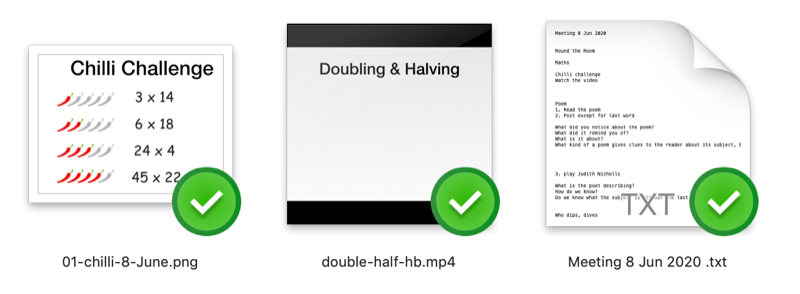
I really hammered the size of the movie and images. Handbrake and imageoptim both multi platform, open source & free, are great tools.
I had suggested that the pupils watch the two videos before the meet, not all had but they were so short I don’t think it did anyone any harm to watch twice.
It was interesting too in the mix of audio, text and image posted to chat that the class used to join in.
I’ve not seen this rather crude method of running a meeting described but it has lead to the smoothest meeting of the nearly 30 I’ve had over the last 6 or 7 weeks.
Some notes, part of a ragged collection on my lockdown learning.
I had a wee lightbulb moment this week. I’ve been running daily Teams meetings with my class and having a lot of problems with pupils not seeing the content of slides presented. My way of handling these meetings has been to use a PowerPoint slide deck to step through what I want to discuss and teach. It gives me some structure, allows be a board and to explain some thing visibly.
It has lead to a lot of pupils telling me a they can’t see the slides.
I had planned to do a bit of flipping so this week I used the day’s slides as the basis for a screencast or two each day. These were posted first thing in the morning so pupils could watch before the meeting at 2. Then if the slides failed I’d just continue and hope the pupils memories helped untested what I was saying. This didn’t work all that well. Not all the pupil read the morning post or watched the video. The videos were all short, 2 or 3.
The other problem is that pupils don’t all turn up every day, so if you try to teach a series of lessons it gets complicated. This is further complicated by having a multi-composite with a wide range of maturities and levels. For those that do come every day I imagine the repetition gets a bit tedious.
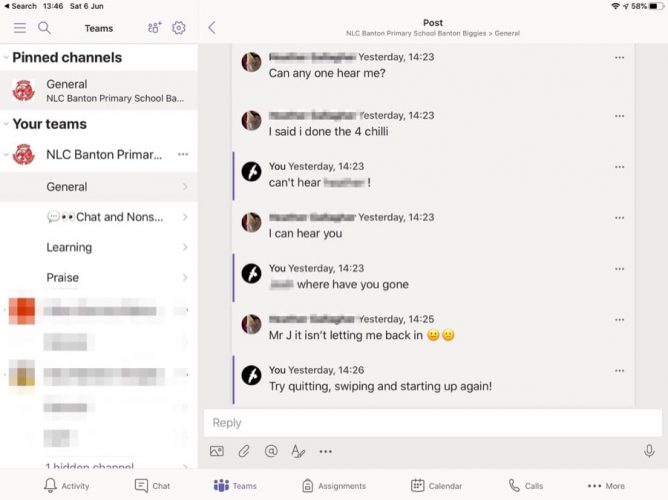
💡On Friday I abandoned the slides. Not sure why I didn’t think of this before, caught in the headlights? Instead I had a text file of notes and in a folder a few images and a video. These were uploaded into the chat at the appropriate time. The video was only a minute or so long and very small. I can also copy and paste text to the chat.
This worked a good deal better, the pupils could all see the content, reply with text and their own images while we talked. I’d been using the chat to collect writing in previous meets but this was a lot better.
An easy way to export the chat would be useful.
We did have problems with some pupils getting dropped and a few who lost the ability to talk. Most solved by quitting the meeting and app and starting again.
So my plan is to do just this for meetings in the future. Not sure how much I’ll be doing going forward as we go back into school next week to start organising for the new year. That will cut down on time for meetings and preparation for those meetings.
I am hoping getting rid of the PP will save me a bit of time too. Making ‘good enough’ explanatory videos doesn’t take very long. I either record talking over a few keynote slides or the screen of a whiteboard on an iPad. Try for one take, little editing. I then run them through handbrake to reduce the file size.
Things that have worked best for me, or I think are worth testing more:
On the Minecraft front, I’ve had the server up and running for an hour every day, usually only 3-5 pupils this wee. Interestingly one who never comes to meeting, so proving useful in a small way. The Virtual Banton continues to expand. Now seems to have a railway in the sky and a zoo. I don’t spend much time there, occasionally popping in for a chat to to get some sort of idea on what is happening. I do listen to the talk though
A decade since I left teaching and it seems to have gone from free sharing of openly-licensed resources to edu-influencers getting people to like and retweet for resources
A lot to unpack in this. I was naively optimistic about open sharing (& about knowledge of copyright & licenses spreading).
Read:The Wedding by DorothyWest ★★★★☆ quite outside my normal zone. I enjoyed all the dips into the history of a middle class black American family.
Morning Fox. I’ve been surprised at the lack for foxes spotted in my 7am lockdown walks. Half an hour earlier this morning. Heard gulls and crows kicking up.

Some poems written by @Banton_Pr Biggies (p4-7) in our Teams Meeting last week. We read the same poem, Long Trip by Langston Hughes, every day and wrote our own at the end of the week.
 Aaron Davis (collect.readwriterespond.com)
In A More Beautiful Question, Warren Berger talks about the power and potential of different types of questions. One type that stands out is the simple strategy of asking ‘What If?’ Here then are my thoughts on what if the web were different? #pcPopUp2020 What if people had some sort of ownershi...
#pcPopUp2020 was one of the many online things I’d normally have paid attention to that I’ve missed. Aaron is using the Thread Reader App Micropub publisher which looks interesting too.