Jim Groom bw

I’ve been reading Jim Groom’s bavatuesdays for a few years and though it following ds106:

Digital Storytelling (also affectionately known as ds106) is an open, online course that happens at various times throughout the year.

DS106 is pretty off the wall, but I’ve been inspired by it several times:

It has occasionally crossed my mind to join in with the course, but the time involved and the creative focus made me reluctant. However I do feel there is a lot to be learnt and some fun to be had by following the course so I started thinking about it. I popped a question in the comment box on Jim’s blog about using pivotx, this blogs software instead of the more usual wordpress. Jim got back very quickly and set me up with an account on ds106 which makes the decision about joining in over;-)

I am a wee bit nervous about jumping into something that requires visual creativity. While I am happy enough editing images, audio and video I am not good at visual thinking or design (many webpages attest to this) I do hope to have some fun around the edges. I am encouraged by Jim’s do what you like and leave the rest and welcoming attitude. I am looking froward to finding out a bit more about how the wordpress mechanics pull the course together and investigating this openest of online learning opportunities for the perspective of a learner and with an eye on my day job.

I’d be interested in knowing if any other Scottish educators are taking the course, perhaps we could offer a bit of local support to each other.

If you are interested in ds106 and want to know more Jim Groom – Wednesday Morning Keynote on YouTube is a great, if crackly, 40 minute intro (the animated gif above if from this).

Radio edutalk

Edutalk has now been running for over 2 years, we have published over 300 pieces of educational audio. These vary from TeachMeet recording, through to personal reflection by way of pupil podcasts. Hopefully theses provide interesting and educational listens.

One of the things that David and I talked about when we started EDUtalk was issuing a CD rom of recordings, this would perhaps have helped to keep older, still valuable, audio playing.

One of my thoughts about podcasts is that older episodes get forgotten about in a way that old blogs posts, through searching, do not.

REcently I’ve been reading about and listening to ds106 Radio and Stephen’s Downes’ Ed Radio. These are Internet radio stations. My interest was also stimulated by my daughter who is currently doing some pro bono work for Airing Pain « Pain Concern a podcast and internet radio.

I’ve alway believed (and gone on about) one of the benefits of podcasting over radio is its asynchronously. The potential audience for internet radio would seem to be less. A few things have made me think again:

A comment on Stephen Downes – Google+ about ED Radio:

That's the intent of Ed Radio, it's not something you really focus on, it's more background where you listen while you work & where something may or may not catch your attention.

Somewhere else, Stephen wrote about the interesting challenge of broadcasting to no listeners. Can’t find the quote at the moment.

on broadcasting to radio #ds106 | D’Arcy Norman dot net

How does the ability to instantly broadcast live audio to a group of people impact what we do? How does this instant synchronous connection effect the sense of social presence? And how does having to make the decision of streaming vs. recording effect the experience of sharing?

I’ve also been impressed by the quality of internet radio when streaming to a phone on g3 as well as wifi. So we though we would give this a go

How to

There are various posts on the how to set up a station but I basically went to Internet Radio Servers and set up an Icecast server on pay as you go. I then followed CogDog Guide to Nicecasting – CogDogBlog to test Nicecast. You can use Nicecast to broadcast from iTunes or a mix of iTunes and voice or even iTunes, voice and Skype. You can use Nicecast for an hour at a time for free and pay when you have tested it. I am using it on test mode at the moment. I have also tested the AutoDJ set up, where the station just streams from a set of mp3 you have uploaded via ftp. this seems to works well. Instructions on Internet Radio Servers are straightforward.

I’ve briefly tested Papaya Broadcaster a £2.99 iPhone & iPad app this seem to do the trick. allowing you to broadcast on the move.

A Plan

The costs at the moment £5 a month to host the AutoDJ files and £5 per 10GB broadcast. I am figuring with only a few listeners it will only be £10 a month to broadcast for an hour or so each night, using a variety of sources.

We have a few loose ideas of what to broadcast:

  • Broadcasting sets of audio from the Edutalk Archive on AutoDJ 7:30 to 8:30 each night. The hope is that folk will have it on in the background listening for serendipitous educational audio. I’ve not really worked out the queuing of the audio but will select some and mix then up every day or two. So far I’ve downloaded and converted to the correct samplerate & bitrate over 60 files.
  • Once a week on Wednesdays David and I will attempt some sort of skpye in show where folk can skype in for a chat, we still have to test this. This can be recorded and fed back into Edutalk as a podcast.
  • Curated sets from the Archive, using nicecast and iTunes, possibly opening it up to guest hosts.
  • Live event broadcasts, for example from a TeachMeet using Papaya Broadcaster.
  • Anything else we can dream up or is suggested…

Tech Tips (for geeky teachers)

It seems that you need to use files that all have the same sample rate, bitrate and number of channels. I’ve started off with 60-70 files downloaded from Edutalk , the problem is these do not all have the same sample rate, bitrate and number of channels This can be dome by opening and exporting the files from Audacity, or exporting them from iTunes. This could take quite a while. A quick google found a script for the Lame lib (That is used by Audacity to export mp3s), You need to instal Lame so that it is available for command line use, this sort of stuff can be daunting but worth it as a time saver.

What I did was open the Terminal, navigate to the folder full of mp3s (on a mac you can type cd and then drag a folder onto the terminal window), then you just put this int othe terminal window and hit return:

mkdir save && for f in *.mp3; do lame -m m -b 128 –resample 44.1 "$f" ./save/"${f%.mp3}.mp3"; done

What that does is make a new folder save inside the mp3 folder, then use lame to convert all the mp3s in the folder into new files in the save folder that all have a bitrate of 128, a sample rate of 44.12 and are mono files. Well worth doing if only to avoid having to see asave dialog 60 times.

How to listen

between 7:30 and 8:30 head over to Radio Edutalk – EDUtalk. A flash player should start when the page opens. There are also buttons to listen with winamp, Windows Media player, Real player or QuickTime. Hit the title song to open in iTunes.

I’d love to hear what folk think, ideas for broadcasts or cc licensed audio that could be played.

I’ve been interested in combining maps and media for a while now. Here is a recap of some of the methods I’ve been using. I’ve not often had the chance to do this sort of thing in a teaching situation but continue to believe that mapping media would be a valuable way to record experiences for pupils and a nice slant on digital storytelling.

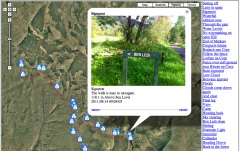
Last Sunday I had a walk to Benvane & Ben Ledi recorded the gpx with the iPhone Trails app (one of my top 10 apps) took photos, video and some panoramas. Here are the three ways I’ve been developing of displaying them on the web. None of these are good as examples of story telling as I am still thinking about the workflow and tech.

Photos on the map

Benvamemap

I’ve built up a fair collection of these over the last few years. this one only uses iPhone photos which means I can skip the stage of matching photos to the gpx file. When I started doing these google maps API was at version 1, I move to 2 and now am behind version 3.

This is the most conventional story combining an image with text in a liner fashion along the track.

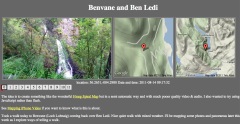
Video Mapping

Videoandmap

Benvane and Ben Ledi video map

I just blogged about this in the previous post

I am hoping that this can produce a more contemplative result.

Although I’ve only just worked out how to do this the workflow is a lot simpler than the photo maps. I’ve developed a mac application (using SuperCard) to make these. All I need to do is to drag some iphone videos out of iPhoto onto the application and it creates the smaller versions of the video and the HTML to display them along side the maps

I you have a mac and would be interested in trying the app, let me know.

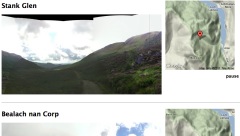
Panoramas in Place

Panomapthumb

Benvane Panos

This is the most recent development, after tweeting about the Video Maps @drewburrett suggested using photosynth for the iPhone to take pano photos and do something similar. I’ve not got a workflow for creating these and don’t think I’ve got the display method right yet but I am quite excited about working out different ways to present pano photos.

As I said I’ve been messing with maps and media for a long time (2006 example) I’ve blogged about it a fair bit, pretty much in a vacuum. I’d be really interested in finding some folk to play along with or a school interested in trying out some of this stuff.

I’ve blogged before about the wonderful Hmsg Spiral Map a project that combines video, audio and google maps into a mesmerising meditative experience.

Recently I noticed that iPhoto shows the location of videos as well as audio which got me thinking a wee bit. I checked out a few exif tools and found that the location was stored in exif data in the same way as photos.

I already had made some crude tools to map walks on google maps and made an odd foray into adding sounds to the photos: burn, so though I might be able to knit together some video and maps.

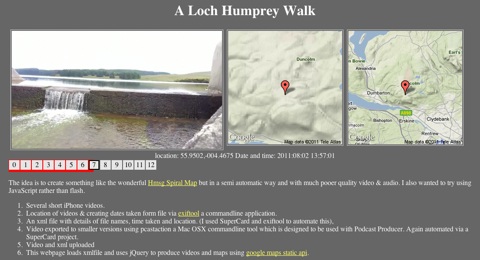
After a few false starts I manage to do this:

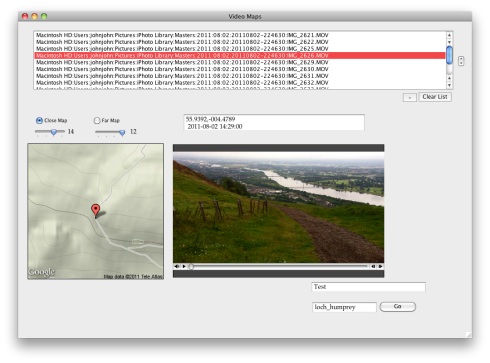
Loch Hump Screen
A Loch Humphrey Walk

This is a webpage that shows a series of videos with a couple of maps pointing to the location the video was shot at. When one video ends the next is automatically loaded. You can jump around by clicking the numbers.It information: videos urls, locations and time shot is stored in an xml file, this is loaded by some javascript (jquery)

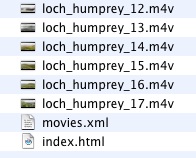
Bideomapfolder

The list of movies and locations are loaded from an xml file that is a very simple list:
<item><file>loch_humprey_02.m4v</file><loc>55.9323,-004.4594</loc><dc> 2011:08:02 21:27:10</dc></item>
I though xml was a good idea as it would allow reuse to display the movie in different ways. As the movies are shown the location is used to show a couple of images using the google maps static api. This first Video Map Experiment was cobbled together using a couple of command line tools (pcastaction, built into Mac OS X and ExifTool by Phil Harvey). I am not knowledgeable about shell stuff but it can often help do interesting things and once you figure it out is easy to reuse.

After a couple of tries I’ve made a Supercard project that sorts this all out, here is what I did to make the A Loch Humphrey Walk

  1. Take videos on iPhone
  2. Trim on iPhone
  3. import into iphoto
  4. Drag videos from iphoto on to a field in a SuperCard project I’ve made.
  5. Click a button on said project which:
    1. Asks me to choose a folder
    2. Gathers locations & date/time from the video files
    3. Makes a copy of videos in the folder, shrinking file size & dimensions (this take a few minutes)
    4. Creates an xml file & and index.html file in the folder to show videos

Video Maps.sc45

I then upload folder to server via ftp.

Getting the JavaScript stuff sorted out took me a wee while and quite a few wrong turnings, but it all seems to work on both Mac & Windows with FireFox, Safari or IE now. I started to write about the gory details in this post, but decided to split them off and I’ll put them up somewhere else sometime soon. I also hope to make the Supercard Project available for anyone who is interested. (If you want to see an early version let me know)

I hope this could be an interesting way to tell a story, record a trip or describe a place. I’d be interested to know what other folk think.

I’ve updated a work mackbook to the new Lion OS and thought I’d post about a couple of interesting things. I posted them to google+1 as a wee experiment and am repeating them here.

Fiona A Scottish Voice in Lion

You can download extra voices from the speech system preference pane. Fiona is a Scots one and quite nice. The speech seems pretty nice to me. Even without upgrading to lion you can select text and send it to itunes as synthetic speech using the service menu. You can also, as I did for the e use applescript to save an aiff file of synthetic speech. I’d I’ve not used this in teaching, but could think of a few way that it might be useful…

Dictionary Access

I frequently access the dictionary on mac os by holding command-control-d over a work, it pops up a wee box showing the dictionary definition. In Lion you double click with 3 fingers and the box is a bit nicer:

QuickTime Pro in Lion

After installing Lion I was disappointed to find the QT pro had vanished from my Utilities folder (Where it was moved by Snow Leopard). Tried to download and install from Apple but got the wrong installer. This is the right one. After the install QT picked up my pro registration key.

The New version of QuickTime X has improved over its Snow Leopard version but still lacks some of Quicktime 7’s features. I was very relieved to find out you could install the old one again. QT 7 can be used for quick & dirty editing and does some things 2 that I can’t do any other way (without buying & learning some other piece of software).

1. I’ve been playing with google+ for a bout a week. Simple and straightforward to use, the main dislike is the difficulty of getting information out of it at the moment. No RSS. I was hoping just to be able to pull the 3 lion post in here, or at least embed the video, but I needed to re-upload them to vimeo. ↩

2.For example you can have a movie with more than one picture in picture movie added to it. You can’t do this from iMovie which is limited to 1 but you can do it quite quickly with QT 7 pro. for example the end of this movie. QT7 also is very applescriptable, many of the features are missing fro QT X’s AppleScript dictionary. I’ve made a few quick scripts that have really sped this up. ↩


With more open tools it is easy to gather, mix and redistribute information, blogs, wiki updates, podcasts, flickr, del.icio.us etc. can all be mashed with existing tools or a bit of scripting. Facebook seems exclusive rather than inclusive, closed rather than open. I am happy to vist but I would not want to live there.

Or am I missing something?

I posted this originally in 2007: Facebook – John’s World Wide Wall Display getting something of the same feeling about Google Plus but perhaps it is early days.


Swiffy converts Flash SWF files to HTML5, allowing you to reuse Flash content on devices without a Flash player (such as iPhones and iPads).

Swiffy currently supports a subset of SWF 8 and ActionScript 2.0, and the output works in all Webkit browsers such as Chrome and Mobile Safari. If possible, exporting your Flash animation as a SWF 5 file might give better results.

Google Swiffy looks good, support extends to flash five. Here is a swiffy animation created with Google Swiffy the original flash file, made by my daughter 11 or so years ago when she was in primary school is on the sam page, I can’t tell the difference.

Swiffy output and flash source

Works on an iPad, Safari, webkit, chrome, firefox on my mac.


River Tales

I am listening so some great pupil podcasts on Mr O’D’s class posterous pupils take on the role of a river and tell their life story:
Rachael does Rivers and
Kyle and the Nile for example. They show, in my opinion, the power of mashing up subjects and reinforce for me the value of podcasting and the voice.

Regular Gems

The User Outcomes section of Doug’s new Synechism Ltd. blog is turning up some nice stuff, this week’s gem for mac users is One Thing Well A weblog about simple, useful software.

UK Sound Map

I didn’t realise that the great UK Sound Map project was limited to a year and read:

The final date for uploads to the UK Soundmap is Friday 24 June, 2011. No new recordings will be added after then, but the UK Soundmap will remain online and you’ll still be able to listen to its collection of sounds.

I really meant to add a boo from work yesterday but got caught up in other things. There is a fair racket as the school, behind which I work, is being renovated. I had a good time contributing to the map and felt quite sad to learn it had finished. Visit the SoundMap and enjoy listening to sounds.

Listening to more podcasts

I’ve been listening to more podcasts recently thanks to Instacast. I’ve removed podcasts from the iPod app of my phone and don’t sync them via itunes anymore. Instacast allows you to build subscriptions (I imported from the iPod app before stopping the sync) and download episodes without being tied to a computer in a much simpler way than the ipod app. I can now sync my podcasts at the office before the drive home, rather than noticing that I had forgotten to sync my phone from my computer at home.

Instacast allows you to see the episodes you have downloaded, and also stream new ones. This can lead to a hammering of your data allowance.

I am presuming that with iOS 5 that apple will have some sort of similar setup too. It is certainly the way I want to go with mobile stuff.

The interface of instacast is nice, very minimal, although the text is a wee bit too small for my eyes at any distance. Well worth £1.19 even if Applce come up with something as good in iOS 5.

Islay high School

Joe Wilson blogs about Islay High School a reminder of all the great work going on there over the past few years. Good to be reminded that it is not the tech:

Beyond the technology they timetable 3rd to 6th year together – which leads to a great community feel in the senior school. This allows for personalised timetables over 3 or 4 years – this gives learners a large range of academic and vocational options and allows some to really stretch themselves – a few 5th years have achieved Advanced Highers.

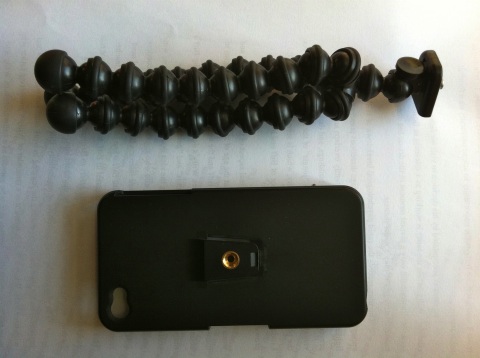
A while back I bought a ‘Gorillapod Gorillamobile Style Tripod for iPhone 4’ from eBay, for about a tenner.

iphone tripod

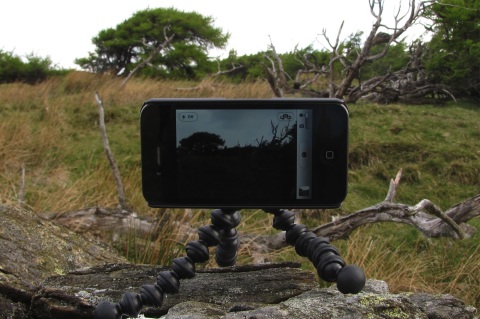
This works very well, and has now survived a few walks and being stuffed in pockets, bags and rucksacs.

Iphone Tripod 2

The seller I bought it from does not seem to have any left but Tripod iPhone 4 search on eBay UK turned up a few similar items.

Here is a pretty steady video shot using the device.