Climate Change: information and resources for primary schools in Scotland a new site from LTS which looks great.

The purpose of this online resource is to provide practitioners from early level onwards with high-quality, accurate and topical resources to help them teach about climate change within Curriculum for Excellence.

Information, new and resources. The resources include creative commons images and lots of video with embed codes:

The videos can be viewed online or downloaded in different formats. Linked to the Sustainable Development Glow Group the resources don’t seem to require a glow login.

The only thing I couldn’t find was information to credit the Creative Commons Images as requested on the site. The images are great and could be used for discussion, stimulation and illustration not only of weather topics but for creative writing.

rusty chain by shoothead
Attribution-NonCommercial-NoDerivs License

It has been a relatively long time since I posted here so I though I’d share some interesting looking things:

HiJack

is a hardware/software platform for creating cubic-inch sensor peripherals for the mobile phone. HiJack devices harvest power and use bandwidth from the mobile phone’s headset interface. The HiJack platform enables a new class of small and cheap phone-centric sensor peripherals that support plug-and-play operation. HiJack has been tested with the iPhone 3G/3GS/4G, iPod Touch, and iPad devices.

So it looks like this could be useful for all sorts of data collection on an iPod Touch or iPad.

29/365 (IPAD) by Jesus Belzunce
Attribution-NonCommercial-NoDerivs License

Fraser Speirs – Blog – How the iPad Wants to be Used Fraiser speaks with a ton of authority:

The iPad is an intensely personal device. In its design intent it is, truly, much more like a “big iPhone” than a “small laptop”. The iPad isn’t something you pass around. It’s not really designed to be a “resource” that many people take advantage of. It’s designed to be owned, configured to your taste, invested in and curated.

and I suspect he has hit this and many other nails on the head, but perhaps there are other models of use that are worth exploring. Certainly the iPad I am testing at work is an easy thing for my wife or daughter to grab for a quick wikipedia search. iPads also seem to me quite happy to be used for communal reading/watching. Given current economic climates I think we need to keep looking at these devices even if we are not in a position to implement cultural and institutional change. Although the optimal use of iPads may be as a personal device we need to keep our eyes open for other possibilities.

Locally the Glencairn iPod touch trial from last session got a nice write up in Nice touch: iPod device educates pupils subtly – Primary – TES Connect Update 2018 broken link, but found here.

I like the look of the iRig Mic which was posted to the UK ADE mail list. Not for sale yet.

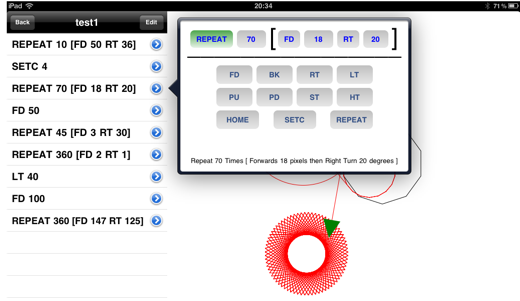
I now seem to have downloaded well over 300 apps for iphone/ipod touch/iPad and need t ostart really thinking about what I want to carry in my pocket. But I just keep seeing things I want to try. The latest iPad App I’ve downloaded in Logo Draw. A free, add supported app for simple Logo programming on the iPad.

Logo Draw

I’ve always had a soft spot for Logo, even trying to make my own teaching toy. This one seems pretty straightforward, the sort of thing I can imagine a small group of children working on?

On Thursday there was a fair bit of tweeting about delicious shutting down. TechCrunch blogged Is Yahoo Shutting Down Del.icio.us? (this post is now updated).

The first thing I did was backup my delicious links.

I’ve got several years worth of delicious links so was a wee bit worried. I also prefer delicious to any other system for saving links I’d seen. It is simple, the interface is clean, the network is useful without turning into another social thing and the API and scripts are useful. I have also used the delicious tools to display sets of links on various webpages (quite a lot in glow) which I don’t want to hunt down and change.

There have been a lot of suggestions for delicious replacements Diigo seems to be a favourite. I looked at this a while ago and, for reasons I can quite recall (probably lack of simplicity), I didn’t stick with it, although a lot of education folk use it. I downloaded Scuttle again and though about setting this opensource delicious like site up but I’ve not done so yet.

Delicious Pinboard

Yesterday I signed up for pinboard this cost about £5 to signup which I hope will mean the service will not go away. I imported my exported delicious link.

I choose pinboard mainly for its delicious like simplicity and the fact it supports the delicious API.

Today things look a little brighter for delicious: delicious blog » What’s Next for Delicious? but I am quite happy to have paid my fiver. I’ve set pinboard to add any new links I post to delicious and set up an email address to post links from my phone. There looks like there are a few more useful features to explore later. I’ll keep using delicious at the moment and see how things go. It is, I feel, a good thing to get occasional reminders about our reliance on free services and to get the opportunity to pay for ones we really need.

Rss From Noun

A while back I noticed More Code Fun: Reading (or ‘to Read’) List – CogDogBlog which pointed to Reading: keeping on top of stuff I save | Helpful Technology The site has a nice byline Digital innovation for people with more sense than money when I grabbed the code to create my reading list.

My reading list pulls together various RSS feeds: my delicious, things live starred in google reader, instapaper & instapaper. I read my google reader and twitter on my phone. I don’t always want to follow the links so star or favourite them for later consumption. The reading list. pulls all of these together. Easy to use and I like the way it combines existing services rather than needing a new one. I’ll easily be able to add other feeds if I want to later on.

This week’s harvest

  • Print With Any Printer From iPad, iPhone – Wired How-To Wiki
    Which I am keeping for later reference. I’ve not felt the need to print from my iPhone in over 2 years of use or from an iPad. In fact I got rid of my home printer a couple of weeks ago (still networked to my wife’s B&W one) because it was gathering dust.
  • I registered for Skype Education as it looks as if it might be interesting.
  • Of the many What to do when you can’t get to school for pupils blog posts Primary Bits and Bytes » Blog Archive » Snow Place Like Home was my favourite, probably because of

    “REMEMBER! Real snow is the best! You should only really be here if you get too cold or fed up with playing out, snowballing or building snowmen!”

  • OOo4Kids looks like it will be worth checking out at work.
  • My Adobe Connect Recipe – CogDogBlog looks very useful for the time that Glow moves to Adobe Connect for video conferencing.
  • I am having an interesting conversation in the glow forums (login required) about video in glow blogs, this provides some food for thought: HTML5 Video Player | VideoJS it amazes me how complicated getting video onto the web is, formats, browsers etc. As someone who doesn’t understand these things it seems to me that the new html5 video tag could surely support more than one video format per browser and clean the whole thing up.
  • yesterday I linked to the NounProject on twitter this collects, organises and adds to the highly recognisable symbols that form the world’s visual language, so we may share them in a fun and meaningful way. The symbols on this site are and always will remain free.

RSS image from used under NounProject Creative Commons — Attribution 3.0 Unported

At TeachMeet SLF 2010 I saw Sean Farrell – logging into glow where Sean showed an idea for a simplified login to glow for younger pupils. More recently I saw Automating the Intial Login Process a blog post and associated screencast by Alex Duff an Education Manager at LTS. This helped me with the idea shown in this screencast: an application that helps pupils login for the first time and changes their password and subsequently logging on.

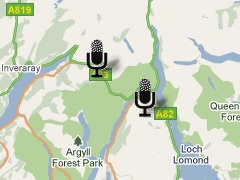
Boos on map

I love Audioboo. We use it as one of the ways to publish to edutalk.info and I’ve joined in tagging some boos uksm for the UK Sound Map project.

Audioboo must be one of the simplest ways to do audio podcasting and it has many nice features. One of the ones that interests me most is the fact that the RSS feed has geo information in it, that is the location that the boo was recorded in (users can I believe turn this off). I have played about with the google maps api in simple ways (eg some walks) and really like the ability to tell a story in space as well as time.

Yesterday I though I’d have a look at the Audio Boo RSS feed (atom really) and see if I could do something similar.

Since google maps support GEORSS I though I’d give that a try first, pasting my audioboo feed into the search box on google maps give me this map which shows the boos without the audio players (no flash support).

I had forgotten about the audioboo api so just recycled some of my old walks stuff

I made a few Adjustments, I usually use magpie RSS Reader for RSS parsing, but I could not get it to work for the tag, due, I expect, to the colon. I therefore switched to the XMLParser provided by Adam A Flynn. The webpage explains that it can manage tags with dashes and colons but I am not sure how to as it is not in the docs yet (As far as I know). I just replaced georss:point with georsspoint and got on with it. The page is pretty much a mess of php and javascript but it works. I took the lazy way out to put audio players in the Google Map info bubbles, I used the html5 audio tag. That means that pre html5 browsers will not see it but this is not vital stuff. On the walk maps I’ve used an flash player so that is doable too.

I am caching the rss feed from AudioBoo so updates might not appear. It would be easy enough to set this up so that the page would load boos from a user or tag in the url /boo.php?tag=thetag or /boo.php?user=user too, but might effect my bandwidth.

Gmap Icon Shadow

The other interesting thing I found was Shadowmaker a webpage that makes shadows for google map icons which is a nice touch. On the walk maps I never got round to doing that. Shadowmaker makes it so easy that I could not avoid it.

Anyway I think this would be a really nice way to podcast a school trip, once a page like this is in place it will reflect any updates to AudioBoo. You could also make one that would map a boos that were tagged with a particular tag although I don’t think AudioBoo had feeds for tags from a particular user?

I’d love to hear from anyone with a class or school interested in a project like this and lend a hand.

If you are interested in learning about custom google maps I’d recommend the Google Maps API Tutorial.