I’ve not posted here for a bit longer than usual. I am not sure why as I’ve got a few posts running round my head at the moment. I did have some time this week but that was eaten up by sorting out a few backend things on this blog. Last weekend I updated the blog to PivotX – 2.0.0: beta 12j and I must have made a mistake or two. In the new version of pivot some thing have changed (Upgrading from previous beta releases). By the middle of the week I had noticed a few funny things going on, individual posts were giving 404 errors. I tried uploading the files again but due to the careless way I had originally installed pivot I had to be careful not to over write my templates. I them made things even worse. To cut a long story short I uploaded a clean version of pivot, and move my data across then deleted the old directory. Hence the change of theme.

I suspect that the root of the problem stems from the way I move the blog to here from the Sandaig Primary site.

I could probably footer around and put the old theme back in place but as I had never really finished that one I was not too sad to see it go. At the moment I am using the bare bones theme which is designed to be customised.

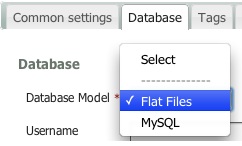
Flatfiles

One of the main reasons I use Pivot (which is now officially pivotX) is the fact you can easily customise the theme of you know a little html. The original reason I picked it was it was the only blog I could find that used flat files rather than a database. PivotX now gives you the choice to use MySQL if you want. At the moment I am sticking with flat files.

I also quite like the barebones theme, I’ve always like fixed width or maximum width webpages but flexible is beginning to grow on me.

I guess I’ll tweek away at the template and css, but I now have a much cleaner starting point to start from.

Another thing that seems to be fixed by the clean install is the MetaWeblog API which I had managed to break in the move here so I am now back to blogging with TextMate which I am delighted about (or will be if this post works when I hit ?-?-p).

All I need now is a bit of time to tweek and some more to actually blog, for today this will depend on the weather.

Blogged from tm

I usually think I can google with the best of them but I am coming round to thinking twitter is quicker!

Yesterday I was working on a wee document on how asus netbooks running linux could be used in class. (I hope to add some more stuff to Doug’s google presentation soon). The webcan can record video nicely, but the files are .ogg ones. On the machine i was using there was no video editing software so I was thinking of moving the video onto a mac to edit. I started googling ogg to mov and the like but didn’t find a result. I figured the ffmpegx might do the trick, but installing that app is not straightforward. So I tweeted: anyone know how to convert ogg video on a mac. can only get VLC to view simple solution prefered at 3:32 PM. By 3:34 PM rogbi200 had tweeted @johnjohnston http://handbrake.fr will convert most things!, followed by one from atstewart and two from jimhenderson.

Handbrake works a treat, is easy to install.

Today, still working on the asus, transferring screen-shots via pen drive to a mac for documentation, I could not see how to eject the disk, right click had no eject. I tweeted atstewart and twowhizzy replied. Again I had spent a few minutes googling. Again twitter was quicker.

My tongue is in my cheek of course, I’ve probably run dozens of google searches over the last two days which have got me what I wanted, twitter seems a good option when you can’t find what you want.

wallace monument

I spent Thursday and Friday at the Stirling Management Centre learning about Glow Learn. This is just my first reaction to the training, my own opinion which will probably change once I’ve had a chance to discuss and think a bit more.

Back in Glasgow I had been a Glow mentor but as the Glow roll out hadn’t started before I left my experience limited to a couple of pilots when I spent a fair bit of time testing glow. I’ve never used glow in a teaching situation and it now feels peculiar that I will not be doing so.

In North Lanarkshire we have just started rolling out glow accounts to mentors and only had our mentor training a couple of weeks ago so it is a bit of a jump going straight into glow learn. The in-school mentors will have a wee while longer before they get to the Learn training but it might have been better if we could have had a bit of time to embed glow before getting into learn, unfortunately this is not possible.

Most of the time over the two days was spent in a mix of instruction and practical activity. The group I was in was lead by Karen-Ann MacAlpine, Ian Hoffman, Lorna Murray all of RM Glow Team, Lorna is the RM contact for North Lanarkshire. The pacing and delivery of the material was excellent, lots of time to practice and chat and ask questions.

Pictures from Glow Learn Training are on the New North Lanarkshire Glow Blog which is being developed by the Glow Development officers.

Glow Learn is a VLE (virtual learning environment) within glow. I’ve never taught with a vle and have only come across them by accessing a Moodle course or two. Glow learn allows teachers to gather objective and learning resources together into courses, present them to pupils and follow those pupils tracks recording and assessing their progress.

Glow learn also allows the organising an sharing of resources and courses with other glow users. It allows teacher to search for courses and resources and use these.

Finally it allows the courses created to be added to a Glow group in a learning space sitting along site discussion boards and other resources.

The practical job of all of this organisation, sharing and presentation is necessarily complex. Even after two days I was struggling to hold a consistent overview of how all the bits fitted together in my head.

The learn section allows you to collect resources of several types, files, links and tests. You can make your own or search for them in resources that are available above you in the hierarchy, that is, resources at the national level or your school level are available to you. Resources (and courses) created can pushed up the hierarchy to make the available for more users. The organisation of this becomes interesting when you start to think about who has permission to edit resources and how that will effect other users. Various safeguards are in place to prevent other teachers changing courses.

Once you have created some resources and added them to a course you can add students/pupils and assign them work. Glow learn is flexible enough to allow work by pupils to be a quiz/test answered online or submission of any sort of file. I like the idea of allowing pupils to answer or record their learning in different ways.

It seems that glow learn is adaptable enough to use in different ways, you could just create the resources and use that as a whole class teaching tool, or you could have a class access differentiated resources and complete assignments online.

Back in glow itself glow learn resources can be presented through a learning space which in this case is a specialised web-part that can be added to a glow page. Although this looks like a good idea it also adds to a teachers workload as pupils need to be added to both the course in glow learn and the learning space.

GLOW learn has loads of potential to widen the curriculum subjects offered in many schools - especially at advanced higher

Good Things About Glow Learn:

  • Potential of Creating Courses for reuse.
  • Sharing and using other courses.
  • Collaborative building of courses and schemes of work.
  • Widen range of children’s work & Choices.
  • Combine with other resources in Glow, discussions, video conferences etc.

Possible Drawbacks

  • Fairly steep learning curve.
  • Some of Glow’s GUI is confusing, I think learn is better than glow itself in this respect.

The advantages that glow learn has over other online tools such as blogs and wiki are the potential for sharing of resources with other Scottish teachers, the archiving and tracking of pupil learning over the pupils whole career. This will depend on the willingness of Local Authorities and teachers to share and on their skill in describing and tagging their resources.

It is early days for glow learn and I understand that it is still in development,the team spoke about the fact that they did not know how the VLE was going to be used and how it would develop in practise. This could be a very positive thing if glow learn will be actively developed to accommodate the users.

As some of us come late to the glow party there are already signs of glow 2, I noticed this tweet from Laurie O’Donnell:

“@JConnell @jayerichards Just like Glow 1 the plan for Glow 2 is go public with a draft spec and seek suggestions to make it better.”

Although I made a fair number of suggestions for the improvement of glow one during the pilot I am only now figuring out what could be the best thing about glow 2.0, keep it in beta.

Instead of designing a spec which is fixed in stone I hope glow 2 like most of the Web 2.0 applications we now use will be in perpetual beta. Think about how much the google services have changed in the last few years, look at posterous adding features as users suggest them, keeping ease of use at the top of the agenda. The definition of Perpetual beta at Wikipedia would be a good starting place for glow 2.

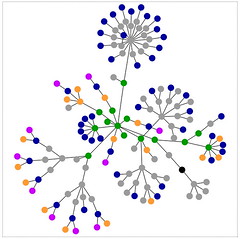
sandaig home

This post consists of some notes and information to go along with a short chat I will be having with folk at the North Lanarkshire business meeting in Modern Languages at the invite of Robert Dalzell QIO International Education.

Disclaimer, a quick scan of this blog will prove that I’ve not mastered my first language never mind a second. I have no real knowledge of MFL except that I read quite a few MLF blogs and I have talked to MFL teachers before.
Not much of this post is specfic to MFL but hopefully the examples I give on the day will be of practical use to the audience.

Why Blogs?:

  • Easy low bar technology:
    If you can type you can blog. Recent blogging systems deal with text, and multi-media is a very simple and straightforward way. Low cost or free. Modern blogs handle media and organisation automatically in ways that used to be open only to skilled web developers.
  • Community & audience:
    There is already a widespread network of educational blogging you can join. For pupils blogging can make learning real and purposeful.
  • Dissemination & Aggregation:
    Through RSS (really simple syndication) it is easy to keep up with a large number of blogs and easy for your blog to be widely read.

Further reading on OpenSourceCPD:

Ways to use blogs in education::

  • CPD
    Blogging has become a powerful tool for professional development for many teachers and educators worldwide. By reading blogs you can keep up with some of the latest ideas in education and join in discussions of these ideas.
    I’ve put together some ideas about this at OpenSourceCPD- Reading Blogs as CPD and there are some links to mfl teachers blogs below.
  • Teacher to Pupil:
    Teachers can publish homework, revision, extra material. This can be text, files such as pdfs, audio (podcasting) or video.
  • Pupil Publishing:
    (This is my favourite bit) A static website involves a fair bit of work and distances children from the publishing process. Weblogs allow children to become more directly involved in the publishing process without delving into time consuming html skills.
    Allow children to ‘write the web’ as opposed to reading it.

    It is another wall display

    To give the children a wider (one of the widest) audience for some of their work, increase their sense of ownership and responsibility of their work and gain feedback and co-operation from others. Working in small groups on a shared text/media encourages peer feedback and co-operation.

    Hopefully it should inform parents and even allow children to understand aspects of class life. Scanning down the blog show a surprisingly wide variety of activities recently covered.

    For many children working on the computer still has motivational value and this is surely increased by the fact that we are publishing for the world.

    Many types of media; images, comics, audio, video, animation can be used by pupils as well as text. Starting Blogging in the Classroom

Further Reading:
Blogs tagged MFL on ScotEduBlogs:


LTS: MFLE – Information, support, ideas and resources for modern languages teaching

Friday afternoon I saw this tweet: Twitter / tombarrett: “Three Interesting Ways to … from Tom Barrett and popped over to the google presentation on using your Pocket Video Camera in the Classroom. At that point there were three ways and a few folk in the chat. I got an invite from Tom and when I got home I added a slide, by that time there were four ideas so mine made five, I added another later in the evening. By this morning there are nineteen ideas in the slide deck and there have always been a few folk viewing the presentation when I’ve checked it. As I get ready to post this there are 21 ideas. There has also be a ton of tweets linking to the presentation.

Tom has a wonderful ability to get these things rolling through his extensive twitter network. The shared google presentation idea is a great idea, Tom has used it before: Thirty-Eight Interesting Ways (and tips) to use your Interactive Whiteboard and a couple on google earth, as has Doug Belshaw with Interesting Ways to use Netbooks in the Classroom.

What is about these efforts is the amount of collaboration that they attract, much more tha, for example my own efforts. I think part of the secret is probably the low bar to add to the resource. I guess it took me about 2 or 3 minutes to add the first of my slides and about 90 seconds for the second. This is a lot more reasonable than expecting folk to create a wiki page and fill it up. Google Slides are pretty straightforward, no need to read the docs, the technology is pretty transparent. The other part of the secret is, of course, Tom’s excellent use of twitter and the respect he has earned from educators around the world, I can’t wait for his next idea.

When I heard I was going to be working in north Lanarkshire one of the first things I did was to check ScotEduBlog’s list of blogs to see if there was much blogging activity going on, I found one: Our Lady’s High School.

in the few months I’ve been there I’ve heard of many more, but the other week I overheard my colleague Ian unblocking a blog, this turns out to be Mr Mallon’s Video and audio media part of Mr Mallon’s Physics Site which has a great url http://helpmyphysics.co.uk/. The site contains a pile of resources for physics and science including a podcast and video recordings by pupils. I has a listen to a podcast and pinged a mail to David Noble for the Podcast Directory his review says:

Very professional production from this North Lanarkshire teacher. Mr Mallon mixes a range of topics and approaches with humour and educational songs. Links to fun and helpful resources to enhance learning are provided.

I discovered a few more blogs this week when Robert Dalzell a North Lanarkshire QIO mailed me to ask if I’d have a word at the Modern Languages business meeting about blogs and blogging. He already has an example blog up and pointed me to euroblog from Coltness and Modern Languages @ Dalziel. I’ll be looking forward to getting into my comfort zone (not the mfl bit obviously) and talking about blogs.

If there are any other North Lanarkshire blogs out there please let me know.


Wu wei – No action
Originally uploaded by ????

I’ve been a fan of posterous since it started and have been amazed how the service has added features as quickly as they have been suggested. A couple of days ago the announced public group sites with post by moderation. This allow you to open up a blog to posts by anyone, but you get to moderate the posts.

I imagine you could use a group posterous for a inter school poetry blog (for example) between schools allowing children to concentrate on their writing and the evaluation of their partners.
Or a a zero setup class blog if your pupils have separate email addresses.

Posterous of course is blogging by email, with zero setup. Posterous takes just about any sort of media and deals with it in a sensible way. Posterous also sends you posts to other places (twitter, flickr, blogs etc) automatically if you want.

Garry Tan one of posterous’ cofounders had set up a public blog Posterous Recipes for Recipes and I though I’d give it a spin. All I needed to do was to drag a couple of photos from iPhoto onto the mail icon on my Mac’s dock, up popped a mail window with the photos attached, I put in the address post@recipes.posterous.com and clicked send, it was that simple. No resizing of photos, posterous presents them beautifully without out me having to think about them.

Posting my recipe, Posterous recognised my email and linked my recipe to my own posterous. And as I posted to post@ rather than posterous@ it picked up my settings and tweeted for me and posted the photos to flickr too!

Although the main way of accessing Posterous is via email, the web interface if beautiful for example, commenting in posterous is a very sweet, no opening the post in a new window, just an ajax reveal of the comment box: simple and clean without confusion.

The guys at posterous are incredibly responsive, I’ve mailed and tweeted them a few time and always had replies within hours, give the time difference this is really impressive. They are improving posterous almost all of the time; on one occasion in response to a blog post elsewhere, taking suggestions, acting on them and reporting all in the comments!

The fact posterous deals with blogging sorts of media without the user having to think. This echoes a Chinese philosophical phrase act without doing; ? ? ?; wei wu wei (wei wu wei: “action without action” or “effortless doing”).

This reminds me of When the technology gets boring, then things get interesting socially, a quote I saw in a comment on Ewan‘s blog, originally from Clay Shirky. Elsewhere (I think) Ewan talked about email as an example of this. With posterous you can use email, a tech you can use without thought, so that you can concentrate on what you are posting, the teach not the tech (Ewan again). Or for pupils the learning not the ict skills.

Last week I had some Glow training, I am starting to get quite excited about the possibilities of pupils using Glow. The potential is there, but the tech needs to become less obvious. Posting video to glow involves using a browser, then an ftp client, and then back to a browser. Coincidentally the previous night I was testing a flip video camera and popped the result onto posterous by simply dragging the file onto my mail app, filling in the to address and hitting send.

The Flip camera and posterous are both effortless technology, in education both could help by lowering the bar so that learners can concentrate on the learning and not get caught up in the tech. Glow has incredible ambition and potential I hope it becomes an effortless tool in the same way posterous and the flip camera are.

sunset from cochno hill

For the last couple of years I’ve had end of year blogs reviews (2006 and 2007 Roundup) and I guess it it that time again.

I’ve had a bit more change in my life than usual this year reflected in the change of blog url and title.

I don’t really think I’ve got my head round the direction of the blog yet but I hope it will develop over the next year.

I’ve blogged steadily, although at a reduced rate this year about a post a week. The main reason in this reduction is probably twitter which is providing sense of community, which is one of the reasons I blog, without the effort. I blogged about twitterish things a few times: News Reading, New Tweeting, ObliqueTweet, my first twitterbot, Edu Twits – a no code mashup (part 1) and Twitter, fun and facts and generally had fun with twitter.

I also blogged about and blogged with posterous. I’ve manages 64 posts there since June a much better posting rate than here. Posterous is an amazing blog service where you can blog via email, very simple to use with lots of interesting possibilities. At this time last year I was pointing to Tumblr but I think posterous is better for my purposes and posterous can forward posts to tumblr (and blogs and twitter and flickr and…). I’ve not used posterous in an educational setting, although I know Dai Barnes is using it with pupils successfully.

I’ve always enjoyed blogging about actual use of technology in my classroom as opposed to possible ideas but I did as usual post about technology that I’d played with tested rather than used with children including:

A minor note on my big change in September was the iPhone. It has transformed my tech life and I blogged about it: ScotEduBlogs on iPhone, took it for a walk and onto the onto the train. The phone has change my reading habits (more rss), blogging habits (more twitter and posterous), filled up my flickr account and increased my interest in gps, kml and mapping. I’ve not really used the phone facility much though;-)

I did a fair bit of blogging about my classroom including: A Jukebox and a Wiki, On the street where you live – An International Poetry Project and GPS MathTracks, the last was about my favourite lesson in 2008, combining several interests: teaching outside, gps and the iPhone. It was also one of the last lessons I taught at Sandaig.

After I left I posted a couple of times rounding up my ideas about Small Scale Video and Cameras in Class these, I think, are my most useful posts this year.

Sunrise

Next year, blogging about my classroom, which I’ve always though was my mainstay will disappear. I guess I’ll keep playing with the toys (my least commented on posts are the ones I like most; messing about with APIs and amateur mash ups, but lack of comment will not stop that;-) ), I’ll think about classroom practise without getting too idealistic or unrealistic (I hope) and probably post about Glow as it is introduced into North Lanarkshire. Have a good one!

Like many folk who teach using ict and blog about using computers in teaching I take a lot of screenshots. Macs have great keyboard shorts cuts for this built into the system:
?-shift-3 put a screenshot of the whole screen on the desktop.
?-shift-4 gives you cross hairs to snap a selection.windowshadow

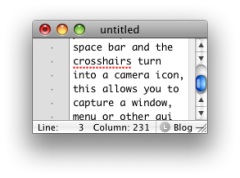
While in the selection mode you can press the space bar and the cross-hairs turn into a camera icon, this allows you to capture a window, menu or other gui element and adds a nice drop shadow to it automatically.

With both keyboard commands you can hold the control key down and the screenshot will go to the clipboard rather than the desktop. The latest version of the MAC OS uses png files as default.

This is very useful stuff and I usually just take the screenshot with the control key down and paste into ImageWell for annotating, cropping resizing and uploading, all of which ImageWell does very quickly and efficiently. ImageWell even put the html image tag onto the clipboard after uploading.

I know a lot of folk use skitch for this sort of thing, but I’ve always found ImageWell fits better with my style of working.

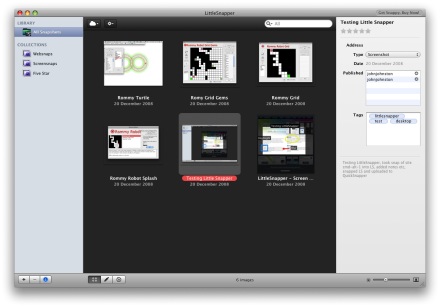
So I though I was pretty well fixed for taking screenshots, but I have now downloaded the demo of LittleSnapper, Screen and Web Snapping for Mac OS X to give it a try. LittleSnapper doesn’t do much more that the above mac screen capture as far as capturing from the desktop, but it then handles the pictures in some very useful ways. The application instals a system wide menu which lets you take a variety of screenshots but instead of the resulting pictures ending up on the clipboard the end up in LittleSnapper.

The LittleSnapper interface is quite familiar if you use iPhoto, itunes and the like. Very intuitive it allows you to tag, rate and describe the images. You can organise them into folders, collections (sets for folders) and with smart folders.

You can annotate the images, adding text, blurs (useful for usernames and personal details), highlights and various vertor graphics.

I said above that LittleSnapper doesn’t do much more than the system for desktop screenshots, but it does for screenshots of websites where things become even more interesting. You can just use the system menu to snap your current browser window into your LittleSnapper application. When you do so it not only snaps the page it brings in the source code and the url of the page. You can also (again from the system wide menu or a keyboard shortcut) pull the current page into LittleSnapper’s built in web-browser. you can then snap an element of the page, you click the element selection tool and the mouse then highlights elements on the current webpage as you rollover them, paragraphs, divs, and other html define sections of the page. click on an element and then a button to snap the element. The element is added to your library awaiting annotation.

The annotations, crops, highlights etc are applied in a non destructive way so that you can roll back to the original image if you want.

After you have done all of this you can then upload the images in several ways, via ftp, to flickr (example) or QuickSnapper, this last is a companion site to littleSnapper with lots of flickrish, web2.0 features (example). The ftp and quicksnapper export worked seamlessly here, but the flickr export uploaded the pic to flickr but then LittleSnapper sat with a progress bar for a few minutes, LittleSnapper unexpectedly quit on cancelling the progress bar. The image was on flickr but on the tags or description.

From the Case Studies on the LittleSnapper site would suggest that the audience for the application is made up of designers and developers. I think that they could add eduTech to that list. For writing walkthroughs, documenting, blogging and presenting LittleSnapper looks like a very handy tool. If the flickr upload works it would be easy to write and publish guides to using software without leaving the application by producing a set of screenshots with descriptions. (This could then be published to a website using the flickr API perhaps.)

It would also be interesting if the app was AppleScriptable as another option for automatically publishing. I guess it is early days for that.

The only obvious thing I can see missing is a way to resize images before publishing them which would be very handy for blogging. I think I’ll stick with ImageWell for at least part of the process, but keep testing LittleSnapper for its organisational features.

If you are a mac using educator I’d recommend giving LittleSnapper the once over.