Reposted PressED Conf - A tweeting WordPress conference on Twitter (Twitter)
“Hey #PressEd people. We're aiming to make the next PressEd twitter conferenxe as equitable as possible. We welcome your thoughts and suggestions. RTs gratefully appreciated”

I enjoyed PressED, #pressedconf18,  last time, looking forward to seeing the rerun with extra equitably.

Replied to INTERTEXTrEVOLUTION by Greg McVerryGreg McVerry (jgregorymcverry.com)
Wow @dshanske back at it and already addressed the bugs in last release of post-kind plugin. @mrkndvs @johnjohnston is out. Please update to  3.1.1 and let us know if you bump into issues. #IndieWeb #digped #literacies If you read the change log Dave tackled a ton of issues in 3.1.0. Always looking...

in reply to: Greg manual u-in-reply-to

Hi Greg, both Arron:

⚠ Version 3.1.1 · Issue #230 · dshanske/indieweb-post-kinds

and I:

3.1.1 text Array in quotes and Name · Issue #231 · dshanske/indieweb-post-kinds

Have let David know about a couple of problems we are having. This post being an example!

Replied to Searching for my #IndieWeb WordPress Exit Plan by Greg McVerryGreg McVerry (jgregorymcverry.com)
It maybe some time before I start th move from WordPress. This is about developing the exit plan. Not jumping from the plane while I try to put on the chute.

Hi Greg,

I’ve had my own struggles with getting IndieWeb working here too. I’ve a fair bit I still need to sort out.

I wish I had a bit more time to play/work with this stuff, I don’t think I’d fix any problems but I might get things here working more to my liking.

I do think that WordPress is the best chance of getting the IndieWeb working for the rest of us. The other approaches seem to technically daunting for me.

On getting webmentions to work I found the WP Crontrol plugin useful. It lets you see the webmentions queueing up and you can run them manually. That might be worth a punt.

Anyway, good luck and I’ll be very interested to see what you come up with.

Reposted WordPress Glasgow on Twitter (Twitter)
“Join us this Saturday at @SouthBlockSpace for a full day of #WordPress #OpenSource Step into the community and join the #Accessibility, #Core - #DataPrivacy & #Gutenberg, #Support, #ThemeReview, #Polyglots and #Marketing teams for a fun day! https://t.co/aXbEGVgFst https://t.co/xnDy2I5yks”

Going to pop along to the morning sessions.

Replied to INTERTEXTrEVOLUTION by Greg McVerryGreg McVerry (jgregorymcverry.com)
Ahh I think you use SemPress I am using 2016-IndieWeb I want to change the bookmark feed so the title of the post is the title of the source, needs to include link to source, and then my content. For quotes the block quote doesn’t display. I just haven’t had the time to practice making the templ...

Hi Greg,
My bookmark feeds don’t have the titles of the bookmarks. Nor link to them. Ones < 280 chars don’t have titles.

The RSS templates are not in my theme but in WordPress in wp-includes. I added only one of my own for microcasts and it goes in my theme folder. It is added as a custom feed.

I don’t think that the indieweb themes do anything with the RSS. It sounds like you are looking for daring fireball type titles/links? I think there was a plugin for that.

BTW I didn’t, yet, get a mention from your post?

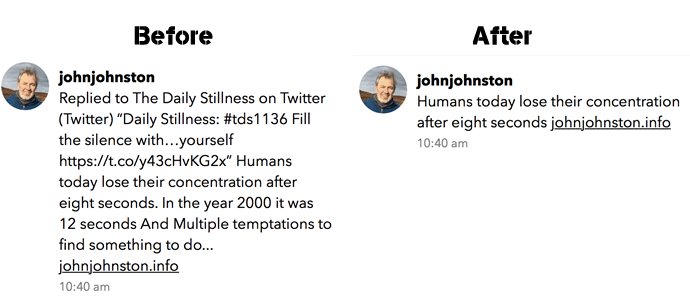
Since joining micro.blog I’ve been messing around with my blog and its RSS on and off. I had settled on removing the titles for status post RSS feed. This means short status posts (<280 characters) were passed over to micro.blog and displayed the whole content there. Longer posts are truncated and linked.

Unfortunately this meant that microblog looks quite ugly sometimes, especially when it posts a truncated indieWeb reaction that includes a quote. So I’ve changed how it works a little to only remove titles from the RSS id there are <280 characters.

This is a status post, so hopefully it will show up on Micro.Blog as a linked title.

Details in this gist: functions that have do with micro.blog and microblogging that live in my child theme’s functions.php

Before and after display of a post in micro.blog


As part of my summer holiday fun with WordPress I though I might create a ‘proper’ RSS feed for my microcast.

There are quite a few podcast plugins that would do the job but I though it might be interesting to try a bit of DIY.

Back when I started a class podcast at Radio Sandaig I used to create the RSS feed by hand with a text editor and a fair bit of copy and paste. Over at Edutalk we use feedburner to massage the feed for iTunes.

I used information from How to Roll Your Own Simple WordPress Podcast Plugin | CSS-Tricks to get me started with the template.

I copied the feed-rss2.php file from the wp-includes folder to my child theme folder renaming it feed-microcast.php

wp-content/themes/sempress-child/feed-microcast.php

I adjusted the query to get the posts from my microcast category. I also hard coded the title, link, image and a few other things to simplify the process a little.

I then used the template from CSS-Tricks as a guide to adding the various podcast tags to my template.

This ended up with a pretty broken feed, mostly due to my lack of care, but I fixed it up later I got it linked up.

I didn’t want to use the custom post type approach used in the article because that would involve editing all the old posts or converting them to the new type somehow.

My first idea was to create a feed template and switch to that when the RSS feed for my microcast category was called for.

After failing to get the template to switch for the standard category feed, /category/microcast/feed I ended up with a custom feed at /feed/microcast.

and I add

add_action('init', 'customRSS');
function customRSS(){
        add_feed('microcast', 'customRSSFunc');
}

function customRSSFunc(){
        get_template_part('feed', 'microcast');
}

to my functions.php file.

I then spent a bit of time using the W3C feed validation service until I fixed the feed up to valadate.

I’ve still got to get a link to the feed into the microcast category page head tag and I hope to do that as soon as I’ve gone a bit of research. For now I’ve a link in the sidebar.

Here is the template: WordPress RSS feed template for my microcast

Replied to Creating a tag cloud directory for the Post Kinds Plugin on WordPress by Chris AldrichChris Aldrich (BoffoSocko)
Yesterday after discovering it on Xavier Roy’s site I was reminded that the Post Kinds Plugin is built on a custom taxonomy and, as a result, has the ability to output its taxonomy in typical WordPress Tag Cloud widget. I had previously been maintaining/displaying a separate category structure fo...

I’ve done this, think I might have to read the ‘wp tag cloud’ in the WordPress Codex to make it look a bit nicer.

Liked Workshop to Event Workflow in WordPress by Tom Woodward (bionicteaching.com)
Please think about stuff like this every time you hear a supposed web developer/ed tech person say “WordPress can’t . . . ” I’m not a skilled web developer and if I can figure out these things many others could do far better. Most supposed limitations are a failure of imagination rather than the technology or the skill. Also take note of how many times I tried things here. Not every one was a complete failure but there were plenty of those and a number that didn’t generate events at all. This stuff doesn’t necessarily come easy to me. Try not to get discouraged. In the future you can fail at entirely new and more complicated things!

👍 Enjoyed @twoodwar’s WordPress workings.