

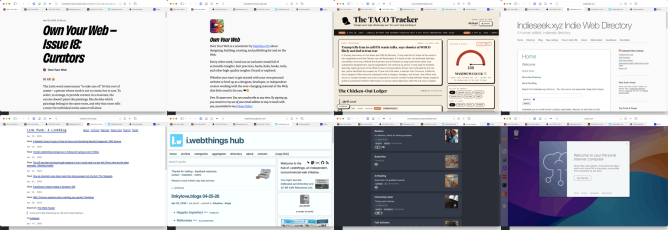
I’ve not posted a set of links for a while, keep saving them, but retired life is busier than I thought it would be. I am prompted by this newletter post:
Own Your Web – Issue 18: Curators
So every time you share a link on your blog, every time you write a few sentences about why someone else’s work matters to you, every time you add a new entry to a blogroll or a links page – you are a curator. You are doing what no algorithm can do. You’re saying: I am a person. I read this. I think you should read it too.
There is a good selection of links to link curators.
I am not sure when I subscribed to Own Your Web
Own Your Web is a newsletter by Matthias Ott about designing, building, creating, and publishing for and on the Web.
But it is great. There is an RSS feed too.
The TACO Tracker: Every Time Trump Chickens Out
Trump won’t stop chickening out. We won’t stop tracking it
One of the more amusing uses of AI
Via brad who has the Indieseek.xyz Indie Web Directory
Indieseek.xyz is a small human curated, searchable, directory of web links to both websites and to individual web pages. We try and list pages that are informative, fun, classic and useful
And
Just a linkblog, mainly for articles and individual blog posts that I find and want to share. I think of this as me being a DJ only playing articles rather than songs.
Brad also post funny political thoughts most days on mastodon.
Another great source of links is Joe Jennet
i.webthings hub
Welcome to the hub of i.webthings, an independent, noncommercial web initiative
Joe credits where he finds his links which can lead to some other interesting directories.
Commonplace is a self-hosted, federated link-collection manager. You can create curated collections of links and share them with followers across both the Fediverse (Mastodon, Pixelfed, etc.) and Bluesky — without creating new accounts on either network
Created by Doug Belshaw. And changing quickly. I am logged on via indieAuth, which is nice. I’ve created a few collections, the largest so far is AI Reading. It is always interesting to try out new pieces of software.
Commonplace allows sharing collections, suggestions and replies.
Commonplace now has a bookmarklet, which is for me essential. It grabs an image and description via open graph (I’d guess) to give a description. You can edit this and add curators notes.
I’ve used a bunch of link collectors over the year, delicious, pinboard, locally in the drafts app, on my site and a few more. I’ve not used pinboard much in the last few years. I feel a bit guilty about not updating my lifetime sub when pinboard changed to annual fees. Life-timers like myself could upgrade to a yearly fee. I didn’t. I mostly use drafts in a fairly disorganised way. At the very least commonplace is giving me the chance to think a bit about my link collection & sharing. It is also interesting to watch the development, as Doug is AI coding the site.
Here is an ‘real’ teaching and learning link. I’ve been doing the odd bit of supply and wonder if I should give this a go.
micro:bit CreateAI is a free, web-based tool that makes it easy for students to explore AI through movement and machine learning (ML).
You can use micro:bit CreateAI to train an ML model and then run it on your BBC micro:bit V2.
- Collect movement data from the micro:bit accelerometer
- Train an ML model to recognise patterns in the data
- Code the micro:bit to run ML models and take your creation anywhere.
And a last weird one.
Code seems like a computer on the web. You get a desktop. Also can create web apps and get access to AI. The UI has me baffled. I might not be the audience.
Likes