

Back in the day, I enjoyed getting children to create pop art style pictures with Flash a 2004 example:
The children brought in photos as guide layers and traced them. Flash is rather a complex app for children, but we managed to have a fair bit of fun with it over the years. I’ve a set of instructions Cartoon your face with flash in pdf format for flash 5 (or maybe mx?) produced a while back.
Recently I’ve discovered an easier way to achieve the same thing, I’ve been out in a couple of classrooms team teaching using the smartboard, and this is a nice way to get children drawing on the board:
1. Get a photo onto the board
This can be done pretty quickly with Photo Booth on a mac, just drag a picture onto smart notebook:
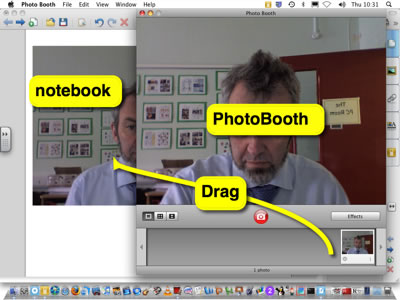
Or you could take photos with a digital camera and import them, or use a webcam or get a photo of someone famous from the web etc.
2. Trace the photo
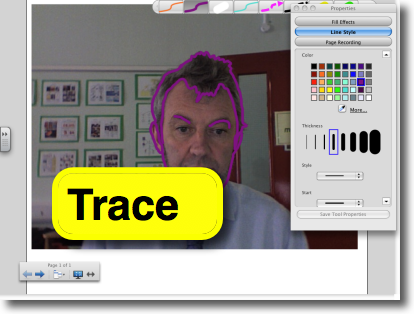
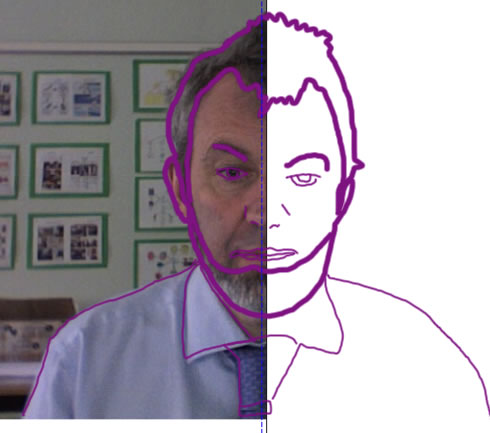
3. Hide/remove the photo
4 Copy the image and paste into another application for editing.
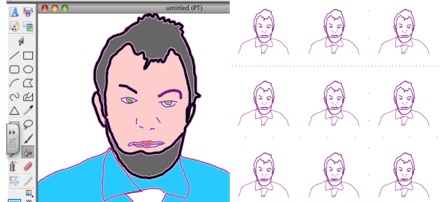
This is quite a lot of fun and an easy way to get pupils using the pens.
I’ve added this to the wonderful Forty Interesting Ways (and tips) to use your Interactive Whiteboard – Google Docs where there a lot of great ideas for using iwb.
Before August 2014 I used disqus for comments, so this form shows up on older posts.
blog comments powered by Disqus