
sat-7

FutureLearn is a massive open online course (MOOC) platform founded in December 2012 as a company majority owned by the UK’s Open University. It is the first UK-led massive open online course platform, and as of October 2013 had 26 University partners and – unlike similar platforms – includes three non-university partners: the British Museum, the British Council and the British Library.

from: FutureLearn – Wikipedia, the free encyclopedia

I’ve signed up for and started the Creative Coding course at FutureLearn. It looked like an interesting course and I was interested to try out the FutureLearn platform.

The Platform

Unlike some MOOCs I’ve dipped my toe into FutureLearn is based on its own platform. FutureLearn is in beta and they are developing new features and evolving the offer. They have started with the smallest feature set that they though they could.

The webpages are extremely clear and it is easy to follow the course.

The course I am doing is split into 6 weeks.

Futurelearn Creativecoding Overview

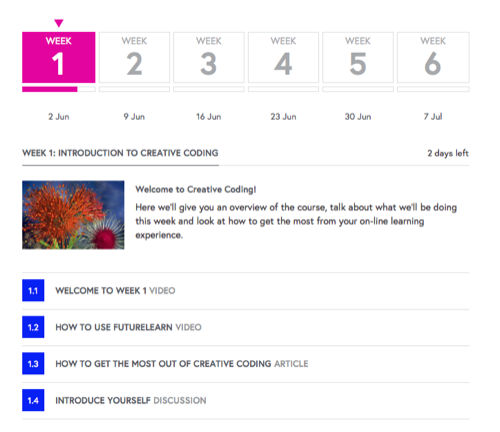
The week view gives an overview of a number of tasks to be carried out in the week.
Futurelearn Weekview

The colour of the wee square letting you know if you have completed the ‘task’.

Futurelearn Tasks Done

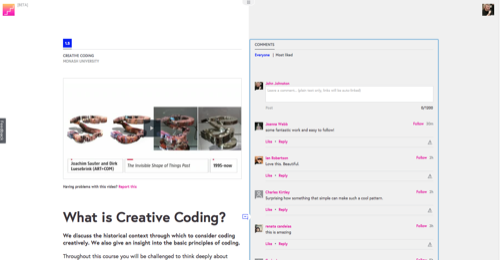
Each task is laid out rather like a blog post, with content at the top and a place for participants to comment. On a wide screen computer the comments appear at the side, but on my 1280 macbook they are below.
Futurelearn Post

There are already 100s of comments on most of the week one tasks.

The course encourages you to post your results to Flickr: The Monash Creative Coding Pool and to use #FLcreativecoding. The links to images can then be added in the comments. Folk are also posting images to other places, tumblr, dropbox etc.

Learning Processing

There is a fair bit of interaction going on in the comments and quite a lot of folk helping others. I’ll be interested in seeing any signs of community growing in such a large class.

The course has been very easy to work through so far as far as organization goes. Each task is clearly set out, the videos have be of good quality and very clear. As I have been doing most of this on my commute I’ve had a few problems when the Scot Rail internet connection is poor (Falkirk!). The system works very well on a technical level. If fells like reading and responding to a series of blog posts. I am sure you could do something similar on a smaller scale with a blog. I’ll be interested to see what new features FutureLearn add as time goes on.

This has been quite good fun so far. A fairly gentle introduction to the application and some basic principles in the first week. The videos and handouts have been clear. Some of the folk taking part are obviously experienced coders and it might be a bit daunting to see some of their work others seem to be taking their very first steps in programming/coding. I’ve had enough experience with baby steps to keep me going this week. I expect I might hit a trig wall at some point I had a quick look at the khan videos suggested for getting up to speed with trig but there looked like too many to watch in a reasonable time.

The Course suggests that you need at least three hours a week to keep up, I think that would be a pretty bare minimum I am guessing I have spent five or more hours and could have done with a few more to really get the week one lessons in my head.

The course is certainly not one you could drop in and out of, it seems to be pretty linear and even in the first week you would find it hard to skip many tasks unless you already had some knowledge.

So far it has got me more interested in processing that I have been and I hope I can find the time to keep up for the next few weeks.
Renameing Glow Docs

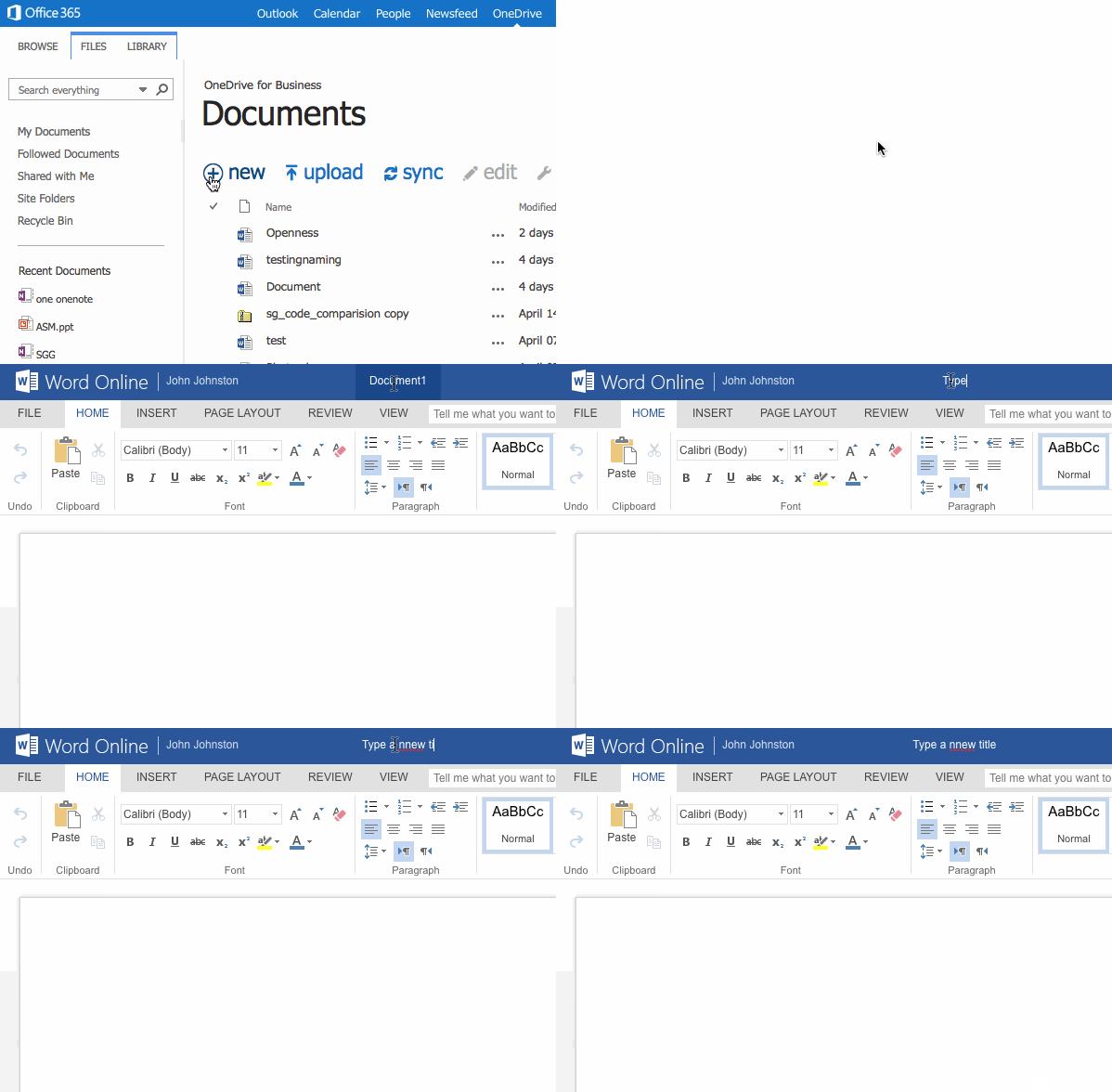
Here is a nice quick way to create short screencasts as animated gifs.

The one above was created because there seems to have been a change in the way you create documents in onedrive for business (ie in the MS 356 tenancy in glow).

Previously I got a dialog to name a file when I clicked +new in onedrive. Now it just created a new doc and takes you there to edit it. After saving you can rename the doc from the file list by clicking the elipse … after the doc name, but that is a bit of a fuss. It is easier to rename the doc when editing by clicking on its title.

LICEcap can capture an area of your desktop and save it directly to .GIF (for viewing in web browsers, etc) or .LCF (see below).

LICEcap is an intuitive but flexible application (for Windows and now OSX), that is designed to be
lightweight and function with high performance.

from: Cockos Incorporated | LICEcap

LICEcast is free and runs on windows and mac.

Screen-casting usually takes a fair bit of effort, sometimes using quite a complex application and needing some editing. This resulting vide may not play on different browsers or operating systems. Animated Gifs are pretty compatible. It only took me a few moments to create the one above and upload it.

The Internet With A Human Face – Beyond Tellerrand 2014 Conference Talk

The first thing to centralize was search. Google found a superior way to index our web, and the other search engines faded away. Then Google acquired the one true ad network, and wrote the dominant analytics suite.

Email centralized in the face of rampant spam, with attractive offers of free storage to sweeten the deal.

Facebook won the social network wars in the US, and began gobbling up competitors in other countries.

The mobile devices that are taking over the web fall into one of two camps. One of them pretends to be more open than the other, but it’s mostly a matter of marketing. In practice they both have complete control of their ecosystem.

I tumbled and tweeted another quote from this presentation yesterday. You could easily quote the words that go with every slide. I’d highly recommend reading this if you are at all interested in the internet, privacy and information.

I am coming back to it today thinking that the awareness of your online presence, the data trails you leave and the consequences should sit squarely with internet safety in schools.

Maciej Ceglowski the presenter, run the wonderful Pinboard bookmarking service. He is also a painter who has painted in Scotland.


A quick test

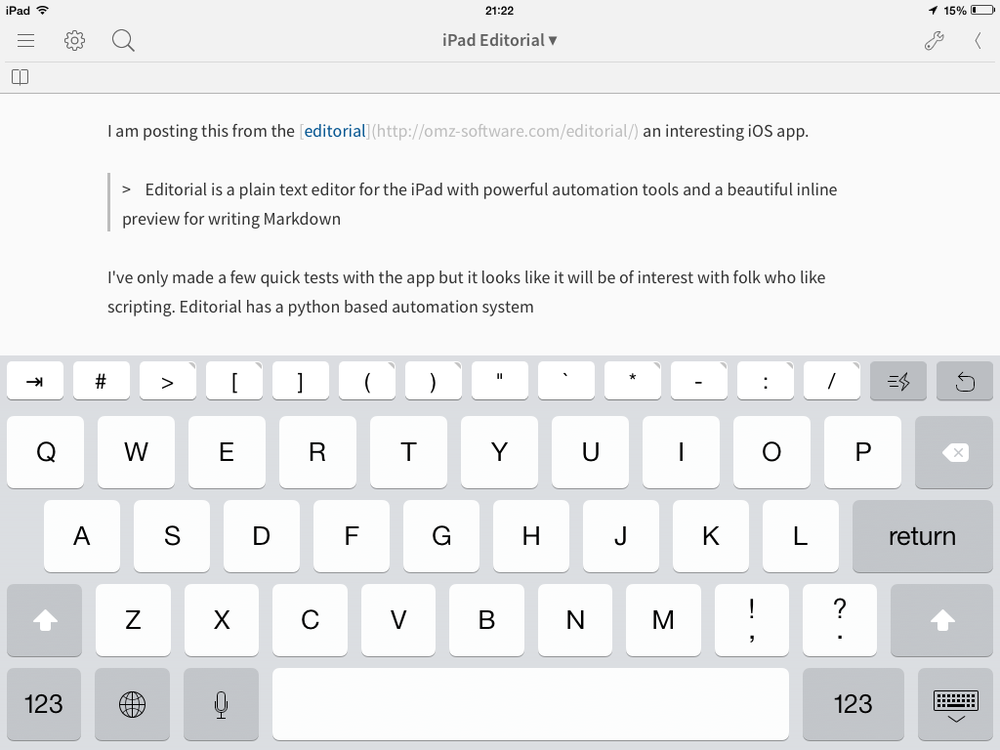
I am posting this from the editorial an interesting iOS app.

Editorial is a plain text editor for the iPad with powerful automation tools and a beautiful inline preview for writing Markdown

I've only made a few quick tests with the app but it looks like it will be of interest with folk who like scripting. Editorial has a python based automation system with which users can use and build workflows. You edit these workflow in the app itself.

Although I know no python I managed to edit the publish to metaweblogapi workflow to work with this pivotx blog. I also managed to import and configure the FTP image upload script

I am writing this post in markdown and hoping my blog understands it or that the publish script converts to html first. Update I needed to add conver to html to the workflow. This was simple.

It looks like there are plenty of workflows to install and much for the tinkerer to play with.

My own use of the iPad has changed over time and I am not sure this is for me. I mainly use my iPad for browsing, reading RSS (and posting findings to tumblr & twitter), social media, note taking , email and some light image and video editing. I've a few workflow type things that I do in Drafts but that is about it. I'll probably poke around in Editorial and see how it goes. I guess you can't have enough choice in ways to post to a blog.

I’ve written here about FeedWordPress quite a few times and if you have spoken to me about technology for learning I’ve probably mentioned it to you too. FeedWordPress is a WordPress plugin that lets you aggregate, on the one blog, many blogs (or other sources that provide RSS).

FeedWordPress is used extensively on DS106 (Which I probably talk about far to much for my co-workers comfort) and we now use it on ScotEduBlogs to aggregate over 100 Scottish educational blogs.

I’ve posted about how I think this would be a great tool for learning in schools, allowing pupils to work in there own spaces but pull project related content from multiple sources together.

I’ve just found a wonderful example of this in use (somewhat more interesting than ScotEdublogs and easier to grasp than ds106)

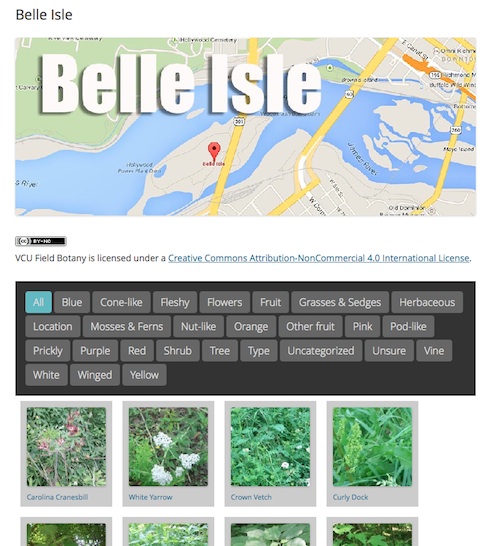
This site allows 20 students to record botanical findings, they do so by posting to their own blogs. The results are aggregated on to Field Botany | Plants of the James River Park System, There are already 700 posts.

Belle Isle

The students can post photos and informatino straight to their blogs with mobile phones while in the field.

Tom Woodward on who’s blog I discovered this site explains the details:

This early days for the site but in the end the intrepid biology duo of Jill Reid and Dianne Jennings will worked with their students to create a site that local residents can use to identify plants in our James River Park System.

Tom goes onto explain how he set the site up and the plugins used.

Glow Blogs

One of the problems with suggesting FeedWordPress for learning is that it requires a fair bit of work to get going, you cannot use it on WordPress.com, edublogs or other sites that host blogs for you, you need to set up your own hosting and add and configure the plugin. As we work our way through requirements and procurement of the new blogging solution for glow the possibility of being able to offer this sort of factuality is very exciting…

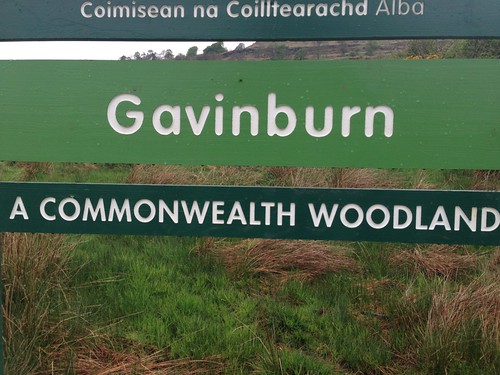
I’ve been keeping half an eye on the digital commonwealth project since talking to David on Edutalk. Last weekend I was doing a little blogging about the project and taking a short walk or two. One of the many attractive aspects of the project is that it invites people to think about the word and concept of commonwealth. Coincidently I read, not for the first time, a newish sign on the path to Loch Humphrey.

Commonwealth

This is an area I’ve started to really enjoy over the last few years. I feel it fits very well with my idea of commonwealth.

The start of the walk, by the gasworks, is about 15 minutes drive from Glasgow, and near public transport. It is popular, runners, mountain bikers, power walkers, ramblers of all shapes and sizes are there early to late. There is a fairly well graded track to the Loch if you need to keep your feet dry, or you can zig-zag the fields and moor. You will usually see a few wild flowers and the odd bit of wild life if you keep your eyes open. Once you are past the first hill the traffic noise stops. Out beyond the Loch it feels surprisingly isolated if you are early enough.

This seems to me to be a precious resource and although owned by farmers and the forestry commission (I guess), it feels as if some of the experience is part of our common wealth.

Mapping The Commonwealth

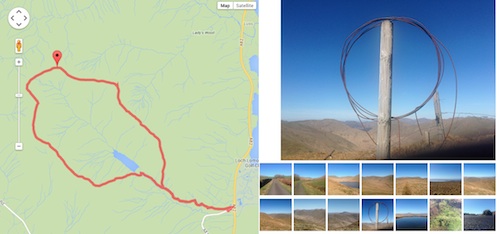
Over the years I’ve made efforts to record walks in various ways, posterous, fargo, and lots of map mashups. Recently I’ve had another go at this, this time trying to really simplify the workflow. I’ve ended up with a html template that uses a kml file produced by the Trails iPhone app and a flickr set. So to produce a page like this: Duncolm Mostly Floral I:

  1. Take a walk, record the track with trails, take some pictures.
  2. Stick the kml file in a folder in dropbox.
  3. Upload the photos to a new flickr set.
  4. Duplicate an html file, change the url of the kml file and the id of the flickr set.
  5. Write a couple of lines on notes in the html file.

I think this could be improved as a workflow with some sort of simple template. This would contain on separate line: A title; the flickr set’s id; the kml file and the notes.

Walk map

I’ve been fascinated with sort of recording/notetalking/storytelling for a fair while now and it is sort of my unofficial ‘digital commonwealth’.

I continue to see that this sort of activity could be great fun in class and there many ways to mash up maps, words and images. Wouldn’t it be great if the new glow blog solution had a Geo-Rss plugin for fold to activate.

I’d recommend showing the digital commonwealth to your class, whatever age and stage and at least borrowing some of the ideas for using digital media, if you do not join in. If you do want to join in I believe there are still places for a few more schools to receive some support.

David tell me there is still room for a few more schools and you can get in touch via email or twitter: DigCW2014. They are particularly need schools in Borders, Angus, Perth & Kinross, W Lothian, Clackmannan, Stirling, W Dunbartonshire, East Ren, Renfrewshire.

A while back on Radio Edutalk I had the pleasure of talking to David McGillivray about the Digital Commonwealth 1. It is a pretty exciting project:

The ambition of the Digital Commonwealth project is to enhance the capacity of individuals and groups to use freely available mobile digital (and social) media tools and techniques to ensure their voices are heard in a saturated (and often commercially) motivated media landscape. The Digital Commonwealth project focuses on lowering the threshold for involvement for individuals and groups so that they can be empowered to exploit creative tools and technologies to tell their stories, digitally. The project reaches out to individuals and groups experiencing social, cultural or economic marginalization, whether related to age, ethnicity, poverty, disability or social isolation.

Digital Commonwealth

Since then I’ve heard that there are now 60 schools involved with the project along side a host of other community groups. The twitter stream is filled with delight: Twitter / Search – #digCW2014.

David tell me there is still room for a few more schools and you can get in touch via email or twitter: Digital Commonwealth (DigCW2014) on Twitter. They are particularly looking for:

Some highlights of the project include:

You can find out more about the projects on the Digital Commonwealth site fascinating to see social media being used across sectors.

1. Radio #EDUtalk 11-9-2013: David McGillivray | EDUtalk

First published on Fargo moved here 22 Jul 2019

With Dorothy, the weather forecast said 11 Centigrade, but it turned out to be 8, a cold May, grey sky, cold breeze.
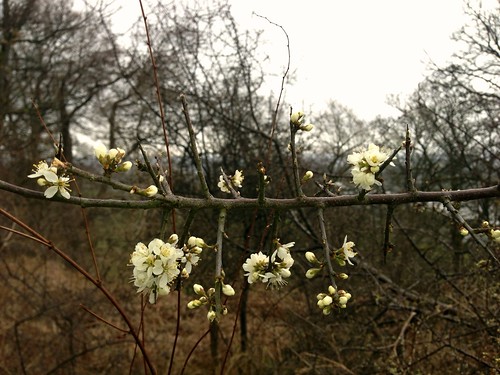
The Blackthorn is out, and plenty of primrose around the wee burns on the slope.
Blackthorn
A fairly quite afternoon for a popular walk. We spent some time zigzagging through the trees.
On the way down a Raven gave us a good show of flying without flapping, soaring on the updraft.
Wind tree


Bridgy lets you post to social networks – and comment, like, reshare, and
more – from your own web site. It also pulls other people’s comments, likes, and
reshares of your posts back to your site. In
IndieWeb lingo, Bridgy lets you
POSSE to
the silos easily and
backfeed the responses
automatically.
Check
out this example
, or see the docs for more details.

from: Bridgy

This looks like a really exciting development in social media. Recently most of the commentary on blog posts has moved to twitter, g+ or facebook. This looks like it could link that up and push out posts and then pull comments made on other sites back to your blog.

Aloe polyphylla Schönland ex Pillans Counterclockwise Spiral by brewbooks
Attribution-ShareAlike License

As mentioned in the previous post we are gathering requirements for a new wiki service in glow.

The current wiki solution, mindtouch is now no longer supported so we need a different flavour of wiki going forward. This is a great opportunity to think about how wikis can be used in learning.

We would like to hear from as many Scottish educators and learners with views on wikis. As part of this process we have put up a short survey and invite anyone interested to respond. If you are involved in Scottish education, a potential glow user, please take a few minutes to fill in the survey. This is a real chance to affect the future of Glow.

I would of course be happy to chat or otherwise communicate about wikis. If you would like to get in touch via a comment here, a tweet to @johnjohnston or with the #glowscot tag or any other method of communication. If you are not interested in wikis, but know someone who is, please pass this on.