
search and fetch

Over the years I’ve been very keen on Creative Commons and using CC material in blog posts by pupils.
Pupils (and adults too) find attribution difficult.

Back in around 2008-2009 I made A flickr CC search toy aimed at pupils, to help them attribute. Later I added a feature that stamped the image with the attribution, which hopefully was easier than embed code. Later again, in 2010 I made FlickrStampr the same sort of search but squarely aimed at users of iPod Touches. At the time I believed that iPod Touches would be big in schools (Lot of ipodtouch posts here).

Both of these webpages were knocked up fairly quickly and had various modifications over the years. A couple of years back I made the iPod size one a bit more responsive so that it displayed a little better on an iPad or computer. I’ve now taken this and worked on it a bit more with the intention of replacing both of the above pages.

Earlier this year Jo Badge pointed me towards Photos For Class which is a very similar beast, except that it is built by professionals. I wonder if I inspired them?

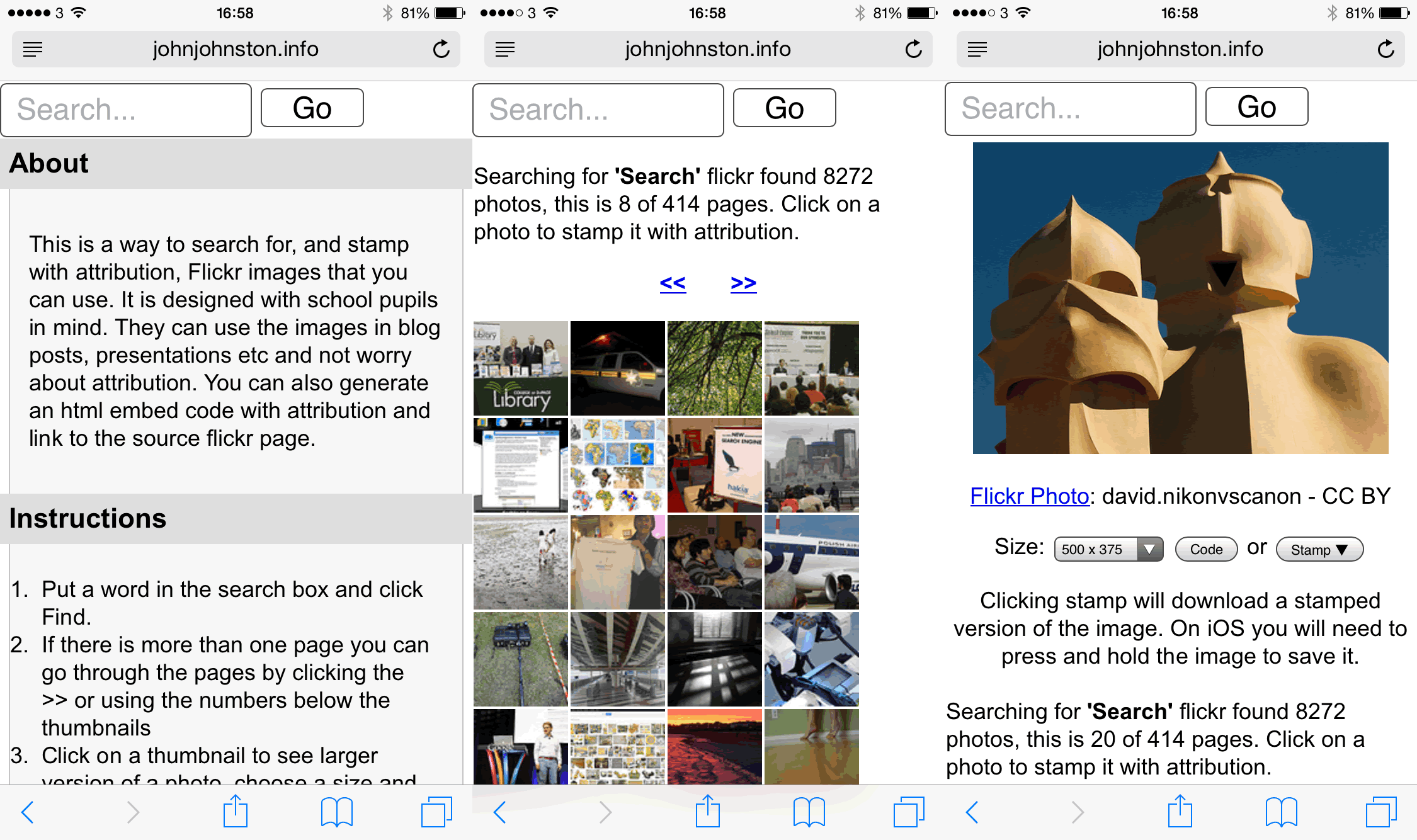
So over the last couple of weeks I’ve been updating a new version: FlickrCC Stampr combining and improving (I hope) the two pages.

This new one will search flickr for cc images and then give you a stamped version or embed code. If this new page works out I’ll redirect the old pages to is soon.

I got boost to my interest in this playing with Alan’s flickr attribution helper: Now Three Flavors of Flickr CC Attribution Helper. I found out how to and added the code that gets all available sizes from flickr and lets you embed or stamp any particular size.
fcc


If you have an interest in this sort of thing, please give  FlickrCC Stampr a try. I’d be interested in any feedback.
A couple of weeks ago I kicked of a blogging bootcamp as part of my day job. The idea is to help folk through getting started with class blogging. Each week for 10 weeks there are, technical tasks, discussions and blogging challenges which participating classes (or teachers) can choose to do.

My thinking is based on my own experience in a few online classes/MOOCs and, of course ds106. The bit I really wanted to do was aggregate the participants blogs back to the bootcamp blog. Hopefully this would lead to some connections and community.

I had hoped as part of the progress with glow blogs we would by now have had a plugin in place that would help with this. Unfortunately this has not happened yet.

My next though was to set up a blog outside glow, install the necessary plugin (FeedWordPress probably) and aggregate the posts there. This aggregation could be brought back to the bootcamp blog as an RSS feed.

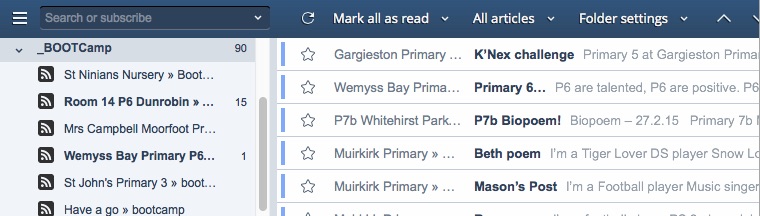
I ended up going for much less work. I use Inoreader as my RSS reader. It has the rather nice feature when you can get an RSS feed for any of your folders of feeds. This is how it works.

After participants make their first post, they send me a link. We are asking them to categorize their posts bootcamp so I use the feed for that. For example Wemyss Bay Primary P6, their bootcamp category is:

https://blogs.glowscotland.org.uk/in/primary6wbps/category/bootcamp/

So the RSS feed will be

https://blogs.glowscotland.org.uk/in/primary6wbps/category/bootcamp/feed

I add that to my Inoreader and put it in the BootCamp folder:

inoreader screeshot

From the Folder Settings menu I can then get a link to the aggregated RSS feed and a page that aggregates all the posts too.

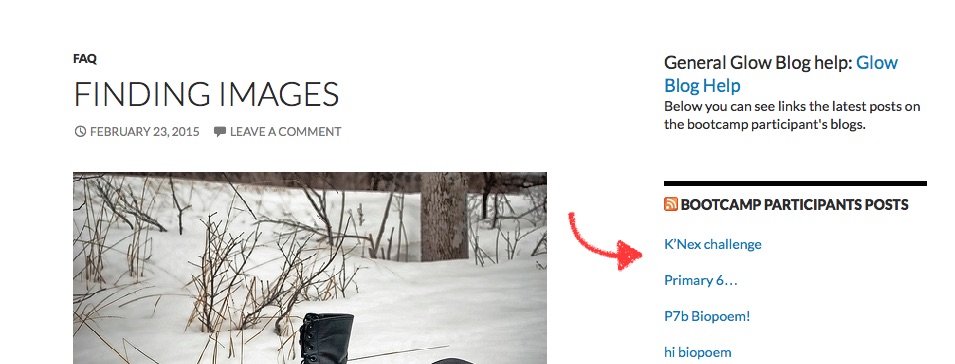
Back on the bootcamp blog I’ve added a RSS widget to the sidebar using this feed. This displays the last 20 posts from participants on the blog.

rss widget on bootcamp blog

I’d prefer to show more of the participants post on the main section of the blog but I believe this is a further wee story that shows how nice this sort of technique could be. If we get a suitable plugin in glow blogs, we could run all sots of ‘events’ and learning experiences by just aggregating participating class or school blogs through a ‘mothership’ blog.

31314

I’ve not blogged much about work recently, but this story is a good one if somewhat tangled.

We are working, in the Glow blogs team, on the next release. This is mainly to address any problems with the upgrade to WordPress 4.0.1 that came out in January.

My work includes: watching reports come through the help desk; passing on problems that come directly to me (twitter, email and phone) through to the RM. I do a wee bit of tyre kicking and talking to the test team on the way.

On Tuesday I got a mail from a teacher, to the effect that the link to My Sites from the Local Authority home pages didn’t work. Talking to Grant, one of the test team, I found out he was chasing the same problem. We kicked it around a bit and found that if a new users creates a blog on their LA before accessing My Sites, the link did not work, it leads to a list of blogs that the user has a role on.

This is not a show stopper as the user can click on any of the blogs and then the My Site link in the Admin Bar as a work around.

While testing this out we noticed that although the Admin Bar is visible on any Glow blog in your Local Authority, the My Sites link on it leads to the same error (with a list of your sites page).

Thinking these were linked I raised a call to the RM help desk. This got passed through to the team at Automattic. They have quickly fixed the first issue and recorded the fix in our system (JIRA) for following development. The code will be in the next release, hopefully in two or three weeks.

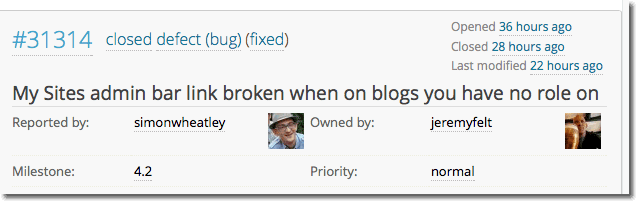
At this point we asked about the second bug, we were told that is was in WordPress core and the team had not only reported it but proposed an initial fix. It is worth pointing out that this was put into the WordPress tracking system at quarter to eleven on Thursday night:

#31314 (My Sites admin bar link broken when on blogs you have no role on) – WordPress Trac

You can see from the linked page, that the ticked was closed at 6:29 on Friday morning. The fix and some improvements are currently attracting the attention and input from three other developers who are completely unconnected from Glow.

So What?

The people that helped with this one included:

  • The teacher who reported the problem
  • The Testers contracted to the Scottish Government
  • The RM Help Desk who are the first point of contact for Glow fault
  • The Developers from Automattic working for Glow
  • WordPress developers who have nothing to do with and likely no knowledge of Glow

Which quite a complex system, but it seems to be working. Most of these people are on the hook and doing their job, but I wonder if a bug in a commercial system would be fixed so quickly? We don’t have the bug fixed in our system but it looks good for being sorted out in a subsequent upgrade.

For me this was pretty exciting. It feels pretty good for those of us who think that Open Source and Openness in general is a good idea in Education.

There is obviously a lot of deep thinking to be done here, my initial though holds, I don’t think the internet is unique. we have managed to mismanage a lot of other things collectively, ozone layer, environment, health the net is no different. Except it might be easier to sort out internet economy and culture than the environment.

As for artists, the internet can at leat give creative types the chance of bypassing the hegemonies that control publication and access to audience?

ard-reflection

Ten years ago today I made my first post on this blog. 882 post (plus this one) for a total of over a quarter of a million words. I’d posted to blogs before this one, but this one stuck.

You would think, by this time, I’d have some sort of plan going, but no, this blog continues to be pretty haphazard without a real sense of audience or single purpose.

It does provide me with a thinking tool and scrapbook which I continue to enjoy and that is still enough for me.

The blog has been the starting point for all sort of online and offline experiences. I’ve dallied with other online spaces and playgrounds, but keep coming back here.

The blog itself has moved and changes: starting as a sub weblog of my school/class site using pivot; it moved to this domain and got a change of name when I left school; got upgraded to pivotx; and then moved to WordPress. I still think of it as the same place.

Along the way, I’ve broken links, lost images and comments, but still have a reasonable portfolio of my ramblings and technological roaming.

The image with this post is to remind me to try and reflect rather than ramble;-)


Now we have moved Glow Blogs into the 21st century we are going have some fun.

The idea of the bootcamp is a place were folk can get help in starting or improving their class blogs.

The bootcamp will take you through creating a blog, adding features and a range of blogging activities. Classes will have the opportunity to link up with other glow blogs and the world wide blogging community.

Each week there will be ‘technical’ tips, blogging challenges and discussion points that can be carried out in your classroom and on your blog.

What you need: A Class, somewhere to blog (glow for example). No technical knowledge needed.

While most of the technical support will be aimed at glow users the bootcamp is open to any classroom.

Details of how to sign up are on the Blogging Bootcamp blog