I got a request from a teacher who wanted to download a years worth of images from a Glow Blog (for end of year slideshow).

Although there are plugins that can do this these are not available on Glow Blogs. I was stumped apart from going through the site and downloading them 1 by 1. But after a wee bit of thinking I though I’d try using the REST API via AppleScript.

The REST API will list in JSON format the media:

http://johnjohnston.info/blog/wp-json/wp/v2/media/

Look at that in FireFox for a pretty view.

JSON Helper is

an agent (or scriptable background application) which allows you to do useful things with JSON directly from AppleScript.

So I can grab the list of media from a site in JSON format use appleScript to download all the files.

The script I wrote is not great, you can’t download from a particular year, but a quick look at the JSON will help in working out how many files to download.

I am sure there are more efficient ways to do this and I’ve only tested on a couple of site, but it seems to do the trick and might be useful again sometime.

Continue for the script:

Replied to How to Own & Display Your Twitter Archive on Your Website in Under 10 Minutes by Chris AldrichChris Aldrich (Chris Aldrich | BoffoSocko)
As part of my evolving IndieWeb experience of owning all of my own internet-based social data, last year I wanted a “quick and dirty” method for owning and displaying all of my Twitter activity before embarking on a more comprehensive method of owning all of my past tweets in a much more compreh...

Chris,rather a late reply but it might be of interest,  I’ve been using Martin Hawksey‘s twitter archiver for a while now. This archived my tweets to Google Drive and made them available online:  Keeping your Twitter Archive fresh and freely hosted on Github Pages – MASHe

i take it a step further by pulling to my local drive and ‘ftp pushing’ to my site:

Pushing and Pulling the Twitter Archive

This keeps my archive up to date on a daily basis withou any work on my part here:  Your Twitter archive


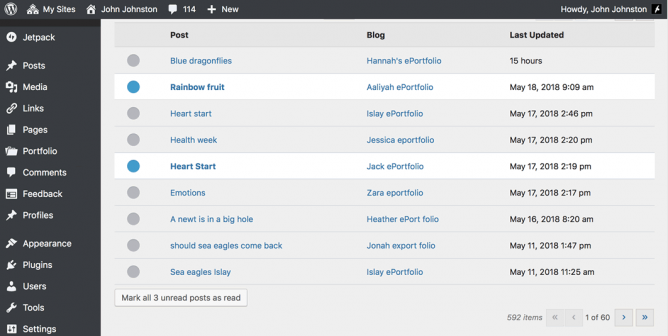
Glow Blogs Reader Screenshot

In Glow Blogs, we have the Glow Blogs Reader (Follow Blogs)

The Glow blogs reader allows you to ‘follow’ a number of Glow Blogs. In following blogs you will be able to see which of these blogs has been updated in your dashboard rather than have to visit each site to check for updates.

Useful because 1. it allows you to follow private blogs which an RSS Reader will not and 2. For teachers unfamiliar with RSS and readers it will be a lot simpler.

It doesn’t have the facility to mark off or record posts that you have commented on which is of interest to Aaron.