Since the start of the holidays I’ve spent quite a few hours in Glow trying out some tools. I gave a brief account a few days ago and said I was not sure if blogging about glow was permitted, since then I’ve seen a good few posts tagged glowscotland so I guess this will be ok. Glow is also down at the moment so I might as well gather my thoughts.(That was Saturday, this is
 Wednesday Thursday, glow resurfaced after the weekend)
(star)The concept of having the tools free and safe for all in Scottish education is wonderful.
(star) The guides are clear.
(wish) I wish the software would work in the quick and simple way that many web tools do.
Read on past the more for more details…
Web Hosting
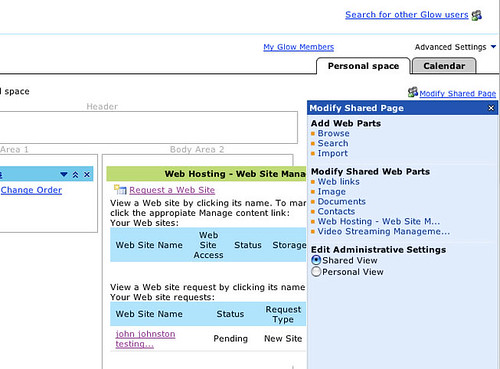
This first thing I tried was the Web hosting facility. This allows glow users to have a website which is either internal viewable only by glow members that you give permission to, or to be viewable to the world at large.
To get some webspace you first add the Web hosting part to your own glow page (My Glow). To do this you open a Modify shared Page section on the page. Browse the Web parts available and then add a Web Hosting – Web site management part to your page. This is a wee bit clunky if you are used to Ajax driven web 2.0 style pages, but it doesn’t take too long. Once you have a Web Hosting – Web site management part on your page you need to click the Request a Web Site link in that part.
This takes you to a page where you choose the size of your site, decide if it is going to be public or not and if not which glow members will be able to see it. I choose a public site and named it ‘john johnston testing…’ which was not a good idea.
you then need to wait until the request is granted, this seems to happen on the next working day. My first site did not work due to the spaces and periods in the title which become part of the url. Unfortunately spaces and periods were not listed as problematic chars, I also wasted time by not checking until I had uploaded pages to the site. I set up another site and then set it up
To set up a site on glow you need to create the web pages, images etc and upload them via your browser.
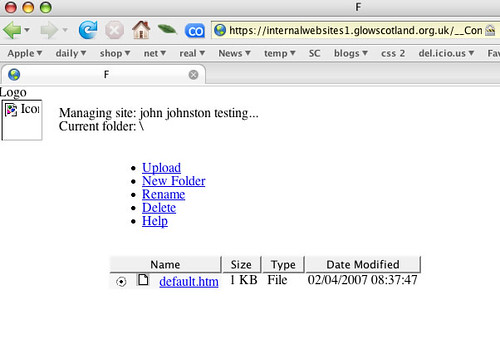
The process for uploading files is pretty primitive as you can see from the screenshot above (although the final page will look better once it has a stylesheet.).
I uploaded a file without trouble but I would not like to have to set up a site with several pages and images.
The Webhosting Quick Start Guide was clear and easy to follow but the actual process was a bit too clumsy.
A user with the know how to create a website would be better served by uploading it in a more standard way.
A user without the know how would be better using something like Google Page Creator.
I realised later that I had set the permissions for the page I made to be internal to glow, so I went back into the management and set it to public. The url for the site changed and I cannot open the new or the old page. This might be due to the fact that this is a pilot and we are not supposed to connect to the public at large.
Video Streaming
I was very interested in this, at Sandaig Television we have run into a few bandwidth problems. Glow allows you to upload streaming video and then make that public. I am hoping to use that to show the children’s video on the school blogs via reference movies.
Again the Quick Start guide was simple and easy to follow.
again you need to add a webpart to your glow page to list your videos. except it doesn’t actually list your videos just provides a link to the page that does. What is interesting is that you do not upload your video through glow but with an ftp application. So I did. It looks like the video is then moved swiftly to another location as your ftp folder is always empty.
After uploading a video you can edit the clip information through a page linked from the list of videos:
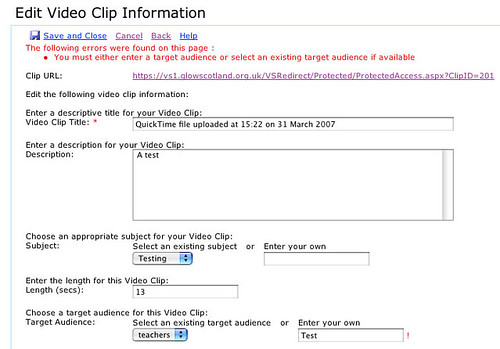
This was pretty straightforward although as you can see from the screenshot I got a bit muddled setting a target audience, I choose teachers then decided to add my own (test) submitting the form gave an error. There is a url for the clip you upload to share. Unfortunately the first video I uploaded gave a 404 not found error, I tried again and then headed for the feedback discussions where got some extra information on how to set my video to work for streaming I followed this but it still did not work (this time a -5408:timedout error). I’ve posted feedback and emailed support so I guess I’ll hear more after the holidays.
Overall the video streaming looks like a great idea, the instructions are clear if not completely straightforward but the process suffers badly when compared to uploading video to youtube
Glow Chat
I’ve not used this yet except to join an empty chat room, once set up it looks like a fairly standard java inside your browser chat with moderation.
Glow Meet
This is the best tool I have tried so far and I’ve only tried it for an hour or so. Hopefully we are going to have a wee bloggers meet later on today. Tessa has covered this tool well in her blog: Glow ?Chat? And ?Video-Conferencing? and is instrumental in setting up the meet this afternoon.
Again the Quick start guides are clear and easy to follow, I had no trouble setting up a glow group and a meet. Again you need to do all the rather clunky add webpart stuff.
While this is not video conferencing as I know it (full screen tv, moving camera) I is a great tool set with a lot of possibilities for teaching and learning.
update: I’ve now spent a couple of hours inside a Marratech conference with some familiar folk from various Scots Edu blogs. (Mr W covered the meet).
Nearly all of the tool we tried worked well, and it became clear that this would be a powerful tool for leading an online presentation allowing others to put in their 2 pence worth. After there was 8 or so folk in the room the various webcam feeds slowed down quite a bit, I wonder if these will be much use in practise. (It might be an idea to turn this on and then off which will give others in the chat a still of each participant and see who is talking). Again audio feed was clear most of the time if everybody keeps their headphones plugged in and avoids feedback. I do not know if this will be set up so that a moderator can turn users audio up in the final version of glow, but that might be handy. We should have another chat early next week to learn a bit more about the tools.
Discussion Forums
These should be one of the most potently useful parts of glow. The ability to set up discussions for groups and to connect to others interested in the same area.
Setting up a discussion in a group is easy, click on the discussions tab and then on New Discussion. You can also alter some of the feature of a discussion, but I have not seem I have taken part in a few of the feedback forums and in one test forum set up for a purpose Educational Shareware, there are quite a few test discussions going on but by using the feedback ones and the shareware group, I hope it gave me a feel for the real thing.
Unfortunately I have found navigating the discussions very clunky. lots of scrolling and clicking, neither of the two views let you read and respond with out a lot of clicking.
It is hard to follow discussions that you have started and taken part in, as there is not ‘my discussions’ or even a search. There is no recent discussions list either so to see if a discussion has be updated you need to dig down into the various threads. The date on the threads is not the date that the last addition to the tread or sub thread was made.
I really hope that this can be improved on by the time the portal goes live.
Conclusions
The concept of glow is wonderful. In my opinion at the moment the workings and interface needs some work.
- FTP to upload video not websites, one file upload could be better handled in the browser than multiple files with multiple destinations. I’d swap that one around.
- The overall navigation is quite complex, I frequently get lost and bob back and forward. The fact that you cannot record were you have posted to in discussions is a problem, as is the fact you cannot search or see recent discussion.
- Setting various things up is difficult compared to most Web 2 stuff and especially AJAX techniques, the interface for adding webparts is clunky.
Given that this is a pilot and the problems I list are to do with the interface rather than the concept Glow is looking promising.
These are my opinions, no one else’s. To be taken with the usual pinch of salt.


 ).
). 
 And an interesting looking wiki