On Thursday I went over for a holiday visit to Lourdes Secondary School to visit Lori Ramsay. At the last Glasgow Masterclass meeting Lori had presented a tantalising view of The Mothership which seemed to involve enterprise, podcasting and music. Wendy from Edict invited me to get in touch with Lori to find out more and I popped over to the southside of the city on Thursday morning.

Lori met me and took me to a music classroom full of macs, keyboards and other musical gear. She booted up one of the few macs in Glasgow City Schools and launched into a garageband lesson! This was great, I’ve steered clear of GarageBand except for the occasional voice and background podcast as I have the musical ear of a turnip.
Lori quickly showed me how to teach children to put together a short song or jingle, first blocking out drums, then rhythm and synth followed by some instruments, until we had a wall of sound ‘blocks’. She then knocked holes in the wall to create an intro, verse and chorus. This would be broken down into several lessons in class, but you could really see how excited the children would be. Lori gave me quite a few bit of essential information that a musical person would understand and that I can follow. I an now ready to teach some music watch out for the effect on Radio Sandaig!
Lori explained that she was not a teacher, although she teaches sound engineering at Lourdes, she has a professional sound engineering background. She brings the real world into the classroom using the enterprise model. The pupils learn radio production and sound recording skills at SQA Int 2 Higher and Advanced Higher levels. I m sure that the string of backstage passes hanging on the wall and working with an expert from the real world wil ladd to the positive effect of working on a ‘real’ task.
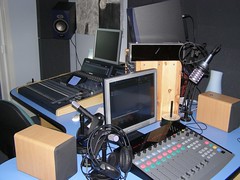
Next Lori took me through a well equipped music studio to a soundproof room where the music could be edited and Radio Shows created. We listen to some of the children’s work. It was immediately apparent that the sound quality was much better than you usually find in a school podcast. We listened to professional sounding music, intros and voiceovers the pupils organising and running the shows. Some of the music was produced by the pupils and some by independent musicians. I was surprised to find that the children produce not podcasts but streaming audio. This is wrapped up in copyright issues, the station plays music from up and coming bands. I asked how they got the music expecting that they would be pulling it from music sharing sites, Lori pointer to a huge pile of CDs these were sent in by aspiring bands to play on the show.
Lori told me the pupils organised a event at the Garage night-club in Glasgow. The show included signed and unsigned bands including some musicians from the school. A & R folk from major record companies turned up. Undoubtedly this has had a real effect on the pupils involved, Lori mentions the positive effect on their attitude and that they are learning real world skills as they gain academic success. The program has a neat fit with the Curriculum for Excellence as well as enterprise.
Next we went online to take a look at the The Mothership.

The first function of the site is the streaming radio station where you can listen to the pupils productions, pupils from 4 Glasgow Secondary schools and one primary are involved:
Central to The Mothership project is the production and streaming of radio shows created by the students in a real professional studio environment. The studio, based at Lourdes Secondary School is available to students on allocated ?studio nights…
 Plans are afoot to expand the number of schools involved.
As well as the music section of the site there is a password protected, secure section as well. This allows pupils to log on and download learning resources or take quizzes on the site. There are also chat rooms which are opened by teachers to help with homework and pre-exam revision. The site is still under development but plans are that pupils will have alien style avatars which they will be able to customise as the gain points through completing learning activities. Lori explained that the design of the site was reviewed by the pupils whose feedback has enabled the web designers to produce what the pupils wanted.
There is an interview of lori on her work on the Bluesbunny Independent Music Reviews Site : Mothership Project
Overall the Mothership project is very impressive, hitting academic, enterprise and Curriculum for Excellence targets. I am looking to taking Sandaig’s broadcasting, audio and video, to a more formal enterprise model this session and hope to get on board.
ACFE enterprise music podcasting radio garageband
aCFE enterprise music garageband podcasting





 If you want to see what I