Normally in the first few days of a holiday I’d find the time to blog that I do not have in a working week.

Not this time, I spent the first 3 days immersed in Glow. There is a lot to try out. I’ve experimented with the web hosting tool, the video streaming, the meeting tool (Marratech) and participated in a few discussion boards. I’ve left various bits of feedback.

Yesterday I gave up and went for a walk and I am off for another one today. I probably need a wee break.

I am going to play a bit more over the holidays though. I don’t think it is appropriate for me to post too much here.

You can see various stuff about Tagged: glowscotland including some screenshots but glow is probably a bit too beta to talk about publicly yet.

I would like to test the tools, with others inside glow. Unfortunately I’ve not met many folk in there yet. So if you would like to meet up in a glow meet, have a yack and test glow meet a bit let me know.

Update, I rushed this post out yesterday and went for a walk leaving the post on hold, a senior moment.

Since then Tess Watson has posted a great report on Glow ?Chat? And ?Video-Conferencing?.

As Tess seems to be more in the know about glow it looks as if it will be ok to blog about the working of the beast. Tess also wants to meet up with folk in there so I’ll give that a go (see her blog for her request)

Last week we had a couple of these mice and wireless keyboards: Gyration – ProductDetail – GC1105CKM.

I didn’t get much time to try it out but I don’t think I’ll be recommending that we get any more ‘smartboards’ for upper primary.

That is probably a bit of an overstatement but the Optical Air Mouse (should that be gyromouse?) was great. I needed to charge it up overnight but after that I just plugged in a usb dongle, pressed a wee button on the dongle and then one on the wireless keyboard and one the bottom of the gyromouse and it worked. There was some software to install but I didn’t bother (well I am nor allowed;-)).

I could then use the mouse anywhere in the classroom, either on a flat surface or by holding down a button on the bottom of the mouse in the air. (It is a WII the children shouted).

I’ve not really had time to check it out with children much other than to give a couple a quick try, but I think using it on a flat surface will do the job for most of them. It should be easy to pass the mouse and keyboard round the class to be used on desks. Using it in the air is a little trickier, you need to use your index finger to hold the under button in and your thumb for the left and right click.

The advantages should be, no need for children to move around the class to get to the smartboard, no shadow or bodies getting in the way and of course you do not need a smart board, a while bit of wall or big bit of paper will do.

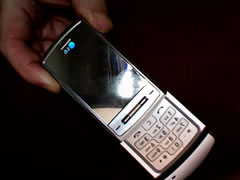
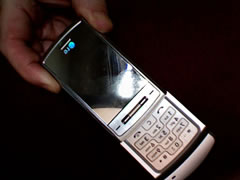
lg_shine

This week I have been working with our two primary seven classes in the media room. Trying as usual to do a little too much in the time, I’ve been doing a bit of basic spreadsheet work and some work on mobile phones.
The first day we talked about communications tech the children had in their homes, it was interesting to me that last years primary 6 figure of just over 60% with internet access in their homes had risen to 85% for the primary sevens (47 children). More surprising was figures of 12 out of 47 who had WII and the just released PS3 in their homes.

(aside, I had one of my p6s post to his weblog from a psp last week)

46 out of 47 children had mobile phones of their own and we had some good discussion of the various ways phones could be used. The children were pretty knowledgeable (knew more than me) about various mobile technologies, but I managed to impress them by posting a couple of quick photos to the web site. Quick fingered kids did the text input.

We finished off today by posting a mind map about mobiles to the blog along with an audio file recorded on my mobile and bluetoothed to my mac to be converted to an mp3 (this had to be usb sticked to a networked machine to get onto the network). Done in the last 10 minutes of a lesson in a fairly off the cuff way, I think this has possibilities.

A couple of snags had to be worked around, converting to mp3 from the recorded amr file with iTunes was at the wrong sample rate for playing in flash so we needed to use audacity to get it right (the file played fine as a straightforward link, but mp3s need to be at sample rate multiple of 11,025Hz (e.g: 11KHz, 22KHz, 44KHz).

A couple of points of interest, I needed to get the LAME Audio Encoder 3.97 for intel macs from Thalictrum – Products before I could get Audacity to export mp3s from our new macbook. I’ve now downloaded the Universal Binary Installer for the Lame lib from Lame – KJams Wiki this allows export from quicktime.

For my own satisfaction at lunchtime I repeated the blog post from the macbook using the mobile as a bluetooth modem. So the workflow could be:

  • Record on mobile, bluetooth to mac
  • Convert with quicktime to mp3
  • Upload from macbook to blog using mobile as a modem.

Toys for the boys perhaps, but also a good place to get the children discussing the positive use of mobiles in education and a way to get some immediate blogging done from bus trip dead-time.

Blogged from tm

A while ago I mentioned that I had received a LG Shine phone from the LG Shine blogger relations programme. I’ve started to investigate/play around to see if it can be of use in my teaching.

As someone who doesn’t usually use a mobile phone much I am not in a position to review the phone and compare it to others. I can say it seems pretty straightforward to use for a newbie.
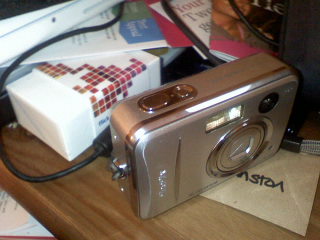
The camera seems to work well except for the lag between clicking the shutter and taking a picture. The picture quality looks ok to me too, here is a random picture of my desk using the macro facility and the unusual flash (the mirror just lights up). I’ve had a few children take photos and they had no problem.

I’ve only tried the video camera briefly and have no complaints. I’ve also used the voice recorder the quality does not sound as good as my iRiver and i guess it would be best for one voice rather than a conversation. The file format is amr, I guess that would be best converted befor sending it to the web.

I listened to the latest Booruch podcast on the way home from work today and it sounded good. Flicking through audio, image and other files is quite easy with the scroll wheel.

It was straightforward to set up bluetooth with a macbook and dell latitude transferring file is simple via this or USB.

Email was again was easy to set up sending and receiving is pretty simple. It is also easy to send an image file via email.

What I am really interested in is using the phone to send stuff to the website/ blogs. I’ve tried a few approaches:

Pivot has a moblog functionality, which I managed to get working last November, but I have completely failed to do so this time arround.

As a workaround it is easy to post photos to Flickr, but that is of limited use as we cannot use flickr in school. I have been experimenting with pulling the images from flickr to the sandaig site: Sandaig MoBlog. One of my class posted a photo easily, you can tell which one is hers because it has got a long description, my texting is not up to it yet. I am not sure if this is a great idea in the long term.

The other thing I’ve been testing (see the last few posts) is BlogMailr a service that provides an email to blog solution. So far I’ve not managed to get this working, the html is a bit mangled. I am not sure why, but I had the same problem posting to wordpress so I don’t think it is a pivot metaWebLog problem.

So as soon as I can I am going to try and let the class loose with the phone, both as a tool to play with and as a way to start discussing the use of mobile phones. I’ve started collecting some links tagged with “mobile” on del.icio.us, if you know of any others let me know (tag them for:troutcolor if you have a moment).

I’d also like to know of any other free mobile to blog solutions out there.

http://www.sandaigprimary.co.uk/pivot/images/031827211858.jpg” alt=”031827211858.jpg” />

Manual Edit: The above was posted from the lg shine via Blogmailr the image has been upload to the site, but the html seems a bit mangled

(Title recycled from Ewan)

The system/organisation for blogging on Sandaig Otters is that 2 children per day from each of the primary seven, primary six and now primary 5 classes are randomly selected as bloggers for the day, their job is to choose something blogworthy, maybe take a photo and the next day to come to the media room between 9 and 9:30 to blog about it.

I am quite please with this system although it relies on me not being class committed so it probably will not last longer than this session.

This week from Wednesday to Friday we had no connection to the internet until about 10 am (403 Forbidden), hence the blogging slow down. quite a few posts were saved in word to be blogged later, but I don’t know if that will happen. I logged the problem with the help desk each day but I don’t know if it will do much good. One operator told me it might be do do with the switching of the primary network between mitel and dell if so there might not be much on the Sandaig Otters blog until after the holidays:(

Particularly disappointing as I had 23 bloggers in the room on Thursday, full to capacity and nothing blogged.